Specialist Part (6): RBD — Inside rbd-mirror: Journal versus Snapshot
TL;DR this chapter in a few lines
- With journaling enabled, librbd writes every change to a journal on RADOS before applying it to the image.
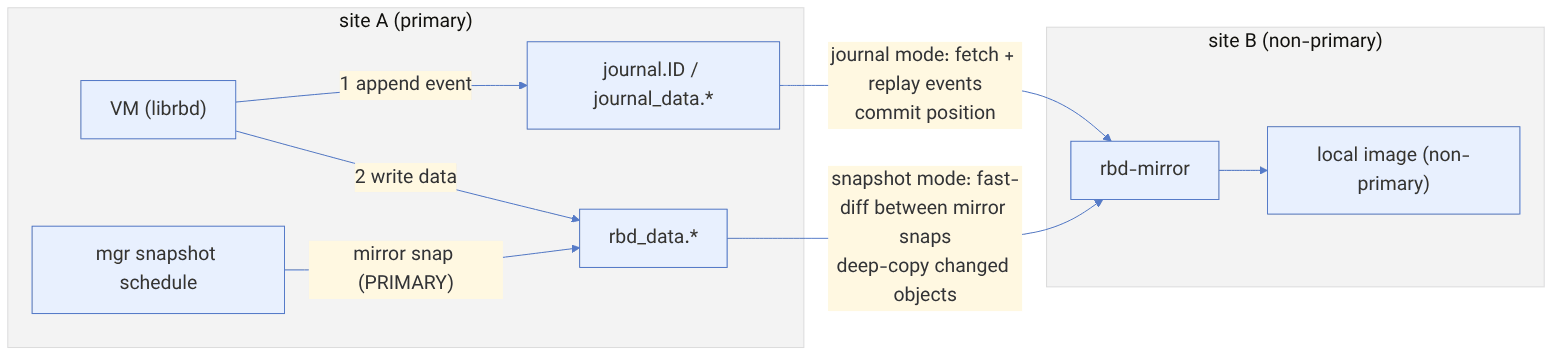
- In journal mode rbd-mirror registers as a journal client on the source and replays events on the destination.
- In snapshot mode, scheduled mirror snapshots are taken on the primary and rbd-mirror copies the difference between consecutive snapshots.
- Several rbd-mirror daemons share images through a leader using watch/notify; the gap between snapshot timestamps is the current RPO.
39-1 Before we begin#
Chapter 2 showed how mirroring is configured and used for failover and failback. This chapter goes inside it: what an image's journal looks like on RADOS and how each event is written byte by byte, what order librbd keeps between the journal and the data, how rbd-mirror replays and commits events in journal mode, which snapshots snapshot mode creates and how it copies only the differences, and how several rbd-mirror daemons divide the work among themselves. Names and defaults have been checked against the main branch of the ceph/ceph repository (November 2026).
39-1-1 What questions does this chapter answer?#
- In which objects is an image's journal stored, and what format does an event have?
- Why is each write written twice with journaling, and in what order?
- What is the commit position, and when is the journal trimmed?
- In snapshot mode, how does rbd-mirror know which objects to copy?
- What states do mirror snapshots have, and how are demote and promote expressed with them?
- How do several rbd-mirror daemons elect a leader and divide the images?
- Which mode should we choose for which load?
39-1-2 Prerequisites#
Chapter 2 (mirroring), chapter 37 (the header, object map and fast-diff), chapter 38 (the dispatch layers and exclusive-lock).
39-2 The journal on RADOS#
39-2-1 The journal objects#
When the journaling feature is enabled, librbd creates a journal for the image (the generic library src/journal and the cls_journal class):
| Object | Content |
|---|---|
journal.<image-id> | the header in omap: order, splay_width, pool_id, minimum_set, active_set, next_tag_tid, next_tag_class, client_<id> (each consumer and its commit position), tag_<tid> |
journal_data.<pool-id>.<image-id>.<n> | journal data; n is the object number |
The journal works like a striped image: splay_width objects (default rbd_journal_splay_width = 4) form an object set, and each object grows up to 2^order bytes (rbd_journal_order = 24, that is 16 MiB). When the objects of the active set fill up, active_set goes up by one. rbd_journal_pool lets the journal live in another pool (for example on SSD).
Source in code: src/journal/JournalRecorder.cc :: JournalRecorder::append, get_object; src/journal/Entry.cc :: Entry::encode
Complexity: O(1) per event; writes are batched per object
pseudocode
append(tag_tid, payload):
    entry_tid = next entry tid for this tag
    splay_offset = entry_tid % splay_width
    object_number = active_set * splay_width + splay_offset
    bytes = Entry{preamble 0x3141592653589793, version 1, entry_tid, tag_tid, data}.encode() + crc32c
    ObjectRecorder[splay_offset].append(bytes)      # batched by flush interval/bytes/age
    if object reaches 2^order: close set ; active_set++ (update header)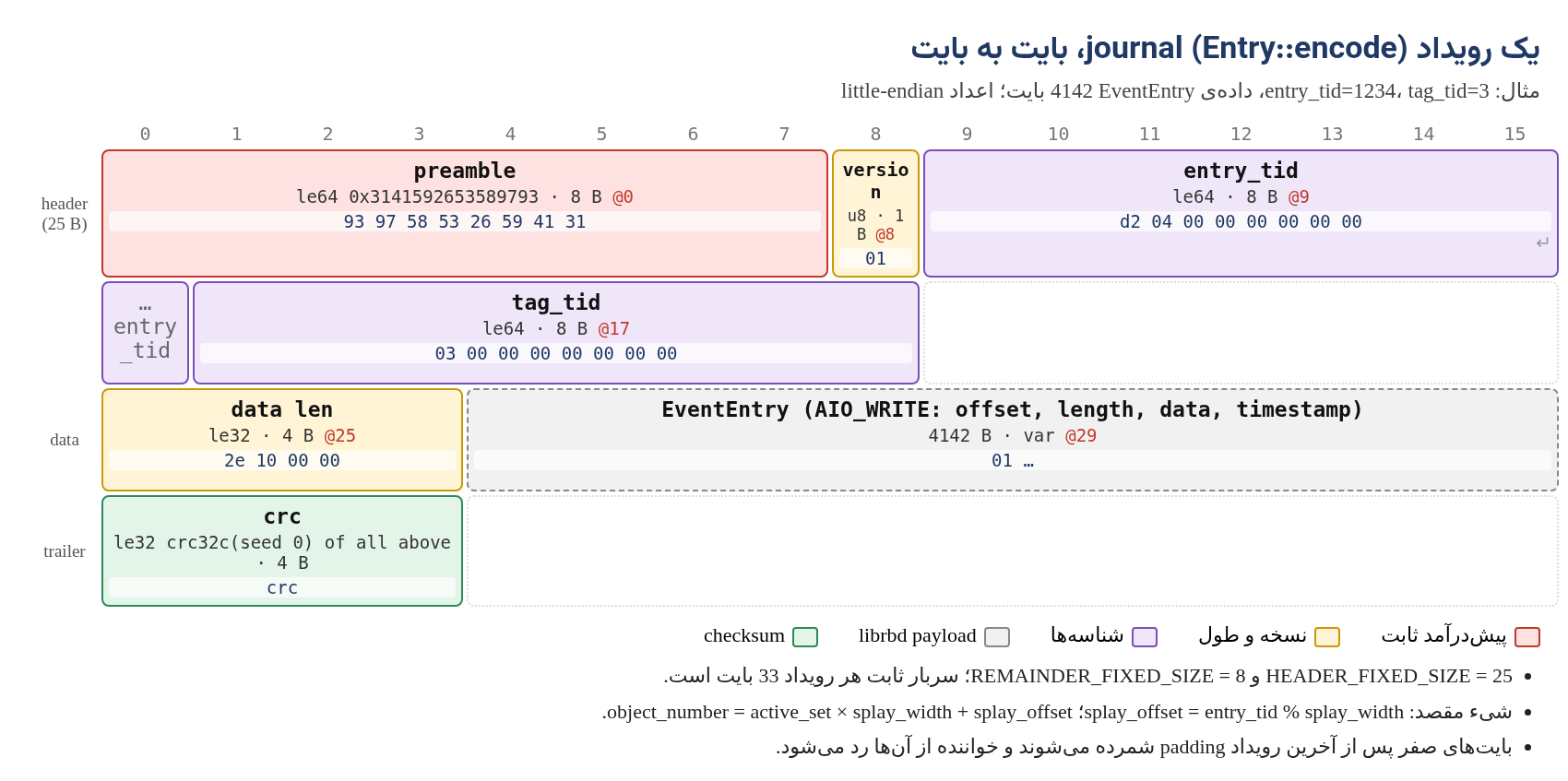
HEADER_FIXED_SIZE is 25 bytes (preamble, version, entry tid and tag tid) and REMAINDER_FIXED_SIZE is 8 bytes (data length and crc), so each event has 33 bytes of overhead. The fixed preamble lets a reader find the start of the next event after corruption or zero padding.
39-2-2 librbd events#
The data of each event is an EventEntry with one of the EVENT_TYPE_* types: AIO_WRITE (1), AIO_DISCARD (0), AIO_FLUSH (2), AIO_WRITESAME (18), AIO_COMPARE_AND_WRITE (19), and operational events such as SNAP_CREATE (4), RESIZE (11), FLATTEN (12), DEMOTE_PROMOTE (13), UPDATE_FEATURES (15) and OP_FINISH (3). A write event carries the full data of the write. Writes larger than rbd_journal_max_payload_bytes (default 16 KiB) are split into several events.
39-2-3 The order of journal and data#
Source in code: src/librbd/Journal.cc :: append_write_event, append_io_event, commit_io_event; src/librbd/journal/ObjectDispatch.cc
Complexity: two RADOS writes per user write; latency = journal append + data write
pseudocode
image write (JOURNAL image layer):
    tid = journal.append_io_event(AIO_WRITE{offset, length, data})
    pass request down with journal_tid = tid
object write (JOURNAL object layer):
    wait until event tid is SAFE (persisted in journal_data objects)
    send data write to rbd_data object
on data write complete:
    journal.commit_io_event(tid)        # after this the event can be trimmed (from the local consumer's view)
client registration:
    master client "" (local librbd) and one client per mirror peer (mirror uuid)
    each client commit_position = last committed (tag_tid, entry_tid) per splay offset
trim: objects of sets < min(commit sets of all clients) are removed ; minimum_set advances
The practical consequence: with journaling each write is written twice, once in the journal and once in the data, and the latencies of the two add up. If a peer becomes unreachable, the journal is not trimmed past that peer's commit position and keeps growing. rbd_journal_max_concurrent_object_sets (default 0, meaning unlimited) can disconnect a lagging peer so the journal does not grow without bound; a disconnected peer must then fully resynchronize.
# example: inspecting an image's journal
rbd journal info --pool rbd --image vm01
rbd journal status --pool rbd --image vm01example (output):
rbd journal '5f3a2b8c1d4e':
header_oid: journal.5f3a2b8c1d4e
object_oid_prefix: journal_data.3.5f3a2b8c1d4e.
order: 24 (16 MiB objects)
splay_width: 4
minimum_set: 7
active_set: 9
registered clients:
[id=, commit_position=[positions=[[object_number=36, tag_tid=3, entry_tid=91421], ...]], state=connected]
[id=b6e4…remote-uuid, commit_position=[positions=[[object_number=30, tag_tid=3, entry_tid=88310], ...]], state=connected]The second client (the peer) has committed object 30 (in set 7) and the local client object 36 (set 9); so sets 7 and 8 are being kept because of the peer.
39-3 Replay in journal mode#
rbd-mirror runs in the destination cluster, registers as a client in the source image's journal and reads the events.
Source in code: src/tools/rbd_mirror/image_replayer/journal/Replayer.cc; EventPreprocessor.cc; src/librbd/journal/Replay.cc
Complexity: O(E) for E events; bandwidth ≈ the source write rate + event overhead
pseudocode
bootstrap: if local image missing or client state = disconnected → full image sync (deep copy)
loop:
    entries = remote_journaler.fetch(rbd_mirror_journal_max_fetch_bytes)
    for e in entries:
        if e.tag changes owner (promote/demote): handle tag, maybe stop
        ev = decode EventEntry ; EventPreprocessor.map_snap_ids(ev)   # the local snap id ≠ the source one
        librbd::journal::Replay.process(ev) on local image             # local image is non-primary
        on safe: remote_journaler.committed(e) → periodically update commit_position
status: entries_behind_primary, bytes_per_second, seconds_until_synced
The destination image has the non-primary feature and only rbd-mirror may write to it. The order of events and the flush points are preserved, so the destination is always crash-consistent: at any moment it is in a state the source had at some past point in time.
39-4 Snapshot mode#
In this mode there is no journal. librbd or the mgr scheduler (rbd mirror snapshot schedule) creates a snapshot in the mirror namespace on the primary image, and rbd-mirror copies the difference between two consecutive snapshots.
39-4-1 The mirror snapshot namespace#
MirrorSnapshotNamespace field | Meaning |
|---|---|
state | PRIMARY (0), PRIMARY_DEMOTED (1), NON_PRIMARY (2), NON_PRIMARY_DEMOTED (3) |
complete | on the destination: copying this snapshot has finished |
mirror_peer_uuids | the peers that still need this snapshot |
primary_mirror_uuid, primary_snap_id | on the destination: the corresponding snapshot on the source |
last_copied_object_number | copy progress, for resuming after an interruption |
snap_seqs | the mapping of source snap ids to destination ones |
Demote creates a snapshot with the state PRIMARY_DEMOTED, and promote on the other side makes the image primary once that snapshot has arrived. That is why a planned failover loses no data: demote puts the last changes into a snapshot and promote waits for it to be complete. rbd_mirroring_max_mirroring_snapshots (default 5) limits the number of mirror snapshots kept.
Source in code: src/tools/rbd_mirror/image_replayer/snapshot/Replayer.cc :: scan_local_mirror_snapshots, scan_remote_mirror_snapshots, copy_snapshots, create_non_primary_snapshot, copy_image, update_non_primary_snapshot, unlink_peer
Complexity: O(the changes between two snapshots); the object list comes from fast-diff, without reading the whole image
pseudocode
on image update notify (or periodic check):
    refresh local and remote images
    local_last = newest local NON_PRIMARY mirror snap (complete or in-progress)
    remote_start = its primary_snap_id ; remote_end = next remote PRIMARY mirror snap after start
    if none: idle
    copy_snapshots: user snapshots between start and end → create locally (snap_seqs)
    get remote image state (size, features, metadata) at remote_end
    create local NON_PRIMARY snapshot (complete=false, primary_snap_id = remote_end)
    request sync slot (rbd_mirror_concurrent_image_syncs)
    copy_image: deep-copy objects changed between remote_start..remote_end
                (object map diff → only DATA_UPDATED / HOLE_UPDATED objects)
                progress → last_copied_object_number
    apply image state ; mark local snapshot complete
    unlink_peer(remote_start): remove our uuid from remote snap's mirror_peer_uuids
    prune older local mirror snapshots
Numerical example. A 2 TiB image (524288 objects of 4 MiB) with a scheduler every 15 minutes. If 3000 objects change in 15 minutes, fast-diff finds exactly those 3000 objects and rbd-mirror transfers about 12 GiB, even if hundreds of small writes were made to each object. In journal mode the same load, if it is 200 MiB/s of small writes, produces about 180 GB of events in 15 minutes. Conversely, if only one byte is written to each of the 3000 objects in 15 minutes, snapshot mode still sends 12 GiB. So the choice of mode depends on the write pattern and the RPO.
| journal | snapshot | |
|---|---|---|
| RPO | seconds | the scheduler interval (minutes) |
| Write overhead on the source | double writes and higher latency | almost zero (only the snapshot and object clones) |
| Clients | librbd only (krbd does not support it) | librbd and krbd |
| Bandwidth | proportional to the write volume | proportional to the number of changed objects |
| Risk | journal growth if a peer falls behind | many snapshots and clones in RADOS |
39-5 Daemons: leader, instances and dividing the images#
Several rbd-mirror daemons can run for one pool (active-active). Coordination is done with watch/notify on objects in that same pool.
Source in code: src/tools/rbd_mirror/LeaderWatcher.cc, InstanceWatcher.cc, ImageMap.cc, image_map/SimplePolicy.cc
Complexity: O(I) for I images per reassignment
pseudocode
each daemon: register instance_<id> in rbd_mirroring ; watch rbd_mirror_leader
leader election: try cls_lock exclusive on rbd_mirror_leader
    leader sends heartbeat every rbd_mirror_leader_heartbeat_interval (5 s)
    if rbd_mirror_leader_max_missed_heartbeats (2) missed → others break lock (with blocklist) and retry
leader: ImageMap with policy rbd_mirror_image_policy_type (simple)
    simple: spread images evenly; persist in rbd_mirroring image_map_<global id>
    on instance add/remove: rebalance and send acquire/release image to instances
instance: InstanceReplayer starts/stops ImageReplayer per assigned image
Numerical example. With three daemons and 300 images, each daemon gets about 100 images. If one fails, the leader removes it after two missed heartbeats (about 10 seconds, plus the watch timeout) and spreads its 100 images between the two remaining daemons. Until then those images are not synchronized; in journal mode that means the source journal grows by that much.
39-6 Command reference#
| Command | Use |
|---|---|
rbd mirror pool enable P {image,pool} [--site-name N] / disable | turning mirroring on in a pool |
rbd mirror pool peer bootstrap create P / bootstrap import P TOKEN [--direction {rx-only,rx-tx}] | linking two clusters |
rbd mirror pool peer {add,remove,set} | managing peers by hand |
rbd mirror pool info P / status P [--verbose] | the configuration and the status of all images |
rbd mirror image enable P/I {journal,snapshot} / disable | turning it on for one image |
rbd mirror image {promote [--force],demote,resync} P/I | failover, failback and resynchronization |
rbd mirror image status P/I | the detailed status of one image |
rbd mirror image snapshot P/I | a manual mirror snapshot |
rbd mirror snapshot schedule {add,ls,status,remove} [--pool P] [--image I] INTERVAL [START] | the snapshot scheduler |
rbd journal {info,status,inspect,export,import,reset} | an image's journal |
ceph orch apply rbd-mirror --placement=N | deploying the daemons with cephadm |
ceph daemon /var/run/ceph/ceph-client.rbd-mirror.*.asok rbd mirror status | the internal status of a daemon |
example (rbd mirror image status rbd/vm01 in snapshot mode):
vm01:
  global_id:   8c1e0a7d-3b52-4f0e-9d2a-6f1b3c4d5e6f
  state:       up+replaying
  description: replaying, {"bytes_per_second":41943040.0,"bytes_per_snapshot":12884901888.0,
               "local_snapshot_timestamp":1794801600,"remote_snapshot_timestamp":1794802500,
               "replay_state":"syncing","syncing_percent":37,"syncing_snapshot_timestamp":1794802500}
  service:     mirror.b on host-b2
  last_update: 2026-11-15 10:56:31
The gap between remote_snapshot_timestamp and local_snapshot_timestamp (900 seconds) is the destination's current lag, that is, the actual RPO at this moment.
39-7 Tuning and troubleshooting#
up+stoppedon the destination: usually means the image is primary on the destination, or both sides have become primary (split-brain). Look atrbd mirror image statusandrbd info(themirroring primaryflag) on both sides;demotethe wrong side and thenresyncit.- The source journal is growing: look at
rbd journal status; if the peer is behind, rbd-mirror is slow or disconnected. Check the bandwidth,rbd_mirror_memory_targetand the number of daemons. - A long full sync: raise
rbd_mirror_concurrent_image_syncs(default 5) carefully; each sync puts a heavy read load on the source. - Mirror snapshots pile up: an old peer that was not removed is still in
mirror_peer_uuids. Checkrbd mirror pool infoand remove the dead peer. - The RPO in snapshot mode is high: shorten the scheduler interval, but not below the time each copy round actually takes (watch
syncing_percent).
39-8 Supplementary and up to date#
- Mirroring of consistency groups (several images with simultaneous snapshots) is under development in the main branch; before using it, check whether your version has it.
- Status messages are kept in
status_global_<gid>andremote_status_global_<gid>inrbd_mirroring, so that each side also sees the other side's status. - Since Octopus, snapshot mode is available and is recommended for most uses; journal mode remains for very low RPO with librbd clients.
39-9 Hands-on exercise#
- 1. Enable journaling on a test image, write with
rbd benchand follow the growth ofjournal_data.*withrados ls. Then haverbd journal inspect --verboseshow a few events. - 2. Read a journal object with
rados getand, withxxd, find the preamble93 97 58 53 26 59 41 31and the fields after it. - 3. In snapshot mode set a 5-minute schedule, run random and sequential write loads separately and compare
bytes_per_snapshot. - 4. Stop one of two rbd-mirror daemons and measure how long it takes for its images to move to the other daemon.
39-10 Review questions#
- 1. What are the names of the journal's header and data objects?
- 2. In which object is the event with entry_tid 1234 written, in a journal with splay_width 4 and active_set 9?
- 3. How many bytes of fixed overhead does each journal event have, and which fields make it up?
- 4. Why must the data write wait for the event to become SAFE?
- 5. What prevents the journal from being trimmed?
- 6. Why is the destination always crash-consistent in journal mode?
- 7. What are the four mirror snapshot states?
- 8. How does rbd-mirror find the changed objects in snapshot mode?
- 9. When does snapshot mode use more bandwidth than journal mode?
- 10. How is the leader chosen in rbd-mirror, and after how long is it replaced?
Answers to these questions are in Appendix E: Answers to Review Questions. Answers to this chapter's questions →
39-11 Sources for this chapter#
- The journal library (Entry.cc, JournalRecorder.cc, Journaler.cc
https://github.com/ceph/ceph/tree/main/src/journal - cls_journal.cc
https://github.com/ceph/ceph/blob/main/src/cls/journal/cls_journal.cc - librbd/journal and Types.h
https://github.com/ceph/ceph/tree/main/src/librbd/journal - rbd-mirror
https://github.com/ceph/ceph/tree/main/src/tools/rbd_mirror - cls_rbd_types.h (MirrorSnapshotNamespace
https://github.com/ceph/ceph/blob/main/src/cls/rbd/cls_rbd_types.h - Mirroring documentation
https://docs.ceph.com/en/latest/rbd/rbd-mirroring/ - rbd-mirror options
https://docs.ceph.com/en/latest/rbd/rbd-config-ref/