Specialist Part (8): RGW — The Request Path, SigV4, Quotas, Rate Limits, GC and Lifecycle
TL;DR this chapter in a few lines
- The Beast frontend runs each connection in a coroutine on a thread pool; the request becomes an op with a fixed sequence of steps.
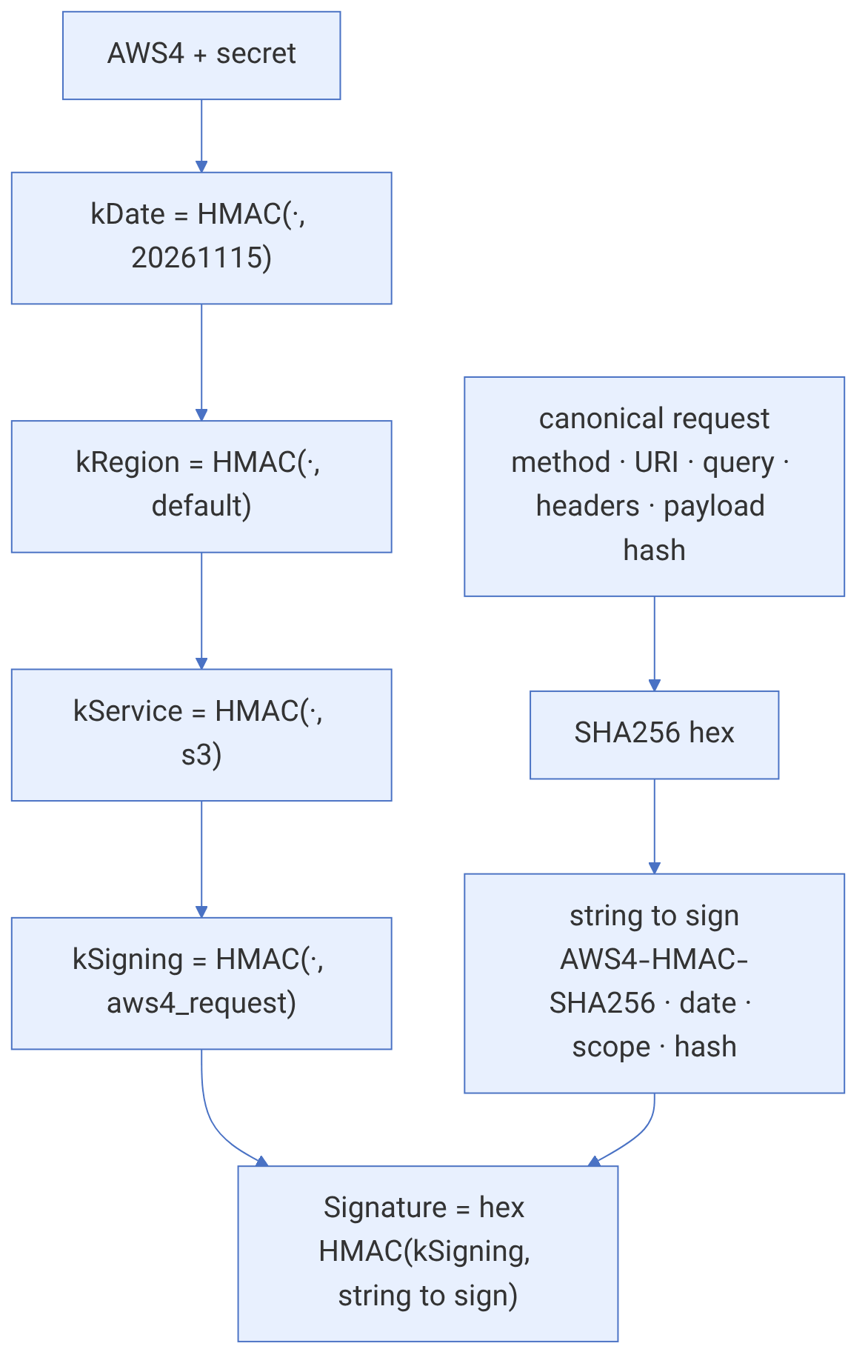
- SigV4 authentication derives a signing key from the secret, date, region and service; the chapter computes one example step by step.
- Quotas are soft (cached per RGW) and rate limits are token buckets per user or bucket.
- Deleted tails go to the gc queue and are freed later; lifecycle runs in a daily window, and
rgw_lc_debug_intervalspeeds it up for tests.
41-1 Before we begin#
Chapter 40 showed how RGW's data is laid out on RADOS. This chapter follows the same data in motion: what stages an HTTP request goes through from Beast to the execution of the op, exactly how a SigV4 signature is rebuilt and checked, how PUT and GET move data in parallel windows, where in the path and with what arithmetic quotas and rate limits are applied, and how the two background workers, gc and lifecycle, divide and schedule their work. Defaults have been read from src/common/options/rgw.yaml.in in the main branch (November 2026).
41-1-1 What questions does this chapter answer?#
- Why might a request with a correct signature be rejected with
RequestTimeTooSkewed? - With how many HMACs is the SigV4 signing key derived from the secret key?
- Is the size quota compared against the actual object size or a rounded value?
- Is the rate limit separate for each RGW or for the whole cluster?
- Why is a pool's space not freed for several hours after a large bucket is deleted?
- Which bucket does lifecycle process, and when?
41-1-2 Prerequisites#
Chapter 4 (RGW), chapter 40 (the data model) and chapter 21 (performance tuning).
41-2 From socket to op#
The default frontend is Beast (rgw_frontends = "beast port=7480"), which, built on Boost.Asio, runs each connection in a coroutine on a pool of threads (rgw_thread_pool_size 128). When rgw_beast_enable_async is on (the default), waiting for RADOS does not block the thread, and one thread can drive thousands of concurrent requests. rgw_max_concurrent_requests (1024) is the cap on in-flight requests.
Source in code: src/rgw/rgw_process.cc :: process_request, rgw_process_authenticated; src/rgw/rgw_asio_frontend.cc
Complexity: a fixed cost per request: authentication, reading the ACL and policy from cache, then op->execute
pseudocode
process_request(req):
    s = req_state ; rest handler by dialect (S3, Swift, admin, STS ...) from URL and headers
    op = handler.get_op()                       # e.g. RGWPutObj_ObjStore_S3
    handler.authorize()                         # SigV4/V2, STS, anonymous ...
    normalize buckets and tenants
    rgw_process_authenticated(handler, op):
        init permissions                        # bucket and user policy, ACL (cached)
        reading permissions ; init op ; verifying op mask
        verifying CORS origin matches ; verifying op permissions (IAM + ACL)
        verifying op params ; pre-executing
        check rate limiting → 503 SlowDown + Retry-After when delayed
        executing: op->execute()                # RADOS I/O, quota check inside
        completing: op->complete() → response, ops log, usage log, bucket notification
Each stage shows up in the log with debug_rgw = 2 (for example req 123 0.000s s3:put_obj verifying op permissions), with the relative time next to each line; this is the simplest way to find the slow stage.

41-3 The SigV4 signature#
Source in code: src/rgw/rgw_auth_s3.cc :: get_v4_canonical_headers, get_v4_string_to_sign, get_v4_signing_key, get_v4_signature; src/rgw/rgw_auth_s3.h :: RGW_AUTH_GRACE
Complexity: five HMAC-SHA256s and one SHA256 over the canonical request; the signing key can be cached
pseudocode
parse Authorization: AWS4-HMAC-SHA256 Credential=AK/YYYYMMDD/region/s3/aws4_request,
                     SignedHeaders=h1;h2;..., Signature=hex
reject if |now - x-amz-date| > RGW_AUTH_GRACE (15 min)      # RequestTimeTooSkewed
canonical = METHOD \n URI \n sorted query \n "name:value\n" for each signed header \n
            SignedHeaders \n payload hash (or UNSIGNED-PAYLOAD / STREAMING-...)
sts = "AWS4-HMAC-SHA256" \n x-amz-date \n "YYYYMMDD/region/s3/aws4_request" \n hex(sha256(canonical))
kDate = HMAC("AWS4" + secret, YYYYMMDD) ; kRegion = HMAC(kDate, region)
kService = HMAC(kRegion, "s3") ; kSigning = HMAC(kService, "aws4_request")
ok if hex(HMAC(kSigning, sts)) == Signature (constant-time compare)
streaming upload: every chunk carries its own signature chained from the previous one
Numerical example. With a made-up secret key (EXAMPLE/secret/NOT+A+REAL+KEY0000000000), region default, date 20261115T071500Z and the request GET /photos/cat.jpg with three signed headers and UNSIGNED-PAYLOAD:
example:
sha256(canonical request) = 36f24a8179a5bc758bde32b4a6932f313216b6c9f7d84e04e33bd7a2086b87f5
kSigning                  = 38793786cc844d69350de848f15fe23b8f7887e3bcbb48d552b2e0a2c1d9746d
Signature                 = 5e63a875b9d9e0ec540db8784929f6d4c5799c453bd5442804a9a7bc7f57aff8
Changing one byte in any of the inputs changes the signature completely. Two common errors: the signing region is not the same as the zonegroup's api_name (SignatureDoesNotMatch), and a proxy has rewritten the Host header. With debug_rgw = 20 RGW prints the text of the canonical request and the string to sign, and you can compare it with the client's output.
Never share a debug_rgw = 20 log from a real environment without scrubbing the headers; it contains the Authorization value, STS tokens and sometimes the request body.
41-4 PUT and GET in motion#
Source in code: src/rgw/driver/rados/rgw_putobj_processor.cc; src/rgw/rgw_op.cc :: RGWPutObj::execute, RGWGetObj::execute; src/rgw/driver/rados/rgw_rados.cc :: get_obj_iterate
Complexity: PUT: O(size) with at most rgw_put_obj_min_window_size bytes in flight; GET: a window of rgw_get_obj_window_size
pseudocode
PUT:
    check quota (estimated size = Content-Length)            # before any data write
    processor = Atomic (or Multipart part / Append)
    loop body chunks: filter chain (compression, encryption, etag md5) → StripeProcessor → ChunkProcessor
        aio write chunk ; keep up to rgw_put_obj_min_window_size (16 MiB) in flight
    complete: wait aio ; index prepare → write head attrs + manifest → index complete (alg-40-1)
    old object's tail (if overwritten) → gc chain with tail_tag
GET:
    read head (attrs + up to first chunk of data) ; check conditions (If-Match, Range ...)
    walk manifest from range start: each RADOS read ≤ rgw_get_obj_max_req_size (4 MiB)
    keep up to rgw_get_obj_window_size (16 MiB) outstanding ; stream to client in order
    filters in reverse (decrypt, decompress)
So the throughput of a single PUT or GET stream is roughly "the window divided by the latency of one RADOS write or read". For a large object over a high-latency connection, enlarging the windows helps but raises memory use per request. S3 clients usually get around this limit with parallel multipart.
41-5 Quotas#
Source in code: src/rgw/rgw_quota.cc :: RGWQuotaHandlerImpl::check_quota, RGWQuotaInfoDefApplier, RGWQuotaInfoRawApplier; src/rgw/rgw_common.h :: rgw_rounded_objsize
Complexity: O(1) with cache; statistics are reread every rgw_bucket_quota_ttl
pseudocode
check_quota(bucket, owner, num_objs = 1, size):
    for scope in (bucket quota, user quota) if enabled:
        stats = quota cache (refreshed after rgw_bucket_quota_ttl = 10 min, or on async update)
        if max_objects >= 0 and stats.num_objects + num_objs > max_objects → QuotaExceeded
        if max_size >= 0:
            if check_on_raw: exceeded = stats.size + size > max_size
            else:            exceeded = stats.size_rounded + round_up(size, 4096) > max_size
        → 403 QuotaExceeded
Two consequences: the quota is read from a cache in each RGW, so several RGWs at the same time can go slightly over the cap (the quota is "soft"); and in the default mode each object counts as at least 4 KiB, so millions of 100-byte objects fill the quota much sooner than their actual size would. A user's quota statistics are rebuilt with radosgw-admin user stats --uid U --sync-stats.
41-6 Rate limits#
Source in code: src/rgw/rgw_ratelimit.h :: RateLimiterEntry; src/rgw/rgw_process.cc
Complexity: O(1) per request; one entry for each account, user and bucket in each RGW's memory
pseudocode
tokens kept ×1000 (fixed point) ; interval = rgw_ratelimit_interval (60 s)
on request, levels checked in order: account, user, bucket (each with its own bucket of tokens):
    elapsed = now - ts ; refill = limit × elapsed / interval  (capped at limit)
    op type ∈ {read, write, list, delete}            # list/delete classes: main branch
    if ops tokens < 1 or bytes tokens < 0:
        delay = ceil(needed × interval / limit) seconds → 503 SlowDown, Retry-After: delay
    else take 1 op token
after response: subtract transferred bytes from read or write bytes bucket (may go negative)
if a lower level blocks, op tokens already taken at higher levels are given back
Example. With max-read-ops = 600 over a 60-second interval, the bucket refills by 10 tokens per second and holds at most 600 tokens. A user who sends 700 GETs back to back after a minute of silence has the first 600 requests accepted and the rest rejected with 503 until the bucket refills. Because the bucket lives in each RGW's memory, behind a load balancer with four RGWs the effective cap becomes up to four times as large; divide the value by the number of RGWs.
# example: setting a limit for a user
radosgw-admin ratelimit set --ratelimit-scope=user --uid=alice --max-read-ops=600 --max-write-bytes=104857600
radosgw-admin ratelimit enable --ratelimit-scope=user --uid=alice
radosgw-admin ratelimit get --ratelimit-scope=user --uid=aliceexample (output):
{ "user_ratelimit": { "max_read_ops": 600, "max_write_ops": 0, "max_list_ops": 0, "max_delete_ops": 0,
"max_read_bytes": 0, "max_write_bytes": 104857600, "enabled": true } }A value of 0 means unlimited. The list and delete fields exist only in versions that have these classes.
41-7 garbage collection#
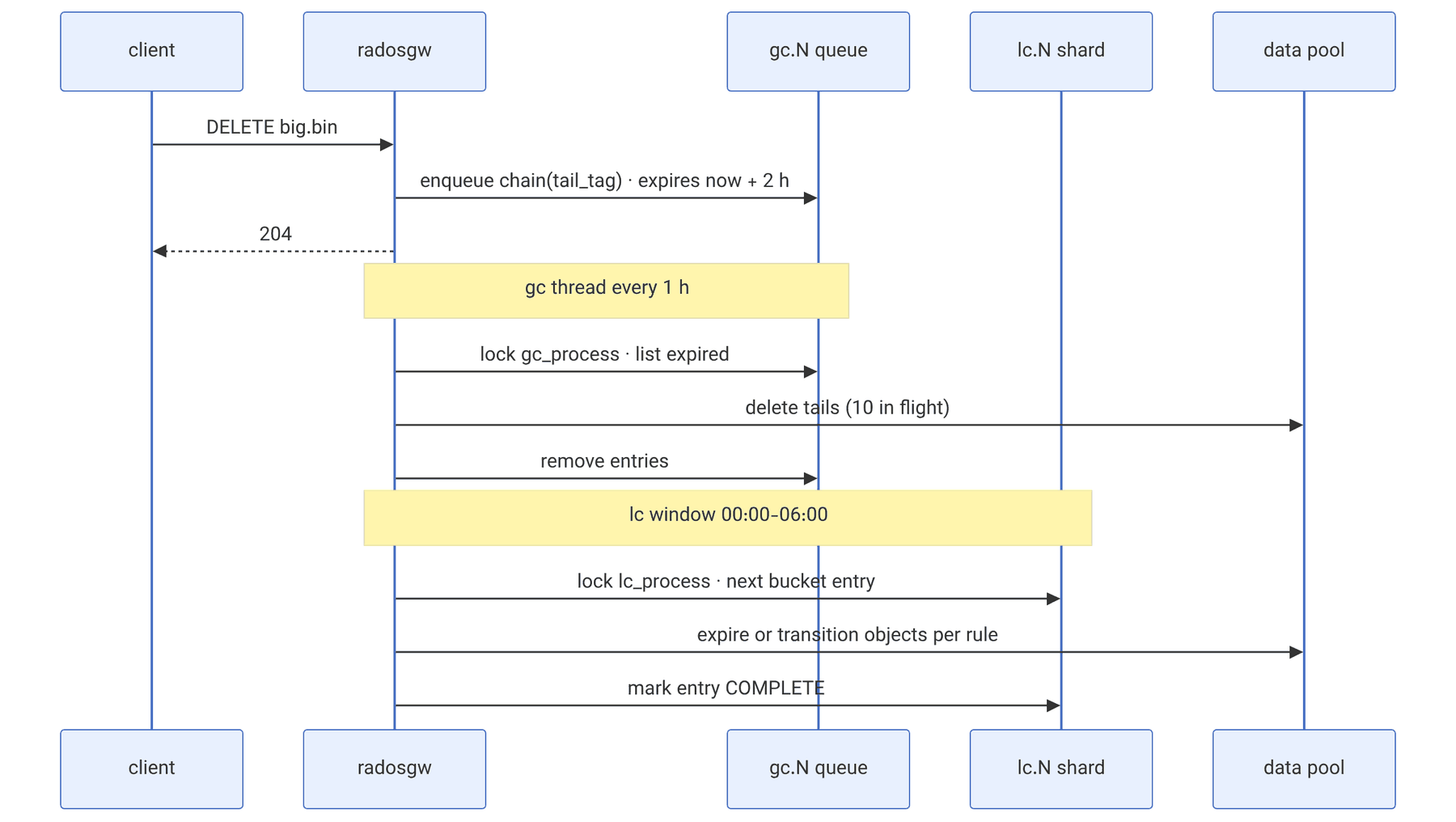
Deleting or overwriting an object changes only the head and the index immediately. The tails are handed to the gc queue in a chain (cls_rgw_obj_chain) with the tail_tag label, so that in-flight GET requests that still hold the old manifest do not lose the tail.
Source in code: src/rgw/driver/rados/rgw_gc.cc :: RGWGC::tag_index, send_chain, process; src/cls/rgw_gc
Complexity: enqueue O(1); process O(number of expired objects) with rgw_gc_max_concurrent_io parallel deletes
pseudocode
enqueue(chain, tag):
    shard = XXH64(tag, seed 8675309) mod rgw_gc_max_objs (32) → object gc.<shard> in <zone>.rgw.log:gc
    cls rgw_gc.queue_enqueue(entry{tag, chain, time = now + rgw_gc_obj_min_wait (2 h)})
    (split into several entries if chain too large for one queue entry)
gc thread every rgw_gc_processor_period (1 h), for up to rgw_gc_processor_max_time (1 h):
    for each shard in random start order:
        try lock "gc_process" on gc.<shard> ; skip if held by another RGW
        list expired entries ; delete each tail object (≤ rgw_gc_max_concurrent_io = 10 in flight)
        remove processed entries from queue (trim in chunks of rgw_gc_max_trim_chunk)
Example. Deleting a bucket with one million 64 MiB objects sends roughly 15 million 4 MiB tails to the queue. With the defaults, none of them is deleted sooner than 2 hours, and each RGW works with 10 concurrent deletes in each hourly cycle; if each delete takes 5 milliseconds, one RGW clears about 7 million tails an hour. Increasing rgw_gc_max_concurrent_io or running radosgw-admin gc process --include-all by hand speeds this up, but also raises the OSD load.
41-8 lifecycle#
Source in code: src/rgw/rgw_lc.cc :: get_lc_index, RGWLC::process, bucket_lc_process, LCOpAction_*; src/rgw/rgw_lc.h
Complexity: each bucket once a day; O(number of objects matching the prefixes) for listing
pseudocode
PutBucketLifecycle: store rules in bucket attr ; add entry "<tenant>:<bucket>:<marker>" to shard
    lc.<ceph_str_hash_linux(key) mod 7877 mod rgw_lc_max_objs (32)> in <zone>.rgw.log:lc
rgw_lc_max_worker (3) worker threads, active only inside rgw_lifecycle_work_time (00:00-06:00):
    pick shard ; lock "lc_process" (rgw_lc_lock_max_time 90 s, renewed) ; take next entry not done today
    bucket_lc_process(entry):
        skip if bucket marker != entry marker (bucket was recreated)
        group rules by prefix ; list objects (and versions) per prefix
        for each object, run matching actions with up to rgw_lc_max_wp_worker (128) parallel ops:
            CurrentExpiration, NonCurrentExpiration, DMExpiration (expired delete markers),
            CurrentTransition, NonCurrentTransition (copy tail to class pool, new manifest)
        abort incomplete multipart uploads older than N days
    mark entry complete with start time
Operational notes: the expiry date is day-based and the run happens in the work window, so "Expiration: 1 day" means "in the first window after one day has passed". For testing, rgw_lc_debug_interval (default -1, off) shortens a "day" to a few seconds, and it must never be left on in production. radosgw-admin lc list shows the status of each bucket:
example (lc list output):
[ { "bucket": ":logs:a1b2c3d4-...4123.9", "shard": "lc.17", "started": "Sun, 15 Nov 2026 00:00:04 GMT", "status": "COMPLETE" },
{ "bucket": ":photos:a1b2c3d4-...4123.7", "shard": "lc.4", "started": "Sun, 15 Nov 2026 00:00:06 GMT", "status": "PROCESSING" } ]41-9 Commands with S3 clients#
| Task | aws cli | mc |
|---|---|---|
| defining the endpoint | aws --endpoint-url https://s3.example.test s3 ls | mc alias set c1 https://s3.example.test AK SK |
| parallel multipart upload | aws configure set s3.multipart_chunksize 64MB then aws s3 cp f s3://b/ | mc cp f c1/b/ |
| versioning | aws s3api put-bucket-versioning --bucket b --versioning-configuration Status=Enabled | mc version enable c1/b |
| listing versions | aws s3api list-object-versions --bucket b | mc ls --versions c1/b |
| lifecycle | aws s3api put-bucket-lifecycle-configuration --bucket b --lifecycle-configuration file://lc.json | mc ilm rule add --expire-days 30 c1/b |
| storage class | aws s3 cp f s3://b/ --storage-class COLD | mc cp --storage-class COLD f c1/b/ |
| presigned URL | aws s3 presign s3://b/k --expires-in 3600 | mc share download --expire 1h c1/b/k |
# example: a simple lifecycle with a transition and an expiry
cat > lc.json <<'J'
{ "Rules": [ { "ID": "logs", "Status": "Enabled", "Filter": { "Prefix": "logs/" },
  "Transitions": [ { "Days": 30, "StorageClass": "COLD" } ],
  "Expiration": { "Days": 365 },
  "AbortIncompleteMultipartUpload": { "DaysAfterInitiation": 7 } } ] }
J
aws --endpoint-url https://s3.example.test s3api put-bucket-lifecycle-configuration --bucket logs --lifecycle-configuration file://lc.json41-10 Tuning and troubleshooting#
| Symptom | Likely cause | Action |
|---|---|---|
RequestTimeTooSkewed | the client's or RGW's clock is off by more than 15 minutes | NTP/chrony |
SignatureDoesNotMatch only behind a proxy | Host or path rewriting | send the original Host, check rgw_dns_name |
| 503 SlowDown with Retry-After | rate limit | ratelimit get, divide the cap by the number of RGWs |
| 503 without Retry-After | rgw_max_concurrent_requests or a full queue | more RGWs or a higher cap, check OSD latency |
| QuotaExceeded sooner than expected | 4 KiB rounding or stale statistics | user stats --sync-stats, check check_on_raw |
| pool space is not freed after deletion | gc queue | count the gc list --include-all entries, then gc process |
| lifecycle does not run | outside the window, a stuck lock, a stale marker | lc list, lc process --bucket B |
41-11 Supplementary and up to date#
- The list and delete classes in rate limiting and the
Retry-Afterheader are found in the main branch; older versions had only read and write. - The gc queue is based on cls
rgw_gc(a two-stage queue on one object); old versions used omap, and the migration path inRGWGC::liststill reads both. rgw_lc_max_rules(1000) is the cap on a bucket's rules.
41-12 Hands-on exercise#
- 1. Sign a GET request with a Python script (only hashlib and hmac) and send it with
curl. Then change one header and seeSignatureDoesNotMatch. - 2. Set a cap of 60 read ops per minute for a user and, with a curl loop, find the time of the first 503 and the value of Retry-After.
- 3. Delete a bucket with 100 objects of 10 MiB and count the
gc list --include-allentries before and aftergc process --include-all. - 4. With
rgw_lc_debug_interval = 10on a test cluster, see a one-day Expiration rule take effect within a few seconds.
41-13 Review questions#
- 1. What are the main stages of
rgw_process_authenticated, in order? - 2. How much clock skew does RGW allow for a SigV4 request, and what error does it return?
- 3. How is the SigV4 signing key derived from the secret key?
- 4. What limits the throughput of a PUT stream, and which option tunes it?
- 5. In the default mode, how much does the size quota count for a 100-byte object?
- 6. Why is the quota in RGW "soft"?
- 7. In practice, what is a rate limit of 600 read ops per minute behind three RGWs?
- 8. How is a chain's gc shard chosen, and why is the tail not deleted immediately?
- 9. How does lifecycle map a bucket to a shard, and in what time window does it work?
- 10. Why does bucket_lc_process check the marker?
Answers to these questions are in Appendix E: Answers to Review Questions. Answers to this chapter's questions →
41-14 Sources for this chapter#
- rgw_process.cc
https://github.com/ceph/ceph/blob/main/src/rgw/rgw_process.cc - rgw_auth_s3.cc
https://github.com/ceph/ceph/blob/main/src/rgw/rgw_auth_s3.cc - rgw_ratelimit.h
https://github.com/ceph/ceph/blob/main/src/rgw/rgw_ratelimit.h - rgw_quota.cc
https://github.com/ceph/ceph/blob/main/src/rgw/rgw_quota.cc - rgw_gc.cc
https://github.com/ceph/ceph/blob/main/src/rgw/driver/rados/rgw_gc.cc - rgw_lc.cc
https://github.com/ceph/ceph/blob/main/src/rgw/rgw_lc.cc - AWS Signature Version 4
https://docs.aws.amazon.com/IAM/latest/UserGuide/reference_sigv-create-signed-request.html - Ceph gc and lifecycle documentation
https://docs.ceph.com/en/latest/radosgw/config-ref/