Object Storage with the RADOS Gateway
TL;DR this chapter in a few lines
- RGW is a stateless HTTP server that speaks S3 and Swift on top of RADOS; run several instances behind the cephadm ingress service.
- An S3 object becomes a head object, tail objects and a bucket index entry; keep the index pool replicated and on SSD.
- Users, subusers, tenants and accounts are different identity levels; for a new design consider accounts (Squid+).
- Versioning, object lock, lifecycle, storage classes, policies, SSE and bucket notifications make RGW a complete S3 service; remember lifecycle rules for incomplete multipart uploads and that gc frees space later.
4-1 Before you start#
4-1-1 What questions does this chapter answer?#
Object storage is the fastest-growing part of the storage world: backups, media archives, logs, machine-learning datasets, CI artifacts and even the "data lake". The de facto standard API in this field is Amazon S3, and the RADOS Gateway (RGW) is Ceph's implementation of it. In this chapter:
- How does object storage differ from block and file, and how does RGW implement it on RADOS?
- How do we deploy RGW with cephadm and put it behind a load balancer?
- What are users, keys, subusers, tenants and accounts, and which should we use when?
- How do we access RGW with S3 (s3cmd and aws-cli) and Swift, and configure virtual-host bucket DNS?
- How do we integrate RGW with Keystone and Hadoop S3A?
- How do today's features such as versioning, lifecycle, object lock, bucket policy and event notification work?
4-1-2 Prerequisites#
The cluster from chapter 1 and the host ceph-node4 with the rgw label, plus client-node1 for the client tools.
4-2 Getting to know object storage in Ceph#
4-2-1 Objects, buckets and the API#
In object storage there is no directory tree and no rewritable block. Data is stored as objects: a key (name), binary content and metadata. Objects are grouped in buckets (in Swift terms: containers) and accessed over HTTP with verbs such as PUT, GET, HEAD and DELETE. An object is usually written in one go and read in one go; changing part of an object means rewriting the whole of it. This very simplicity is what makes huge scale and access from anywhere on the internet possible.
| Property | Block (RBD) | File (CephFS) | Object (RGW) |
|---|---|---|---|
| Interface | Block device | POSIX | HTTP (S3/Swift) |
| Unit of access | Block | Byte in a file | Whole object (with range reads) |
| Metadata | None | Permissions, times | Arbitrary, plus tags |
| Typical scale | Terabytes per disk | Millions of files | Billions of objects |
| Use | VMs, databases | File shares, HPC | Backup, media, analytics data |
4-2-2 RGW on RADOS#
radosgw is a stateless HTTP server (since Nautilus its default frontend is Beast, based on Boost.Asio, and the old civetweb frontend has been retired). It translates each S3 or Swift request into a set of RADOS operations. Because no state is kept in RGW itself, any number of instances can be put behind a load balancer.
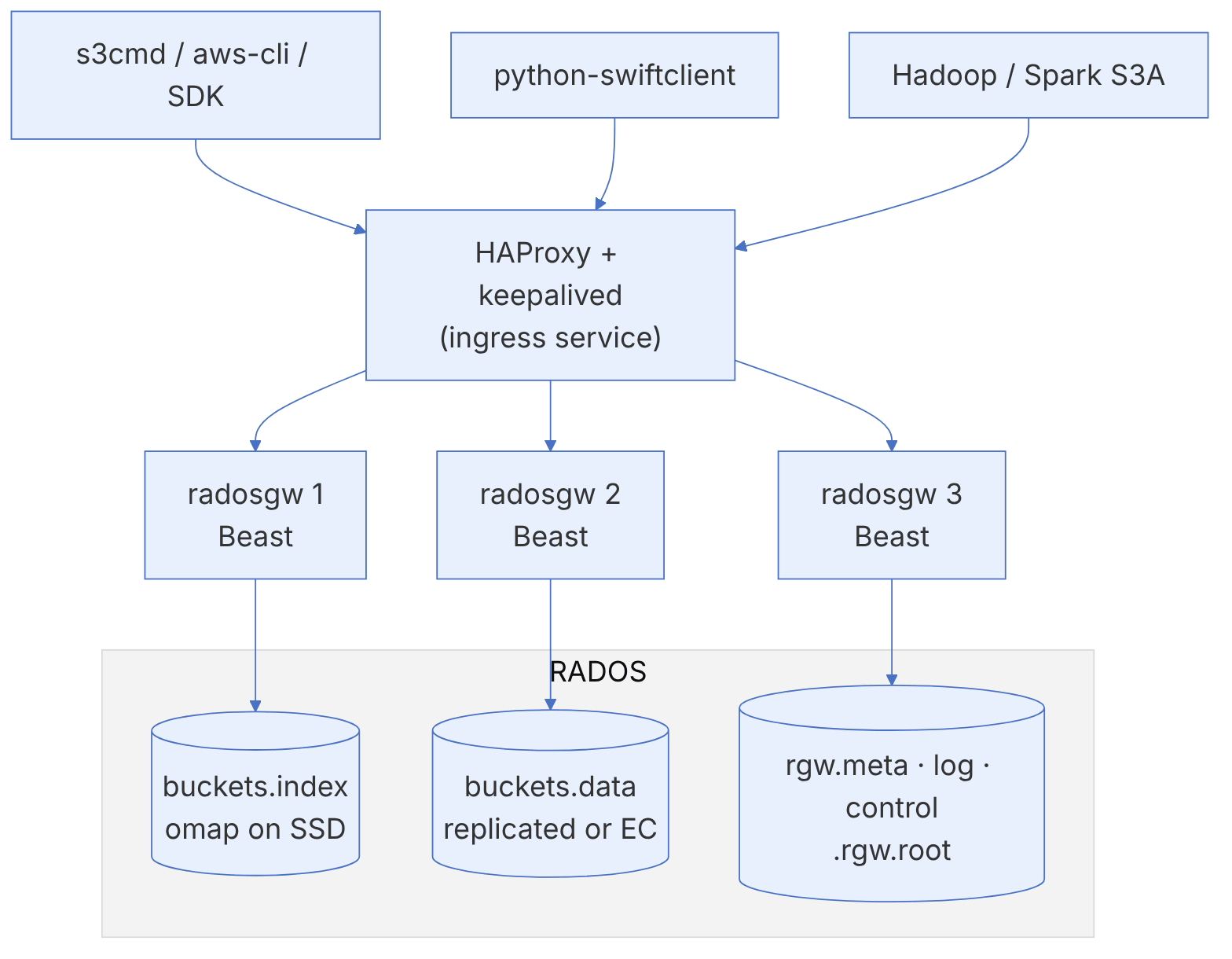
4-2-3 RGW pools#
In a simple deployment (the default zone), RGW creates these pools:
| Pool | Content | Recommendation |
|---|---|---|
.rgw.root | Definitions of the realm, zonegroup and zone | Small; replicated |
default.rgw.control | watch/notify objects for cache coordination between instances | Small |
default.rgw.meta | User and bucket metadata | On SSD if possible |
default.rgw.log | Sync, lifecycle and usage logs | Small to medium |
default.rgw.buckets.index | Each bucket's index in omap | Always on SSD/NVMe and replicated |
default.rgw.buckets.data | Object data | Replicated or EC; the largest pool |
default.rgw.buckets.non-ec | Multipart upload metadata | Replicated |
Never make the index pool erasure-coded (EC does not support omap), and do not put it on HDD. Every PUT and DELETE is an omap update in the index, and a slow index means a slow RGW overall. A CRUSH rule based on device class that puts the index on NVMe is one of the most effective RGW optimisations.
4-2-4 An S3 object in RADOS#
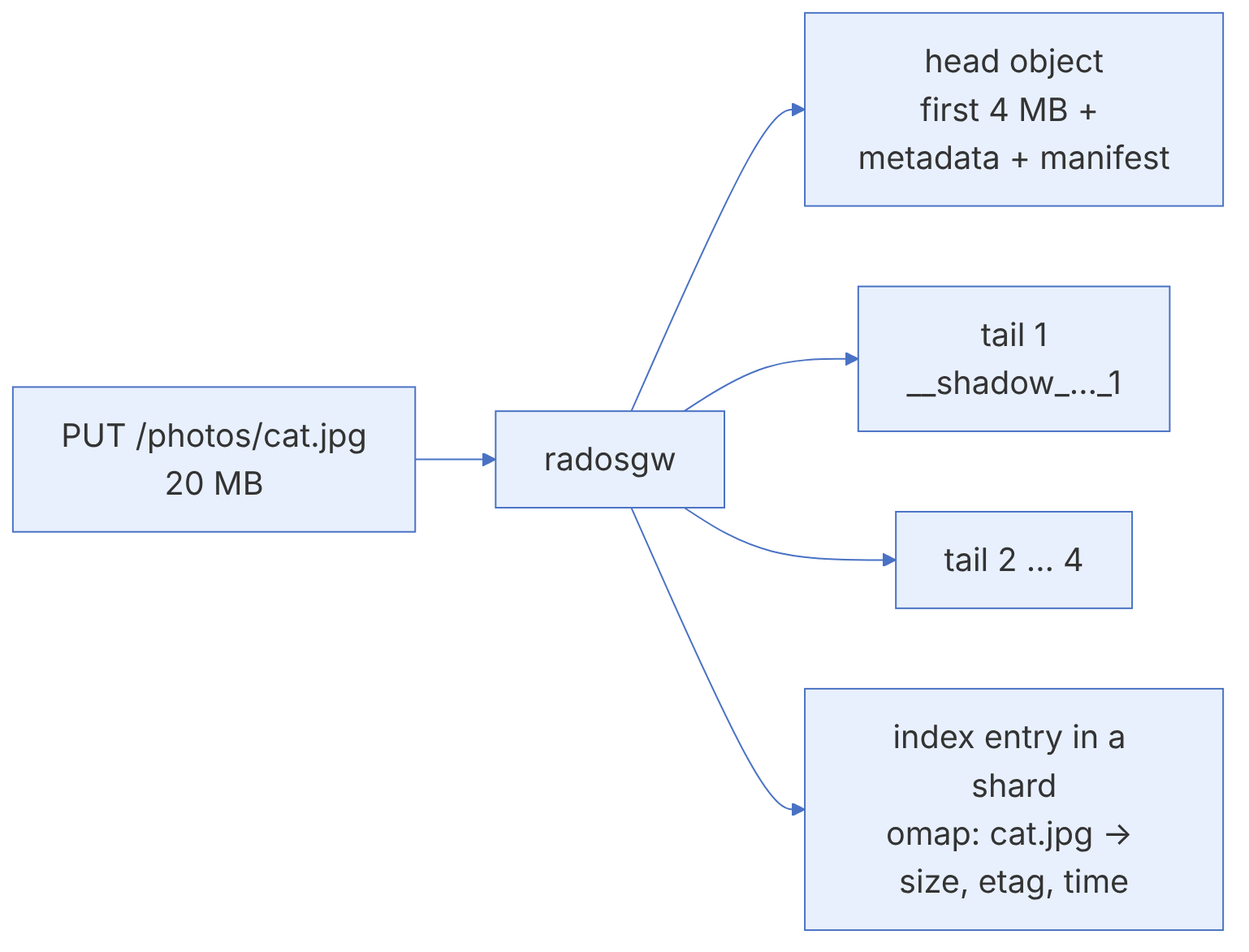
- head object: the first part of the data (by default up to 4 MB;
rgw_max_chunk_size) together with the object's metadata in xattrs and a manifest that lists the remaining pieces. - tail objects: the rest of the data in separate objects (names with the prefix
__shadow_, or__multipart_for multipart uploads). - index entry: a key in the omap of one of the bucket's index shards; used for listing (ListObjects).
Because each bucket's index lives in the omap of RADOS objects, a bucket with hundreds of millions of objects, if not sharded, creates a giant omap object that slows down scrubbing, recovery and even normal operations, and raises the LARGE_OMAP_OBJECTS warning. Dynamic resharding (the default since Luminous) automatically increases the number of shards when the number of objects per shard reaches the threshold rgw_max_objs_per_shard (default 100,000). In Tentacle most of the reshard processing happens before writes are locked, to reduce its effect on clients.
4-3 Deploying and configuring the RADOS Gateway#
4-3-1 Deploying with cephadm#
In the past RGW was installed by hand with packages and ceph-deploy on a separate node. With cephadm one command is enough:
ceph orch host label add ceph-node4 rgw
ceph orch host label add ceph-node3 rgw
ceph orch apply rgw objstore --placement="label:rgw count-per-host:1" --port=8080
ceph orch ls rgw
ceph orch ps --daemon-type rgw
curl http://ceph-node4:8080
An empty ListAllMyBucketsResult response for the anonymous user means RGW is up. For more control, use a YAML spec:
service_type: rgw
service_id: objstore
placement:
  label: rgw
  count_per_host: 2
networks:
  - 192.168.56.0/24
spec:
  rgw_frontend_port: 8080
  rgw_frontend_type: beast
4-3-2 A load balancer with the ingress service#
cephadm has an ingress service that deploys HAProxy and keepalived and puts a virtual IP in front of the RGW instances:
service_type: ingress
service_id: rgw.objstore
placement:
  hosts: [ceph-node3, ceph-node4]
spec:
  backend_service: rgw.objstore
  virtual_ip: 192.168.56.100/24
  frontend_port: 443
  monitor_port: 1967
ssl: trueceph orch apply -i ingress.yaml
ceph orch ls ingressIn recent releases (Tentacle and Umbrella) the certmgr subsystem in cephadm automatically generates and renews cephadm-signed certificates for such services, or accepts your certificate and raises a health warning for certificates that are about to expire.
In production, terminate TLS either at the load balancer or in Beast itself (with rgw_frontend_ssl_certificate). If you terminate it in HAProxy, make sure RGW reads the client's real address from the X-Forwarded-For header (rgw_remote_addr_param = http_x_forwarded_for); otherwise IP-based policies and the logs see the load balancer's address.
If an RGW instance does not come up after apply, look at ceph orch ps --daemon-type rgw and ceph health detail. The most common reason on small clusters is a TOO_MANY_PGS warning or a pool creation error because mon_max_pg_per_osd has been reached, since RGW creates several new pools. Another way to investigate is cephadm logs --name rgw.objstore.ceph-node4.xxxx on the host.
4-4 Users, keys and tenants#
4-4-1 Creating a radosgw user#
RGW users are independent of cephx users and are kept in the RGW metadata pool. The tool for managing them is radosgw-admin:
radosgw-admin user create --uid=alice --display-name="Alice" --email=alice@example.com
radosgw-admin user info --uid=alice
radosgw-admin user list
radosgw-admin key create --uid=alice --key-type=s3 --gen-access-key --gen-secret
radosgw-admin user suspend --uid=alice
radosgw-admin user enable --uid=alice
The output of user create contains an access_key and secret_key pair that the S3 client uses to sign requests (AWS Signature v4).
The output of radosgw-admin user info shows the secret key in plain text. Do not copy it into a ticket, a chat or a CI log. Use a secrets management system (for example Vault) to hand keys to teams, and rotate old keys periodically (key create and then key rm).
4-4-2 Quotas and rate limits#
radosgw-admin quota set --quota-scope=user --uid=alice --max-size=500G --max-objects=10000000
radosgw-admin quota enable --quota-scope=user --uid=alice
radosgw-admin quota set --quota-scope=bucket --uid=alice --max-objects=5000000
radosgw-admin quota enable --quota-scope=bucket --uid=alice
radosgw-admin ratelimit set --ratelimit-scope=user --uid=alice --max-read-ops=1000 --max-write-ops=200
radosgw-admin ratelimit enable --ratelimit-scope=user --uid=alice
Rate limiting was added in Quincy, and in Umbrella the rate-limit response also carries a Retry-After header, which well-behaved clients use to back off.
4-4-3 Subusers and Swift keys#
The Swift API uses the concept of a subuser: an identity under a user with a specific access level and a Swift-specific key.
radosgw-admin subuser create --uid=alice --subuser=alice:swift --access=full
radosgw-admin key create --subuser=alice:swift --key-type=swift --gen-secret
4-4-4 Tenants and accounts#
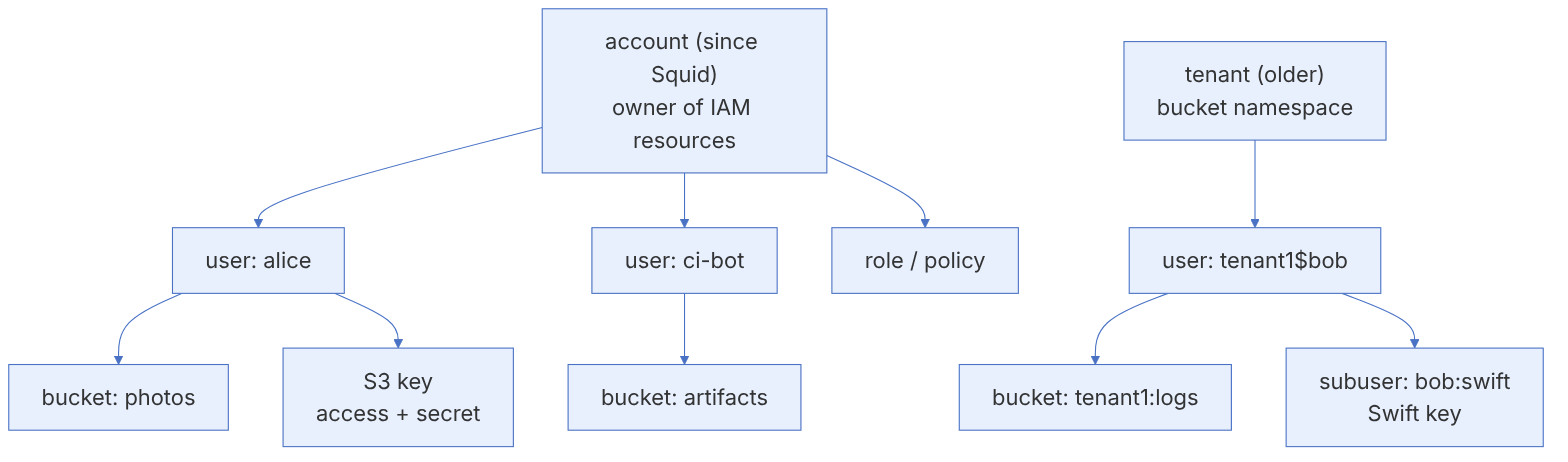
In RGW bucket names are unique across the whole cluster by default. A tenant creates a separate namespace so that two customers can have buckets with the same name:
radosgw-admin user create --tenant=acme --uid=bob --display-name="Bob at ACME"
# Full user name: acme$bob , and the buckets are in the acme namespace
Since Squid, the account adds a concept similar to an AWS account: an account owns users, groups, roles and policies, and its "root user" can manage users and keys through IAM-compatible APIs without the cluster administrator's involvement.
radosgw-admin account create --account-name=acme --email=ops@acme.example
radosgw-admin user create --uid=acme-root --display-name="ACME root" \
  --account-id=<account-id> --account-root --gen-secret --gen-access-key
radosgw-admin quota set --quota-scope=account --account-id=<account-id> --max-size=10T
radosgw-admin quota enable --quota-scope=account --account-id=<account-id>The Tentacle release notes announce that tenant-based IAM features (such as tenant-level CreateRole and PutUserPolicy, and STS Lite) are deprecated in favour of accounts and will not be removed before release V. The tenant itself remains for namespace separation. For a new multi-tenancy design, start with accounts.
4-5 Access with the S3-compatible API#
4-5-1 DNS and virtual-host access#
S3 has two addressing styles: path-style (https://s3.example.com/bucket/key) and virtual-hosted-style (https://bucket.s3.example.com/key). Many recent SDKs default to the second style. To support it:
- 1. Create a wildcard DNS record:
*.s3.example.compointing at the load balancer's virtual IP. - 2. Tell RGW what its domain name is:
ceph config set client.rgw rgw_dns_name s3.example.com
ceph orch restart rgw.objstore
In a multi-zonegroup deployment the host names go into the hostnames field of the zonegroup definition (chapter 5). The TLS certificate must also be a wildcard (*.s3.example.com).
4-5-2 s3cmd#
sudo dnf install -y s3cmd      # or pip install s3cmd
s3cmd --configure              # access key, secret key and endpoint
# or directly in ~/.s3cfg:
cat > ~/.s3cfg <<'C'
[default]
access_key = <ACCESS>
secret_key = <SECRET>
host_base = s3.example.com
host_bucket = %(bucket)s.s3.example.com
use_https = True
C
s3cmd mb s3://photos
s3cmd put cat.jpg s3://photos/
s3cmd ls s3://photos
s3cmd get s3://photos/cat.jpg /tmp/cat.jpg
s3cmd info s3://photos/cat.jpg
4-5-3 aws-cli and the SDKs#
aws configure --profile ceph                      # the keys
aws --profile ceph --endpoint-url https://s3.example.com s3 mb s3://backups
aws --profile ceph --endpoint-url https://s3.example.com s3 cp ./db.dump s3://backups/
aws --profile ceph --endpoint-url https://s3.example.com s3api list-objects-v2 --bucket backups
aws --profile ceph --endpoint-url https://s3.example.com s3 presign s3://backups/db.dump --expires-in 3600Some recent releases of the AWS SDKs send the new data integrity checksums (such as CRC32 in the x-amz-checksum-* headers) with every PUT by default. RGW's support for these features differs between releases; if you see signature errors or "InvalidArgument" after an SDK upgrade, check the release notes of your RGW version and, if necessary, set checksum sending back to "only when required" in the client configuration. The Umbrella notes also report a SigV4 regression in 19.2.6 and 20.2.4 that rejected presigned PUT uploads with an unsigned Content-Type, which has been fixed.
4-5-4 Multipart upload#
For large objects (usually above 100 MB) use multipart upload; aws-cli and s3cmd do this automatically. Incomplete uploads take up space and are not visible in the object listing. Add a lifecycle rule to clean them up (AbortIncompleteMultipartUpload), and check them now and then with radosgw-admin bucket list --bucket=<b> or aws s3api list-multipart-uploads.
4-6 Access with the Swift API#
pip install python-swiftclient
swift -A http://s3.example.com:8080/auth/1.0 -U alice:swift -K '<SWIFT_SECRET>' stat
swift -A http://s3.example.com:8080/auth/1.0 -U alice:swift -K '<SWIFT_SECRET>' post container01
swift -A http://s3.example.com:8080/auth/1.0 -U alice:swift -K '<SWIFT_SECRET>' upload container01 report.pdf
swift -A http://s3.example.com:8080/auth/1.0 -U alice:swift -K '<SWIFT_SECRET>' list container01
Buckets in S3 and containers in Swift are the same thing: a file uploaded with Swift is also visible through S3 (provided the user is the same).
4-7 Integrating with OpenStack Keystone#
In OpenStack clouds we usually want users to access object storage with the same Keystone identity, and RGW to be registered in the catalog as the object-store service.
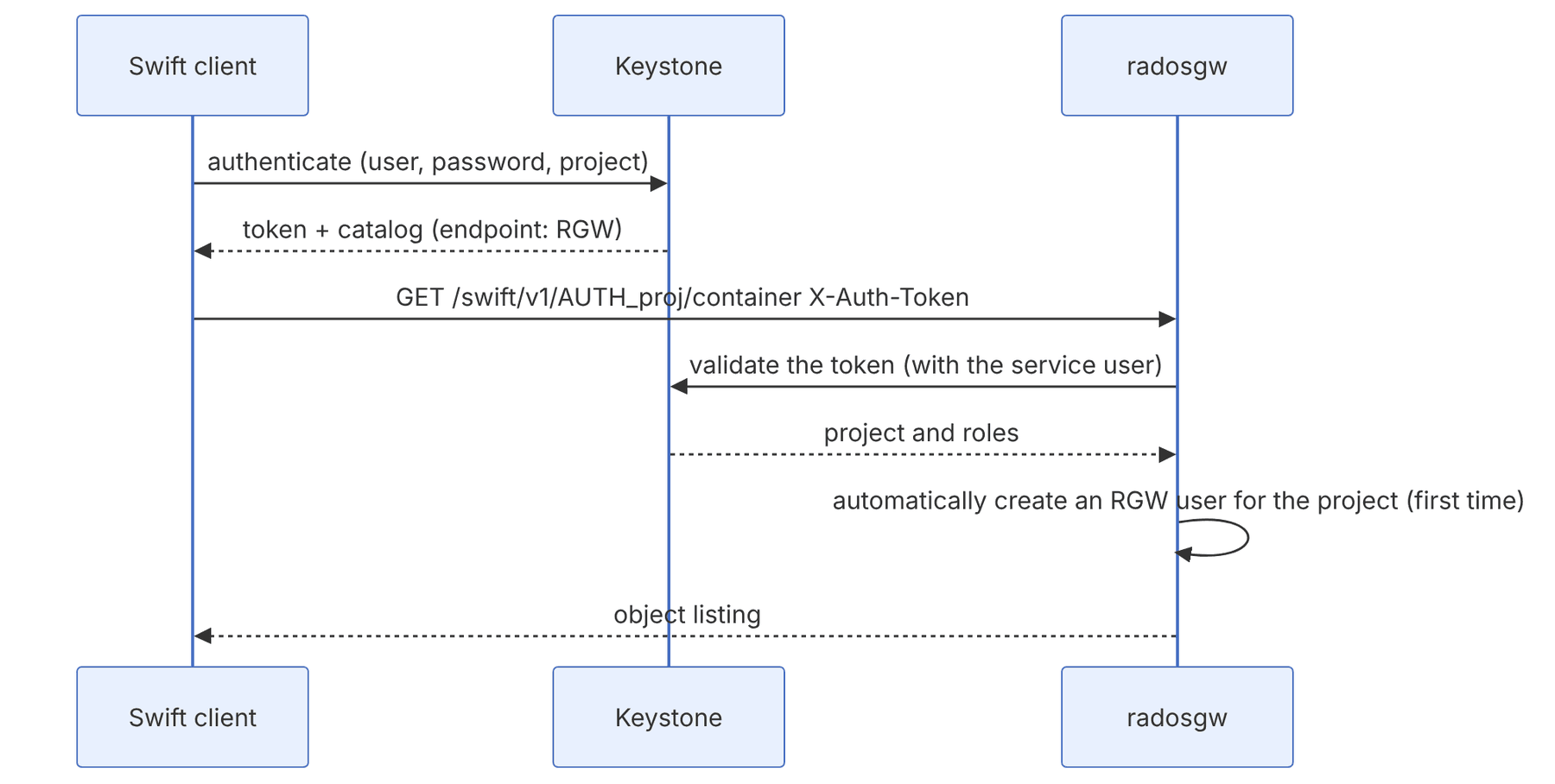
# In Keystone
openstack service create --name swift --description "Ceph RGW" object-store
openstack endpoint create --region RegionOne object-store public \
  "https://s3.example.com/swift/v1/AUTH_%(project_id)s"
# In Ceph
ceph config set client.rgw rgw_keystone_url https://keystone.example.com:5000
ceph config set client.rgw rgw_keystone_api_version 3
ceph config set client.rgw rgw_keystone_admin_user rgw
ceph config set client.rgw rgw_keystone_admin_password_path /etc/ceph/keystone.pass
ceph config set client.rgw rgw_keystone_admin_domain Default
ceph config set client.rgw rgw_keystone_admin_project service
ceph config set client.rgw rgw_keystone_accepted_roles "member,admin"
ceph config set client.rgw rgw_keystone_implicit_tenants true
ceph config set client.rgw rgw_swift_account_in_url true
ceph config set client.rgw rgw_s3_auth_use_keystone trueThe RGW documentation prefers the rgw_keystone_admin_password_path option to putting the password in plain text in the configuration. With cephadm you can make the file available to the container through extra_container_args/a mount or ceph config-key. rgw_s3_auth_use_keystone makes it possible to use EC2 credentials in Keystone (openstack ec2 credentials create) for S3. In Umbrella the old admin-token requirement for Keystone has been removed, and Keystone roles are injected into the IAM policy evaluation environment.
4-8 Integrating with Hadoop and Spark through S3A#
The Hadoop ecosystem connects to any S3-compatible service through the S3A connector. This means you can replace HDFS with RGW for cold or even primary storage and scale compute and storage separately.
<!-- core-site.xml -->
<property><name>fs.s3a.endpoint</name><value>https://s3.example.com</value></property>
<property><name>fs.s3a.path.style.access</name><value>true</value></property>
<property><name>fs.s3a.access.key</name><value>ACCESS</value></property>
<property><name>fs.s3a.secret.key</name><value>SECRET</value></property>
<property><name>fs.s3a.connection.ssl.enabled</name><value>true</value></property>
<property><name>fs.s3a.committer.name</name><value>magic</value></property>hadoop fs -mkdir s3a://analytics/raw
hadoop fs -put events.parquet s3a://analytics/raw/
spark-submit --conf spark.hadoop.fs.s3a.endpoint=https://s3.example.com job.pyWriting the output of Spark jobs to object storage has the "rename" challenge: Hadoop's traditional commit renames a temporary directory, which in S3 means copying and deleting every object. S3A committers (such as directory and magic) solve this with multipart uploads that are completed only at commit time. For heavy analytics workloads on RGW, always enable one of these committers. Hadoop's own documentation on compatibility prerequisites (for example multipart support and consistent listing) is a good guide; RGW has strong read-after-write consistency.
4-9 From the code: bucket index, manifest and the PUT path in RGW#
4-9-1 Two separate places for one S3 object#
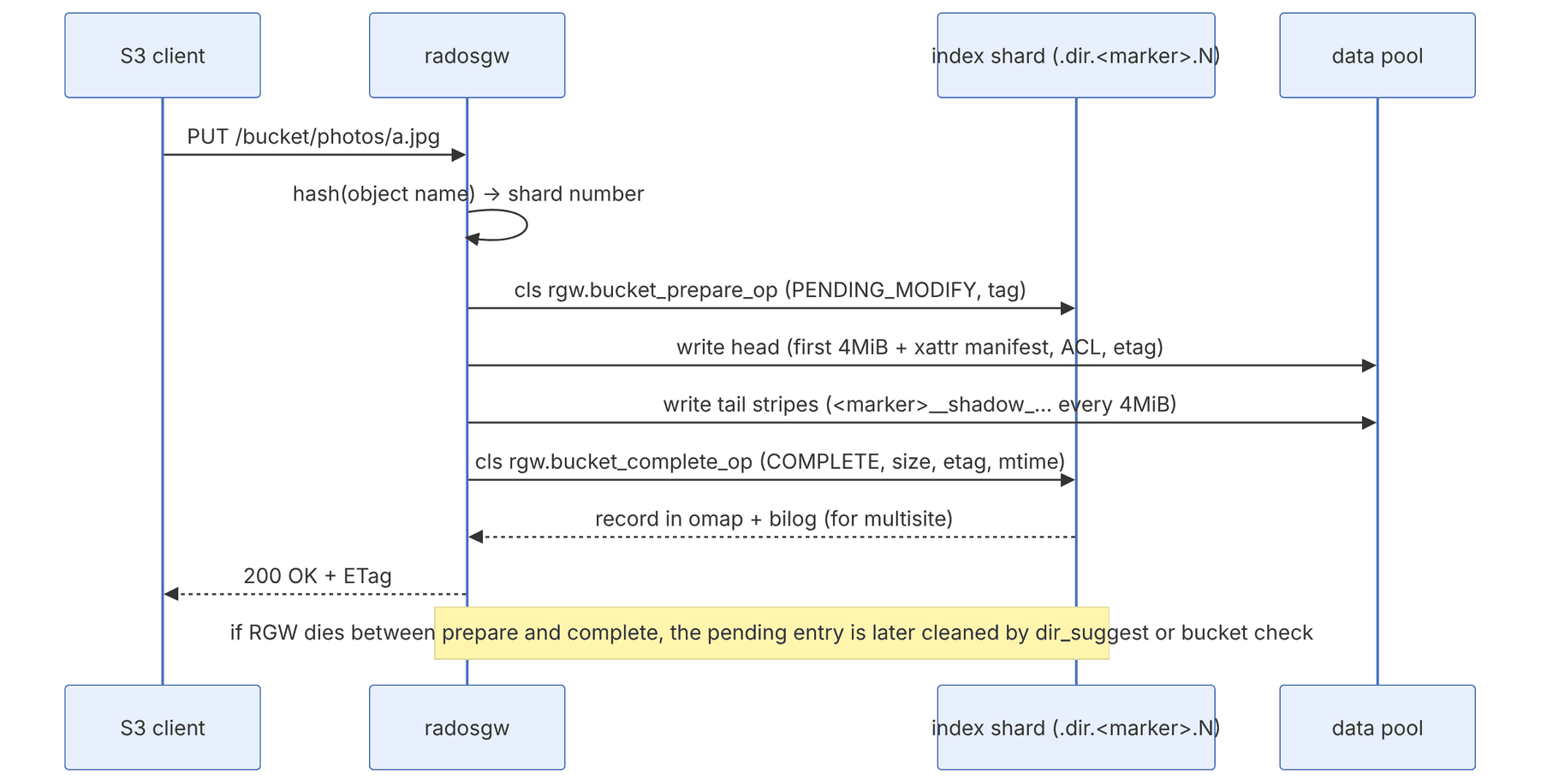
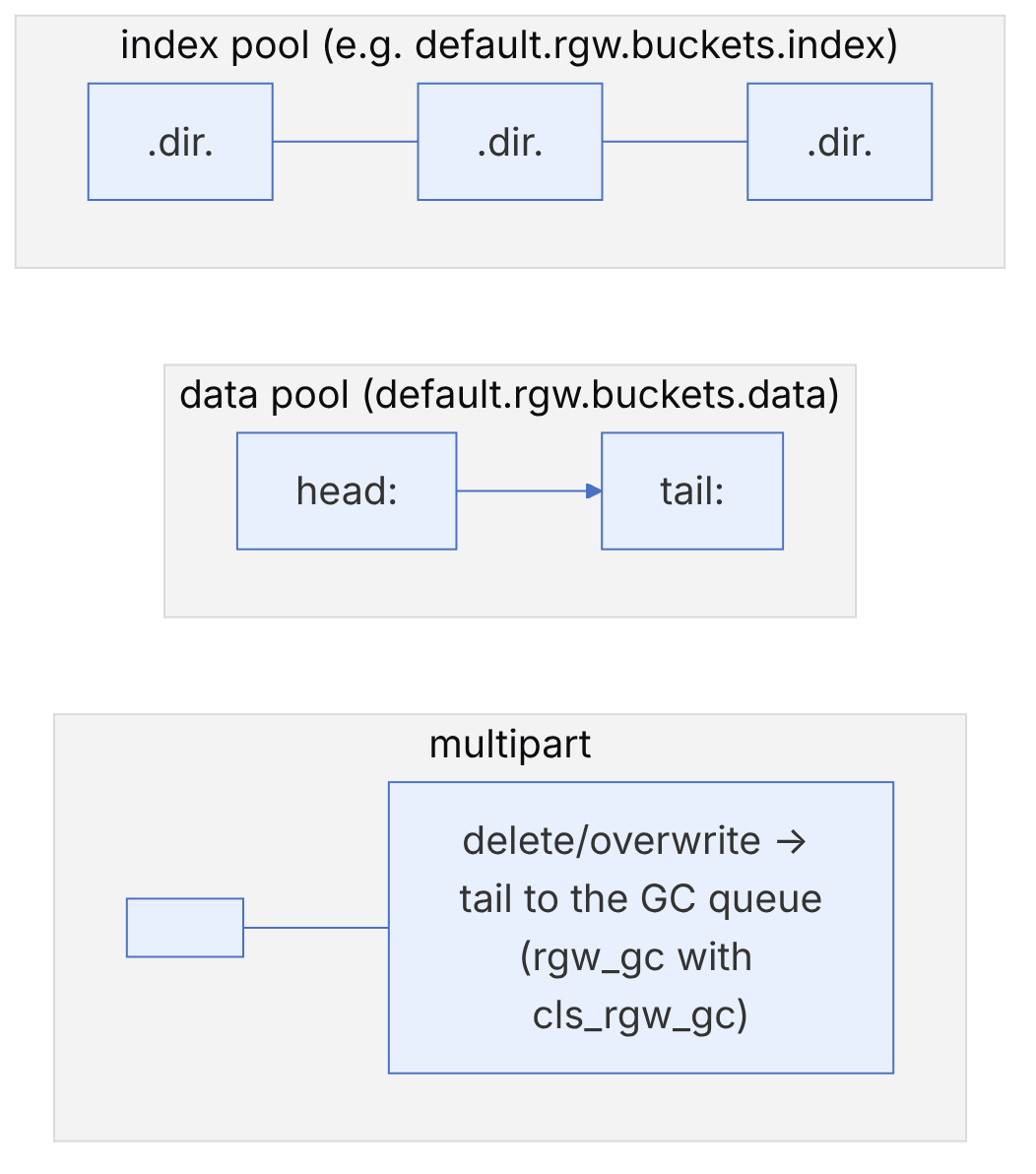
RGW records each S3 object in two independent places. One is the bucket index entry, which lives in the omap of the shard objects in the index pool and is used for List and bucket statistics. The other is the data itself, stored in the data pool as one head and zero or more tails. Keeping these two consistent, without a distributed transaction, is done with a lightweight two-phase protocol on the cls_rgw class.
| Constant/option | Value (main) | Source |
|---|---|---|
| Index shard object prefix | .dir. | rgw/services/svc_bi_rados.cc |
| Default shard count for a new bucket | 11 | default_bucket_index_max_shards in rgw_zone_types.h |
| rgw_override_bucket_index_max_shards | 0 (meaning the zonegroup value) | rgw.yaml.in |
| rgw_dynamic_resharding | true | rgw.yaml.in |
| rgw_max_objs_per_shard | 100000 | Dynamic resharding threshold |
| rgw_safe_max_objects_per_shard | 102400 | Warning threshold of bucket limit check |
| rgw_max_chunk_size | 4_M | Maximum data in the head |
| rgw_obj_stripe_size | 4_M | Size of each tail stripe |
| rgw_bucket_index_max_aio | 128 | Parallelism of operations on shards |
Index entry states in cls_rgw_types.h: CLS_RGW_STATE_PENDING_MODIFY = 0, CLS_RGW_STATE_COMPLETE = 1, CLS_RGW_STATE_UNKNOWN = 2.
pseudocode: put_obj (this book's summary of rgw_rados.cc and cls_rgw.cc)
  shard = hash(key) % num_shards
  tag   = unique_op_tag()
  cls_call(index[shard], "rgw.bucket_prepare_op", {key, tag, op=ADD})
  write head  oid="<marker>_<key>"   data[0:4MiB], xattrs{manifest, acl, etag}
  for i, chunk in stripes(data[4MiB:], 4MiB):
      write tail oid="<marker>__shadow_<prefix>_<i>"
  cls_call(index[shard], "rgw.bucket_complete_op", {key, tag, size, etag, mtime})
      # inside the OSD: COMPLETE entry + update of the stats header + bilog entry
if old version existed: enqueue old tail to GCWhy very large buckets get slow: an alphabetically ordered List must read from all shards and merge the results; its cost grows with the number of shards. On the other hand, an oversized shard (millions of omap keys) causes slow compaction in RocksDB, long scrubs and the LARGE_OMAP_OBJECTS warning. Dynamic resharding balances these two automatically, but in multisite it only works when the zone feature named resharding is enabled in the zonegroup (its constant is defined in rgw/rgw_zone_features.h; to check: radosgw-admin zonegroup get | jq .enabled_features).
Inspection commands:
radosgw-admin bucket stats --bucket=photos | jq '.num_shards, .usage'
radosgw-admin bucket limit check | jq '.[].buckets[] | select(.fill_status!="OK")'
radosgw-admin reshard list ; radosgw-admin reshard status --bucket=photos
radosgw-admin object stat --bucket=photos --object=a.jpg | jq '.manifest'
radosgw-admin bucket check --bucket=photos --check-objects   # without --fix it only reports
radosgw-admin gc list --include-all | jq length
ceph health detail | grep -A3 LARGE_OMAPRGW PUT and multipart
Give a key and a size and follow an S3 PUT through radosgw to the bucket index and the data pool, with the RADOS objects it creates.
- PUT The client sends PUT /bucket/photos/2026/11/img_0001.jpg with 10 MiB of data; RGWPutObj::execute starts.
RGWPutObj::execute (rgw_op.cc) - authenticate The AWS signature is checked (v4 here) and the user's permissions on the bucket are evaluated.
rgw::auth::s3::AWSAuthStrategy, AWSv4ComplSingle (rgw_auth_s3.cc) - tail stripes As the body streams in, the processor writes 2 tail object(s) of 4 MiB to the data pool.
AtomicObjectProcessor::process, RadosWriter::process - index prepare rgw_bucket_prepare_op marks a pending entry for photos/2026/11/img_0001.jpg on shard 5 of 11, so a crash now leaves a trace that can be cleaned up.
RGWRados::Bucket::UpdateIndex::prepare, cls_rgw rgw_bucket_prepare_op - head write The head object is written in one write_full with the first 4 MiB, the manifest and the attributes (ETag, ACL, content type).
RGWRados::Object::Write::_do_write_meta (write_full + xattrs) - index complete rgw_bucket_complete_op turns the pending entry into a listed object on shard 5 and appends to the bucket index log for sync.
UpdateIndex::complete, rgw_bucket_complete_op (+ bilog) - 200 OK radosgw answers 200 with the ETag; the object is now visible in listings.
RGWPutObj_ObjStore_S3::send_response (rgw_rest_s3.cc)
RADOS objects of this upload
- MARKER_photos/2026/11/img_0001.jpg4 MiB + xattrs
- MARKER__shadow_.RAND32_14 MiB
- MARKER__shadow_.RAND32_22 MiB
Default sizes: the head holds up to 4 MiB (rgw_max_chunk_size), stripes are 4 MiB (rgw_obj_stripe_size), a part is at least 5 MiB (rgw_multipart_min_part_size).
Follows:
src/rgw/rgw_op.cc :: RGWPutObj::execute, RGWCompleteMultipart::executethe PUT and complete-multipart operationssrc/rgw/driver/rados/rgw_putobj_processor.cc :: AtomicObjectProcessor, MultipartObjectProcessorwriting the head, stripes and partssrc/rgw/driver/rados/rgw_rados.cc :: Object::Write::_do_write_meta, Bucket::UpdateIndex::prepare / completewriting the head and updating the indexsrc/cls/rgw/cls_rgw.cc :: rgw_bucket_prepare_op, rgw_bucket_complete_opthe two index operations on the OSDsrc/rgw/services/svc_bi_rados.h :: bucket_shard_index; src/common/ceph_hash.cc :: ceph_str_hash_linuxwhich bucket index shard a key goes tosrc/rgw/driver/rados/rgw_obj_manifest.cc :: RGWObjManifest (head, stripes, rgw_obj_stripe_size 4M)how the object is laid out in RADOS
4-10 RGW by the numbers: index shards, reshard, listing and the manifest#
The four algorithms in this section decide in which index object an S3 object is recorded, when and into how many shards a bucket is split, how much data an ordered bucket listing reads from the OSDs, and in which RADOS objects, with which names, the object's own bytes are stored. All references are to main in November 2026, and the numbers were computed with Python re-implementations of the same functions. The shard-reduction logic of dynamic reshard and the details of some factors were added or changed in recent releases. Check the code of your own release before relying on them.
4-10-1 Choosing the index shard#
Source in code: src/rgw/services/svc_bi_rados.h :: RGWSI_BucketIndex_RADOS::bucket_shard_index; src/rgw/driver/rados/rgw_tools.h :: rgw_shards_mod; src/common/ceph_hash.cc :: ceph_str_hash_linux
Complexity: O(key length)
pseudocode
key = object name   (for multipart parts: the key of the final object, so that all parts are in one shard)
sid  = ceph_str_hash_linux(key)                         # hash = (hash + (c<<4) + (c>>4)) × 11 for each byte
sid2 = sid XOR ((sid AND 0xFF) << 24)                    # moves the low-order bits to the top
shard = n ≤ 7877 ? sid2 mod 7877 mod n : sid2 mod 65521 mod n
index oid = ".dir." + bucket_marker + "." + shard   (with a layout generation, ".dir.<marker>.<gen>.<shard>")
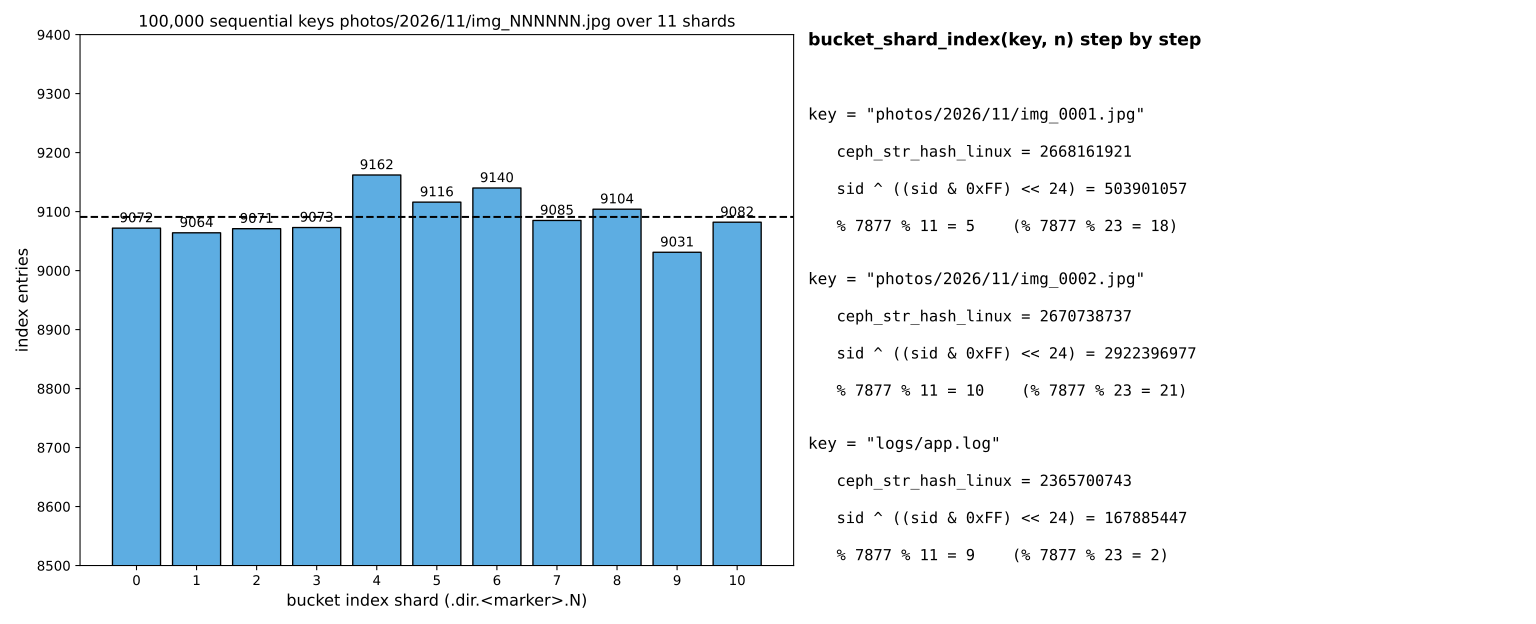
Numeric example. For the key photos/2026/11/img_0001.jpg, ceph_str_hash_linux is 2668161921. Its low byte is 0x81, and after XOR with 0x81000000 we get 503901057. 503901057 mod 7877 mod 11 = 5, so with 11 shards (the zonegroup default for a new bucket) the entry lands in .dir.<marker>.5. The next key, img_0002.jpg, goes to shard 10 and logs/app.log to shard 9. If the bucket moves to 23 shards, these same three keys move to shards 18, 21 and 2. That is why a reshard must rewrite every entry. For 100000 consecutive keys with the pattern img_NNNNNN.jpg, the smallest shard got 9031 entries and the largest 9162, that is ±1 percent around the mean of 9091. This hash is weak, but it spreads ordinary names well.
4-10-2 Dynamic reshard: when, and to how many shards?#
Source in code: src/rgw/driver/rados/rgw_reshard.cc :: RGWBucketReshard::calculate_preferred_shards, nearest_prime
Complexity: O(log P) to search the list of 304 primes up to 1999
pseudocode
max_objs = rgw_max_objs_per_shard (100000) ; max_dyn = rgw_max_dynamic_shards (1999) ; min_dyn = 11
min_objs = min(10000, ceil(max_objs / 100))           # reduction threshold: 1000
if cur < max_dyn and objs > cur × max_objs: increase
elif cur > min_dyn and objs < cur × min_objs: reduce   (if rgw_dynamic_resharding_may_reduce, with a delay)
else: do nothing
m = multisite ? 8 : 2
new = clamp(objs × m / max_objs, min_dyn, max_dyn) ; new = the smallest prime ≥ new in the list
new = min(max_dyn, max(new, min_dyn, min_layout_shards))
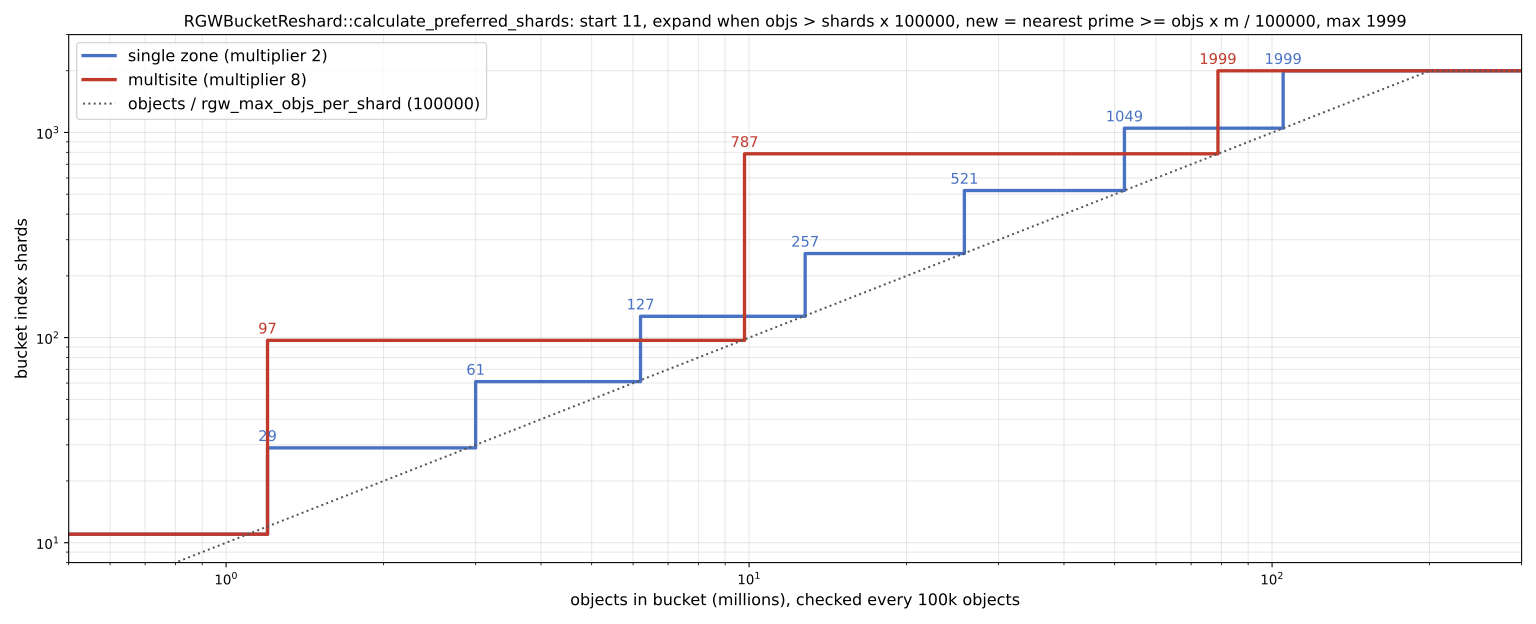
Numeric example. A bucket starts with 11 shards. Suppose it is checked once every 100000 objects. At 1.2 million objects the condition 1200000 > 11 × 100000 holds. new = 1200000 × 2 / 100000 = 24, and the nearest prime greater than or equal to it is 29. The growth path in one zone is: 11 → 29 (1.2 million) → 61 (3 million) → 127 (6.2 million) → 257 (12.8 million) → 521 (25.8 million) → 1049 (52.2 million) → 1999 (105 million). In multisite, with a factor of 8, only three reshards are needed: 11 → 97 → 787 → 1999. The purpose of the larger factor is to reduce the number of reshards, because each reshard in multisite creates a new bilog generation that sync has to pass through. Reduction is also possible. If a bucket with 101 shards drops to 90000 objects, 90000 < 101 × 1000, and 11 shards are proposed. The default of rgw_dynamic_resharding_reduction_wait in main is 120 hours, so that a bucket that is temporarily empty is not shrunk immediately.
4-10-3 Ordered listing: how many entries from each shard?#
Source in code: src/rgw/driver/rados/rgw_rados.cc :: RGWRados::calc_ordered_bucket_list_per_shard, cls_bucket_list_ordered
Complexity: Each page O(s × k) entries from s shards and an O(n log s) merge
pseudocode
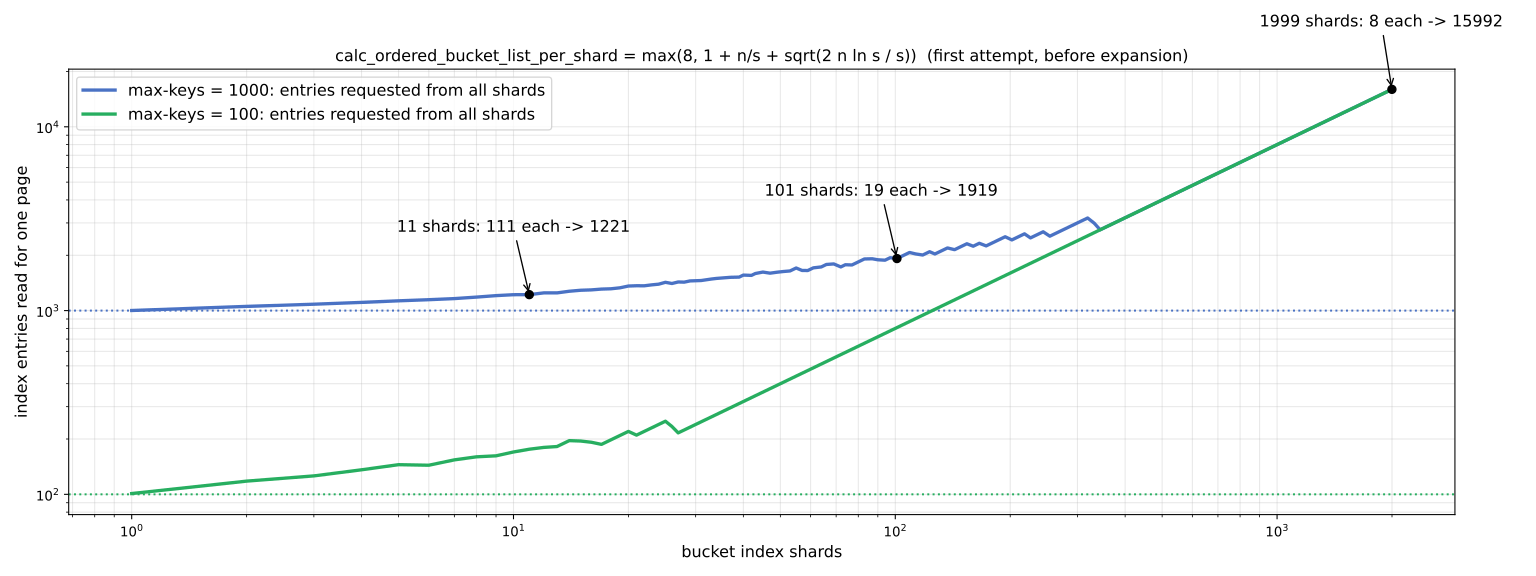
per_shard(n, s) = max(8, 1 + ⌊n / s⌋ + sqrt(2 n ln s / s))     # the Raab and Steger "balls into bins" analysis
k = per_shard(max_keys, shards)
read up to k entries after the marker from each shard (in parallel)
ordered merge ; if one shard ran out early and n entries were not reached: retry with k × 2^(expansion − 1) (at most 1024 times)
Numeric example. The default S3 page is a thousand keys (max-keys = 1000). With 11 shards: ⌊1000 / 11⌋ = 90 and sqrt(2000 × ln 11 / 11) ≈ 20.9, so k = 111 and the total number of entries read is 1221, that is 22 percent extra. With 101 shards: k = 1 + 9 + 9.6 ≈ 19 and the total is 1919. With 1999 shards, ⌊1000 / 1999⌋ = 0 and the root is about 2.8, but the minimum of 8 applies and a total of 15992 entries, 16 times what is needed, is read from 1999 index objects. Each shard is also a separate cls call. So a bucket with 1999 shards sends 1999 cls operations to the OSDs for every 1000-key page. If the application only needs an unordered listing (for example cleanup or backup), allow-unordered=true in the API or --allow-unordered in radosgw-admin removes this cost.
4-10-4 RADOS object names: head, tail and multipart#
Source in code: src/rgw/rgw_obj_manifest.cc :: RGWObjManifest::get_implicit_location; src/rgw/driver/rados/rgw_putobj_processor.cc :: AtomicObjectProcessor::prepare; src/rgw/driver/rados/rgw_obj_manifest.cc :: RGWObjManifest::generator::create_begin
Complexity: O(size / stripe) objects per PUT
pseudocode
head_max = rgw_max_chunk_size (4 MiB)   # if the placement has inline data and the tail is in the same pool, otherwise 0
stripe   = rgw_obj_stripe_size (4 MiB, aligned with the pool alignment)
prefix   = "." + rand_alnum(32) + "_"    (normal PUT) ; name + "." + upload_id   (multipart)
location(part, stripe_no, ofs):
    part == 0 and ofs < head_max: head object = "<marker>_<name>"
    part == 0:                     ns shadow    "<marker>__shadow_" + prefix + stripe_no
    part > 0 and stripe_no == 0:   ns multipart "<marker>__multipart_" + prefix + "." + part
    part > 0:                      ns shadow    "<marker>__shadow_" + prefix + "." + part + "_" + stripe_no
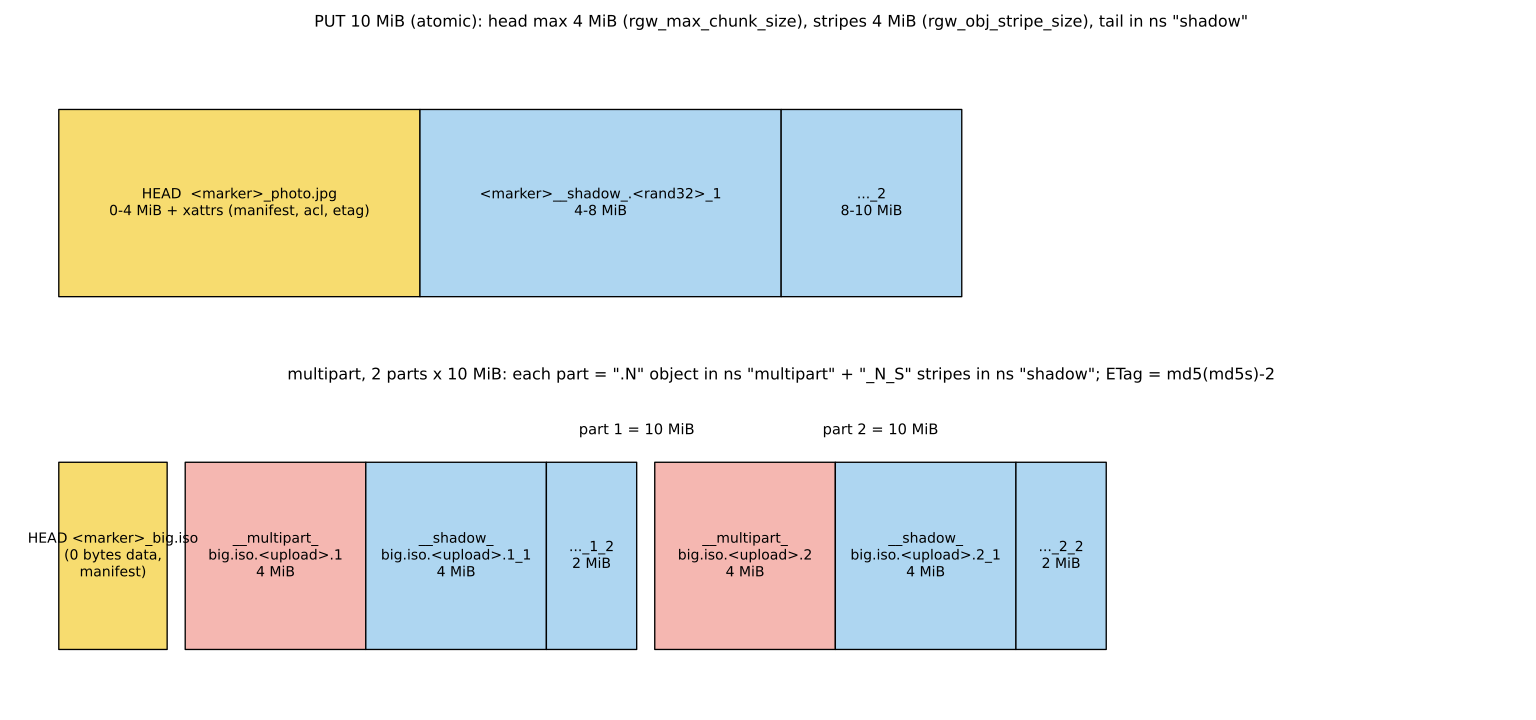
Numeric example. A PUT of a 10 MiB file named photo.jpg in the default pool creates three RADOS objects. The head, named <marker>_photo.jpg, holds the first four megabytes of data along with the manifest, ACL and ETag xattrs. Two tail objects named <marker>__shadow_.<rand32>_1 (4 MiB) and ..._2 (2 MiB) hold the rest. A multipart upload with two 10 MB parts for big.iso creates these: a head with no data and the manifest, and for each part an object __multipart_big.iso.<upload>.N with the first 4 MiB of that part and two stripes in the shadow ns named big.iso.<upload>.N_1 and .N_2. In total one 20 MB S3 object is seven RADOS objects. The ETag of such an object is the md5 of the concatenated binary md5s of the parts with the suffix "-2", not the md5 of the whole file. Deleting the object immediately removes only the head. The tails go to the GC queue (radosgw-admin gc list) and are removed after rgw_gc_obj_min_wait. That is why pool space is not freed immediately after a mass deletion.
4-11 Advanced S3 features in RGW#
4-11-1 Versioning and object lock#
With versioning enabled on a bucket, every overwrite or deletion creates a new version, and earlier versions can be recovered. Object lock goes one step further: it makes versions undeletable and unchangeable for a set period (WORM); a key feature for protecting backups against ransomware and for legal data retention requirements.
EP="--endpoint-url https://s3.example.com --profile ceph"
aws $EP s3api create-bucket --bucket vault --object-lock-enabled-for-bucket
aws $EP s3api put-object-lock-configuration --bucket vault \
  --object-lock-configuration '{"ObjectLockEnabled":"Enabled","Rule":{"DefaultRetention":{"Mode":"COMPLIANCE","Days":30}}}'
aws $EP s3 cp backup-2026-11-15.tar s3://vault/
aws $EP s3api list-object-versions --bucket vault
aws $EP s3api get-object-retention --bucket vault --key backup-2026-11-15.tar| Mode | Behaviour | Who can delete earlier? |
|---|---|---|
| GOVERNANCE | The version is locked until the period ends | A user with the s3:BypassGovernanceRetention permission |
| COMPLIANCE | The version is locked until the period ends | No S3 user, not even the owner |
| Legal Hold | A lock with no end date | Until it is removed |
Object lock in COMPLIANCE mode is final from the S3 API's point of view, but a cluster administrator with radosgw-admin or RADOS access can still technically delete the data. Real protection against an attacker who has reached the cluster administrator's credentials requires separation of access, monitoring and an off-site copy. Also, a bucket created with object lock cannot later be made without it; choose the default period carefully.
4-11-2 Lifecycle, storage classes and placement#
The placement target determines in which pools a bucket's data and index live. Each placement can have several storage classes, each pointing to a different data pool. Lifecycle rules move objects to another class or delete them after a while.
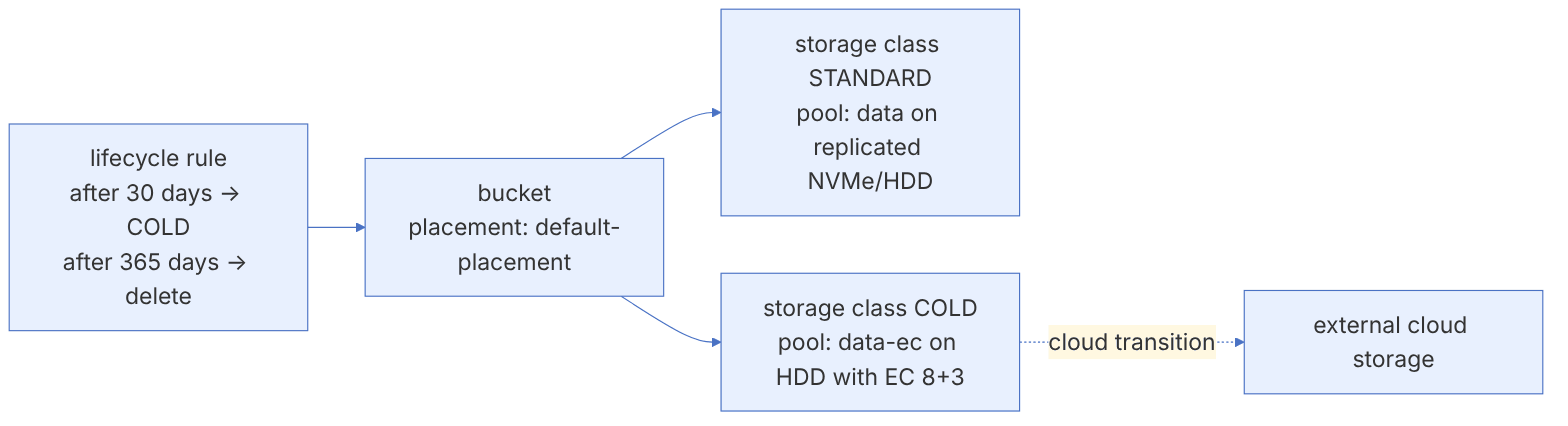
# Define the COLD class in the default zonegroup and zone
radosgw-admin zonegroup placement add --rgw-zonegroup default \
  --placement-id default-placement --storage-class COLD
radosgw-admin zone placement add --rgw-zone default \
  --placement-id default-placement --storage-class COLD \
  --data-pool default.rgw.cold.data --compression lz4
radosgw-admin period update --commit # only if a realm is defined{"Rules":[{"ID":"tiering","Status":"Enabled","Filter":{"Prefix":"logs/"},
"Transitions":[{"Days":30,"StorageClass":"COLD"}],
"Expiration":{"Days":365},
"AbortIncompleteMultipartUpload":{"DaysAfterInitiation":7}}]}aws $EP s3api put-bucket-lifecycle-configuration --bucket logs-bucket --lifecycle-configuration file://lc.json
radosgw-admin lc list
radosgw-admin lc process --bucket logs-bucket # run by hand for testingIn the lab, to see the effect of lifecycle without waiting several days, set rgw_lc_debug_interval to, for example, 60 so that each lifecycle "day" counts as sixty seconds. Never leave this option on in production.
In recent releases lifecycle can also move objects to S3-compatible cloud storage (cloud transition), and in Umbrella restoring from Glacier or tape (cloud restore) has become more complete with management tools and event notifications.
4-11-3 Bucket policy and IAM#
RGW supports the AWS policy language. The example below allows the user ci-bot to write only under the artifacts/ prefix:
{"Version":"2012-10-17","Statement":[{
  "Effect":"Allow",
  "Principal":{"AWS":["arn:aws:iam:::user/ci-bot"]},
  "Action":["s3:PutObject","s3:GetObject"],
"Resource":["arn:aws:s3:::builds/artifacts/*"]}]}aws $EP s3api put-bucket-policy --bucket builds --policy file://policy.jsonWith accounts (since Squid), the same policies can also be attached to users and groups with the IAM APIs, and STS can be used for temporary credentials and AssumeRoleWithWebIdentity (OIDC).
4-11-4 Server-side encryption#
RGW supports SSE-C (key from the client), SSE-KMS (key from Vault, KMIP or Barbican) and SSE-S3. Umbrella added AES-256-GCM encryption, and CopyObject also works for encrypted objects.
SSE-C and SSE-KMS are only allowed over an HTTPS connection. If you terminate TLS at the load balancer, tell RGW that requests arrived securely (rgw_trust_forwarded_https = true), and turn this on only when you are sure the load balancer always sets or strips this header itself.
4-11-5 Event notification and bucket logging#
RGW can send events such as object creation or deletion to Kafka, AMQP (RabbitMQ) or HTTP; a basis for event-driven processing (for example generating a thumbnail after a photo upload):
aws $EP sns create-topic --name uploads \
  --attributes '{"push-endpoint":"kafka://kafka.example.com:9092","persistent":"true"}'
aws $EP s3api put-bucket-notification-configuration --bucket photos \
  --notification-configuration '{"TopicConfigurations":[{"Id":"n1","TopicArn":"arn:aws:sns:default::uploads","Events":["s3:ObjectCreated:*"]}]}'
Bucket logging (recording each bucket's requests in another bucket) was added in Tentacle according to the documentation, and in Umbrella it gained a journal mode, support for EC pools and management commands.
4-12 Day-to-day RGW operations#
4-12-1 Frequently used commands#
radosgw-admin bucket list
radosgw-admin bucket stats --bucket=photos
radosgw-admin bucket limit check            # shards near the threshold
radosgw-admin reshard list
radosgw-admin reshard add --bucket=photos --num-shards=101
radosgw-admin gc list --include-all | head
radosgw-admin gc process
radosgw-admin usage show --uid=alice --start-date=2026-11-01
radosgw-admin bucket check --bucket=photos --check-objects --fixDeleting an object in RGW does not free space immediately. The head object is removed, but the tail objects are handed to the garbage collector and removed after rgw_gc_obj_min_wait (default two hours). If you did a mass deletion and ceph df did not change, look at the gc queue. On busy clusters you may need to tune the rgw_gc_max_concurrent_io and rgw_gc_processor_period parameters.
4-12-2 Troubleshooting#
Symptoms and how to investigate:
The SignatureDoesNotMatch error: a clock difference of more than 15 minutes between client and server, or a load balancer that changes the Host header, or path-style versus virtual-host confusion.
The NoSuchBucket error even though the bucket exists: the client uses virtual-host, but rgw_dns_name or the zonegroup hostnames are not set, so RGW cannot tell the bucket name from Host.
Very slow listing: the index on HDD, a bucket without enough shards, or millions of deleted versions in a versioned bucket.
The LARGE_OMAP_OBJECTS warning: large index shards; find the guilty bucket with radosgw-admin bucket limit check.
To see the details of a request, temporarily raise debug_rgw: ceph config set client.rgw debug_rgw 20, and put it back after reproducing the problem.
4-13 Supplementary and up to date#
- ingress and certmgr in cephadm: the load balancer and certificates are now part of the orchestrator.
- Accounts and IAM (Squid onwards): self-service management of users, groups, roles and policies; Umbrella added GetAccountSummary, account-level PublicAccessBlock, account quota management APIs and S3 Object Ownership (disabling ACLs).
- S3 GetObjectAttributes was added in Tentacle, and for AWS compatibility the LastModified time is rounded to the second.
- Full object dedup arrived in Umbrella as a technical preview.
- The Redis-based D4N cache is under development.
- Lua scripting: RGW allows Lua scripts to run at various stages of request processing (for example for custom logging or changing behaviour); Umbrella added the new
postAuthhook.
4-14 Summary and review#
4-14-1 Chapter summary#
- RGW is a stateless HTTP server that implements S3 and Swift on RADOS; with cephadm and the ingress service it scales horizontally with ease.
- Each S3 object has a head object, a number of tails and an entry in the bucket index; the index must be on SSD and replicated.
- Users, subusers, tenants and accounts are different levels of identity and multi-tenancy; consider accounts for a new design.
- Virtual-host access requires wildcard DNS,
rgw_dns_nameand a wildcard certificate. - Keystone and S3A connect RGW to OpenStack and the data ecosystem.
- Versioning, object lock, lifecycle, storage classes, policies, SSE and event notification have turned RGW into a complete S3 service.
4-14-2 Common mistakes#
- The index pool on HDD or EC.
- Running a single RGW instance without a load balancer.
- Forgetting lifecycle for incomplete multipart uploads.
- Expecting space to be freed immediately after deletion (not knowing about gc).
- Creating a bucket with object lock in COMPLIANCE mode with a long period for testing.
- Clock differences between clients and RGW.
4-14-3 Hands-on exercise#
- 1. Deploy RGW with two instances and an ingress service, and show that the service does not stop when you stop one instance.
- 2. Create a user with a 1 GB quota and observe RGW's behaviour when the quota is exceeded.
- 3. Create a bucket with versioning, overwrite a file three times and then delete it, and use
list-object-versionsto see all the versions and the delete marker. Restore the second version. - 4. Create a cold storage class on an EC pool and watch objects being transitioned in the lab with lifecycle and
rgw_lc_debug_interval. - 5. Write 100,000 small objects to one bucket (for example with
s3-benchmarkor a parallel script) and observe dynamic resharding withbucket limit checkandreshard list.
4-14-4 Review questions#
- 1. Why do we call RGW "stateless", and what effect does this have on high-availability design?
- 2. Which objects does a 20 MB S3 object become in RADOS?
- 3. Why should the index pool not be EC or on HDD?
- 4. What problem does dynamic resharding solve, and what is its default threshold?
- 5. What is the difference between a tenant and an account?
- 6. Which configuration is needed for virtual-hosted-style access?
- 7. How do the GOVERNANCE and COMPLIANCE modes of object lock differ?
- 8. Why is cluster space not freed immediately after a mass deletion of objects?
- 9. What does the
rgw_s3_auth_use_keystoneoption make possible? - 10. Why do S3A committers matter for Spark on RGW?
Answers to these questions are in Appendix E: Answers to Review Questions. Answers to this chapter's questions →
4-14-5 Sources for this chapter#
- Ceph documentation — Ceph Object Gateway
https://docs.ceph.com/en/latest/radosgw/ - cephadm documentation — The RGW and ingress services
https://docs.ceph.com/en/latest/cephadm/services/rgw/ - Ceph documentation — Managing RGW with radosgw-admin
https://docs.ceph.com/en/latest/radosgw/admin/ - Ceph documentation — User Accounts
https://docs.ceph.com/en/latest/radosgw/account/ - Ceph documentation — Keystone integration
https://docs.ceph.com/en/latest/radosgw/keystone/ - Ceph documentation — Placement and storage classes
https://docs.ceph.com/en/latest/radosgw/placement/ - Ceph documentation — Dynamic resharding
https://docs.ceph.com/en/latest/radosgw/dynamicresharding/ - Ceph documentation — Bucket event notification
https://docs.ceph.com/en/latest/radosgw/notifications/ - Ceph documentation — Server-side encryption
https://docs.ceph.com/en/latest/radosgw/encryption/ - Ceph documentation — S3 API compatibility
https://docs.ceph.com/en/latest/radosgw/s3/ - Apache Hadoop documentation — The S3A connector
https://hadoop.apache.org/docs/stable/hadoop-aws/tools/hadoop-aws/index.html - AWS documentation — S3 Object Lock
https://docs.aws.amazon.com/AmazonS3/latest/userguide/object-lock.html