Multi-Site Object Storage with RGW Multi-Site
TL;DR this chapter in a few lines
- A realm is the global namespace, a zonegroup is the unit of data replication, a zone is one cluster, and a period is a committed configuration version.
- Metadata flows from the master zone; object data is replicated asynchronously and active-active between the zones of a zonegroup.
- Set it up by hand with
radosgw-adminor withceph rgw realm bootstrap; watch it withsync status,bucket sync statusandsync error list. - Failover means promoting another zone to master and committing the period; do not promote in a hurry during a short network outage.
5-1 Before you start#
5-1-1 What questions does this chapter answer?#
A Ceph cluster, however large, sits in one data centre. For disaster recovery, for bringing data closer to users in different regions, or for migrating between data centres, we need to replicate object data between several independent clusters. RGW Multi-Site is Ceph's answer to this need. In this chapter we look at:
- What are the realm, zonegroup, zone and period, and how do they together build a global namespace?
- How does today's multisite (version 2, since Jewel) differ from the old federated configuration of Hammer?
- What are the network, time and capacity prerequisites for a multi-site deployment?
- How do we configure two zones, both by hand with
radosgw-adminand with the automatedceph rgwmodule? - How do we read the sync status, find problems and move the master during a disaster?
- How do sync policy, the archive zone and resharding work in multisite?
5-1-2 Prerequisites#
Two Ceph clusters (for a lab, two single-node clusters are enough) whose RGWs can reach each other over HTTP. You should know the concepts of chapter 4.
5-2 Multisite concepts#
5-2-1 The hierarchy#
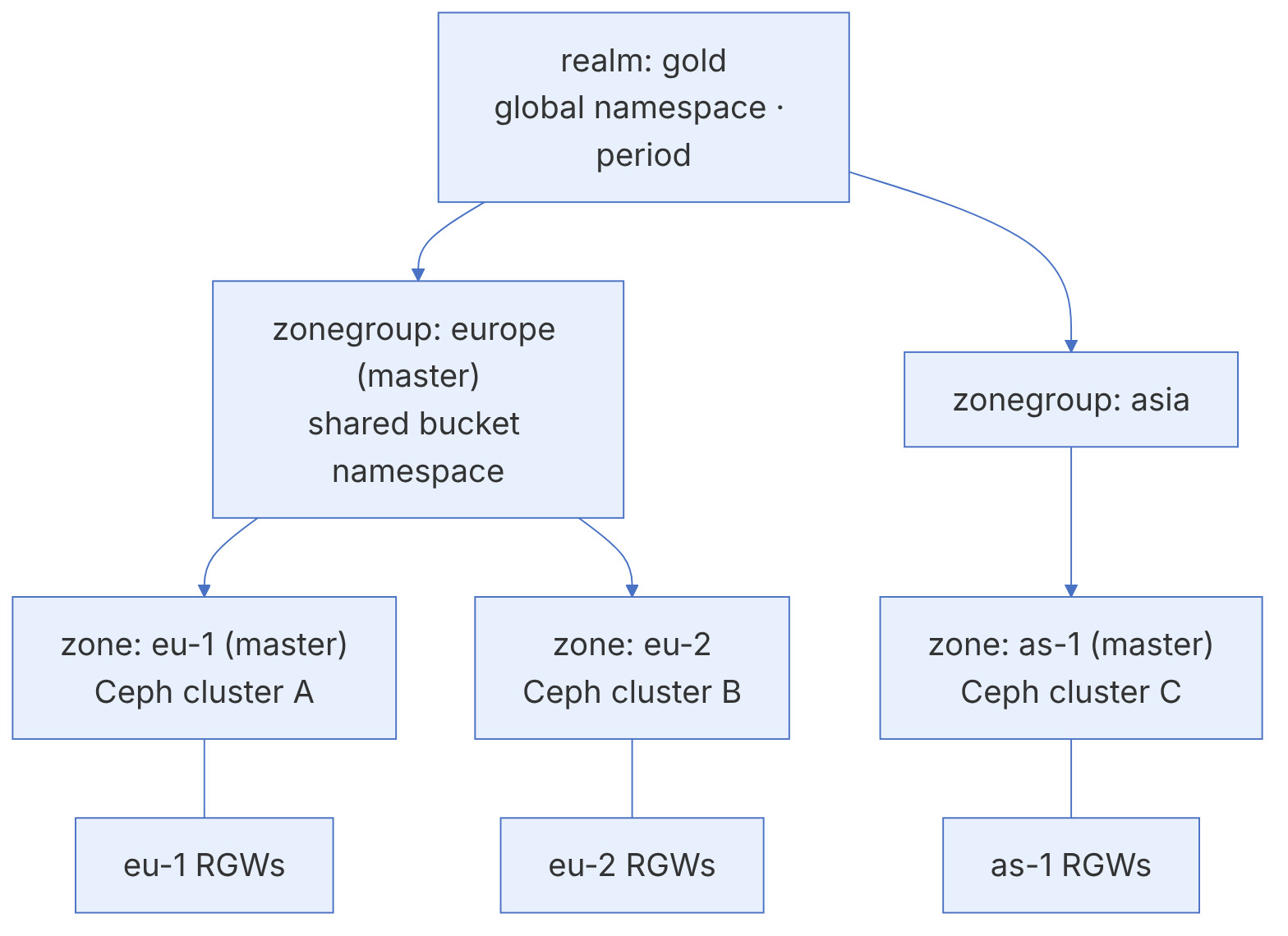
| Concept | Definition | Note |
|---|---|---|
| zone | A set of pools and RGW instances in one Ceph cluster | Each zone is in one cluster; one cluster can have several zones |
| zonegroup | A group of zones between which bucket data is replicated | Formerly called a "region"; one zone in it is the master |
| realm | The global container of zonegroups; a unique namespace for users and buckets | One zonegroup in it is the master |
| period | A version of the realm configuration with an id and an epoch | Every structural change is published with period update --commit |
| master zone | The zone that accepts metadata (users, buckets) and distributes it to the others | Users and buckets are created only through it |
5-2-2 What is replicated, and how?#
- Metadata (users, buckets, policies) is replicated at the realm level and always originates from the master zone of the master zonegroup. A bucket creation request sent to a non-master zone is automatically forwarded to the master.
- Object data is replicated only between the zones of one zonegroup. Different zonegroups share a namespace (bucket names are unique), but each bucket's data lives only in its own zonegroup.
- Sync is asynchronous and active-active: clients can write in any zone, and changes reach the other zones after a short delay. In a conflict between concurrent writes to one object, the last write (by time) wins.
Because sync is asynchronous, multisite is not a substitute for strong consistency between sites. If an application writes in site A and immediately reads in site B, it may see an old version or no version at all. Design applications so that each client has a "home site", or so that they do not depend on immediate cross-site reads.
5-2-3 Changes from the federated configuration in Hammer#
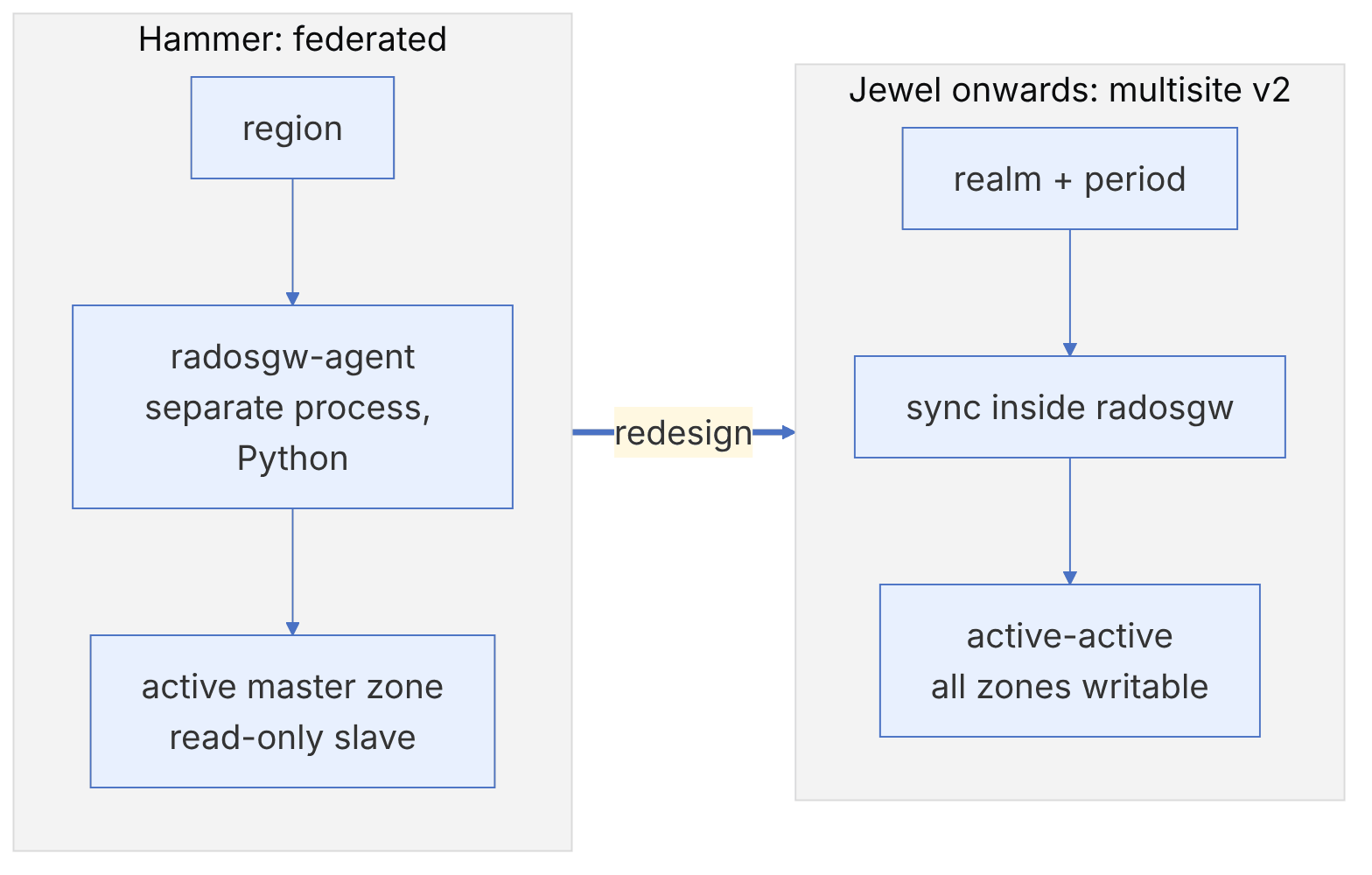
In Hammer and earlier, replication was done by an external Python process called radosgw-agent, the secondary zone was read-only, and the realm and period concepts did not exist. Since Jewel, multisite has been redesigned:
- Sync happens inside radosgw itself (no agent is needed).
- All zones can accept data (active-active).
- The realm and period make consistent, versioned configuration changes possible.
- Failover is done by moving the master zone and committing a new period.
Many features have been added since: sync policy with bucket-level control (Octopus), the archive zone, resharding without stopping sync (since Reef, with the zone feature named resharding), and in Umbrella numerous fixes to sync correctness.
5-3 Multisite prerequisites#
5-3-1 Network and time#
- HTTP(S) access between RGWs: the RGWs of each zone must see the endpoints of the other zones. Usually each zone's endpoint is the address of its load balancer.
- Bandwidth: the rate of data change (not the total volume) is what matters. The initial sync (full sync) transfers all existing data; for several hundred terabytes it takes days.
- Latency: multisite is designed for WANs and tolerates high latency, but high latency increases the lag.
- Clock sync: conflict resolution and request signing depend on time. All nodes must be synchronised with NTP.
5-3-2 The system user and endpoints#
Zones use a system user with a shared key to read each other's logs and objects. This user is created in the master zone, and its key goes into the configuration of every zone.
The system user has full access to all data and metadata of the realm. Protect its key like the cluster administrator's key, open the sync endpoints only on the private network or VPN between sites, and use TLS.
5-3-3 Capacity and pools#
Each zone has its own pools, whose names start with the zone name (for example eu-1.rgw.buckets.data). If you create the pools before setup, you can set the CRUSH rule, EC and target_size_ratio correctly from the start; otherwise RGW creates them with defaults. Besides the data, the log pool (<zone>.rgw.log) is busier in multisite and should be on fast media.
Design both sites symmetrically in capacity. A secondary zone that fills up first stops sync, and after space is freed it has a large lag to catch up.
5-4 Configuring multisite by hand#
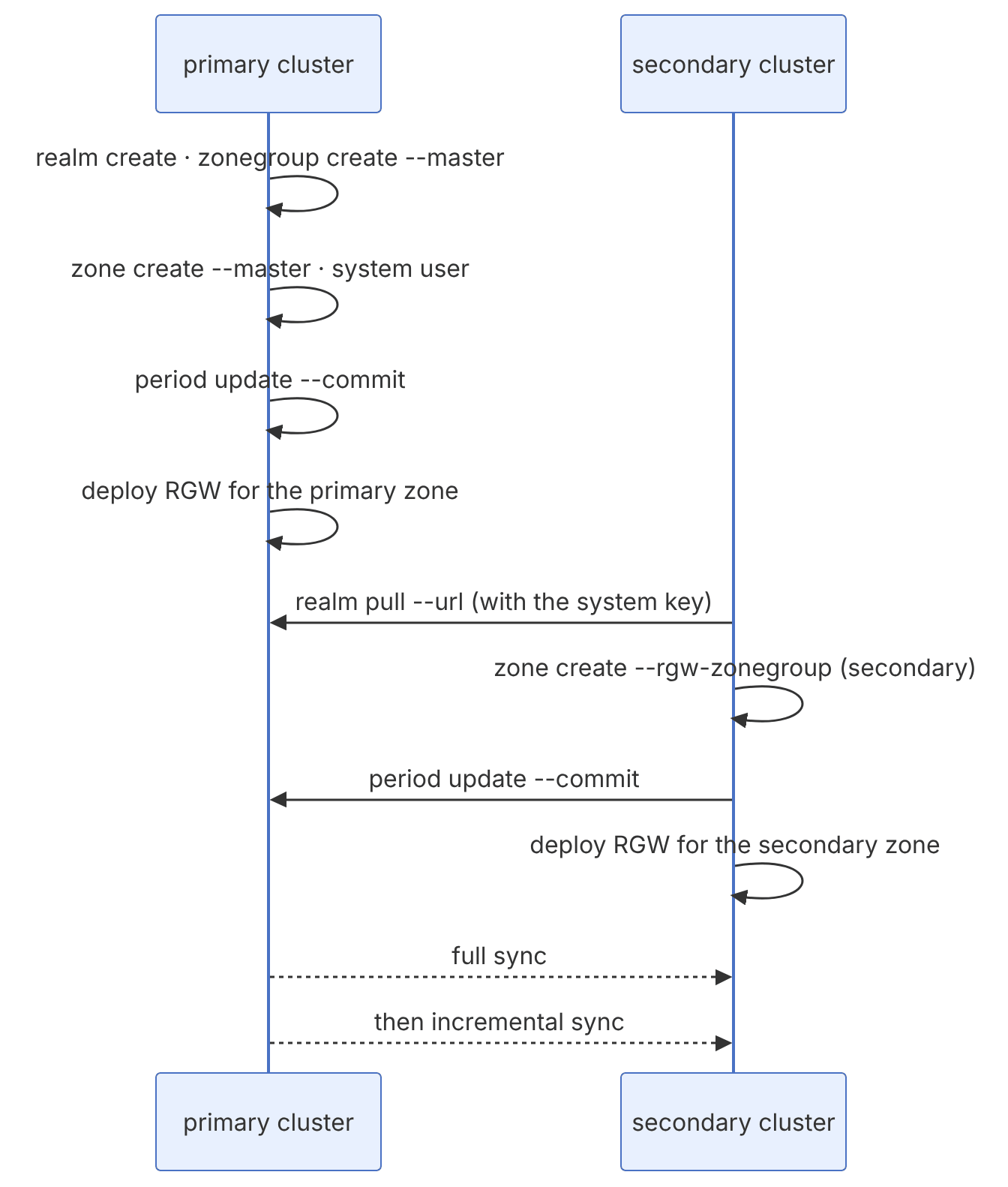
Assumptions: the primary cluster with RGW reachable at http://rgw-eu1.example.com:80 and the secondary cluster at http://rgw-eu2.example.com:80. A realm named gold, a zonegroup named europe, and zones eu-1 and eu-2.
5-4-1 Step 1: the structure in the primary cluster#
radosgw-admin realm create --rgw-realm=gold --default
radosgw-admin zonegroup create --rgw-zonegroup=europe \
  --endpoints=http://rgw-eu1.example.com:80 --rgw-realm=gold --master --default
radosgw-admin zone create --rgw-zonegroup=europe --rgw-zone=eu-1 \
  --endpoints=http://rgw-eu1.example.com:80 --master --default
If you previously had a single-site RGW with the default zone and zonegroup (default) and it holds data, then instead of creating a new zone, rename the default zone and zonegroup and add them to the realm (the documentation's "Migrating a Single-Site Deployment to Multi-Site"). Otherwise the data in the old zone is left orphaned.
5-4-2 Step 2: the system user#
radosgw-admin user create --uid=sync-user --display-name="Multisite sync" --system
# take access_key and secret_key from the output
radosgw-admin zone modify --rgw-zone=eu-1 --access-key=<AK> --secret=<SK>
radosgw-admin period update --commit
5-4-3 Step 3: RGW for the primary zone#
With cephadm, deploy the RGW service with a specific realm and zone:
ceph orch apply rgw gold-eu1 --realm=gold --zone=eu-1 \
  --placement="label:rgw count-per-host:1" --port=80
5-4-4 Step 4: the secondary cluster#
radosgw-admin realm pull --url=http://rgw-eu1.example.com:80 \
  --access-key=<AK> --secret=<SK>
radosgw-admin realm default --rgw-realm=gold
radosgw-admin period pull --url=http://rgw-eu1.example.com:80 --access-key=<AK> --secret=<SK>
radosgw-admin zone create --rgw-zonegroup=europe --rgw-zone=eu-2 \
  --endpoints=http://rgw-eu2.example.com:80 --access-key=<AK> --secret=<SK>
radosgw-admin period update --commit
ceph orch apply rgw gold-eu2 --realm=gold --zone=eu-2 \
--placement="label:rgw count-per-host:1" --port=80If period update --commit on the secondary cluster fails with "failed to commit period" or "connection refused", test access from the secondary cluster with curl http://rgw-eu1.example.com:80, and make sure the system keys were set correctly in zone modify (radosgw-admin zone get --rgw-zone=eu-1). A common mistake is a host name that resolves on only one of the sites.
5-5 Automated configuration with the rgw module#
Since Reef, the MGR module named rgw (the ceph rgw command) condenses all the steps above into two commands and is coordinated with the orchestrator:
# primary.yaml on the primary cluster
rgw_realm: gold
rgw_zonegroup: europe
rgw_zone: eu-1
placement:
  label: rgw
  count_per_host: 1
spec:
rgw_frontend_port: 80ceph mgr module enable rgw
ceph rgw realm bootstrap -i primary.yaml
ceph rgw realm tokens # a base64 token containing the realm, endpoint and keys# secondary.yaml on the secondary cluster
rgw_zone: eu-2
rgw_realm_token: <token>
placement:
label: rgw
spec:
rgw_frontend_port: 80ceph mgr module enable rgw
ceph rgw zone create -i secondary.yamlThe automated method is much faster and less error-prone for simple structures (one zonegroup and two or more zones). For complex structures (several zonegroups, custom placements, migration from single-site) the manual method gives more control. The Ceph dashboard has also had a wizard for automating multisite since Tentacle.
The realm token contains the system user's key. The same care we described for the bootstrap token in RBD mirroring is needed here.
5-6 Checking the sync status#
5-6-1 sync status#
radosgw-admin sync statusSample output in the secondary zone:
          realm 1c2d... (gold)
      zonegroup 7a8b... (europe)
           zone 9e0f... (eu-2)
   current time 2026-11-15T08:12:44Z
zonegroup features enabled: resharding
  metadata sync syncing
                full sync: 0/64 shards
                incremental sync: 64/64 shards
                metadata is caught up with master
      data sync source: 3d4e... (eu-1)
                        syncing
                        full sync: 0/128 shards
                        incremental sync: 128/128 shards
                        data is caught up with source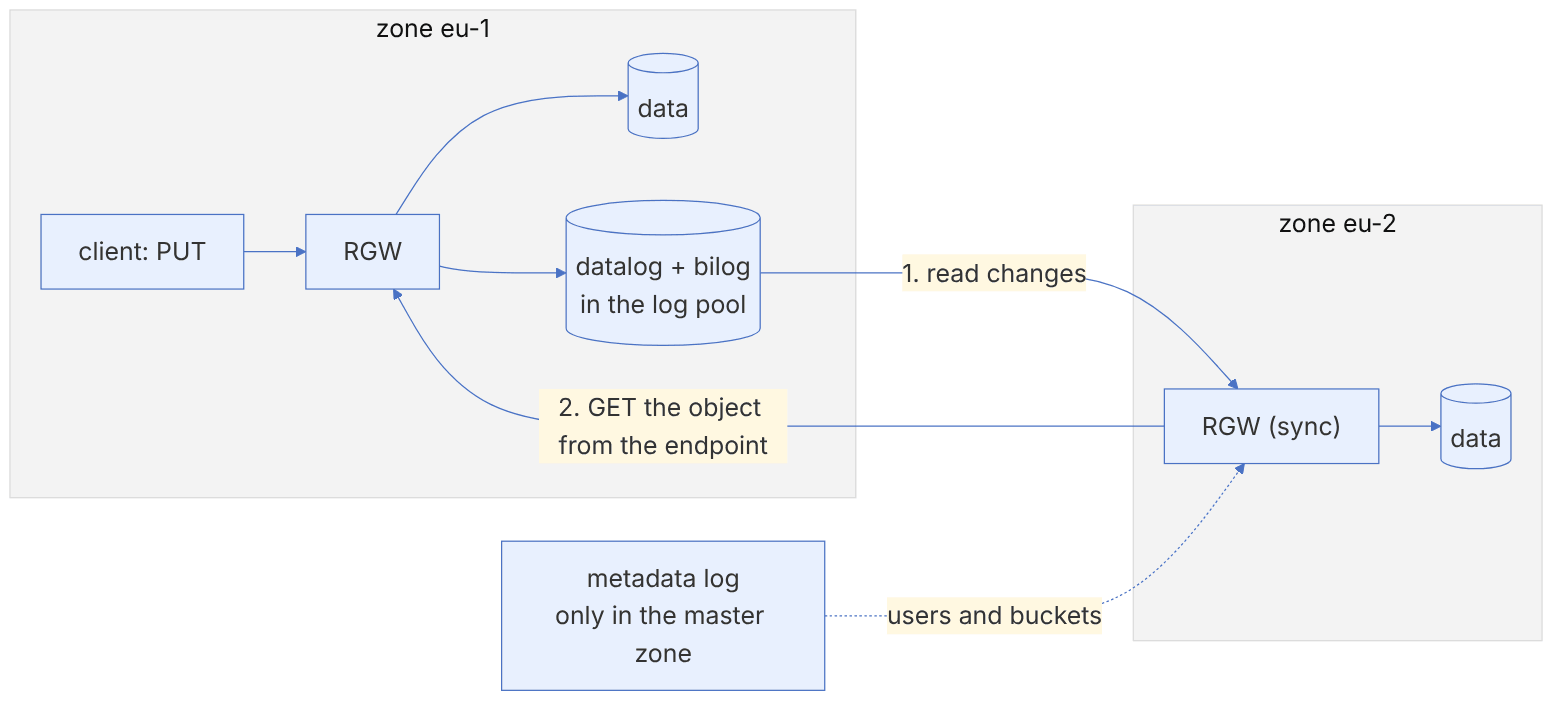
| Phrase in the output | Meaning | Action |
|---|---|---|
| metadata is caught up with master | Metadata is in sync | — |
| data is caught up with source | The data of all shards is in sync | — |
| behind shards: [..] | Some data shards are behind | If it persists, check sync error list and the bandwidth |
| oldest incremental change not applied | The oldest unapplied change | Compare the time difference with now (the real RPO) |
| full sync: N/M shards | A full sync is in progress | Normal after setup or a resync |
5-6-2 Additional commands#
radosgw-admin sync status --rgw-zone=eu-2
radosgw-admin metadata sync status
radosgw-admin data sync status --source-zone=eu-1
radosgw-admin bucket sync status --bucket=photos
radosgw-admin sync error list | head -50
radosgw-admin sync error trim
radosgw-admin period get | jq '.period_map.zonegroups[].zones[].name'Three frequent problems:
Persistent lag in a few shards: usually a very busy bucket or a corrupt object. Look at bucket sync status on high-traffic buckets and at sync error list.
403 errors in the sync log: the system key in one of the zones does not match the real user, or the system user has been deleted or suspended.
Sync does not start: the zone endpoints (zone get) point to an address that is not reachable from the other site (for example localhost or an internal name).
5-7 Testing the sync of users, buckets and objects#
# On the primary cluster (master zone)
radosgw-admin user create --uid=tester --display-name="Multisite tester"
# On the secondary cluster, after a few seconds:
radosgw-admin user info --uid=tester        # the user has been synced
# With s3cmd or aws-cli
aws --endpoint-url http://rgw-eu1.example.com s3 mb s3://ms-test
aws --endpoint-url http://rgw-eu1.example.com s3 cp ./report.pdf s3://ms-test/
aws --endpoint-url http://rgw-eu2.example.com s3 ls s3://ms-test/
# Write in the secondary zone and see it in the primary (active-active)
aws --endpoint-url http://rgw-eu2.example.com s3 cp ./notes.txt s3://ms-test/
aws --endpoint-url http://rgw-eu1.example.com s3 ls s3://ms-test/
radosgw-admin bucket sync status --bucket=ms-testMeasure how long an object takes to reach the other zone: in a loop, write a small object with the current time in its name to eu-1 every second and list it in eu-2. Then use the tc tool on the secondary RGW host to simulate 200 milliseconds of latency (tc qdisc add dev eth0 root netem delay 200ms) and watch the effect. Remember to run tc qdisc del dev eth0 root at the end.
5-8 From the code: multisite sync logs and coroutines#
5-8-1 Three logs, three layers#
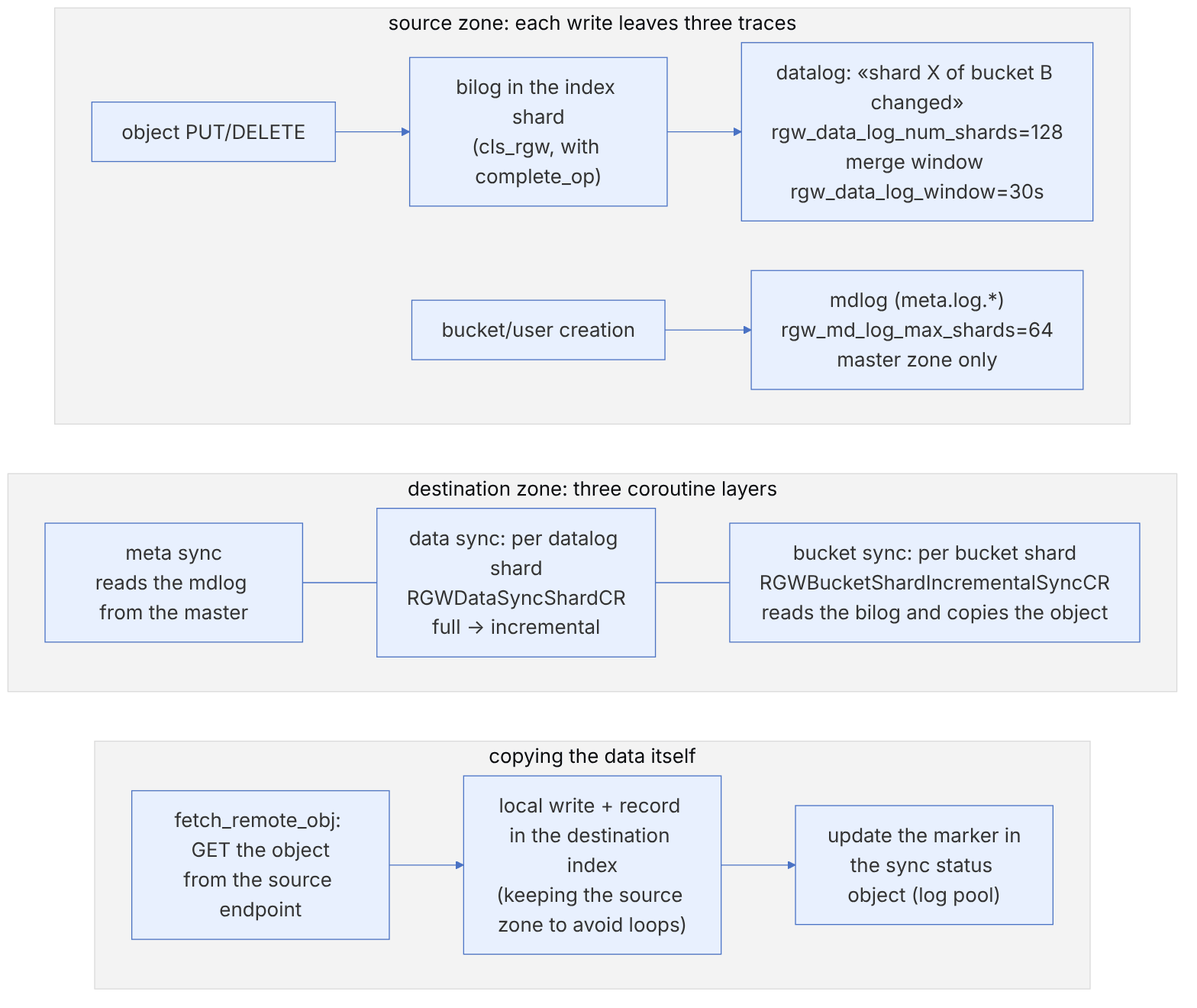
Multisite sync in RGW is pull-based. Each destination zone reads the source zone's logs over REST and applies the changes itself. Three kinds of log play a part in this:
| Log | Where it is stored | What it records | Defaults (main) |
|---|---|---|---|
| bilog | Next to each bucket index shard (cls_rgw) | Every object change in that shard | Along with complete_op |
| datalog | The zone's log pool | "This bucket shard has changed" (not the object itself) | rgw_data_log_num_shards=128, rgw_data_log_window=30 |
| mdlog | meta.log.* objects (rgw_mdlog.h) | Metadata changes: user, bucket, bucket instance | rgw_md_log_max_shards=64 |
5-8-2 The data sync state machine#
rgw_data_sync_info in src/rgw/driver/rados/rgw_data_sync.h has three states: StateInit = 0, StateBuildingFullSyncMaps = 1 and StateSync = 2. The implementation is based on RGW's own coroutine framework (RGWCoroutine). The main classes in rgw_data_sync.cc are: RGWDataSyncShardCR (the loop for each shard), RGWDataFullSyncShardCR, RGWDataIncSyncShardCR, RGWListRemoteDataLogShardCR and, for the bucket layer, RGWBucketShardIncrementalSyncCR.
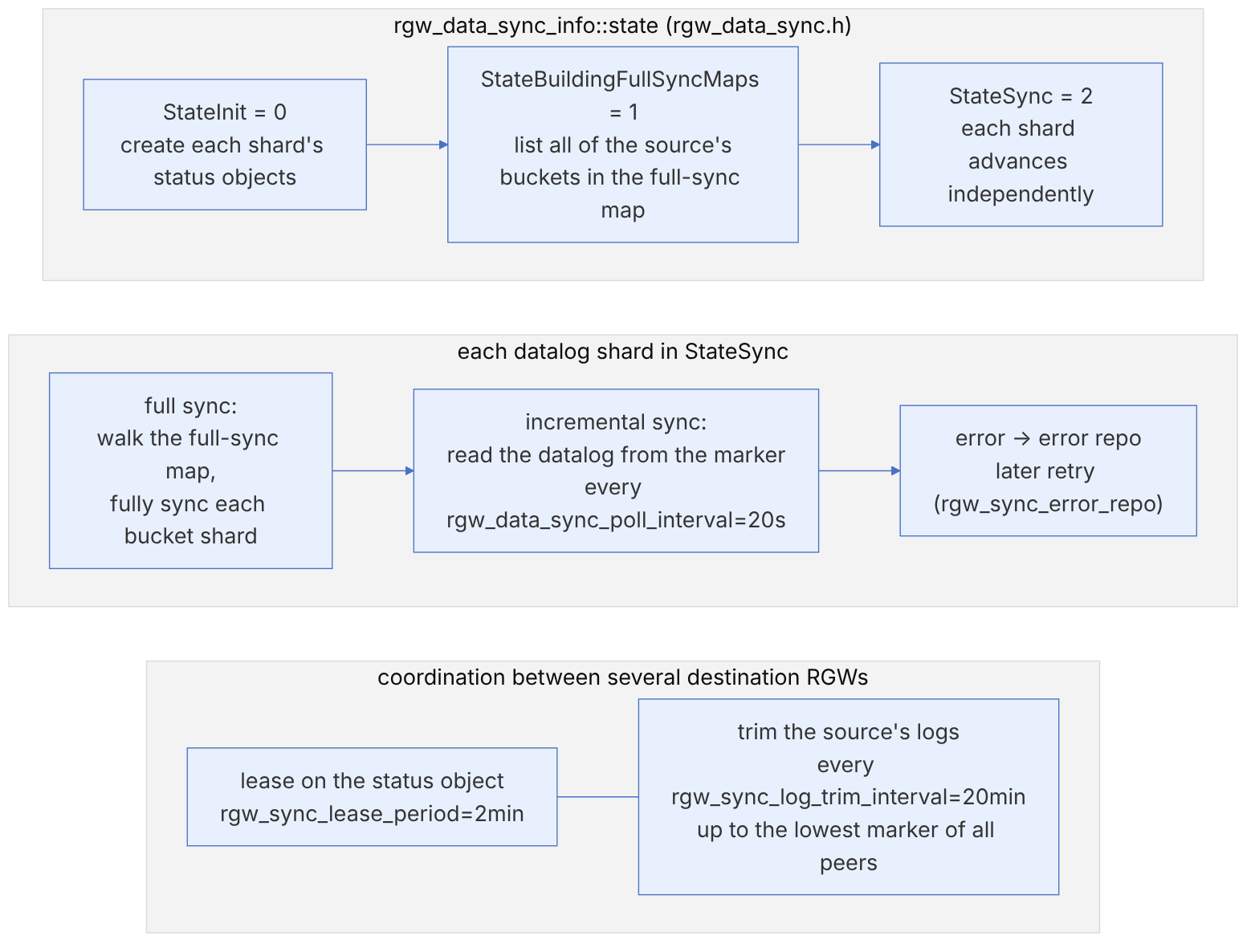
pseudocode: one datalog shard in the destination zone (this book's summary of rgw_data_sync.cc)
  loop:
    acquire lease(shard, rgw_sync_lease_period)          # 2min; only one RGW
    if shard.state == full_sync:
        for bucket_shard in full_sync_map[shard] from marker:
            run bucket sync (full) ; persist marker
        shard.state = incremental
    else:
        entries = remote.list_datalog(shard, after=marker)
        for e in entries (dedup by bucket_shard):
            spawn bucket_incremental_sync(e.bucket_shard)  # at most rgw_bucket_sync_spawn_window=20 at once
              → read remote bilog after bucket marker
              → for op in bilog: fetch_remote_obj / remove
        persist marker ; if no entries: sleep rgw_data_sync_poll_interval (20s)
on error: add to error repo for retry| Option | Default | SRE note |
|---|---|---|
| rgw_run_sync_thread | true | Can be set to false on user-facing RGWs so that sync runs only on dedicated RGWs |
| rgw_data_sync_poll_interval | 20 | The minimum delay in the quiet state |
| rgw_meta_sync_poll_interval | 20 | For metadata |
| rgw_bucket_sync_spawn_window | 20 | Parallelism of bucket sync per shard |
| rgw_sync_lease_period | 2_min | If an RGW dies, the shard passes to another RGW after expiry |
| rgw_sync_log_trim_interval | 20_min | A lagging peer blocks trimming, and the log pool grows |
A destination zone that is down or lagging blocks trimming of the source's logs, because trimming only advances up to the lowest marker. The result is omap growth in the log pool and the LARGE_OMAP_OBJECTS warning. Always remove a deleted zone from the zonegroup as well and commit the period.
Inspection commands:
radosgw-admin sync status
radosgw-admin data sync status --source-zone=us-east --shard-id=7
radosgw-admin bucket sync status --bucket=photos
radosgw-admin sync error list | jq '.[0].entries[:5]'
radosgw-admin datalog status ; radosgw-admin mdlog status
radosgw-admin bilog list --bucket=photos --max-entries=55-9 Multisite by the numbers: datalog and mdlog shards, the merge window and trimming#
This section examines four small functions that determine the load and latency of multisite sync. References are to the main code in November 2026. The numbers were computed with a Python re-implementation of ceph_str_hash_linux (from src/common/ceph_hash.cc). The "low bits of the hash" point below is the result of our own analysis and simulation, not a statement from the Ceph documentation.
5-9-1 Which datalog shard?#
Source in code: src/rgw/driver/rados/rgw_datalog.cc :: RGWDataChangesLog::choose_oid
Complexity: O(bucket name length)
pseudocode
shift = max(bucket_shard_id, 0)
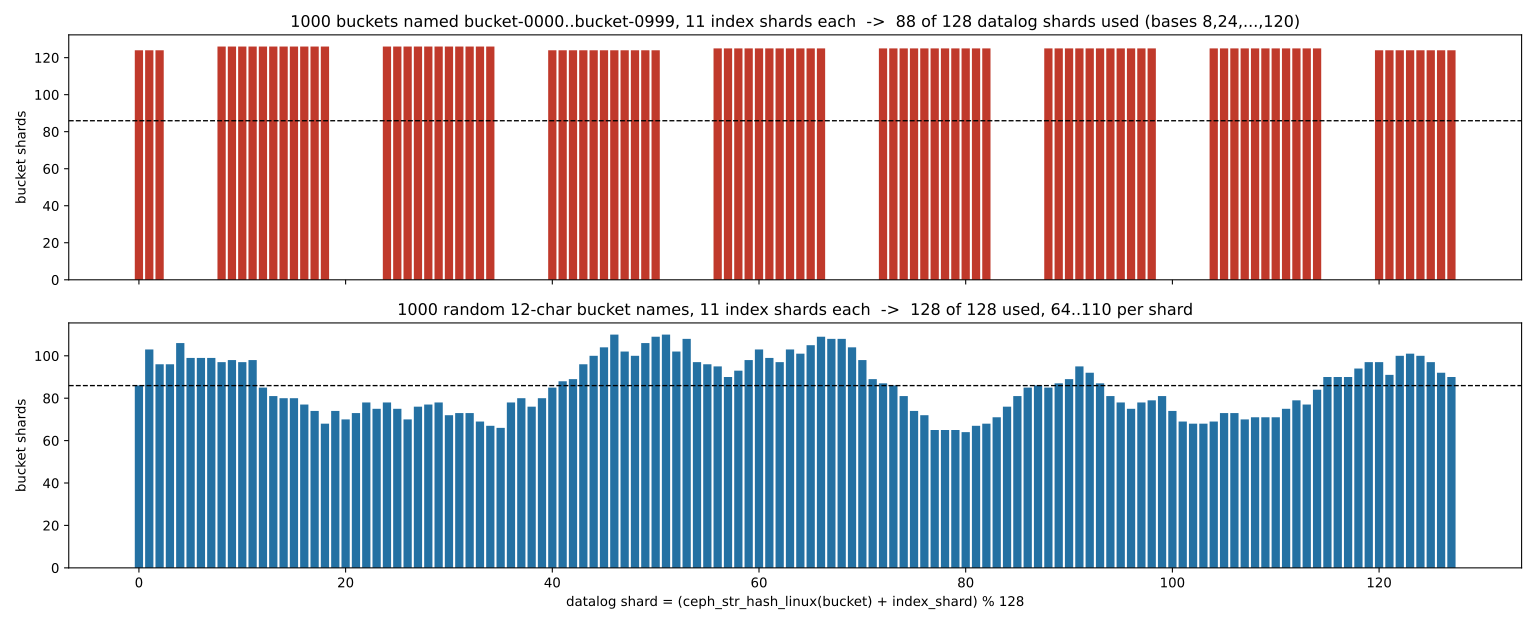
index = (ceph_str_hash_linux(bucket.name) + shift) mod rgw_data_log_num_shards     # default 128
# no XOR and no prime; a bucket's shards land on consecutive datalog shards
Numeric example. The hash of the name photos is 3484799263, and 3484799263 mod 128 = 31. If the bucket has 11 index shards, its changes are recorded in datalog shards 31 to 41. This spread is deliberate, and Casey Bodley called it an "important scalability property" in the design of multisite reshard, because several destination RGWs can split the load of a busy bucket between them (each datalog shard is held by only one RGW with a two-minute lease).
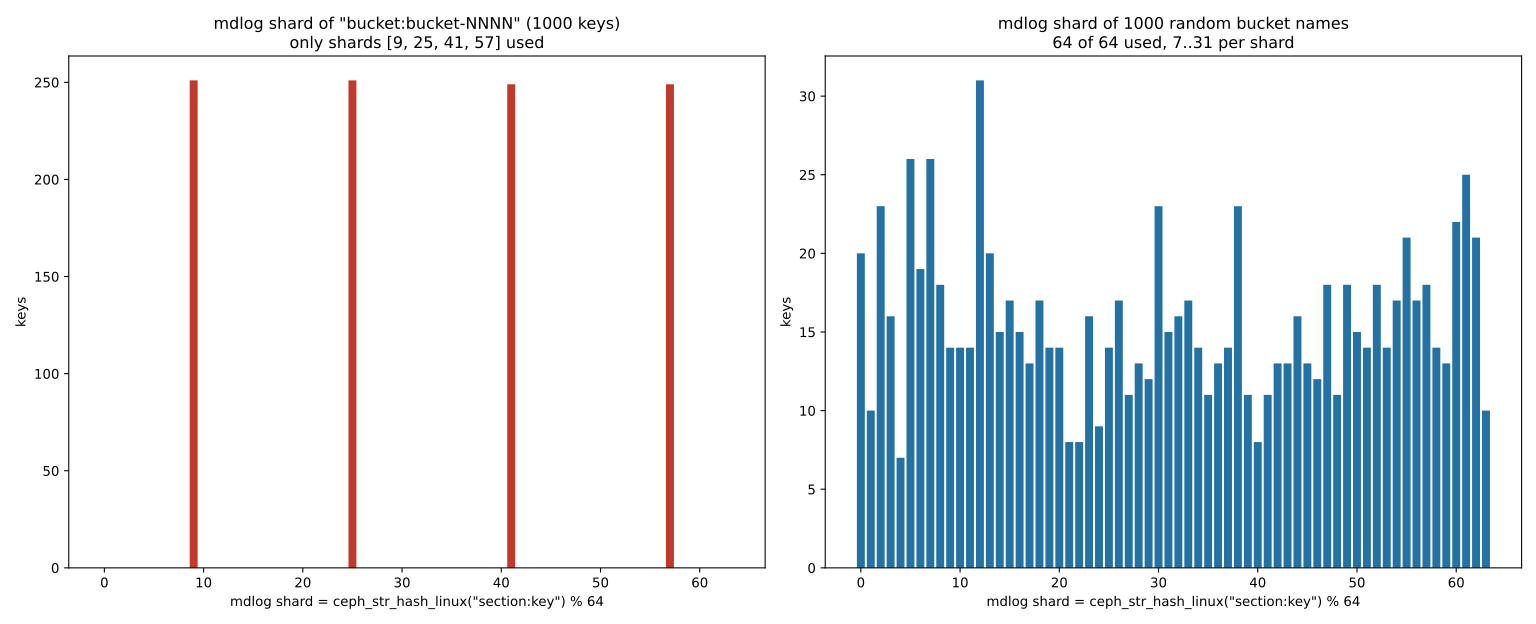
The low-bits point. At each hash step the value c<<4 is a multiple of 16. So hash mod 16 depends only on the high nibble of the characters (3 for all ASCII digits, 6 for a to o and 7 for p to z). Therefore all names of the same length that differ only in digits have the same hash mod 16. For 1000 buckets named bucket-0000 to bucket-0999, hash mod 16 is always 8, and only 8 base values (8, 24, …, 120) out of 128 are possible. With 11 shards per bucket, only 88 of the 128 datalog shards get work, and 40 shards always stay empty. The same number of buckets with random 12-character names fills all 128 shards. The bucket index does not have this problem, because before the mod it moves the low byte to the top with XOR and divides by the prime 7877. This point has no effect on sync correctness. It only reduces parallelism and load spreading across the destination RGWs.
5-9-2 The datalog merge window#
Source in code: src/rgw/driver/rados/rgw_datalog.cc :: RGWDataChangesLog::add_entry, renew_entries, renew_run
Complexity: O(1) per write and O(number of active bucket shards) per renew
pseudocode
add_entry(bs):
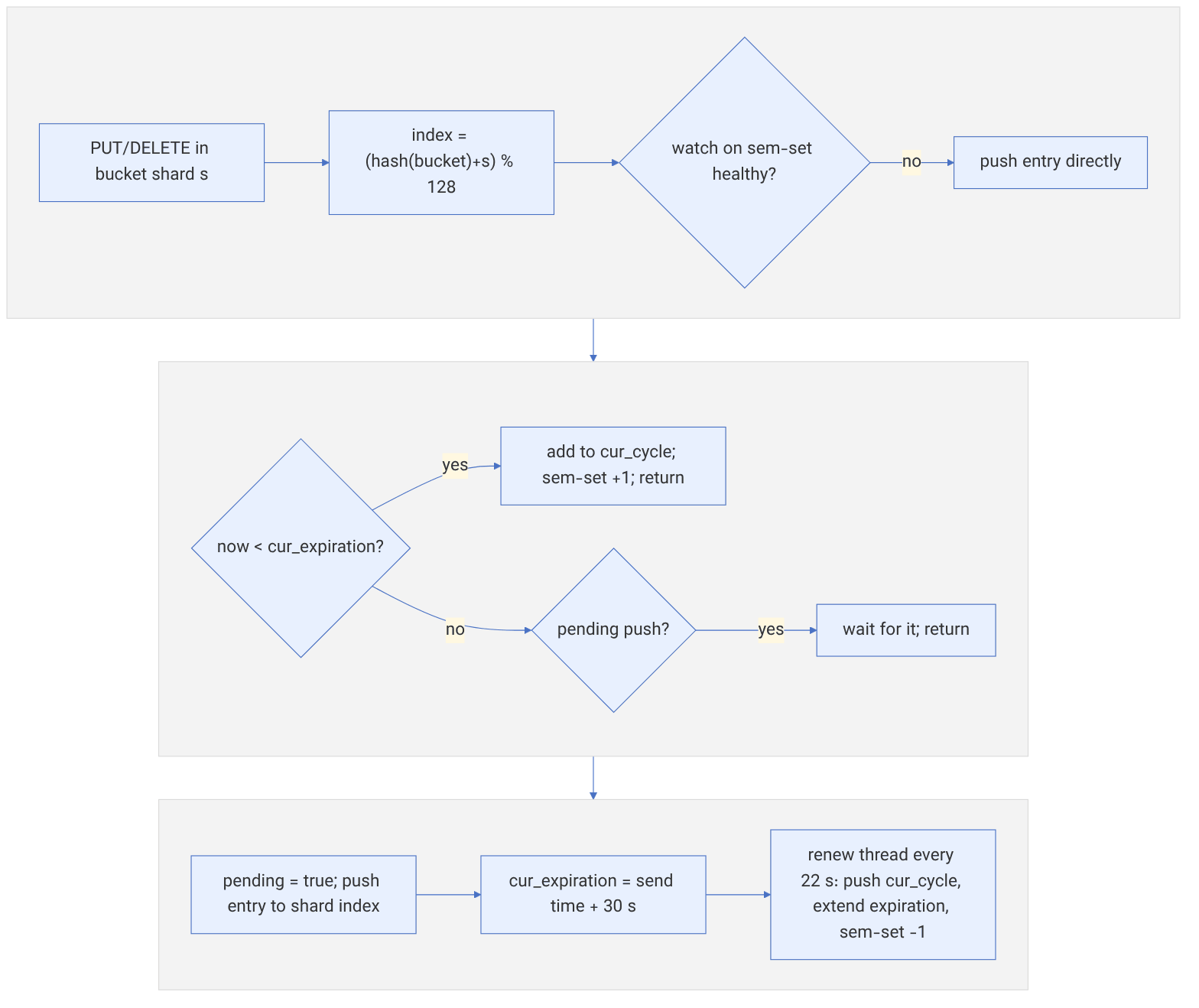
    if the watch on the sem-set is not healthy: push(entry) ; return        # the safe path, no optimisation
    status = change_status[bs]
    if now < status.cur_expiration:                       # recorded in the last 30 seconds
        cur_cycle.add(bs) ; sem_set[index] += key ; return
    if status.pending: wait for the current push ; return
    status.pending = true ; sent = now
    push(entry{key=bs, gen, timestamp=now})
    status.cur_expiration = sent + rgw_data_log_window      # from the start time, not the end
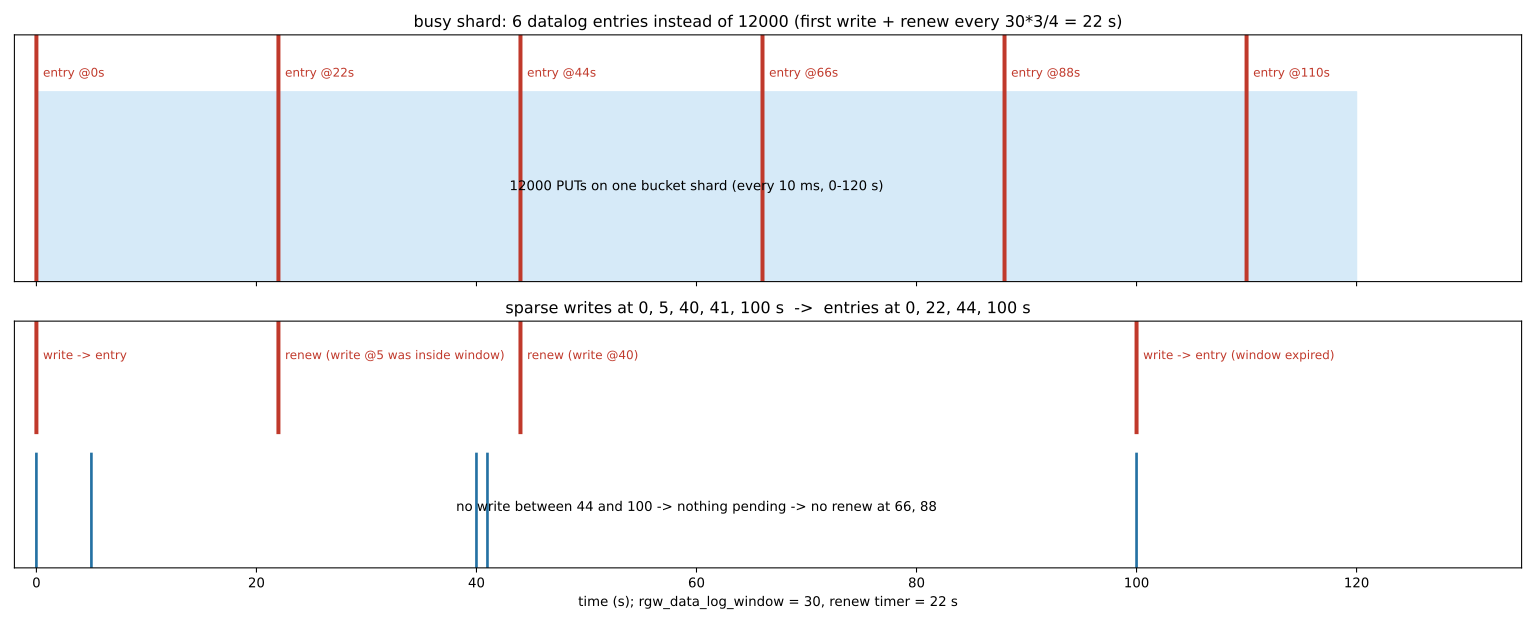
renew_run: every window × 3/4 seconds (with 30 → 22 seconds, integer division)
    for each bs in cur_cycle: push(entry) ; cur_expiration = now + window ; sem_set −= key
Numeric example. Suppose that from second 0 to 120 there is a PUT on one bucket shard every 10 milliseconds (12000 writes). Datalog entries are recorded only at seconds 0, 22, 44, 66, 88 and 110: six entries instead of 12000. If the writes are scattered (seconds 0, 5, 40, 41 and 100), entries are recorded at 0, 22 (renew for the write at second 5), 44 (renew for 40 and 41) and 100. Because there is no write between 44 and 100, nothing is left to renew at 66 and 88. Each datalog entry only means "look at this bucket shard again". The details of the change are in the bilog, and the destination reads them. So merging loses nothing; it only adds at most about one window to the delay in discovering a change. The sem-set counter set and the "watch is not healthy" path exist in the main code, and their purpose is to avoid losing pending keys if an RGW dies before renewing. Older releases did not have this mechanism. Check the code of your own release before relying on it.
5-9-3 Which mdlog shard?#
Source in code: src/rgw/driver/rados/rgw_sal_rados.cc (hash_key = section + ":" + key); src/rgw/driver/rados/rgw_metadata.cc :: rgw_shard_name, RGWMetadataLog::add_entry
Complexity: O(key length)
pseudocode
hash_key = section + ":" + key            # e.g. "user:alice" or "bucket:photos"
shard = ceph_str_hash_linux(hash_key) mod rgw_md_log_max_shards     # default 64
oid = "meta.log." + period_id + "." + shard
Numeric example. user:alice goes to shard 52, bucket:photos to 50 and bucket.instance:photos:a1b2c3d4.4567.1 to 28. Only the master zone produces the mdlog, and each period has its own log. The same low-bits point is more severe here, because 64 is also a power of 2 and there is no shard shift. 1000 keys bucket:bucket-0000 to bucket:bucket-0999 land in only 4 shards (9, 25, 41 and 57), about 250 keys each. In practice the result is that the initial meta sync of such names concentrates on 4 shards instead of being spread over 64.
5-9-4 Trimming logs: the minimum marker across all peers#
Source in code: src/rgw/driver/rados/rgw_trim_datalog.cc :: DataLogTrimCR, take_min_markers, get_stable_marker
Complexity: O(peers × shards)
pseudocode
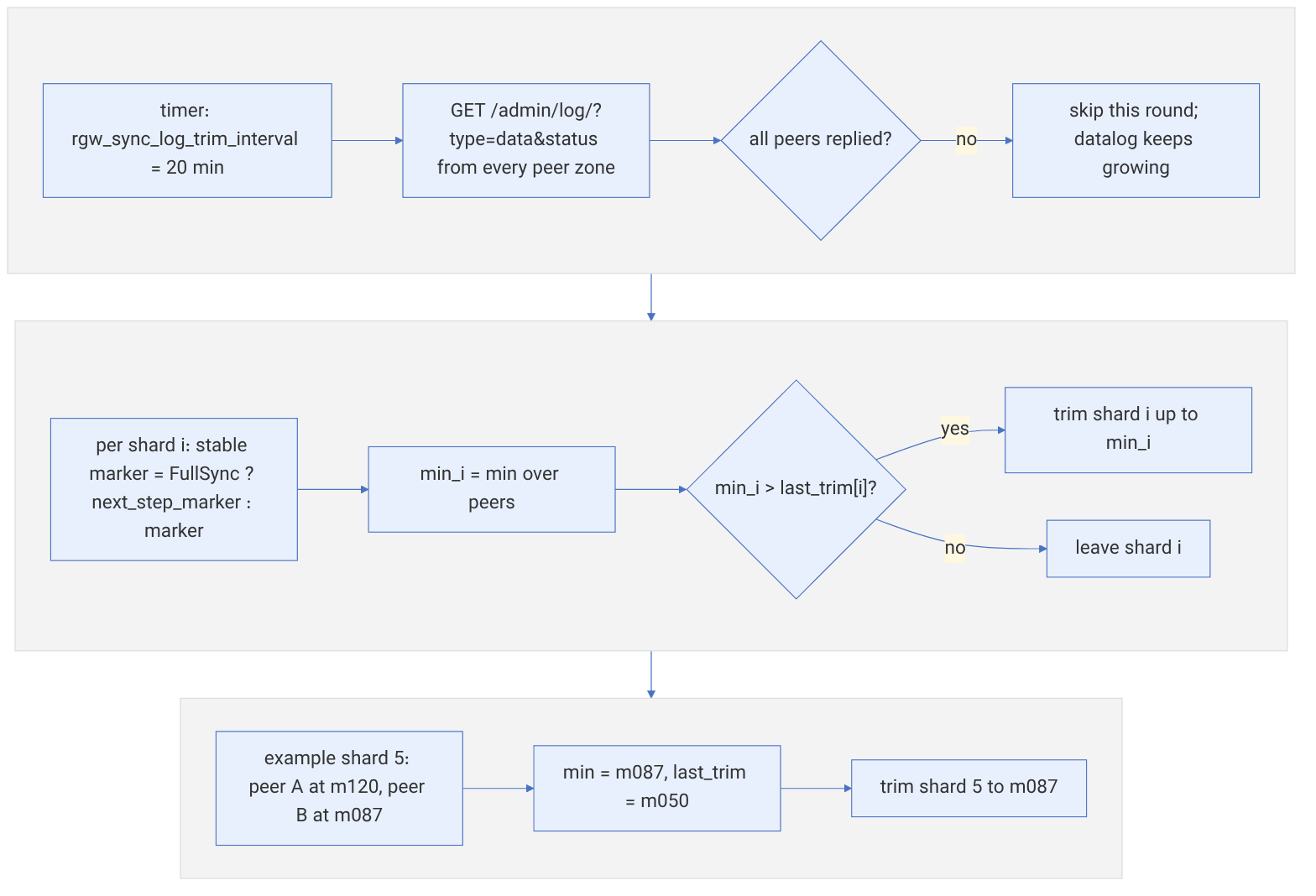
every rgw_sync_log_trim_interval (20 minutes):
    status[p] = REST GET /admin/log/?type=data&status from each peer
    if even one peer does not respond: do not trim this round
    for shard i:
        stable(p) = state == FullSync ? next_step_marker : marker
        min_i = min_p stable(p)
        if min_i > last_trim[i]: trim(shard i, up to min_i) ; last_trim[i] = min_i
A symbolic example. Suppose that in shard 5, peer A has advanced to marker m120 and peer B (which is still in full sync) to a next_step_marker of m087, and the previous trim went up to m050. So shard 5 is trimmed up to m087. Entries m088 to m120 remain until B reaches them too. Real markers depend on the backend type (cls_log or FIFO), and m120 is only a symbol. The practical consequence is that "every peer must respond". If a zone is unreachable for a long time, the datalog and bilogs of the source zone are not trimmed and the log pool grows. Before permanently removing a zone, take it out of the zonegroup and commit the period.
5-10 Failover and failback#
5-10-1 When the master zone becomes unavailable#
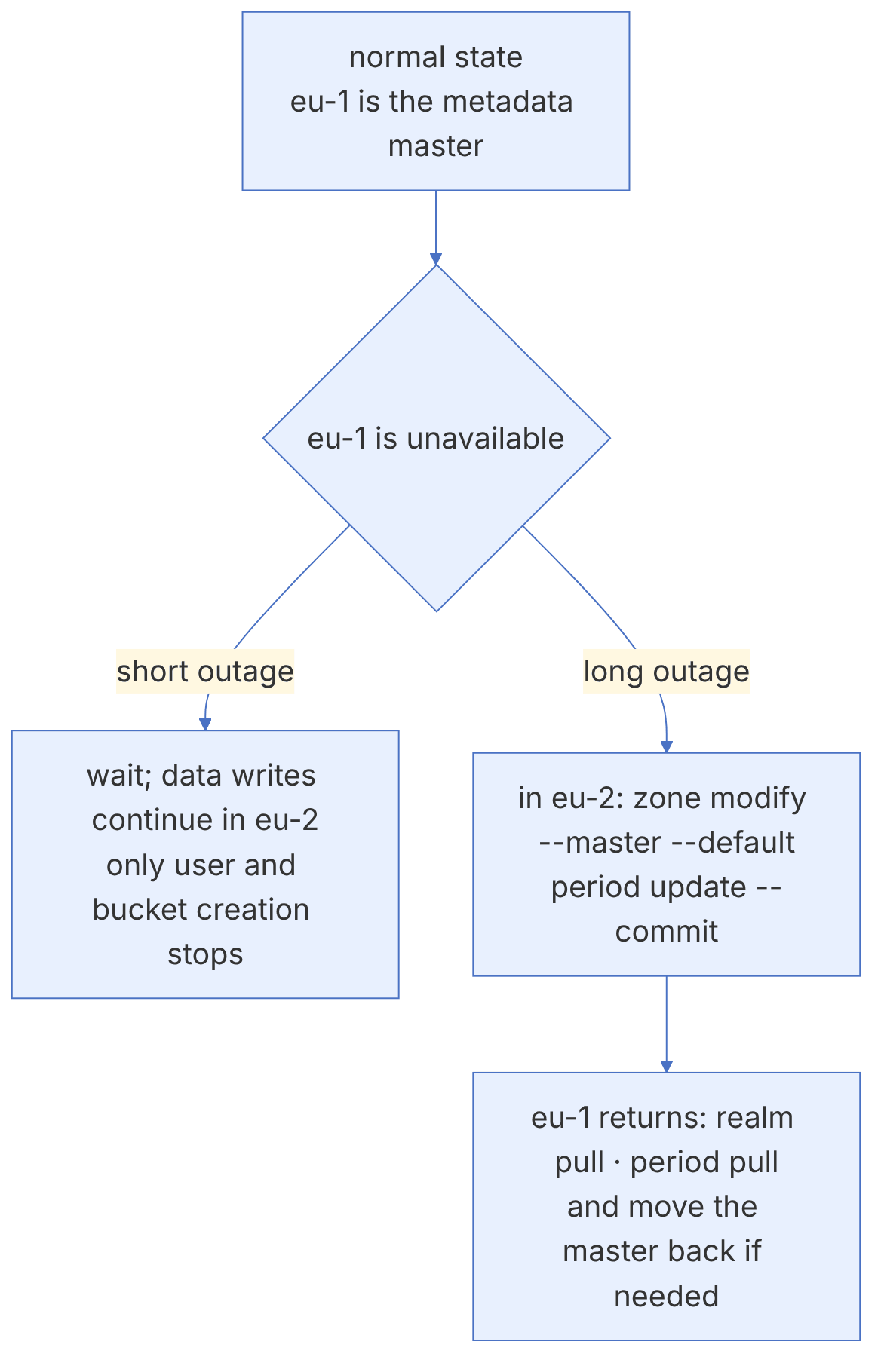
When the master zone fails, the other zones still accept data, and the S3 service continues for existing buckets. But metadata operations that need the master (creating a user or bucket, changing a policy) fail. If the outage is long, make the secondary zone the master:
# On the eu-2 cluster
radosgw-admin zone modify --rgw-zone=eu-2 --master --default
radosgw-admin period update --commit
ceph orch restart rgw.gold-eu2
5-10-2 Return of the old master#
When eu-1 comes back, it must fetch the new period from the current master to learn that it is no longer the master:
# On the eu-1 cluster
radosgw-admin realm pull --url=http://rgw-eu2.example.com:80 --access-key=<AK> --secret=<SK>
radosgw-admin period pull --url=http://rgw-eu2.example.com:80 --access-key=<AK> --secret=<SK>
ceph orch restart rgw.gold-eu1
radosgw-admin sync status
# If you want to move the master back, after it has synced:
radosgw-admin zone modify --rgw-zone=eu-1 --master --default
radosgw-admin period update --commitIf both zones consider themselves master at the same time (for example because of a network split between sites and a hasty promotion), two different period histories are created. Before promoting the secondary zone, make sure the old master is really unavailable or its RGWs have been stopped, and after it returns, pull the period before making any change.
5-10-3 A minimal runbook#
- 1. Confirm the master failure through two independent paths (monitoring and contact with the site team).
- 2. Announce the status and stop non-essential metadata changes.
- 3. Promote the secondary zone to master and commit the period.
- 4. Update DNS or GSLB so that clients go to the healthy endpoint.
- 5. After the primary site returns: pull the period, check
sync statusuntil caught up, and decide whether to move the master back. - 6. Record the times and lessons in the incident log.
5-11 Sync policy: fine-grained control of sync#
Since Octopus, sync policy lets you decide what goes from where to where, instead of "all buckets in all zones". Policies are defined as groups, flows (the flow between zones) and pipes (which buckets), and are applied at the zonegroup or bucket level.
# All buckets "allowed" by default but not enabled
radosgw-admin sync group create --group-id=global --status=allowed
radosgw-admin sync group flow create --group-id=global --flow-id=eu-mesh \
  --flow-type=symmetrical --zones=eu-1,eu-2
radosgw-admin sync group pipe create --group-id=global --pipe-id=all \
  --source-zones='*' --source-bucket='*' --dest-zones='*' --dest-bucket='*'
radosgw-admin period update --commit
# Enable sync for one bucket only
radosgw-admin sync group create --bucket=critical-data --group-id=critical --status=enabled
radosgw-admin sync group pipe create --bucket=critical-data --group-id=critical \
  --pipe-id=p1 --source-zones='*' --dest-zones='*'
radosgw-admin sync info --bucket=critical-data| Group status | Meaning |
|---|---|
| enabled | Sync happens |
| allowed | Permitted, but only if a lower-level (bucket) policy enables it |
| forbidden | Prohibited; bucket-level policies cannot enable it either |
A common pattern: allowed at the zonegroup level and enabled at the bucket level only for sensitive buckets. This avoids wasting inter-site bandwidth on temporary or reproducible buckets.
5-12 The archive zone#
The archive zone is a special zone that keeps every version of every object, even if they are deleted or overwritten in the other zones. Buckets in the archive zone have versioning automatically. This is a way to protect against accidental or malicious deletion without imposing versioning on users.
radosgw-admin zone create --rgw-zonegroup=europe --rgw-zone=eu-archive \
  --endpoints=http://rgw-arc.example.com:80 --tier-type=archive \
  --access-key=<AK> --secret=<SK>
radosgw-admin period update --commit5-13 Resharding in multisite#
Before Reef, dynamic resharding was not supported in multisite, and a manual reshard also disrupted bucket sync. Since Reef, the zonegroup feature named resharding lets each zone reshard its buckets independently without interrupting replication. According to the zone features documentation, this feature should be enabled only when all zones have been upgraded to a release that supports it:
radosgw-admin zonegroup modify --rgw-zonegroup=europe --enable-feature=resharding
radosgw-admin period update --commit
radosgw-admin sync status | grep features5-14 Performance and design#
- Dedicated sync RGWs: with the
rgw_run_sync_threadoption you can run sync on specific instances and free the user-facing instances from its load. Point the zone endpoints at the sync instances (or their load balancer). - A fast log pool: the datalog and bilog are written to the log pool; put this pool on SSD.
- Number of datalog shards: the default is 128, and it determines the parallelism of data sync.
- Monitoring the lag: the Prometheus exporter in the MGR and the perf statistics of the RGW client have sync metrics. Define an alert based on "oldest incremental change not applied".
- Log capacity: if one zone is down for a long time, change logs accumulate in the other zone. Automatic log trimming happens only when all zones have received those changes.
RPO in multisite is not fixed; it depends on the rate of change, bandwidth, latency and the number of small objects. Huge numbers of small objects (for example millions of files of a few kilobytes) are a CPU and request bottleneck, not a bandwidth one. For a realistic estimate, test with a sample of your own workload and measure "oldest incremental change not applied" at peak load.
5-15 Supplementary and up to date#
- Automation with
ceph rgwand the dashboard wizard (Tentacle) have brought setup down to a few minutes. - Zone features: besides
resharding, features such ascompress-encrypted(Reef) andnotification_v2(Squid) are enabled in a coordinated way across all zones with the zone feature mechanism. - OIDC in multisite: Umbrella added support for OIDC in multi-site environments.
- Sync correctness fixes: the Umbrella notes list numerous fixes, including an infinite full-sync loop, a segfault at startup, forwarded requests with UNSIGNED-PAYLOAD, bucket-level full-sync locking and zonegroup renaming. If you have sync problems on older releases, take upgrading seriously.
- The cloud sync module: a zone with
--tier-type=cloudcan replicate data to an external S3 service.
5-16 Summary and review#
5-16-1 Chapter summary#
- The realm is the global namespace; the zonegroup is the unit of data replication; a zone is one cluster; a period is a configuration version.
- Metadata is distributed from the master zone; data is replicated between the zones of a zonegroup asynchronously and active-active.
- Multisite version 2 moved sync into radosgw and removed Hammer's old agent.
- Setup is manual with
radosgw-adminor automated withceph rgw realm bootstrapandceph rgw zone create. sync status,bucket sync statusandsync error listare the main monitoring tools.- Failover means making another zone the master and committing the period; after the return, pull the period.
- Sync policy, the archive zone and the
reshardingzone feature have made multisite more flexible.
5-16-2 Common mistakes#
- Endpoints that are reachable from only one site.
- Creating a new zone instead of renaming the default zone that holds data.
- Keeping the system user's key in scripts and repositories.
- Hastily promoting the secondary zone to master during a temporary network outage.
- Enabling a zone feature before all zones have been upgraded.
- Ignoring lag until users report it.
5-16-3 Hands-on exercise#
- 1. Build two single-node clusters and set up multisite once by hand and once with
ceph rgw realm bootstrap. Compare the time and the number of steps. - 2. Write a thousand objects in the primary zone and record the progress of sync with
sync statusandbucket sync status. - 3. Stop the RGWs of the primary zone, write an object in the secondary zone and try creating a bucket. Explain the error message. Then do a full failover.
- 4. Create a sync policy under which only buckets named
critical-*are synced, and show that other buckets are not synced. - 5. Add an archive zone, delete an object in the primary zone and find its version in the archive zone.
5-16-4 Review questions#
- 1. How do the roles of the zonegroup and the realm differ in replicating data and metadata?
- 2. What is a period, and why must it be committed after structural changes?
- 3. What are the three main differences between multisite version 2 and the federated configuration in Hammer?
- 4. Why does creating a bucket in a non-master zone fail when the master is lost, while writing an object does not?
- 5. What role does the system user play, and why must it be strongly protected?
- 6. What information does the phrase "oldest incremental change not applied" give in the output of
sync status? - 7. Write down the steps of a failover and of returning the old master.
- 8. What is the difference between the enabled, allowed and forbidden states in sync policy?
- 9. What problem does the archive zone solve?
- 10. Why was resharding problematic in multisite before Reef, and how is it solved today?
Answers to these questions are in Appendix E: Answers to Review Questions. Answers to this chapter's questions →
5-16-5 Sources for this chapter#
- Ceph documentation — Multi-Site
https://docs.ceph.com/en/latest/radosgw/multisite/ - Ceph documentation — Multisite Sync Policy
https://docs.ceph.com/en/latest/radosgw/multisite-sync-policy/ - Ceph documentation — Zone Features
https://docs.ceph.com/en/latest/radosgw/zone-features/ - Ceph documentation — The rgw module in the MGR
https://docs.ceph.com/en/latest/mgr/rgw/ - Ceph documentation — Archive Sync Module
https://docs.ceph.com/en/latest/radosgw/archive-sync-module/ - Ceph documentation — Cloud Sync Module
https://docs.ceph.com/en/latest/radosgw/cloud-sync-module/ - cephadm documentation — The RGW service in multisite
https://docs.ceph.com/en/latest/cephadm/services/rgw/ - Umbrella release notes (Multisite section
https://docs.ceph.com/en/latest/releases/umbrella/