Ceph and OpenStack
TL;DR this chapter in a few lines
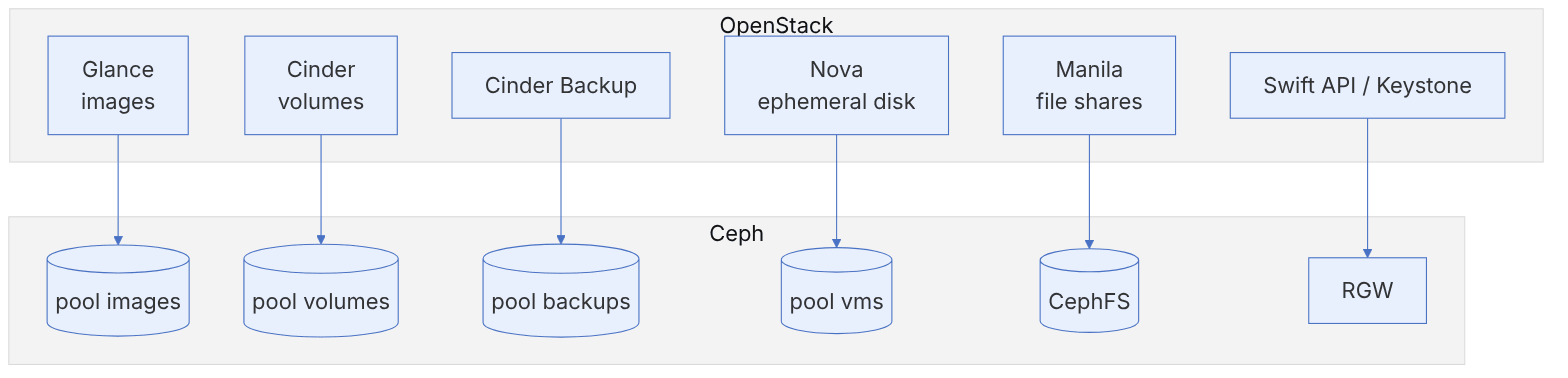
- One Ceph cluster can back all of OpenStack's storage: Glance, Cinder, Cinder Backup, Nova ephemeral disks, Manila and Swift/S3 through RGW.
- Give every service its own pool and Ceph user;
client.cinderonly reads the images pool. - Copy-on-write from image to volume needs raw-format images and
show_image_direct_url = True; qcow2 silently loses it. - The libvirt secret UUID must be identical on every compute node and equal to
rbd_secret_uuid;images_type = rbdmoves ephemeral disks to Ceph for easy live migration and evacuate.
3-1 Before you start#
3-1-1 What questions does this chapter answer?#
OpenStack and Ceph matured at almost the same time and very soon became the "default pair" of private clouds. OpenStack user surveys have shown for years that Ceph is its most popular block storage backend. In this chapter we look at:
- Why does Ceph fit OpenStack so well, and which OpenStack services use which part of Ceph?
- Which pools and users, with which permissions, do Glance, Cinder, Cinder Backup and Nova need?
- How is each service configured, and how does copy-on-write bring VM creation down from minutes to seconds?
- Which tool makes it easiest to set up a test OpenStack environment today?
- Which points matter in production for performance, security and operations?
3-1-2 Prerequisites#
The Ceph cluster from chapter 1 and familiarity with RBD (chapter 2). A basic familiarity with the OpenStack components helps. Older tutorials used RDO packages on CentOS 7 to install OpenStack; we introduce today's options and present the configuration in a way that is independent of the installation tool.
3-2 Ceph: OpenStack's best companion#
3-2-1 Why did this pair succeed?#
- One backend for everything: Glance (images), Cinder (volumes), Cinder Backup, Nova (ephemeral disks), Manila (file shares) and even the Swift- and S3-compatible API are all served by one Ceph cluster.
- End-to-end copy-on-write: when Glance and Cinder/Nova are both on Ceph, creating a volume or a VM disk from an image is just an
rbd clone. There is no need to copy a multi-gigabyte image onto the compute node's disk. - Live migration without separate shared storage: because the VM disk is on Ceph, live migration moves only the memory.
- Scaling at the pace of the cloud: each new compute node is just another client. Storage capacity and performance grow by adding nodes to Ceph.
- Open source with no vendor lock-in: both projects are open source and share a large community.
3-2-2 Services and pools#
| OpenStack service | Ceph component | Suggested pool | Ceph user |
|---|---|---|---|
| Glance | RBD | images | client.glance |
| Cinder | RBD | volumes | client.cinder |
| Cinder Backup | RBD | backups | client.cinder-backup |
| Nova (ephemeral) | RBD | vms | client.cinder (or client.nova) |
| Manila | CephFS (native or NFS) | CephFS file system | client.manila |
| Swift/S3 | RGW with Keystone | RGW pools | RGW user (chapter 4) |
3-3 Setting up a test OpenStack#
3-3-1 Today's options#
The old way of installing OpenStack was with RDO packages and the Packstack tool on CentOS 7, both of which are obsolete today. These are the most common ways today:
| Tool | Suitable for | Note |
|---|---|---|
| DevStack | Quick development and testing on one machine | Not for production; Ceph can be attached with the devstack-plugin-ceph plugin |
| Kolla-Ansible | Containerised lab and production | Mature support for external Ceph for Glance, Cinder, Nova and Manila |
| OpenStack-Ansible | Production on LXC or bare metal | Ansible roles for attaching Ceph |
| OpenStack Charms / Sunbeam | Canonical environments | Attaching to Ceph through Juju interfaces |
In this chapter we assume a test OpenStack (for example with Kolla-Ansible or DevStack) is ready and Ceph already exists, that is the "external Ceph" pattern, which is also the most common pattern in production. We give the configuration with each service's standard file names; in Kolla-Ansible the same settings go into the /etc/kolla/config/<service>/ directory.
Do not deploy Ceph inside OpenStack (for example with the old Kolla or TripleO roles). Keep the life cycles of the two systems separate: Ceph is deployed and upgraded with cephadm, and OpenStack is only its client. This separation makes upgrading each of them independent and low-risk. TripleO, which once promoted this pattern, has itself been retired.
3-4 Configuring OpenStack as a Ceph client#
3-4-1 Creating the pools#
for p in images volumes backups vms; do
  ceph osd pool create $p
  rbd pool init $p
done
ceph osd pool ls detail | grep -E "images|volumes|backups|vms"
With pg_autoscaler enabled there is no need to set the number of PGs by hand, but it is better to tell the autoscaler the expected share of each pool so that it gets a suitable PG count from the start and you avoid a wave of PG splits later:
ceph osd pool set volumes target_size_ratio 0.6
ceph osd pool set vms target_size_ratio 0.2
ceph osd pool set images target_size_ratio 0.1
ceph osd pool set backups target_size_ratio 0.1
3-4-2 Users and permissions#
The official Ceph documentation suggests these three users. Note that client.cinder only has read permission on images, because it only needs to create clones from images:
ceph auth get-or-create client.glance \
  mon 'profile rbd' osd 'profile rbd pool=images' mgr 'profile rbd pool=images'
ceph auth get-or-create client.cinder \
  mon 'profile rbd' \
  osd 'profile rbd pool=volumes, profile rbd pool=vms, profile rbd-read-only pool=images' \
  mgr 'profile rbd pool=volumes, profile rbd pool=vms'
ceph auth get-or-create client.cinder-backup \
  mon 'profile rbd' osd 'profile rbd pool=backups' mgr 'profile rbd pool=backups'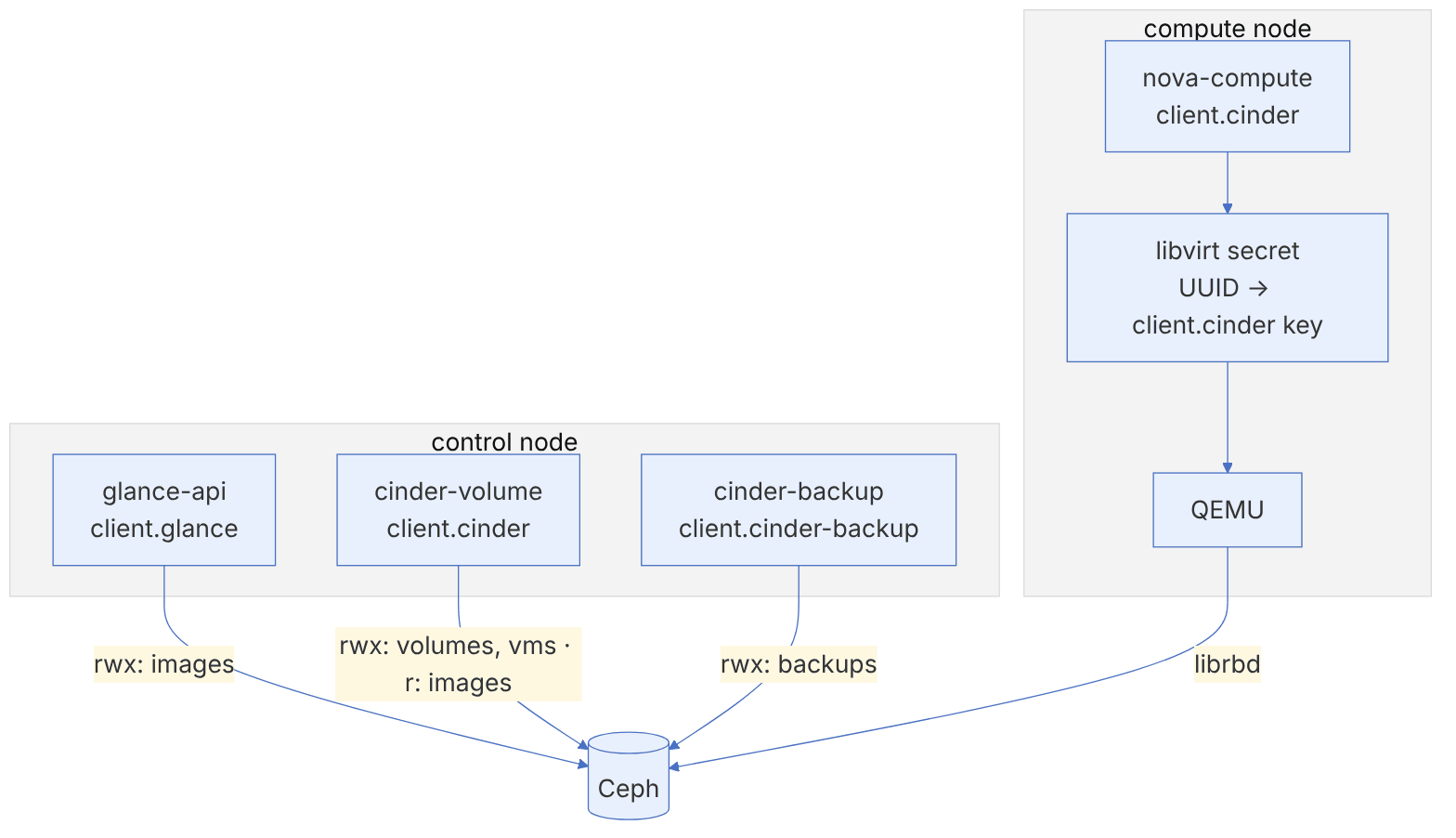
3-4-3 Distributing keyrings and ceph.conf#
ceph config generate-minimal-conf > /tmp/ceph.conf
# Glance node
scp /tmp/ceph.conf glance-host:/etc/ceph/ceph.conf
ceph auth get client.glance | ssh glance-host sudo tee /etc/ceph/ceph.client.glance.keyring
ssh glance-host sudo chown glance:glance /etc/ceph/ceph.client.glance.keyring
# cinder-volume and nova-compute nodes
ceph auth get client.cinder | ssh cinder-host sudo tee /etc/ceph/ceph.client.cinder.keyring
ceph auth get client.cinder | ssh compute1 sudo tee /etc/ceph/ceph.client.cinder.keyring
# cinder-backup node
ceph auth get client.cinder-backup | ssh backup-host sudo tee /etc/ceph/ceph.client.cinder-backup.keyringKeep keyrings with the right ownership and permissions (chmod 600 and owned by the service user). If an OpenStack service cannot read its keyring, you usually get a misleading error such as "error connecting to the cluster" or "permission denied" with code 13.
3-4-4 The secret in libvirt#
On compute nodes QEMU gets the Ceph key from libvirt, not from a file. We must create a secret with a fixed UUID and later use the same UUID in Cinder and Nova:
UUID=$(uuidgen)        # create it once and use the same value on every compute node
cat > secret.xml <<X
<secret ephemeral='no' private='no'>
  <uuid>${UUID}</uuid>
  <usage type='ceph'><name>client.cinder secret</name></usage>
</secret>
X
sudo virsh secret-define --file secret.xml
sudo virsh secret-set-value --secret ${UUID} \
  --base64 $(ceph auth get-key client.cinder)
sudo virsh secret-listThe secret UUID must be the same on all compute nodes, otherwise live migration fails, because the domain XML is transferred to the destination host with that same UUID. Deployment tools such as Kolla-Ansible do this automatically; keep the UUID value in the inventory.
3-5 Configuring Glance with a Ceph backend#
3-5-1 glance-api settings#
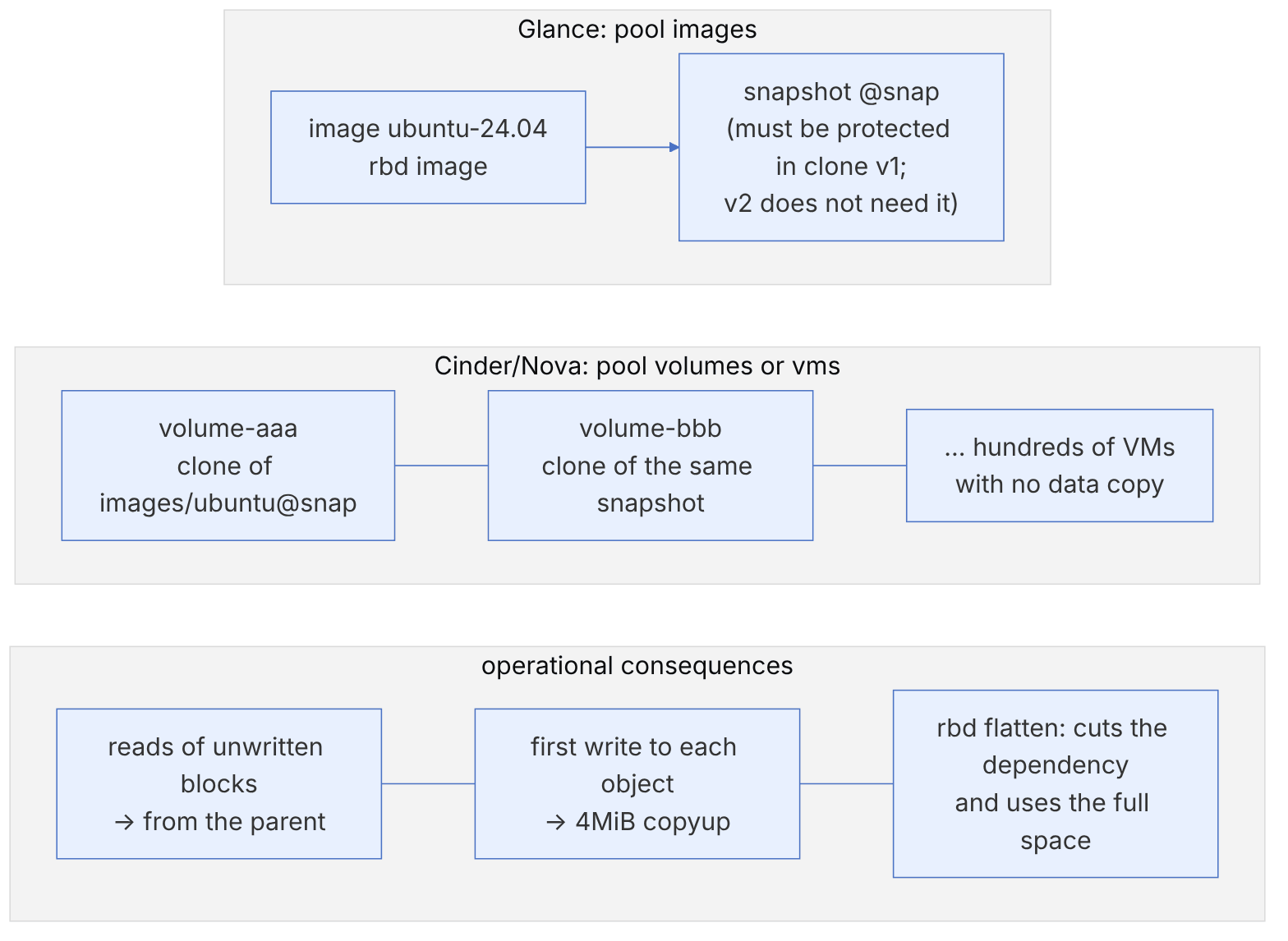
Glance keeps images as RBD images in the images pool and, after upload, creates a snapshot named snap of each image so that Cinder and Nova can clone from it.
# /etc/glance/glance-api.conf
[DEFAULT]
enabled_backends = ceph:rbd
show_image_direct_url = True

[glance_store]
default_backend = ceph

[ceph]
rbd_store_pool = images
rbd_store_user = glance
rbd_store_ceph_conf = /etc/ceph/ceph.conf
rbd_store_chunk_size = 8show_image_direct_url = True is essential for copy-on-write, because Cinder and Nova use this address (rbd://fsid/images/<id>/snap) to recognise that the image is on the same cluster and that they can create a clone. But this option exposes the image's storage location through the API. If the Glance API is reachable by end users, restrict access to this field with Glance policies, or use the multiple-locations feature and an internal endpoint.
3-5-2 Image format: always raw#
Copy-on-write only works when the image is stored in Glance in raw format. If you upload qcow2, Cinder and Nova have to download and convert it every time, and the main advantage is lost.
qemu-img convert -f qcow2 -O raw ubuntu-24.04.qcow2 ubuntu-24.04.raw
openstack image create ubuntu-24.04 \
  --disk-format raw --container-format bare \
  --file ubuntu-24.04.raw \
  --property hw_scsi_model=virtio-scsi --property hw_disk_bus=scsi \
  --property hw_qemu_guest_agent=yes --property os_require_quiesce=yes
rbd -p images ls -l --id glance
The properties above, which the Ceph documentation also recommends, mean: a virtio-scsi controller (which supports discard), attaching the disks to it, enabling the QEMU guest agent, and requesting a quiesce (fsfreeze) during snapshots for better consistency.
Recent Glance releases can do "image conversion" during import (an import plugin). With it enabled, a user can upload qcow2 and Glance itself converts it to raw and stores it in Ceph. For public clouds where end users upload images, this is easier than educating them.
3-5-3 Disabling Glance's local cache#
If Glance's management cache is enabled, images are also copied onto the Glance node's local disk, which is pointless with Ceph. In the pipeline configuration, change the flavor from keystone+cachemanagement back to keystone.
3-6 Configuring Cinder#
3-6-1 The RBD backend#
# /etc/cinder/cinder.conf
[DEFAULT]
enabled_backends = ceph
glance_api_version = 2

[ceph]
volume_driver = cinder.volume.drivers.rbd.RBDDriver
volume_backend_name = ceph
rbd_pool = volumes
rbd_ceph_conf = /etc/ceph/ceph.conf
rbd_flatten_volume_from_snapshot = false
rbd_max_clone_depth = 5
rbd_store_chunk_size = 4
rados_connect_timeout = -1
rbd_user = cinder
rbd_secret_uuid = 457eb676-33da-42ec-9a8c-9293d545c337| Option | Meaning | Recommendation |
|---|---|---|
| rbd_flatten_volume_from_snapshot | Should a volume created from a snapshot be flattened immediately? | false for speed; true if you want to delete the snapshot soon |
| rbd_max_clone_depth | Maximum depth of the clone chain before an automatic flatten | 5 (the default) is fine |
| rbd_store_chunk_size | Object size in megabytes | 4 (the same as the RBD default) |
| rbd_secret_uuid | The libvirt secret UUID | Must match the secret defined on the compute nodes |
| rbd_exclusive_cinder_pool | The pool is used only by Cinder | true for faster capacity calculation on large pools |
3-6-2 Volume types and multiple backends#
In production you usually have more than one storage class, for example one pool on NVMe and one on HDD. Each becomes a separate backend in Cinder and a volume type:
[DEFAULT]
enabled_backends = ceph-nvme,ceph-hdd

[ceph-nvme]
volume_driver = cinder.volume.drivers.rbd.RBDDriver
volume_backend_name = ceph-nvme
rbd_pool = volumes-nvme
rbd_user = cinder
rbd_secret_uuid = 457eb676-33da-42ec-9a8c-9293d545c337

[ceph-hdd]
volume_driver = cinder.volume.drivers.rbd.RBDDriver
volume_backend_name = ceph-hdd
rbd_pool = volumes-hdd
rbd_user = cinder
rbd_secret_uuid = 457eb676-33da-42ec-9a8c-9293d545c337openstack volume type create fast
openstack volume type set fast --property volume_backend_name=ceph-nvme
openstack volume type create capacity
openstack volume type set capacity --property volume_backend_name=ceph-hddRemember that the permissions of client.cinder must also cover the new pools (ceph auth caps). The NVMe pool is placed on the right disks with a CRUSH rule based on device class (ceph osd crush rule create-replicated nvme-rule default host nvme) (chapter 8).
For clusters with thousands of volumes, consider Cinder active-active and the backend_host option (or cluster in recent releases), so that several cinder-volume services can manage one Ceph backend and the failure of one does not stop volume management.
3-7 Configuring Cinder Backup#
Volume backups go to a separate pool (or preferably another Ceph cluster). The Ceph driver for Cinder Backup supports incremental backup: if the source and target are both Ceph, only the diff of changes is transferred with rbd export-diff and import-diff.
[DEFAULT]
backup_driver = cinder.backup.drivers.ceph.CephBackupDriver
backup_ceph_conf = /etc/ceph/ceph.conf
backup_ceph_user = cinder-backup
backup_ceph_chunk_size = 134217728
backup_ceph_pool = backups
backup_ceph_stripe_unit = 0
backup_ceph_stripe_count = 0
restore_discard_excess_bytes = trueA backup kept on the same Ceph cluster gives no protection against the failure of the cluster itself (an administrative mistake, a software bug, ransomware that has reached the admin credentials). Do not forget the 3-2-1 rule: for critical data, send backups with backup_ceph_conf to another cluster (preferably on another site).
3-8 Configuring Nova#
3-8-1 Booting directly from Ceph (ephemeral on RBD)#
By default Nova creates the machines' ephemeral disks on the compute node's local disk. With the following configuration, each VM's root disk becomes an image in the vms pool, cloned from the Glance image:
# /etc/nova/nova.conf on every compute node
[libvirt]
images_type = rbd
images_rbd_pool = vms
images_rbd_ceph_conf = /etc/ceph/ceph.conf
rbd_user = cinder
rbd_secret_uuid = 457eb676-33da-42ec-9a8c-9293d545c337
disk_cachemodes = "network=writeback"
hw_disk_discard = unmap
live_migration_permit_auto_converge = true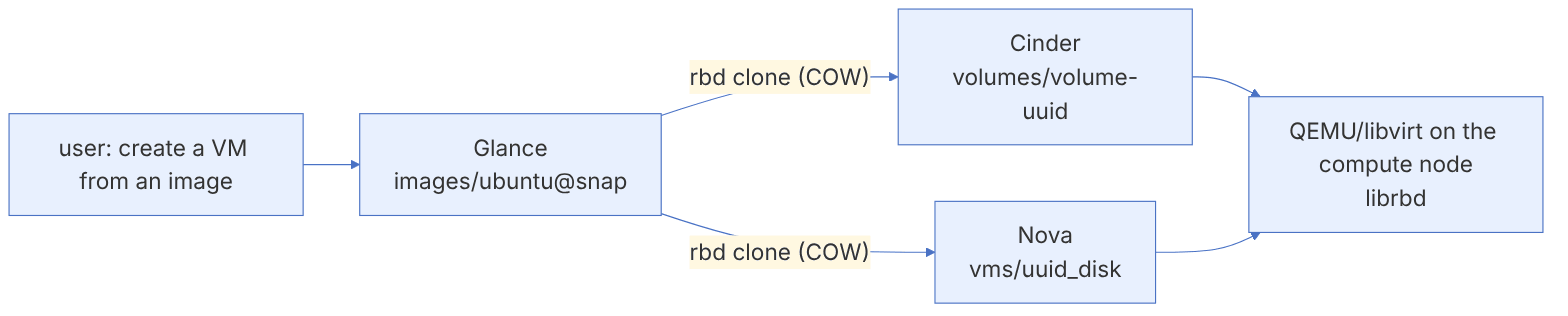
disk_cachemodes = "network=writeback" sets the cache mode of network disks in QEMU to writeback so that the librbd client cache is enabled. This is safe, because librbd honours the guest operating system's flushes, and the option rbd cache writethrough until flush (default true) guarantees that the cache stays in writethrough mode until the guest has shown that it sends flushes. hw_disk_discard = unmap passes the guest's discards to Ceph so that deleted space is really freed.
3-8-2 Attaching Cinder volumes#
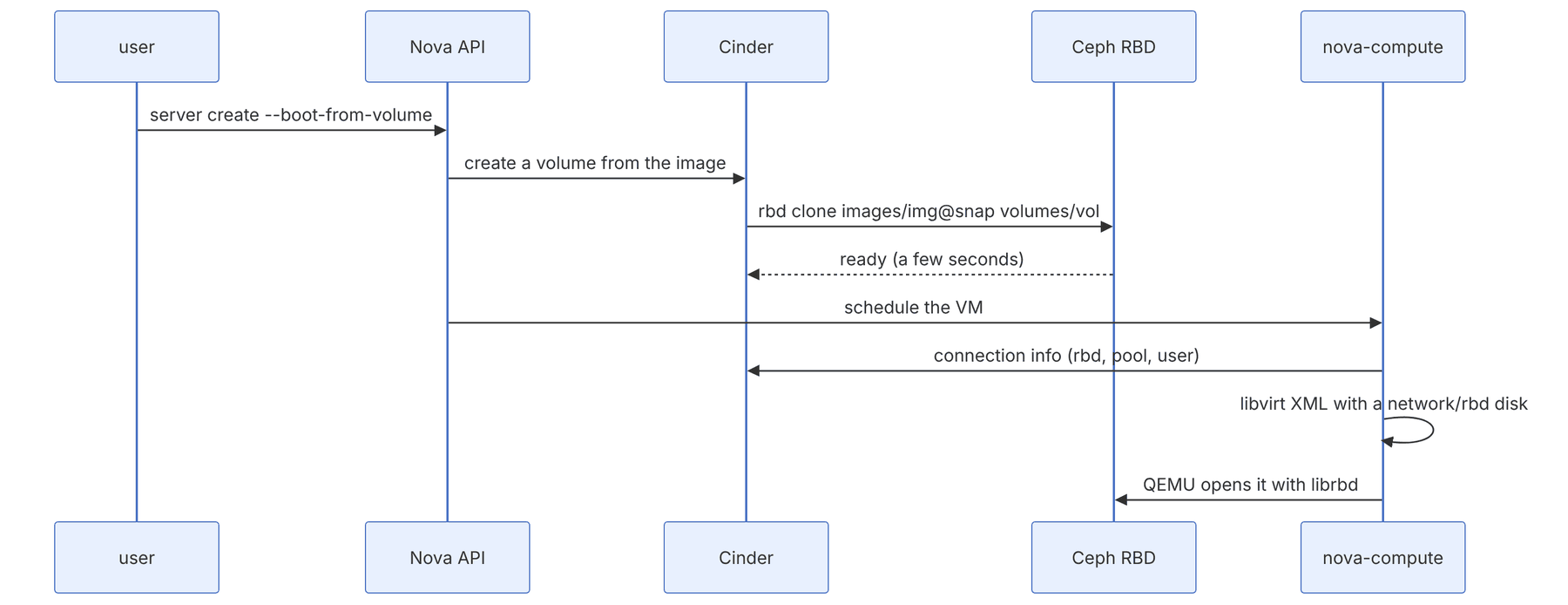
Attaching volumes needs no further configuration in Nova, provided that the libvirt secret is defined and the client.cinder keyring is on the compute node. Nova gets the connection information (the rbd protocol, pool, image name, user and secret UUID) from Cinder and defines a disk of type network with the rbd protocol in the domain XML.
3-8-3 Admin socket and logs for virtual machines#
The Ceph documentation suggests enabling an admin socket and a log file for the QEMU clients on each hypervisor. This is very valuable when troubleshooting the performance of a particular VM:
# /etc/ceph/ceph.conf on the compute nodes
[client]
rbd cache = true
rbd cache writethrough until flush = true
admin socket = /var/run/ceph/guests/$cluster-$type.$id.$pid.$cctid.asok
log file = /var/log/qemu/qemu-guest-$pid.log
rbd concurrent management ops = 20sudo mkdir -p /var/run/ceph/guests/ /var/log/qemu/
sudo chown qemu:libvirt /var/run/ceph/guests /var/log/qemu/ # the user and group names depend on the distribution
# After restarting the VM:
sudo ceph --admin-daemon /var/run/ceph/guests/ceph-client.cinder.<pid>.<cctid>.asok perf dump3-9 From the code: clone, copy-on-write and copyup in librbd#
3-9-1 Why this section matters for OpenStack#
When Glance and Cinder/Nova are both on Ceph, creating a new VM does not mean copying the image. The service takes a snapshot of the Glance image and creates a layered clone of it (the layering feature). A clone is only metadata: a new header with a parent pointer to (pool, image id, snap id) and an overlap. The real cost is paid later and gradually, on the first write to each object, with an operation called copyup.
3-9-2 The CopyupRequest state machine#
In src/librbd/io/CopyupRequest.cc the functions run in this order: send → read_from_parent → (deep_copy if needed) → update_object_maps → copyup → finish. Several concurrent write requests to one object are attached to one shared copyup with append_request, so that the parent's data is read only once.
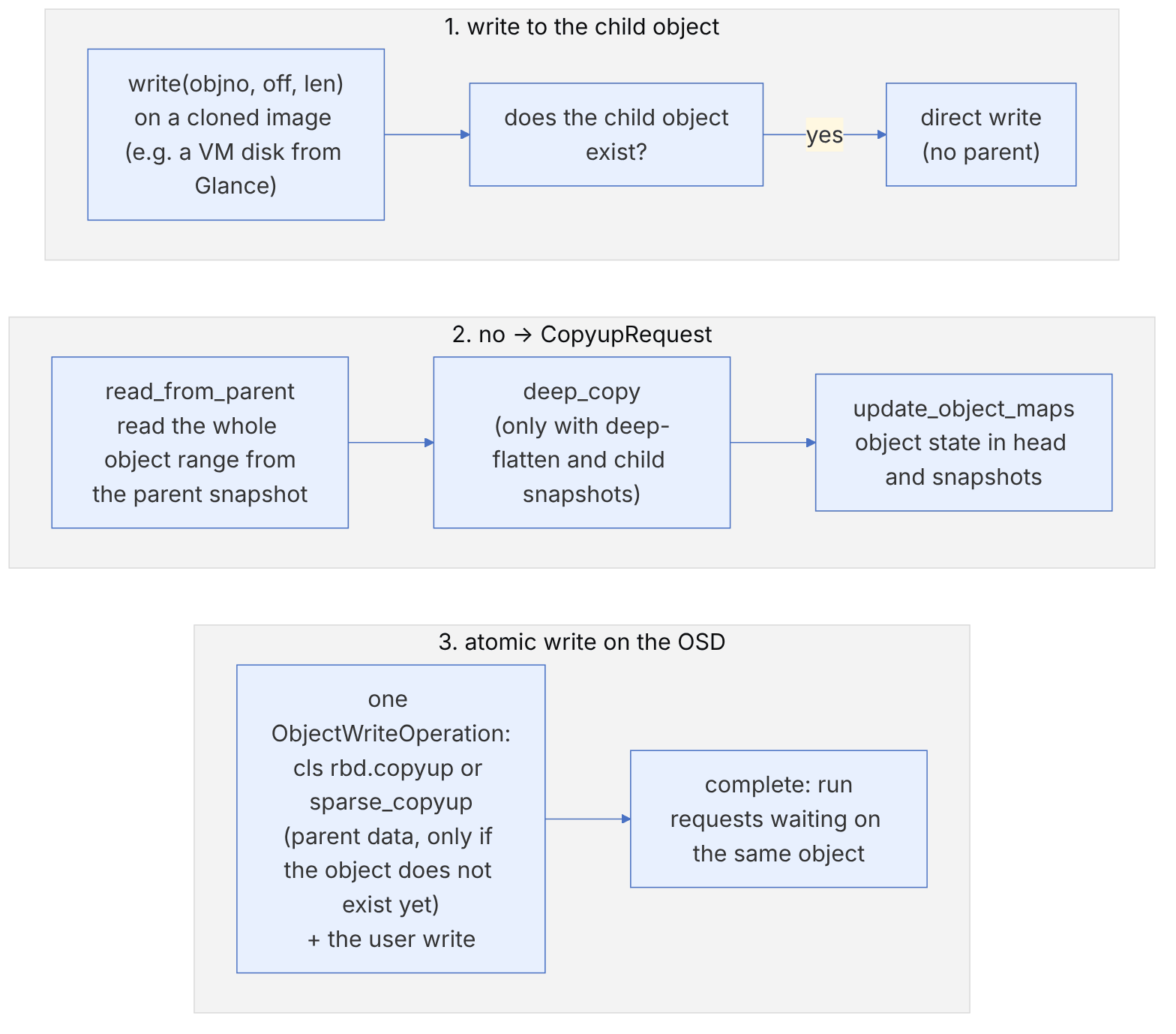
// from ceph/ceph, LGPL — src/librbd/io/CopyupRequest.cc, copyup() (excerpt)
    cls_client::sparse_copyup(op, m_copyup_extent_map, m_copyup_data);
...
cls_client::copyup(op, thick_bl);pseudocode: the clone read/write path (this book's summary)
read(objno, extent):
r = osd_read(child_obj)
if r == -ENOENT and extent within parent_overlap:
r = read parent image @snap at same image offset
if rbd_clone_copy_on_read: schedule copyup(objno) # default false
return r
write(objno, extent, data):
if child object may not exist (object map != EXISTS) and within overlap:
copyup = get_or_create CopyupRequest(objno); copyup.append(this)
else: osd_write(child_obj, data)| Option (rbd.yaml.in) | Default | Effect |
|---|---|---|
| rbd_default_clone_format | auto | v2 if min_compat_client is at least mimic |
| rbd_clone_copy_on_read | false | copyup on read (warms the child at the cost of writes) |
| rbd_parent_cache_enabled | false | A read-only cache of the parent on the host (immutable object cache) |
| rbd_sparse_read_threshold_bytes | 64_K | Threshold for using sparse-read |
The "copyup storm": after hundreds of VMs boot at the same time from one image, every small write (such as logs or cloud-init) to an untouched object causes a 4 MiB read and write. Symptoms: a sudden rise in write bandwidth with low IOPS in ceph osd pool stats. Remedies: smaller objects for base images, gradual rbd flatten of write-heavy VMs, or limiting the boot rate.
Inspecting the parent chain:
rbd info volumes/volume-aaa | grep -A3 parent
rbd children images/ubuntu@snap           # all children (v2 includes other pools)
rbd du volumes/volume-aaa                 # real usage after copyups
rbd flatten volumes/volume-aaa            # a long operation; reports progress
ceph osd get-require-min-compat-client3-10 librbd beneath OpenStack, by the numbers#
Every disk that Nova, Cinder or Glance creates on Ceph is ultimately an image in librbd. This section follows four librbd algorithms that directly affect the behaviour of OpenStack virtual machines, with code and numbers: mapping disk bytes to objects, the object map, computing the difference between snapshots (the basis of cinder-backup's incremental backups) and the QoS limiter. All code references are to the main branch of the Ceph repository as reviewed in November 2026. The numbers in the examples were recomputed with Python re-implementations of the same functions.
3-10-1 From disk offset to object name#
Source in code: src/osdc/Striper.cc :: Striper::file_to_extents; src/librbd/ImageCtx.cc :: ImageCtx::init_layout
Complexity: O(len / stripe_unit) pieces per request; O(1) per piece
pseudocode
os = object_size ; su = stripe_unit ; sc = stripe_count
if sc == 1: su = os                      # the RBD default: each object is one "block"
spo = os / su                             # stripes per object
cur = off ; left = len
while left > 0:
    blockno   = cur / su
    stripeno  = blockno / sc ; stripepos = blockno mod sc
    objectset = stripeno / spo
    objectno  = objectset × sc + stripepos
    x_off = (stripeno mod spo) × su + cur mod su
    x_len = min(left, su − cur mod su)
    add to the extent of object objectno (buffer_extents keeps the order of the user buffer)
    cur += x_len ; left −= x_len
oid(objectno) = object_prefix + "." + hex16(objectno)   # format 2 image: rbd_data.<id>.%016llx
Numeric example. Consider an image with order = 22 (4 MiB objects) and the default stripe (stripe_count = 1). The guest VM writes 1 MiB at offset 10.5 MiB. Because sc = 1, su becomes 4 MiB. blockno = ⌊10.5 / 4⌋ = 2, so objectno = 2 and the offset inside the object is 10.5 − 8 = 2.5 MiB (0x280000). The whole write becomes one extent on object rbd_data.<id>.0000000000000002.
Now create the same image with "fancy striping" (--stripe-unit 65536 --stripe-count 4, which requires the STRIPINGV2 feature). su = 64 KiB and spo = 4 MiB / 64 KiB = 64. Offset 10.5 MiB means blockno = 168, stripeno = 42, stripepos = 0, objectset = ⌊42 / 64⌋ = 0 and objectno = 0. The 1 MiB write breaks into 16 pieces of 64 KiB (blockno 168 to 183). The pieces go in turn to objects 0, 1, 2 and 3: piece 0 to object 0, piece 1 to object 1, and so on. Each object receives four consecutive pieces in the range 0x2a0000 to 0x2e0000 (stripeno 42 to 45 times 64 KiB). The practical result is that one large sequential write engages four PGs, and probably four primary OSDs, at the same time, while each random 4 KiB request still goes to one object. Neither QEMU nor Nova sees any of this. Striping is set only when the image is created and cannot be changed later.
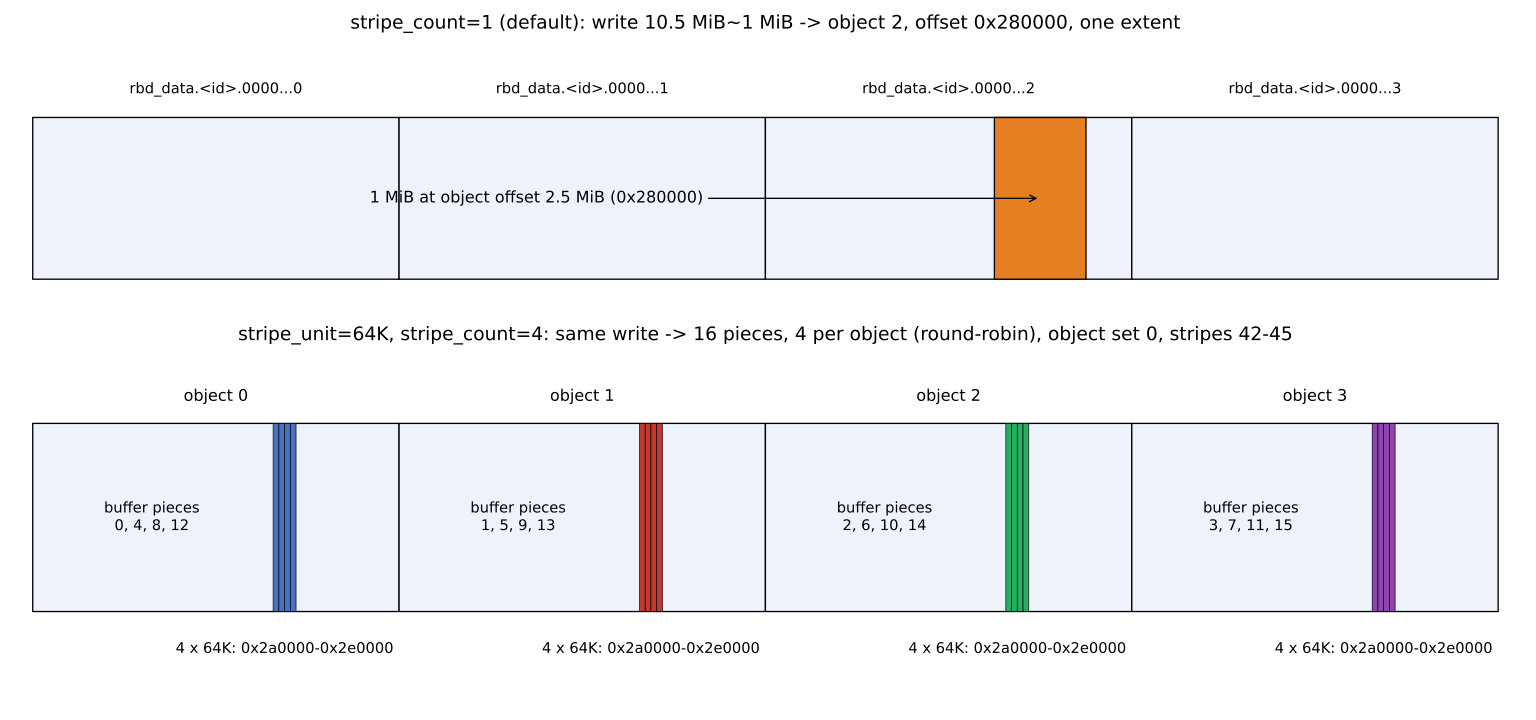
The chart above makes a practical point clear. When a volume is backed up or migrated with rbd export, its performance depends on the number of objects read at the same time. With the default stripe, librbd relies on rbd_concurrent_management_ops and several concurrent requests for parallelism. With fancy striping, even a single large request engages several objects at once. For OpenStack VMs the default is usually better, because guest workloads are small and random.
3-10-2 The object map: two bits per object#
Source in code: src/include/rbd/object_map_types.h; src/librbd/ObjectMap.cc :: ObjectMap::is_compatible; src/cls/rbd/cls_rbd_types.h :: MAX_OBJECT_MAP_OBJECT_COUNT; src/librbd/io/ObjectRequest.cc :: AbstractObjectWriteRequest; src/librbd/object_map/SnapshotCreateRequest.cc :: update_object_map
Complexity: Memory 2·N bits for N objects; each update O(1) plus one cls call on the rbd_object_map object
pseudocode
N = ceil(image_size / object_size)
if N > 256000000: object map incompatible ⇒ the object-map/fast-diff feature cannot be used
map = BitVector<2>[N]  (00 NONEXISTENT, 01 EXISTS, 10 PENDING, 11 EXISTS_CLEAN)
write(objectno):  if map[o] ≠ EXISTS: first map[o] = EXISTS (before writing the data)
discard/remove(o): map[o] = PENDING ; remove the object ; then map[o] = NONEXISTENT
snap create:      copy the map to rbd_object_map.<id>.<snapid> ; in HEAD every EXISTS ⇒ EXISTS_CLEAN
read(o):          if map[o] == NONEXISTENT ⇒ no trip to the OSD (or straight to the parent)
Numeric example. A one-terabyte volume with 4 MiB objects has objects. Its object map is 262144 × 2 / 8 = 65536 bytes, that is 64 KiB, and fits easily in any client's memory. The limit of 256000000 objects with 4 MiB objects means a maximum image of 256000000 × 4 MiB ≈ 976.6 TiB. With 64 KiB objects the same limit drops to about 15.3 TiB. The map in that case is 256000000 × 2 / 8 = 64000000 bytes (about 61 MiB). Anyone who creates an image with order = 16 for a database should know that above this size they lose the object map, and therefore fast-diff and a fast rbd du.
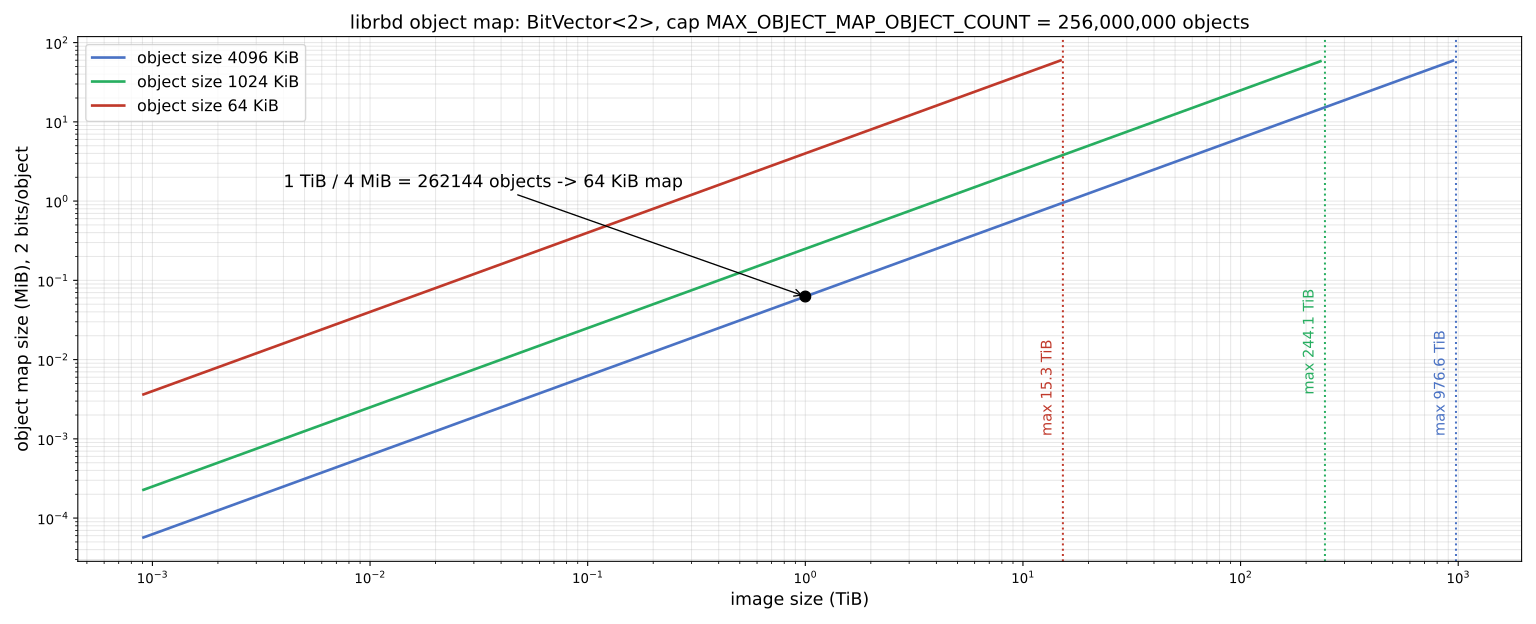

The "map first, data second" order has a cost: the first write to each object adds an extra round trip to the OSD holding rbd_object_map.<image id>. This cost is paid only once per object, after which the cell is EXISTS. After each snapshot the cells become CLEAN, and the first write to each object again carries a map update. For this reason very frequent snapshots (for example every minute for snapshot-based mirroring) raise write latency slightly on write-heavy volumes. The object map only works with the exclusive lock, because only one client may update the map.
3-10-3 The difference between snapshots (fast-diff)#
Source in code: src/librbd/object_map/DiffRequest.cc :: DiffRequest::handle_load_object_map
Complexity: O(N × S) for N objects and S object maps between the two snapshots; no data reads
pseudocode
# for diff-iterate from snap_start to snap_end
first map (snap_start):  NONEXISTENT ⇒ HOLE , otherwise DATA (PENDING ⇒ DATA_UPDATED)
for each later map m and each object o:
    HOLE:          if m[o] ≠ NONEXISTENT and this is the last map ⇒ DATA_UPDATED (stays HOLE in intermediate maps)
    DATA:          NONEXISTENT ⇒ HOLE_UPDATED ; EXISTS or PENDING ⇒ DATA_UPDATED ; EXISTS_CLEAN ⇒ unchanged
    HOLE_UPDATED:  if m[o] ≠ NONEXISTENT ⇒ DATA_UPDATED
    DATA_UPDATED:  NONEXISTENT ⇒ HOLE_UPDATED
output: *_UPDATED objects have changed ; HOLE_UPDATED means "report as zero/removed"
Numeric example. We have six objects o0 to o5 and three maps: snap1, snap2 and HEAD. cinder-backup wants to make an incremental backup from snap1 to the current state (the same thing rbd export-diff --from-snap snap1 does).
- o0: EXISTS in snap1, EXISTS_CLEAN in snap2 and HEAD. It starts as DATA and stays DATA. Unchanged and not transferred.
- o1: written before snap2 (EXISTS in snap2). It goes to DATA_UPDATED in snap2 and stays there. Transferred.
- o2: does not exist in snap1 (HOLE). Created in snap2, but because snap2 is intermediate it stays HOLE. In HEAD (the last map) it goes to DATA_UPDATED. Transferred.
- o3: removed in snap2 and goes to HOLE_UPDATED. Reported as a "zero region".
- o4: exists nowhere and is HOLE. No data is transferred.
- o5: written again after snap2 (EXISTS in HEAD). It goes from DATA to DATA_UPDATED. Transferred.
Of six objects, three transfer data and one transfers a zero marker. No object was read for comparison: the whole diff came from three small maps. For a one-terabyte volume this means walking 3 × 64 KiB instead of reading a terabyte.
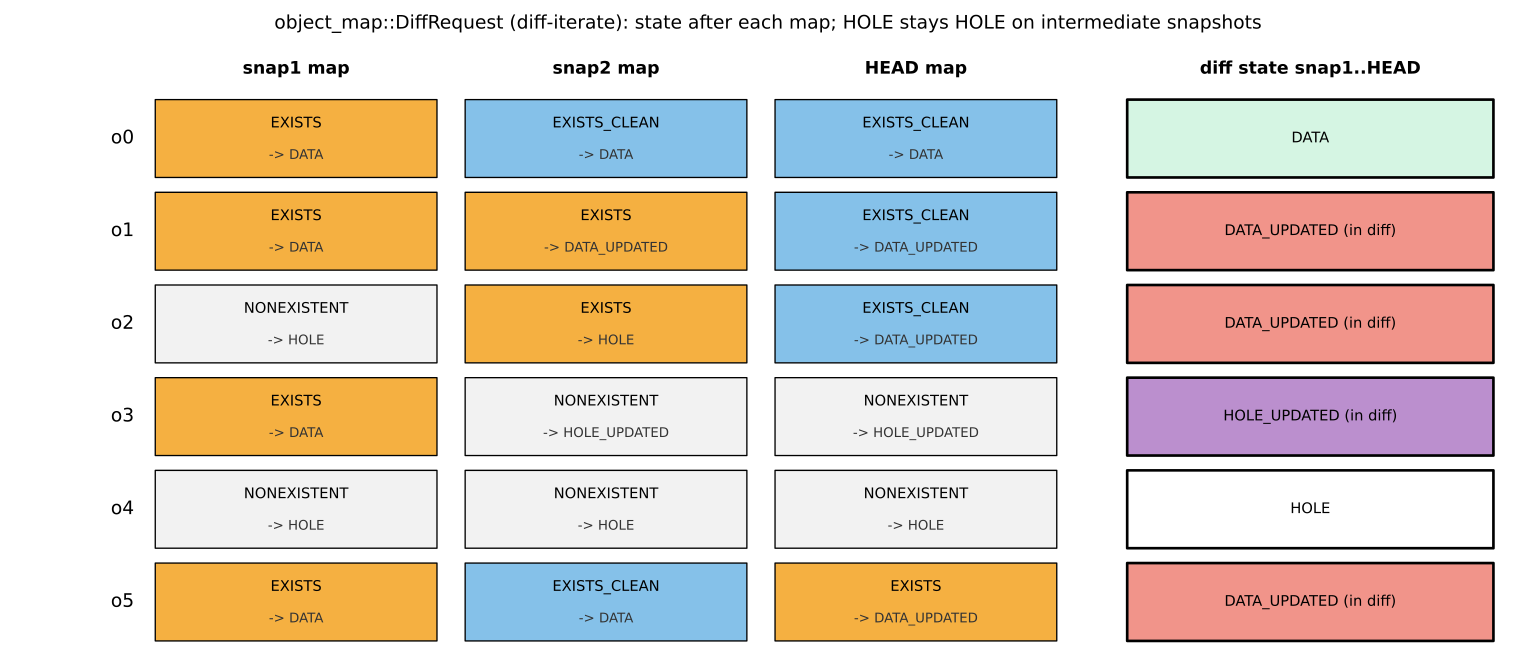
This algorithm relies on an important assumption: the object map must be valid. If a client fails without releasing its lock, librbd may set the "object map invalid" flag. In that case diff falls back to a full walk (list-snaps on every object), which is much slower. rbd object-map check and rbd object-map rebuild are there for rebuilding it. In practice, if cinder-backup's incremental backups suddenly become slow, the first thing to check is this flag in rbd info.
3-10-4 Client-side QoS: the librbd token bucket#
Source in code: src/common/Throttle.cc :: TokenBucketThrottle::set_limit, tokens_this_tick, add_tokens, Bucket::put, Bucket::get; src/librbd/io/QosImageDispatch.cc
Complexity: O(1) per tick; O(b) to release b waiting requests
pseudocode
set_limit(avg, burst, burst_seconds):
    tick_ms = max(1000 / avg, rbd_qos_schedule_tick_min = 50)
    ticks_per_s = 1000 / tick_ms
    max = (burst == 0) ? avg : burst ; capacity = max × max(burst_seconds, 1) ; remain = capacity
each tick:
    tokens = ⌊i × avg / ticks_per_s⌋ − ⌊(i−1) × avg / ticks_per_s⌋     # i = 1..ticks_per_s
    remain = min(capacity, remain + tokens)
    inc = tokens × (max / avg)  if max > avg , otherwise tokens         # refills faster during a burst
    available = min(available + inc, min(remain, max))
    release waiting requests in arrival order while available is enough
get(c): subtract from available and remain ; if not enough, the request stays queued
Numeric example. Consider the limit rbd_qos_iops_limit = 30. tick = max(1000 / 30 = 33, 50) = 50 ms, so there are 20 ticks per second. The tokens per tick have the form ⌊1.5 i⌋ − ⌊1.5 (i−1)⌋, that is 1, 2, 1, 2 and so on. Their sum is exactly 30. For avg = 100, each tick gets exactly 5 tokens. For avg = 7, the tick is ⌊1000 / 7⌋ = 142 ms and there are ⌊1000 / 142⌋ = 7 ticks per second, each with one token.
Now look at bursts: avg = 100, burst = 300 and burst_seconds = 2. So max = 300 and capacity = 600. The burst factor is 300 / 100 = 3, and available rises by 15 units per tick while remain refills by only 5 units. A saturated client (one that always has a waiting request) gets this many IOs in successive seconds in our simulation: 300, 300, 295, 100, 100. remain drops by a net 10 units per tick and runs out after about 60 ticks (three seconds). Then the rate returns to the average. For a client that has been idle for three seconds, available has filled up to the cap of 300, and its first second of activity gets 585 IOs: 300 from the reserve and 15 in each of the next 19 ticks. Note that burst_seconds = 2 does not mean "exactly two seconds of burst". Because the bucket also refills during the burst, the burst lasts somewhat longer.
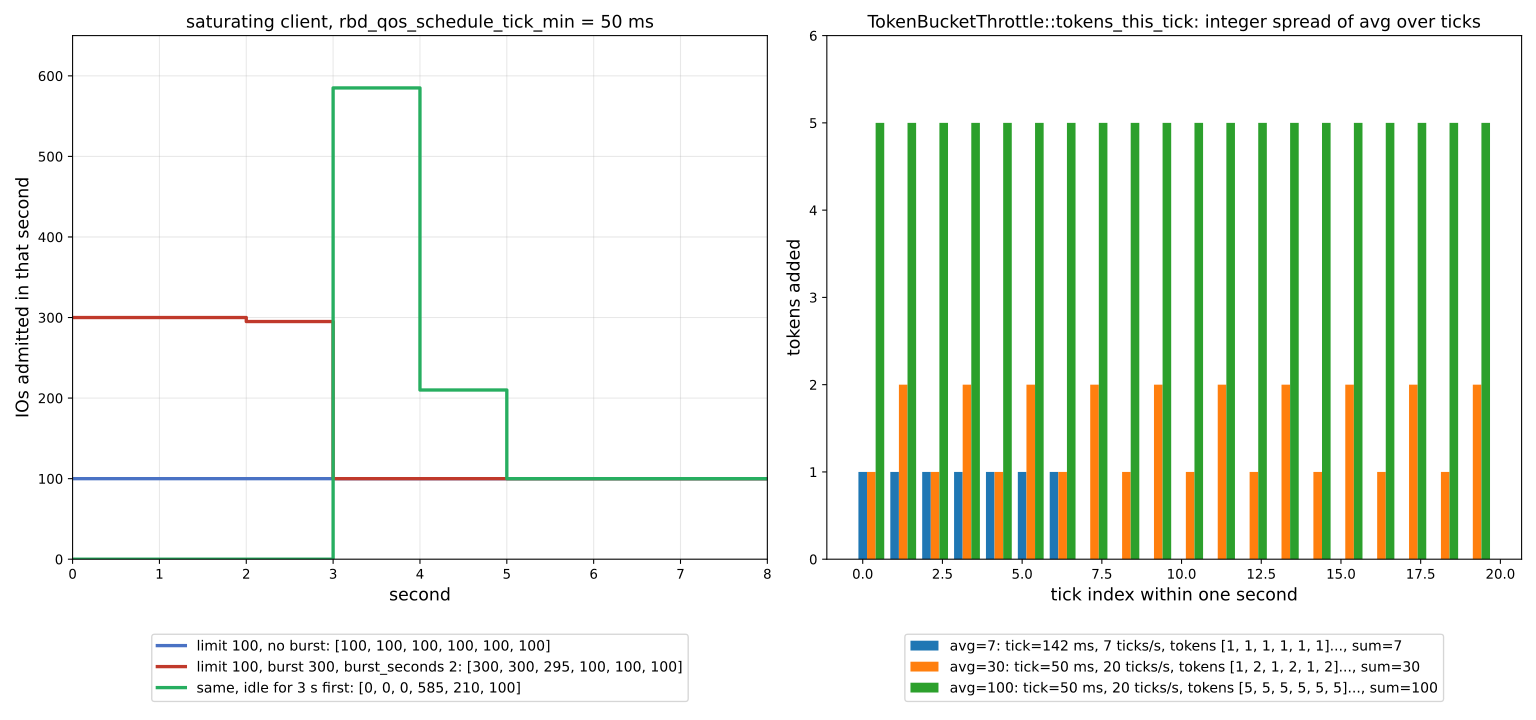
In OpenStack there are two ways to limit a volume's IO. Cinder's "front-end" QoS hands the limit to libvirt (<iotune>), and QEMU applies it before librbd. librbd-side QoS is set with the rbd_qos_* options on the image or pool (rbd config image set vol rbd_qos_iops_limit 300) and runs inside the QEMU process in the QosImageDispatch layer. The first is managed by Cinder and moves with the VM when it migrates. The second is stored in the image's own metadata and applies to every client that opens the image (even rbd bench). Both are client-side and give no global protection to the OSDs. For that, mClock in the OSD (chapter 21) is needed.
3-11 End-to-end test#
3-11-1 Booting a machine from a volume#
openstack volume create --image ubuntu-24.04 --size 20 --type fast vol-web01
openstack volume show vol-web01 -c status
rbd -p volumes ls -l --id cinder
rbd info volumes/volume-<uuid> --id cinder | grep parent
openstack server create --flavor m1.small --network private \
  --volume vol-web01 web01
openstack server show web01 -c status
If copy-on-write works correctly, creating the 20 GB volume takes a few seconds and the output of rbd info shows a parent in the images pool.
3-11-2 Attaching an extra volume#
openstack volume create --size 50 data01
openstack server add volume web01 data01
# Inside the VM
lsblk
3-11-3 Checking from the compute side#
sudo virsh list
sudo virsh dumpxml instance-0000000a | grep -A6 "protocol='rbd'"
In the output you should see a <source protocol='rbd' name='volumes/volume-...'> with the list of MONs and an <auth username='cinder'> referring to the secret.
Some common problems and their symptoms:
Volume creation is slow and the compute node's disk fills up: the image is in qcow2 format or show_image_direct_url is off; CoW does not work and Cinder downloads the image.
The VM does not boot and the libvirt log has the error error connecting: Permission denied: the secret UUID does not match rbd_secret_uuid, or the key inside the secret is old.
Attach works but live migration fails: the secret is not defined on the destination compute node or the UUID differs.
Deleting a volume stops with "has dependent snapshots" or "image has children": the volume was cloned from a parent snapshot or image, and the chain must first be flattened or removed. Look at rbd children.
The capacity reported in Cinder does not match ceph df: Cinder calculates capacity from MAX AVAIL and the pool's share, and it is adjusted by thin provisioning and the max_over_subscription_ratio ratio.
3-12 Beyond block: Manila and the object API#
3-12-1 Manila with CephFS#
Manila is OpenStack's file share service and has two drivers for CephFS:
- Native CephFS: guests connect directly to the cluster with a CephFS client (kernel or FUSE). The fastest path, but the Ceph network must be reachable from the VMs and the guests must be trusted.
- CephFS through NFS: Manila exports shares through Ceph's NFS module (NFS-Ganesha deployed with cephadm). The guest sees only NFS and network isolation is preserved. In recent releases Manila works with the
nfsmodule in the MGR.
ceph fs volume create manila-fs
ceph auth get-or-create client.manila mon 'allow r' mgr 'allow rw'
The permission mgr 'allow rw' is enough for Manila, because Manila creates subvolumes and their users through the volumes interface in the MGR (ceph fs subvolume ...) (chapter 6).
3-12-2 Swift and S3#
Many OpenStack clouds use RGW instead of Swift and register it in Keystone as the endpoint of the object-store service. RGW provides both a Swift-compatible and an S3-compatible API and can accept Keystone tokens. The details of this integration are in chapter 4.
3-13 Production notes#
3-13-1 Performance#
- A separate storage network for compute nodes: separate librbd traffic from tenant traffic. Each compute node's bandwidth must match the number of VMs and their needs.
- librbd cache and readahead:
disk_cachemodes=network=writebackenables the cache. For sequential workloads, client readahead (rbd_readahead_*) also has an effect. - QoS: Cinder can define front-end QoS (applied in QEMU):
openstack volume qos create --consumer front-end --property total_iops_sec=3000 iops3k. This method works with any backend and is more controllable than librbd QoS for a multi-tenant cloud. - Spreading pools over device classes: database volumes on NVMe, archives on HDD.
3-13-2 Operations#
- Upgrade Ceph and OpenStack separately. Bring the librbd clients on the compute nodes to a compatible version. Newer clients work with an older cluster and vice versa across a range of several releases, but check
ceph featuresbefore turning on new features (such asrequire-min-compat-client). - Cleaning up orphaned snapshots: incomplete deletion in OpenStack sometimes leaves images or snapshots behind in Ceph. Periodically compare the list of images in the pools with the list of OpenStack volumes and instances.
- rbd-mirror for DR: send sensitive volumes to a second site with snapshot-mode mirroring. Since Queens, Cinder supports replication in the RBD driver (
replication_device) and backend-level failover.
In many real clouds a compute node that mistakenly lacked images_type=rbd has left some VMs on local disk. When that compute node fails, those VMs are lost with their data and evacuate does not work. Keep the configuration of all compute nodes identical with a configuration management tool, and test its correctness with openstack server show (the OS-EXT-SRV-ATTR field) and by inspecting the domain XML.
3-13-3 Security#
- Each service has its own Ceph user with the least privilege;
client.adminis never placed on OpenStack nodes. - If you use volume encryption in Cinder (with Barbican and LUKS), encryption happens on the compute side (dm-crypt, or LUKS in librbd in recent releases), and Ceph sees encrypted data.
- msgr2 in
securemode (ms_client_mode = secure) encrypts the traffic between compute nodes and Ceph; it costs CPU, so measure it before enabling it.
3-14 Supplementary and up to date#
- Ceph CSI and Kubernetes: today many OpenStack-based clouds also serve Kubernetes on the same Ceph. Ceph CSI (the RBD and CephFS drivers) follows the same pattern of a dedicated user and a separate pool.
- Glance with multiple stores: Glance supports several backends at once (
enabled_backends), for example one Ceph cluster per availability zone, and can copy an image between stores (copy-image). This matters for multi-site clouds where each site has an independent Ceph. - The NVMe-oF gateway: for mixed environments that also have VMware next to OpenStack, the NVMe-oF gateway is the way to serve RBD to ESXi.
- Deployment tools: Packstack and TripleO have been retired; Kolla-Ansible and OpenStack-Ansible are the most common open-source options today.
3-15 Summary and review#
3-15-1 Chapter summary#
- Ceph meets all of OpenStack's storage needs from one cluster: Glance, Cinder, Backup, Nova, Manila and Swift/S3.
- Each service has its own pool and Ceph user;
client.cinderis read-only on images. - End-to-end copy-on-write requires raw-format images and
show_image_direct_url = True. - QEMU gets the Ceph key from a secret in libvirt, and its UUID must be the same on all compute nodes and equal to
rbd_secret_uuid. images_type = rbdmoves ephemeral disks to Ceph as well and simplifies live migration and evacuate.- Manage Ceph outside OpenStack with cephadm; OpenStack should only be a client.
3-15-2 Common mistakes#
- Uploading images in qcow2 format and losing CoW.
- A different secret UUID on compute nodes, and failed live migrations.
- Using one Ceph user with broad permissions for all services.
- Keeping backups on the same cluster.
- Compute nodes that quietly still use local disk.
3-15-3 Hands-on exercise#
- 1. Create the four pools and three users of this chapter and check the permissions with
ceph auth get. Show thatclient.cindercannot write to theimagespool (rbd --id cinder create images/test --size 1G). - 2. Build a single-node OpenStack with DevStack or Kolla-Ansible and connect Glance, Cinder and Nova to Ceph.
- 3. Upload an image once in qcow2 format and once as raw, and compare the time to create a 20 GB volume from each.
- 4. Create one volume type for NVMe and one for HDD, and show with
rbd lsthat volumes are created in the right pool. - 5. Enable the admin socket of the QEMU client and look at a VM's read and write latency with
perf dump.
3-15-4 Review questions#
- 1. What are the three main reasons that made Ceph a popular backend for OpenStack?
- 2. Why does
client.cinderhave only read permission on theimagespool? - 3. Which two conditions are needed for copy-on-write between Glance and Cinder?
- 4. What role does the secret in libvirt play, and why must its UUID be the same on all compute nodes?
- 5. What does the
images_type = rbdoption change in Nova, and what advantage does it bring for evacuate? - 6. Which trade-off do
rbd_flatten_volume_from_snapshotandrbd_max_clone_depthcontrol? - 7. Why is a backup on the same Ceph cluster not enough?
- 8. How do the two Manila drivers for CephFS differ?
- 9. Why is
disk_cachemodes = "network=writeback"safe? - 10. Why is it better to manage Ceph independently of the OpenStack deployment tool?
Answers to these questions are in Appendix E: Answers to Review Questions. Answers to this chapter's questions →
3-15-5 Sources for this chapter#
- Ceph documentation — Block Devices and OpenStack
https://docs.ceph.com/en/latest/rbd/rbd-openstack/ - Ceph documentation — librbd configuration reference
https://docs.ceph.com/en/latest/rbd/rbd-config-ref/ - Ceph documentation — User management
https://docs.ceph.com/en/latest/rados/operations/user-management/ - Cinder documentation — The Ceph RBD driver
https://docs.openstack.org/cinder/latest/configuration/block-storage/drivers/ceph-rbd-volume-driver.html - Glance documentation — Configuring backends
https://docs.openstack.org/glance/latest/configuration/configuring.html - Manila documentation — The CephFS driver
https://docs.openstack.org/manila/latest/configuration/shared-file-systems/drivers/cephfs_driver.html - Kolla-Ansible documentation — External Ceph integration
https://docs.openstack.org/kolla-ansible/latest/reference/storage/external-ceph-guide.html - libvirt documentation — Secrets
https://libvirt.org/formatsecret.html