Programming with librados
TL;DR this chapter in a few lines
- librados is the native RADOS API (C, C++, Python and community bindings): connect, open an IoCtx on a pool and read or write objects, xattrs and omap.
- Operations on a single object are atomic: combine writes, xattrs, omap updates and guards in one operation.
- watch/notify gives a light notification channel on an object; RBD uses it to tell clients about image changes.
- The Objecter on the client computes targets, keeps per-OSD sessions, resends ops on map changes and limits in-flight work; respect
osd_max_object_sizeand stripe large data.
14-1 Before you start#
14-1-1 What questions does this chapter answer?#
RBD, RGW and CephFS are all ultimately clients of librados: the library that gives direct access to RADOS objects. When none of the ready-made interfaces fits your need (for example a message queue, a distributed lock system or a key-value store with atomic guarantees), you can program directly on top of RADOS. This chapter looks at librados from three angles: the API, practical patterns (atomic operations, watch/notify) and the inside of the library (the Objecter).
- What is librados, and where does it sit in the stack?
- How do connections, IoCtx, namespaces and basic operations work?
- What guarantees do compound and atomic operations give?
- How does watch/notify work, and what is it good for?
- How does the Objecter compute each request's target and handle map changes?
- What pitfalls are there in RADOS programming?
14-2 What is librados?#
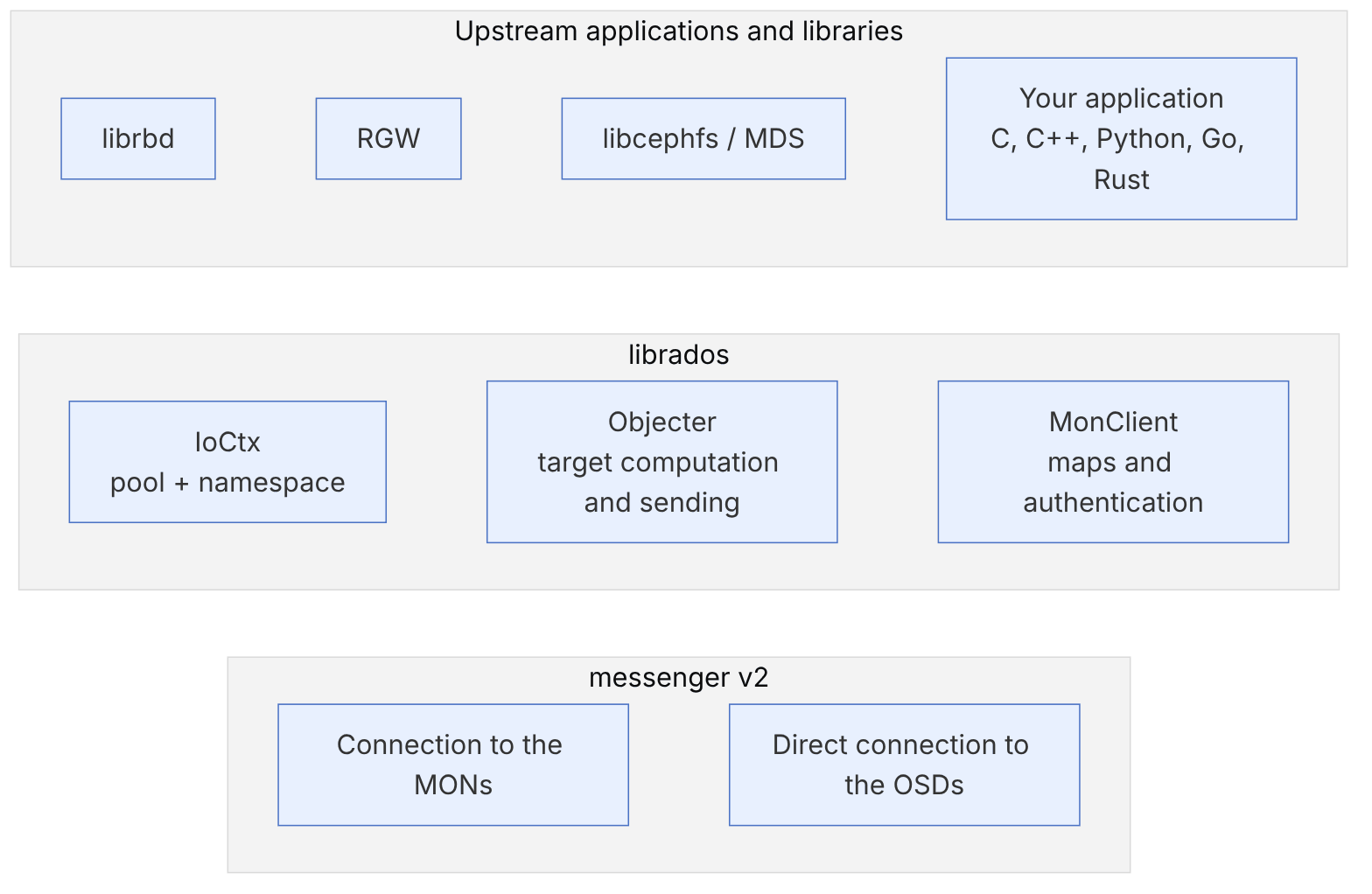
librados is the native RADOS interface and is available in several languages: C (librados.h), C++ (librados.hpp), Python (the rados module), and through community bindings in Go and Rust. The basic concepts:
| Concept | Meaning |
|---|---|
| Rados / cluster handle | A connection to the cluster with a cephx identity and a configuration file |
| IoCtx | An I/O context on one pool (and optionally a namespace); every object operation goes through it |
| Object | A name (an arbitrary string), byte data, xattrs and an omap (sorted key-value) |
| namespace | A name subspace inside a pool, for separating tenants without a separate pool |
| locator key | An alternative key for computing the PG, so that related objects land in the same PG |
| snap context | For self-managed snapshots (the method RBD uses) |
A RADOS object has three independent parts: data (like a file, with offsets), xattrs (a few small attributes) and the omap (sorted key-value, in RocksDB under BlueStore). The omap is excellent for indexes and metadata, but it is not supported in EC pools, and very large omaps (millions of keys in one object) cause problems such as long scrubs and the LARGE_OMAP_OBJECTS warning.
14-3 Getting started#
14-3-1 Preparation#
sudo dnf install -y python3-rados librados-devel     # or apt install python3-rados librados-dev
ceph osd pool create devpool 32
ceph osd pool application enable devpool myapp
ceph auth get-or-create client.devapp mon 'allow r' osd 'allow rwx pool=devpool' \
-o /etc/ceph/ceph.client.devapp.keyringThe x flag in the OSD capability is needed for calling RADOS class methods (exec) (chapter 15). If your application only reads and writes data, rw is enough; grant the least access required.
14-3-2 A simple Python program#
#!/usr/bin/env python3
import rados

with rados.Rados(conffile='/etc/ceph/ceph.conf', name='client.devapp') as cluster:
    print("fsid:", cluster.get_fsid())
    with cluster.open_ioctx('devpool') as io:
        io.set_namespace('tenant-a')
        io.write_full('greeting', b'salam donya')
        io.set_xattr('greeting', 'lang', b'fa')
        print(io.read('greeting'))
        print(dict(io.get_xattrs('greeting')))
        # omap with a WriteOp
        with rados.WriteOpCtx() as op:
            io.set_omap(op, ('k1', 'k2'), (b'v1', b'v2'))
            io.operate_write_op(op, 'index')
        with rados.ReadOpCtx() as op:
            it, ret = io.get_omap_vals(op, "", "", 100)
            io.operate_read_op(op, 'index')
            print(dict(it))
        for obj in io.list_objects():
            print(obj.nspace, obj.key)
14-3-3 The same in C++#
// my_app.cc — example written for this chapter
#include <rados/librados.hpp>
#include <iostream>
int main() {
  librados::Rados cluster;
  cluster.init2("client.devapp", "ceph", 0);
  cluster.conf_read_file("/etc/ceph/ceph.conf");
  if (int r = cluster.connect(); r < 0) { std::cerr << "connect: " << r << "\n"; return 1; }
  librados::IoCtx io;
  cluster.ioctx_create("devpool", io);
  io.set_namespace("tenant-a");
  librados::bufferlist bl;
  bl.append("salam donya");
  io.write_full("greeting", bl);
  librados::bufferlist out;
  io.read("greeting", out, 0, 0);
  std::cout << out.to_str() << "\n";
  cluster.shutdown();
}g++ -std=c++20 my_app.cc -lrados -o my_app && ./my_app14-3-4 Asynchronous (aio)#
For high throughput, send operations asynchronously so that several requests are in flight at once:
import rados, threading
done = threading.Semaphore(0)
def on_complete(completion):
    done.release()
with rados.Rados(conffile='/etc/ceph/ceph.conf', name='client.devapp') as c, c.open_ioctx('devpool') as io:
    N = 64
    for i in range(N):
        io.aio_write_full(f'obj-{i}', b'x' * 65536, oncomplete=on_complete)
    for _ in range(N):
done.acquire()In asynchronous loops, limit the number of in-flight requests (for example with a semaphore). Sending hundreds of thousands of concurrent requests fills the client's memory, and the Objecter throttles (objecter_inflight_ops and objecter_inflight_op_bytes) stall the requests.
14-4 Atomic operations#
14-4-1 Compound operations#
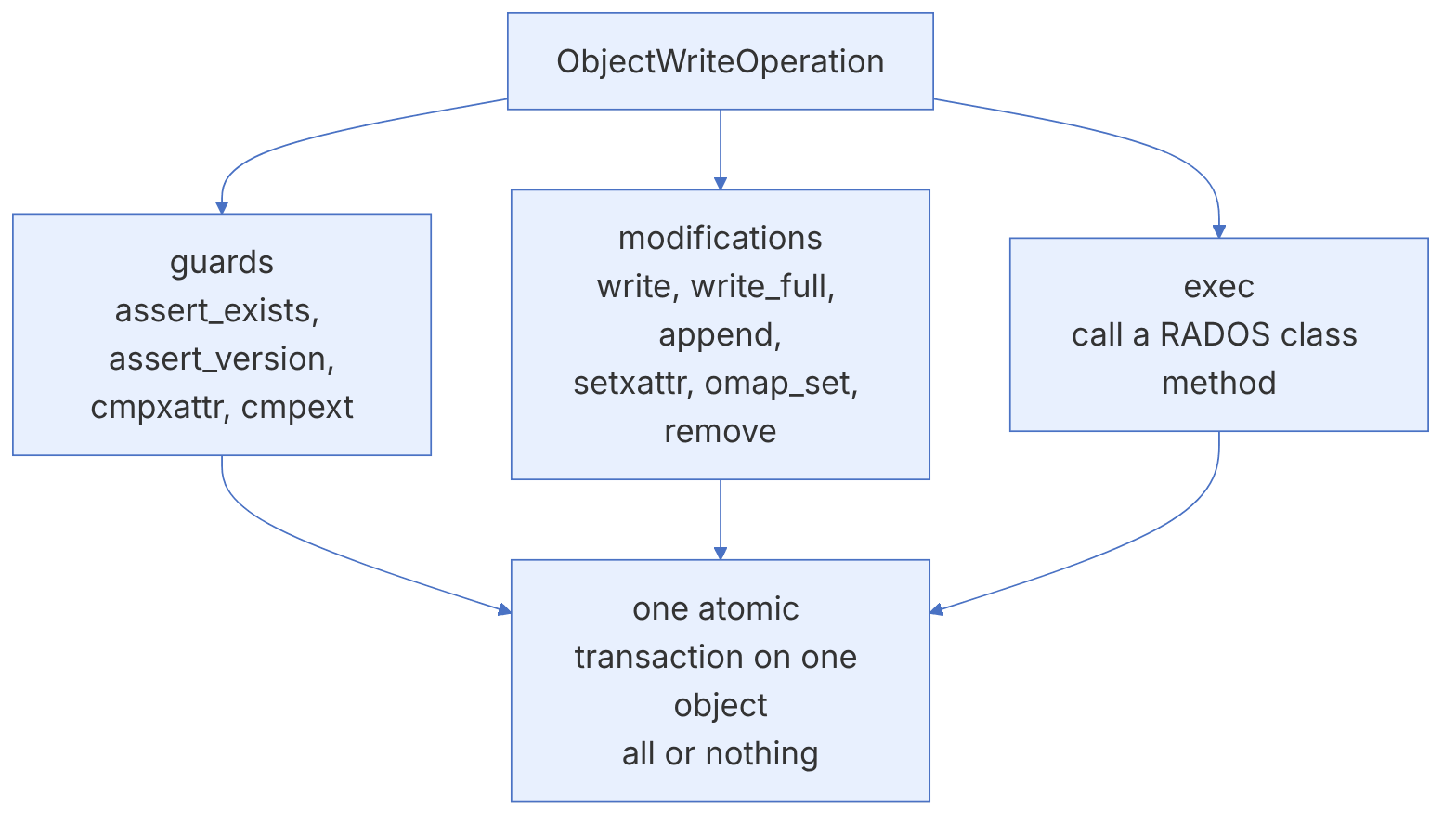
RADOS gives atomic transactions on a single object: you gather several operations (writing data, changing an xattr, updating the omap, conditions) into one ObjectWriteOperation, and the OSD executes all of them together or none of them. If one of the guards (conditions) fails, no change is applied. There are no transactions across several objects; this is the most important design limitation when building on RADOS.
14-4-2 The compare-and-swap pattern with versions#
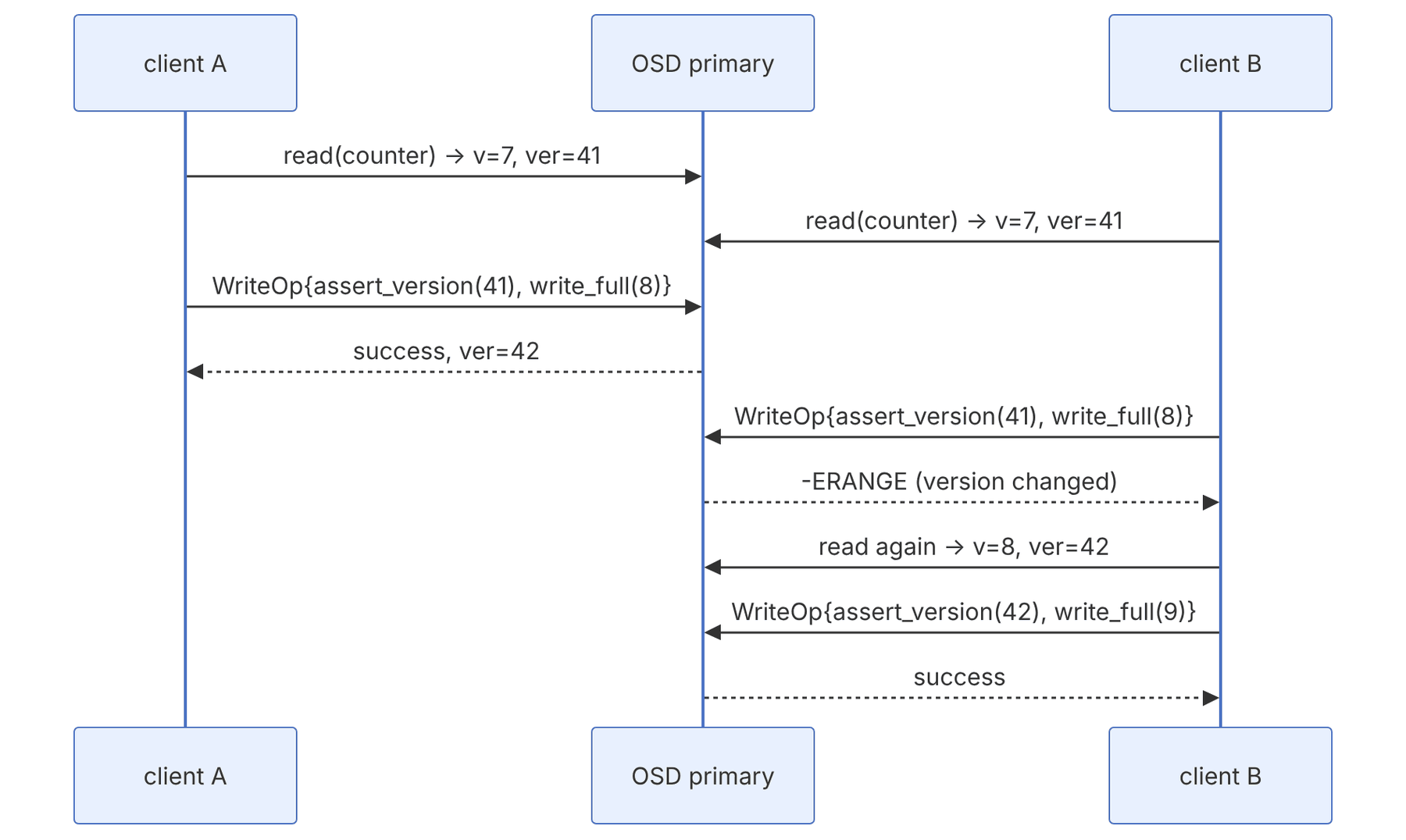
Each object has a user_version that increases with every change. With assert_version you can write "only if nobody has changed it since I read it":
import rados, errno

def increment(io, oid):
    while True:
        try:
            data = io.read(oid, length=64)   # the binding's default length is 8192
            ver = io.get_last_version()
        except rados.ObjectNotFound:
            data, ver = b'0', None
        new = str(int(data) + 1).encode()
        with rados.WriteOpCtx() as op:
            if ver is None:
                op.new(rados.LIBRADOS_CREATE_EXCLUSIVE)    # only if it does not exist
            else:
                op.assert_version(ver)
            op.write_full(new)
            try:
                io.operate_write_op(op, oid)
                return int(new)
            except (rados.OSError, rados.ObjectExists) as e:
                continue    # someone wrote first; retry
In the OSD, this check happens in PrimaryLogPG::do_osd_ops:
// from ceph/ceph, LGPL — src/osd/PrimaryLogPG.cc (excerpt)
case CEPH_OSD_OP_ASSERT_VER:
  ...
  if (!ver) {
    result = -EINVAL;
  } else if (ver < oi.user_version) {
    result = -ERANGE;
  } else if (ver > oi.user_version) {
    result = -EOVERFLOW;
  }
So a stale version returns -ERANGE, and a version that does not exist yet returns -EOVERFLOW. Other guards: cmpxattr (compare an xattr), cmpext (compare part of the data), assert_exists and omap_cmp.
14-4-3 Distributed locks#
librados has advisory locks on objects, implemented with the lock class in the OSD; RBD uses the same mechanism for exclusive-lock:
io.lock_exclusive('jobs', 'scheduler', cookie='node-a', desc='leader', duration=30)
# ... work ...
io.unlock('jobs', 'scheduler', 'node-a')An advisory lock only works if every client respects it. With duration, the lock of a client that has died expires automatically; but a client that has merely become slow can also lose its lock and carry on unaware. For real safety, combine the lock with a guard in the write operation (for example assert_locked in the lock class) or, as RBD does, blocklist the previous client.
14-5 watch and notify#
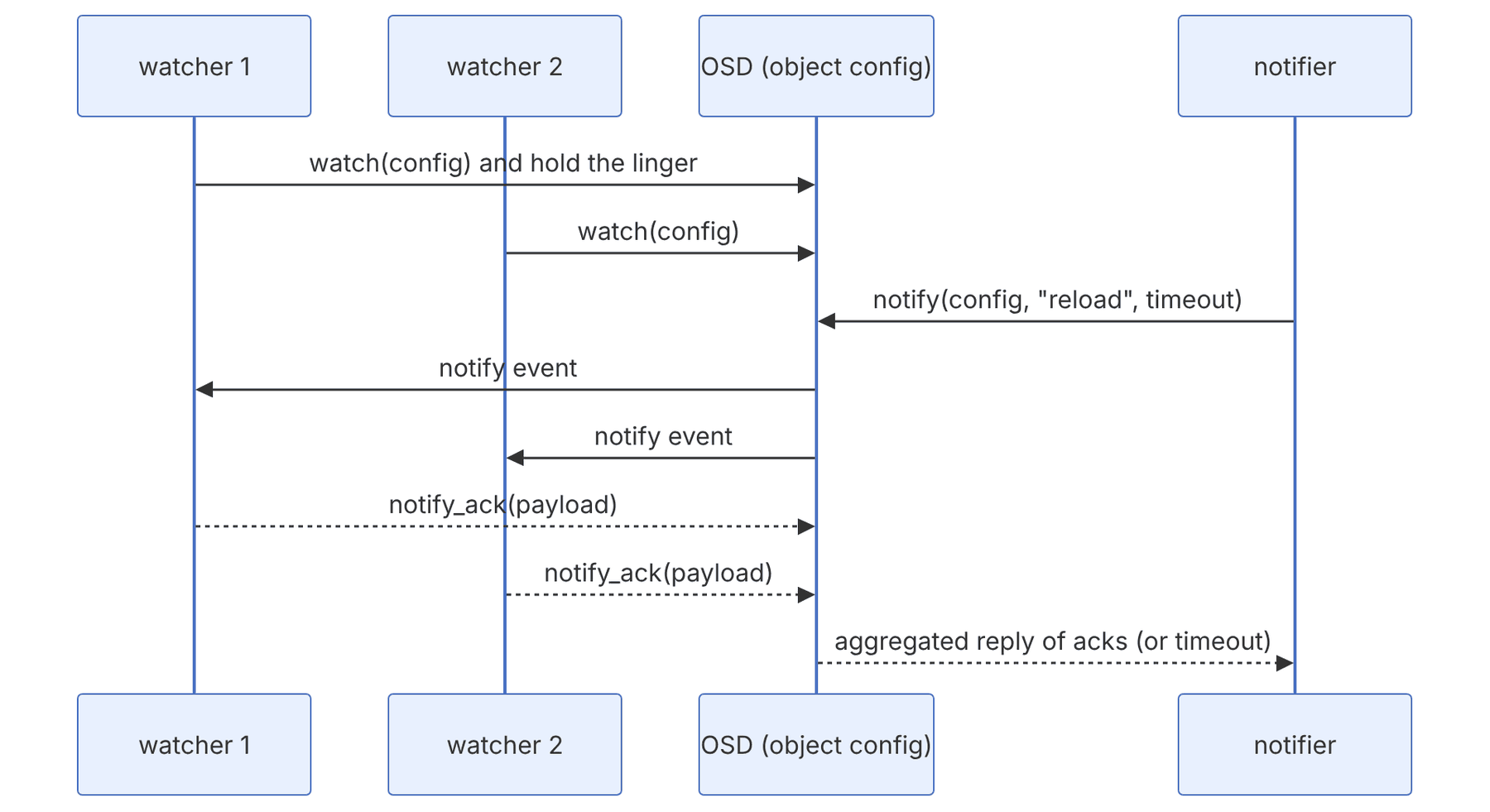
watch/notify is a lightweight notification channel on an object: each client registers a watch on the object, and any client can send a notify that reaches all the watchers. RBD uses it to tell every client that has the image open about changes to the image header (for example a resize or a snapshot). RGW also uses it to synchronize caches between instances.
# watcher.py
import rados, time
def on_notify(notify_id, notifier_id, watch_id, data):
    print("got:", data)
    return b'ok'           # reply payload (in newer binding versions)
def on_error(err):
    print("watch error:", err)    # you must register the watch again
with rados.Rados(conffile='/etc/ceph/ceph.conf', name='client.devapp') as c, c.open_ioctx('devpool') as io:
    io.write_full('config', b'v1')
    with io.watch('config', on_notify, on_error):
time.sleep(600)# notifier.py
with rados.Rados(conffile='/etc/ceph/ceph.conf', name='client.devapp') as c, c.open_ioctx('devpool') as io:
io.notify('config', 'reload', timeout_ms=5000)On the client, a watch is implemented as a linger operation in the Objecter: a request that "never finishes", which the Objecter resends to the object's current primary whenever the map changes or the connection drops (Objecter::_recalc_linger_op_target). In the OSD, the watch is part of the object's state and is kept alive by periodic pings; if the client does not ping within the deadline, the watch is removed and the client's error callback must rebuild it. If not all watchers ack within the deadline, a notify ends with a timeout and returns the list of watchers that did not reply; the OSD-side default deadline is osd_default_notify_timeout (30 seconds in current code).
watch/notify is for notification, not for moving bulk data or for a reliable queue: if a watcher is disconnected at the moment of the notify, it misses the message. The right pattern: write the real data into the object (or the omap), and let the notify only say "something changed, read again". After reconnecting, a watcher should also read the state once.
14-6 Beneath librados: the MOSDOp message, sessions and backoff#
The section "Inside the code: the Objecter" later in this chapter shows how librados hands an op to the Objecter. Here we go one layer lower: what exactly the message on the wire contains, how the Objecter keeps ops in per-OSD sessions, and how an OSD can tell a client "don't send for now" (backoff). All structures are from main (src/osdc/Objecter.cc, src/messages/MOSDOp.h and src/include/rados.h).
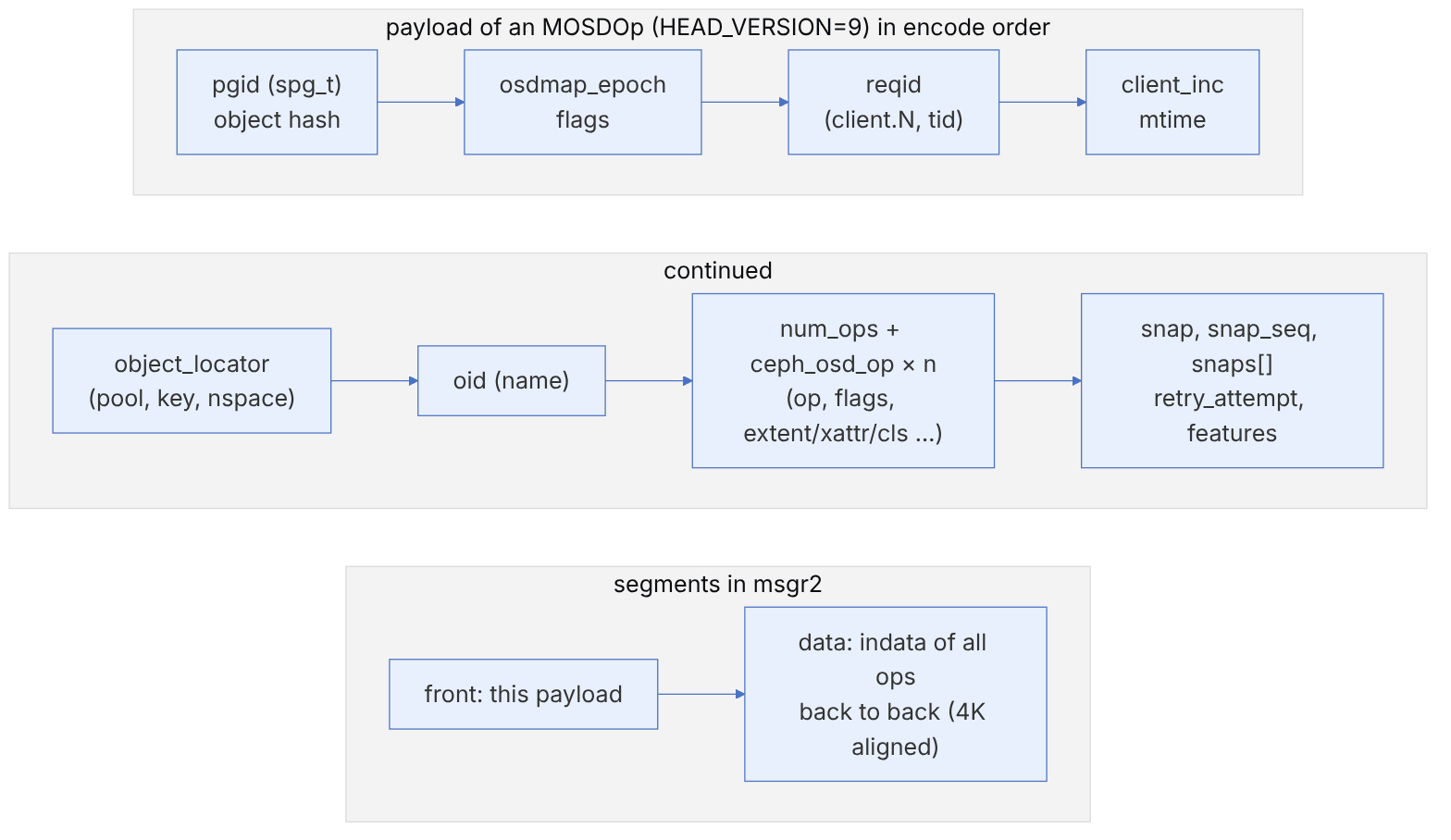
14-6-1 Why does the pgid come before the object name?#
The OSD decodes the message in two stages (partial_decode_needed and final_decode_needed in the class). In the first stage only the pgid, hash, epoch and flags are read. That is enough to send the message to the right operation-queue shard (OSDShard) without a full decode. The full decode (name, ops and snaps) happens later in that shard's thread. This design reduces the work of the messenger thread and increases parallelism. That is why MOSDOp inherits from MOSDFastDispatchOp.
| Field | Role in the OSD |
|---|---|
osdmap_epoch | If it is newer than the OSD's current epoch, the OSD first fetches the map. If it is older and the PG has moved, the op is dropped and the client resends with the new map. |
reqid (client.N:tid) | The key for duplicate detection. The OSD looks it up in the pg log and, for a duplicate op (after a resend), returns the previous reply. |
flags | For example ONDISK, READ, WRITE, BALANCE_READS, LOCALIZE_READS, FULL_TRY |
retry_attempt | The resend counter; visible in the OSD log and in dump_ops_in_flight |
snap_seq, snaps | The writer's SnapContext for COW snapshots (chapter 2) |
14-6-2 Sessions and "homeless" ops#
The Objecter has one OSDSession per OSD, which holds the in-flight ops for that OSD by tid. In _calc_target, each op is mapped to an OSD. If there is no target (the pool was deleted, the PG has no primary, or the map has not arrived yet), the op is moved to homeless_session. With each new map, the Objecter retargets all ops and moves those whose target changed to the new session and resends them.
| Option | Default | Effect |
|---|---|---|
objecter_inflight_ops | 1_K | Cap on in-flight ops; beyond it, op_submit blocks (budget throttle) |
objecter_inflight_op_bytes | 100_M | Cap on in-flight bytes |
objecter_tick_interval | 5 | Seconds; checks for slow ops and sends keepalives |
objecter_timeout | 10 | Seconds; after this, request a map or ping for unresponsive sessions |
rados_osd_op_timeout | 0 | 0 means no timeout; a positive value gives an ETIMEDOUT error |
objecter_completion_locks_per_session | 32 | Sharded locks for ordering completions |
objecter_inflight_ops=1024 is a hidden bottleneck for an application that sends thousands of concurrent ops with aio_write: the aio_* call blocks until budget is freed. If completion callbacks are waiting on the same thread, a deadlock results. Control the queue depth in the application, or raise the option deliberately.
14-7 backoff: the OSD says "wait"#
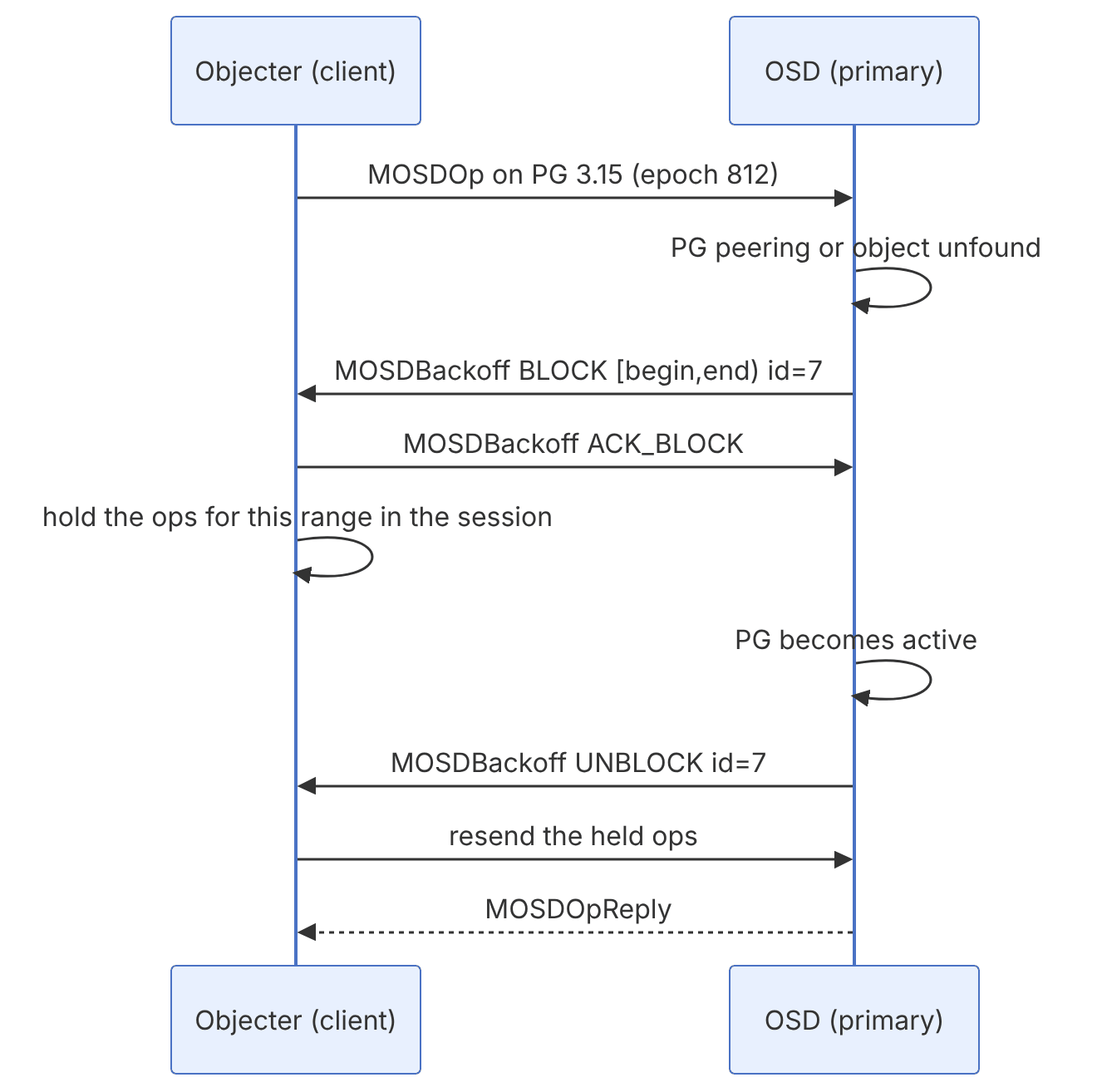
The actions in rados.h are CEPH_OSD_BACKOFF_OP_BLOCK=1, ACK_BLOCK=2 and UNBLOCK=3. The OSD defaults (in main) are osd_backoff_on_unfound=true, osd_backoff_on_degraded=false and osd_backoff_on_peering=false. So by default, backoff is only sent for unfound objects. In the other cases the op is queued in the OSD. backoff needs the RADOS_BACKOFF feature on the client, which Luminous and later clients have.
ceph daemon osd.4 dump_blocked_ops
ceph daemon client.admin.<pid>.<cookie> objecter_requests     # from the client's admin socket
ceph tell osd.4 config get osd_backoff_on_peering14-8 SplitOp (main only)#
The main branch has a new class called SplitOp in src/osdc/ (LGPL 2.1 licence, 2025). The code's own description introduces it as "a basis for splitting operations across several OSDs for better performance": in EC pools, a large read is sent directly to the data shards, and in replicated pools, a large read is split between replicas. The replies are then joined on the client. A counter described as "Client read ops split by SplitOp" has also been added to the Objecter. This class is not in the Tentacle branch (its file does not exist there). So this feature belongs to the next release, and its details, options and defaults may change before release.
Why did reading directly from a shard become possible in EC? In old EC, the client always sent to the primary, and the primary read from k shards and decoded. With FLAG_EC_PLUGIN_PARTIAL_READ_OPTIMIZATION (chapter 27), the data of a range lies exactly in one data shard. If the client knows the stripe layout (stripe_unit and k from the pool profile), it can map the range to shards itself and remove one network round trip (client→primary→shard). Combined with SplitOp, this is the basis for faster reads from EC in future versions.
14-9 The Objecter in numbers: op budget, in-flight cap, watch liveness and notify timeout#
This section examines four small mechanisms in the RADOS client that produce unexpected behaviour in real applications. References are to main as of November 2026. All defaults were read from the files in src/common/options.
14-9-1 The budget of each op#
Source in code: src/osdc/Objecter.cc :: Objecter::calc_op_budget, _throttle_op; src/common/Throttle.h :: Throttle::_should_wait
Complexity: O(number of sub-operations in the op)
pseudocode
budget = 0
for each sub-operation:
    if mode is WR: budget += indata length
    elif mode is RD and it uses an extent (READ, SPARSE_READ, CMPEXT…): budget += extent.length
    elif RD and type ATTR: budget += name_len + value_len
    # the rest (STAT, OMAPGETVALS, CALL with mode RD|EXEC…) count zero
op_throttle_bytes.get(budget)   # cap objecter_inflight_op_bytes = 100 MiB
op_throttle_ops.get(1)          # cap objecter_inflight_ops = 1024
_should_wait(c) = (c ≤ max and cur + c > max) or (c ≥ max and cur > max)| Operation | Budget (bytes) | Explanation |
|---|---|---|
| write 4 KiB | 4096 | Data length |
| writefull 4 MiB | 4194304 | 25 of them fill the whole 100 MiB cap |
| read 64 KiB | 65536 | The extent length, not the length of the actual reply |
| getxattr "user.x" with a 100-byte value | 106 | Name length plus value length |
| omap_get_vals | 0 | Only one unit of the 1024 cap |
| omap_set_vals with 1 MiB of keys and values | 1048576 | WR mode, so indata is counted |
| CALL (class) with 10 MiB of input | 0 | CALL mode is only RD, so the input is not counted |
Conclusion. The byte cap is decisive for large ops, and the count cap for small ones. An op larger than 100 MiB does not deadlock. If cur ≤ max it passes immediately, but afterwards cur > max, and all following ops wait until that op finishes. A class call with bulky input effectively has no byte throttle. An application that sends large blocks with aio_exec must impose its own limit.
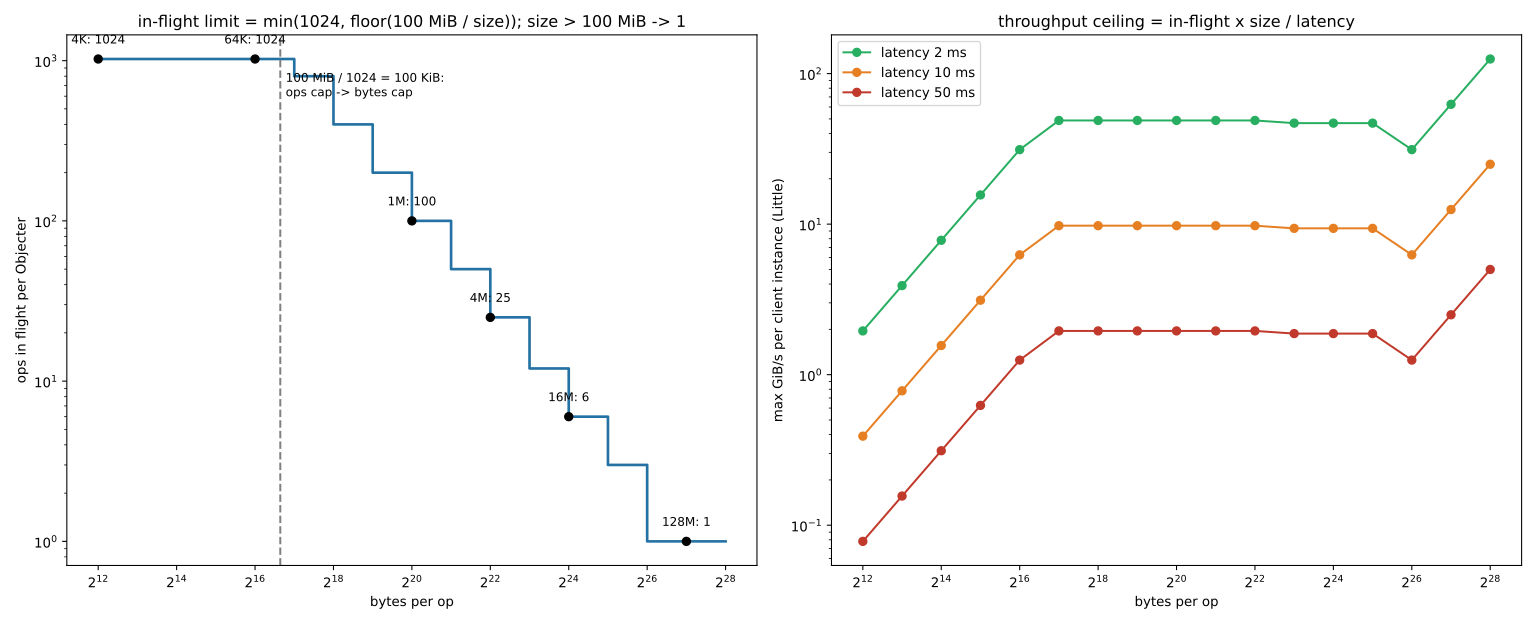
14-9-2 The in-flight cap and Little's law#
Source in code: src/osdc/Objecter.cc :: _throttle_op (with the defaults of objecter_inflight_ops and objecter_inflight_op_bytes)
Complexity: O(1)
pseudocode
N(s) = s > 100 MiB ? 1 : min(1024, ⌊104857600 / s⌋)      # concurrent ops of size s
throughput ≤ N(s) × s / latency
IOPS ≤ N(s) / latency
crossover point: s = 104857600 / 1024 = 102400 bytes (100 KiB)
Numerical example. For a 4 KiB op, N = 1024. With 2 ms latency the cap is 512000 IOPS (2 GiB/s), and with 10 ms, 102400 IOPS. For a 128 KiB op, N = 800. For 4 MiB, N = 25: with 10 ms latency about 9.8 GiB/s, and with 50 ms (EC on HDD under load) only 1.95 GiB/s for an entire librados instance, regardless of the number of threads. For 16 MiB, N = 6. This cap applies to each Rados/Objecter instance. So either raise it with objecter_inflight_op_bytes, or create several independent instances. In QEMU or rbd-nbd processes, the equivalent setting goes in the [client] section.
14-9-3 Watch liveness#
Source in code: src/osdc/Objecter.cc :: Objecter::tick, _send_linger_ping; src/osd/PrimaryLogPG.cc (CEPH_OSD_WATCH_OP_WATCH); src/osd/Watch.cc
Complexity: O(sessions + linger ops) per tick
pseudocode
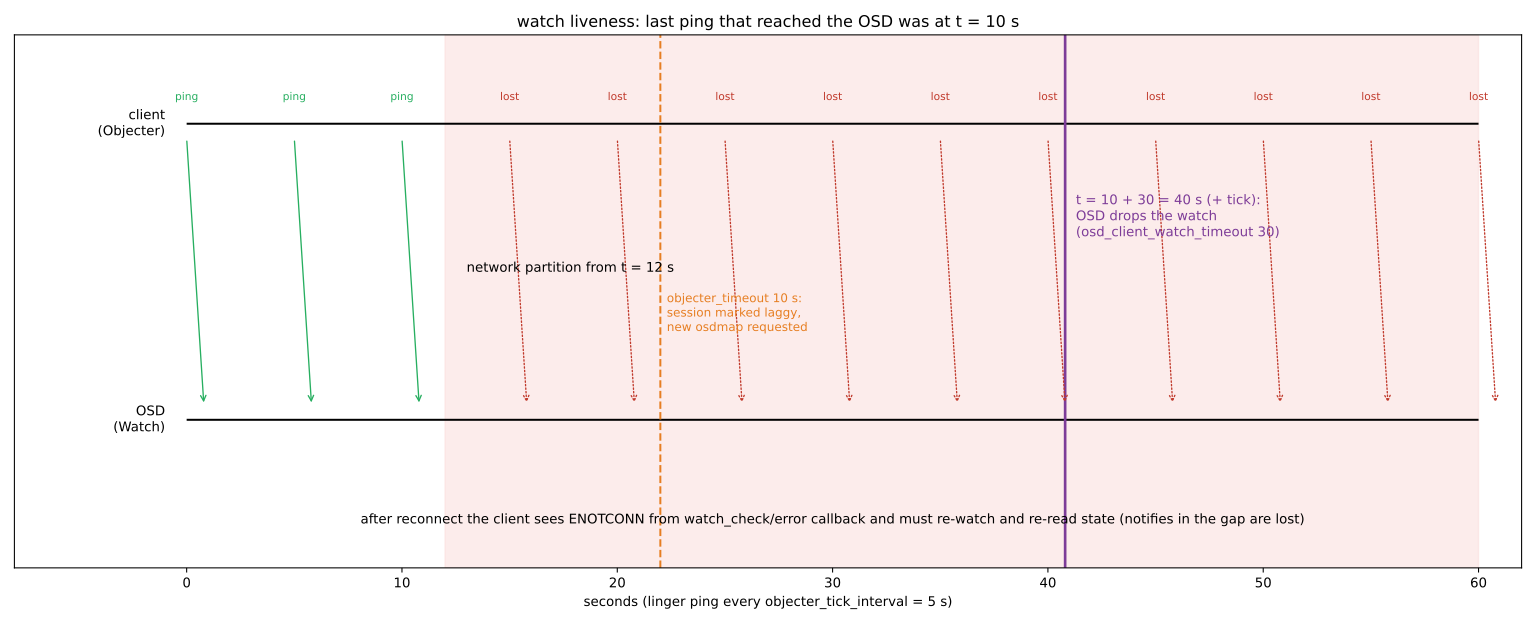
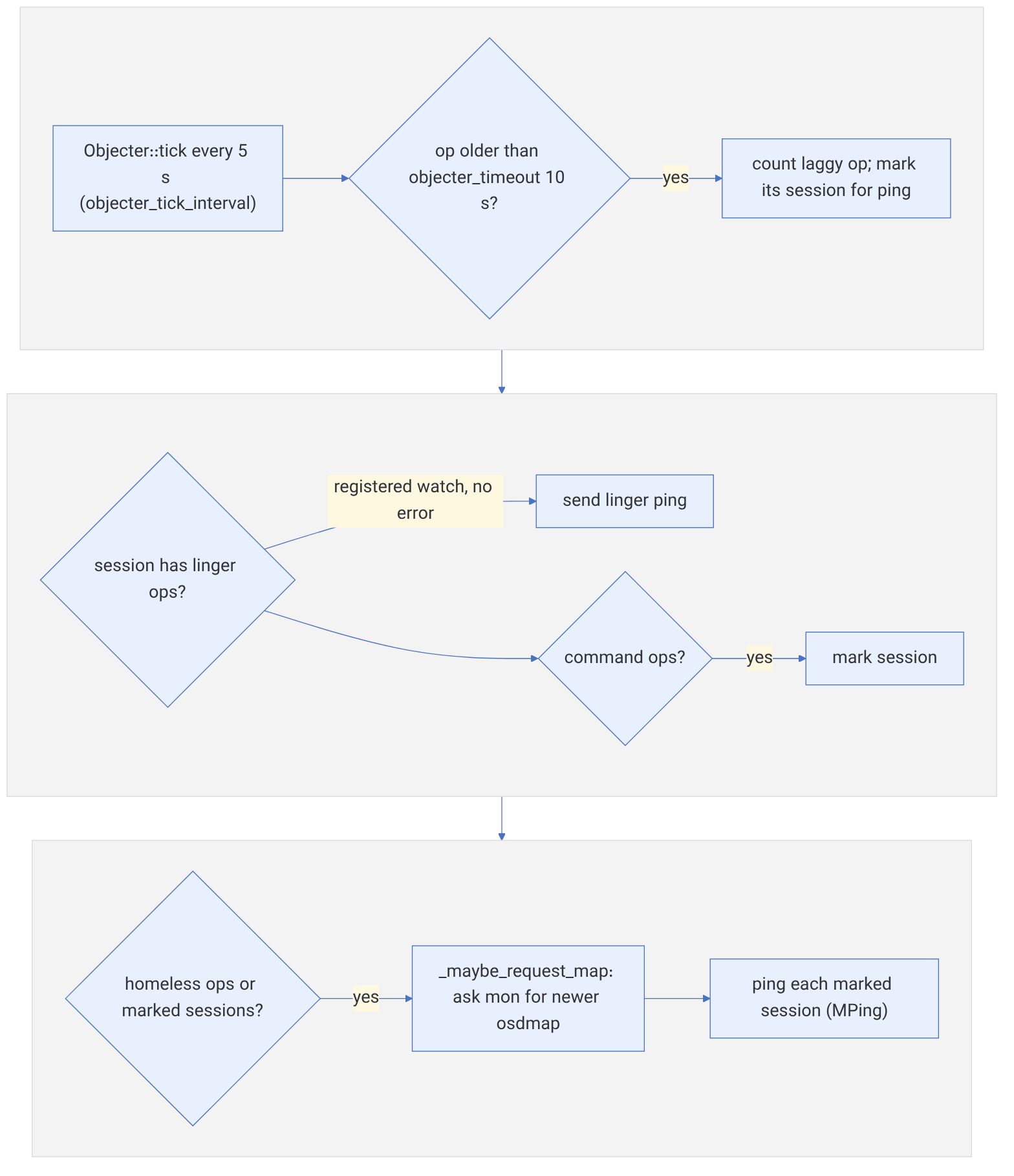
Objecter::tick every objecter_tick_interval (5 s):
    ops older than objecter_timeout (10 s) ← session "laggy" ← MPing and request a fresh osdmap
    for each registered, error-free watch: _send_linger_ping
OSD: watch_info_t(cookie, timeout = op.watch.timeout or osd_client_watch_timeout (30 s))
    each ping refreshes the timer ; if the timeout passes: the watch is removed
client after reconnecting: watch_check or error callback ← ENOTCONN ← watch again and re-read the state
Numerical example. The last successful ping reaches the OSD at second 10, and the network drops from second 12. Around second 40, that is 30 seconds after the last ping, the OSD removes the watch. Any notify sent to that object in the meantime does not reach this client and is recorded in the timeout or missed notify list. A correct application (like exclusive-lock in RBD) re-reads the state from the object itself after a watch error and does not trust past notifies.
14-9-4 Notify timeout: rounding to seconds#
Source in code: src/librados/IoCtxImpl.cc :: IoCtxImpl::notify, aio_notify; src/osd/PrimaryLogPG.cc (CEPH_OSD_OP_NOTIFY)
Complexity: O(1)
pseudocode
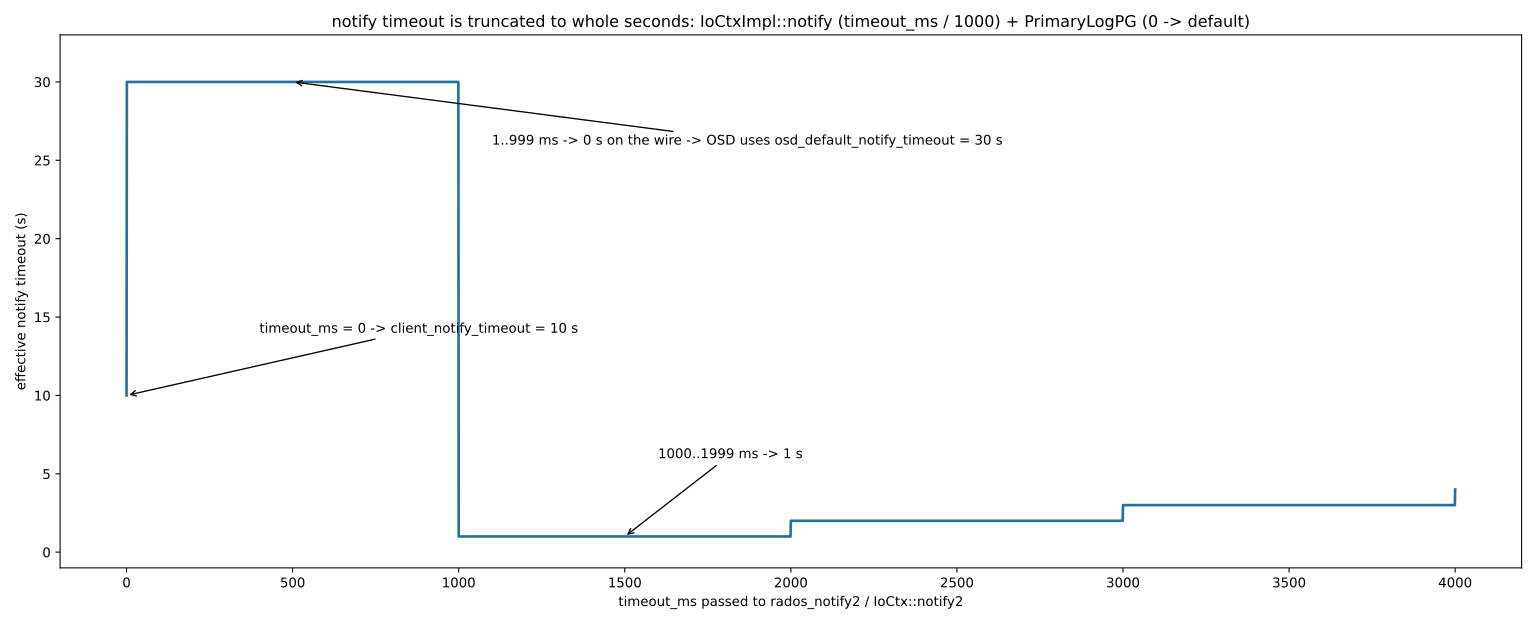
timeout = notify_timeout                         # client_notify_timeout, default 10 s
if timeout_ms: timeout = timeout_ms / 1000       # integer division
on the wire: timeout (seconds)
OSD: if timeout == 0: timeout = osd_default_notify_timeout   # 30 s
Numerical example. A timeout_ms of 0 means 10 seconds. 1500 milliseconds becomes 1 second. But 500 milliseconds becomes 0, and the OSD interprets it as "default", so the notify waits up to 30 seconds for acks, that is 60 times what the programmer asked for. For timeouts under one second, do not use the notify's own timeout; set a separate timer in the application.
14-10 Inside the code: the Objecter#
14-10-1 The role of the Objecter#
The Objecter (src/osdc/Objecter.cc) is the heart of the librados client side: it turns each operation into an Op, computes and sends it to its target (the PG and primary OSD), returns the reply to the requester and, most importantly, reviews in-flight requests on every map change and resends them when needed. librbd, RGW and ceph-fuse all use this same class.
| Function in Objecter.cc | Job |
|---|---|
| _op_submit() | Register the Op, compute the target, apply the throttle and send |
| _calc_target() | Compute the PG and acting primary from the current map |
| _send_op() | Build the MOSDOp message and send it on the OSD connection |
| handle_osd_map() | Receive a new map and review all Ops and lingers |
| _recalc_linger_op_target() | Recompute the target for watches |
14-10-2 Computing the target#
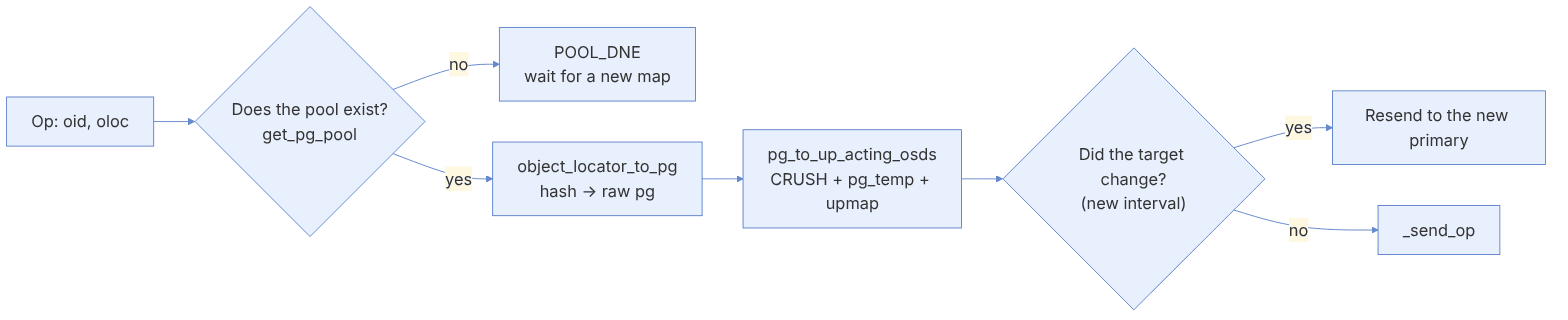
A summary of the logic of Objecter::_calc_target():
- 1. The epoch of the current map is recorded in the target.
- 2.
osdmap->get_pg_pool(): if the pool does not exist, the result isRECALC_OP_TARGET_POOL_DNEand the Op waits for a newer map (perhaps the pool was just created and the client does not have its map yet). - 3. If the pool is broken or has the EIO flag,
RECALC_OP_TARGET_POOL_EIO. - 4.
osdmap->object_locator_to_pg(): hash the object name (or the locator key) and map it to a PG. - 5. Compute up, acting and primary (CRUSH, pg_temp, upmap; chapter 8).
- 6. Compare with the previous target: if the primary, the acting set, the pool size or the PG split has changed (a new interval), the Op must be resent.
on new osdmap (handle_osd_map):
  for op in inflight_ops:
     r = calc_target(op.target)
     if r == NEED_RESEND: cancel on old session; send to new primary
     if r == POOL_DNE and map is new enough: fail op with -ENOENT
for linger in watches: recalc_linger_op_target(linger) # the watch is registered againWhy is resending safe? Each Op has a unique identifier (reqid: the client id and the tid). The OSD keeps the ids of recent requests in each PG's log; if a write that was already applied arrives again (for example because the ack was lost on the way), the OSD recognizes it as a duplicate and returns the same result without executing it again. This idempotency is what makes resending after a map change harmless.
14-10-3 Throttles and client configuration#
ceph config get client objecter_inflight_ops
ceph config get client objecter_inflight_op_bytes
ceph config set client.devapp rados_osd_op_timeout 30 # without this, an Op may wait foreverDefaults in current code: objecter_inflight_ops=1_K, objecter_inflight_op_bytes=100_M, rados_osd_op_timeout=0 (meaning no timeout) and osd_max_object_size=128_M.
librados's default is to keep an Op waiting forever until the PG becomes active again; this is right for storage (no data is lost), but your application may hang. If the application must fail fast (for example an API with an SLA), set rados_osd_op_timeout and rados_mon_op_timeout and handle the -ETIMEDOUT error.
14-11 Pitfalls and design patterns#
| Pitfall | Consequence | The right way |
|---|---|---|
| A very large object (gigabytes) | Slow recovery and scrub; the osd_max_object_size limit | Split into objects of a few megabytes (like the striper or RBD) |
| A very large omap in one object | LARGE_OMAP_OBJECTS, deep-scrub latency | Shard the index over several objects (like the bucket index in RGW) |
| One "hot" object | All load on one PG and one OSD | Spread the keys over several objects |
| Frequent pool listing | Walks every PG; very slow | Keep your own index in an omap |
| Assuming multi-object transactions | Inconsistency after a failure mid-way | Idempotent design or a journal in a single object |
The maximum object size is limited by osd_max_object_size. For large data, use libradosstriper or your own pattern for splitting into 4 MB objects; RBD and CephFS do exactly this.
- A separate cephx user for each application, with access to its own pool or namespace.
- Compound operations are atomic only on a single object.
- For concurrency use assert_version, cmpxattr, or a lock together with blocklisting.
- watch/notify is for notification, not for reliable data transfer.
- Set the client timeout for interactive applications.
- Keep objects and omaps small and distributed.
14-12 Supplementary and up to date#
- watch2/notify2 (C++) and
watch3(C) are newer versions with better error handling; the old watch versions remain in the API. - In the current code's
librados.hpp, a typed formexec(const ClsMethod<...>&, ...)appears for calling class methods (in addition to the old string form). - The Python binding supports
aio_*, WriteOp/ReadOp, omap, watch and locks. - msgr2 in secure mode encrypts librados traffic (chapter 8).
14-13 Hands-on exercise#
- 1. Run this chapter's Python program and look at the objects with
rados -p devpool --namespace tenant-a ls. - 2. Run the atomic counter with ten concurrent processes and confirm that the final value is correct. Then remove the guard and compare the result.
- 3. Write a watcher and a notifier; disconnect and reconnect the watcher and see when a message is lost.
- 4. With
rados_osd_op_timeout, test the application's behaviour when the OSDs of one PG are stopped. - 5. Write ten thousand omap keys into one object and time
rados listomapkeys; then shard over ten objects. - 6. In the Objecter code, find where
RECALC_OP_TARGET_POOL_DNEis handled and explain the behaviour.
14-14 Review questions#
- 1. What are the three independent parts of a RADOS object?
- 2. How does a namespace differ from a pool, and when is it useful?
- 3. Why is the omap not supported in EC pools, and what does that imply for design?
- 4. What does a compound operation guarantee, and what does it not guarantee?
- 5. In which cases does assert_version return ERANGE and EOVERFLOW?
- 6. Why is an advisory lock alone not enough for safety?
- 7. How is a watch preserved in the Objecter after a map change?
- 8. Why is resending an Op after a map change safe?
- 9. When should rados_osd_op_timeout be set?
- 10. What pattern is suitable for storing multi-gigabyte data on RADOS?
Answers to these questions are in Appendix E: Answers to Review Questions. Answers to this chapter's questions →
14-15 Sources for this chapter#
- librados introduction
https://docs.ceph.com/en/latest/rados/api/librados-intro/ - librados C API
https://docs.ceph.com/en/latest/rados/api/librados/ - librados C++ API
https://docs.ceph.com/en/latest/rados/api/libradospp/ - librados Python API
https://docs.ceph.com/en/latest/rados/api/python/ - Objclass and RADOS classes
https://docs.ceph.com/en/latest/rados/api/objclass-sdk/ - Source: src/include/rados/librados.h, librados.hpp
https://github.com/ceph/ceph/tree/main/src/include/rados - Source: src/osdc/Objecter.cc
https://github.com/ceph/ceph/blob/main/src/osdc/Objecter.cc - Source: src/pybind/rados/rados.pyx
https://github.com/ceph/ceph/blob/main/src/pybind/rados/rados.pyx - Source: src/osd/PrimaryLogPG.cc
https://github.com/ceph/ceph/blob/main/src/osd/PrimaryLogPG.cc - Weil et al., "RADOS: A Scalable, Reliable Storage Service for Petabyte-scale Storage Clusters" (PDSW 2007
https://ceph.io/assets/pdfs/weil-rados-pdsw07.pdf