The Ceph File System (CephFS)
TL;DR this chapter in a few lines
- CephFS keeps metadata (tree, inodes, MDS journal) in a metadata pool and file contents in data pools; clients read and write data directly to the OSDs.
- Create restricted clients with
ceph fs authorize; the MDS hands out capabilities (caps) so clients can cache coherently without a global lock. fs volumesgives subvolumes with quotas and snapshots for Kubernetes and Manila; NFS-Ganesha, and SMB in Tentacle, serve clients that cannot mount CephFS.- cephfs-mirror copies snapshots to another cluster; a client whose mount hangs has usually been evicted, so check
dmesgand remount.
6-1 Before you start#
6-1-1 What questions does this chapter answer?#
CephFS was the oldest goal of the Ceph project (Sage Weil's dissertation was about a distributed file system), and at the same time it was the last interface to reach production maturity; it was declared stable in Jewel. Today CephFS backs file shares in OpenStack Manila, ReadWriteMany volumes in Kubernetes, user home directories in HPC clusters and even SMB shares for Windows users. In this chapter:
- What is the CephFS architecture, and what exactly does the MDS do that the OSD does not?
- How do we create a file system, deploy MDSs and get high availability (standby and standby-replay)?
- How do we mount with the kernel client and FUSE, and which should we choose when?
- How do we export CephFS with NFS (and, since Tentacle, with SMB)?
- What are subvolumes, snapshots, quotas and layouts?
- Where does the old claim that "CephFS replaces HDFS" stand today?
6-1-2 Prerequisites#
The cluster from chapter 1 and client-node1. If you ran ceph fs volume create cephfs01 in chapter 1, you already have a file system.
6-2 CephFS and the MDS#
6-2-1 Architecture#
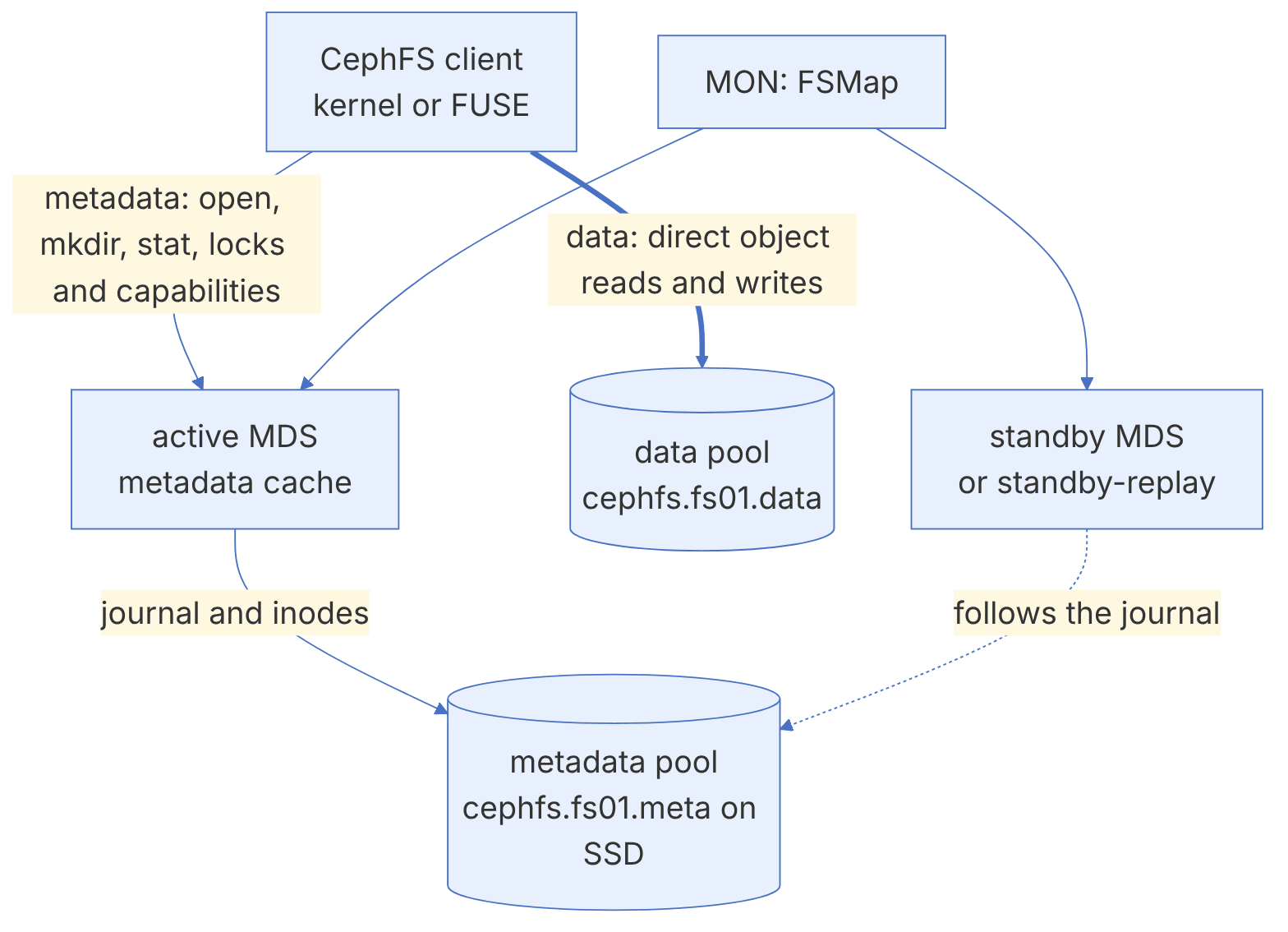
CephFS uses two pools: a metadata pool (the directory tree, inodes and the MDS journal) and one or more data pools (file contents, broken into 4 MB objects, as in RBD). The key point of this design is the separation of the metadata path from the data path:
- The client talks to the MDS for
open,mkdir,stat,renameand locks. - After getting permission, the client reads and writes data directly with the OSDs. The MDS is not on the data path and does not become a bandwidth bottleneck.
The MDS itself keeps no data on local disk. All of its persistent state is in RADOS: metadata changes are first written to a journal in the metadata pool and later moved into the directory objects (dirfrags). This means any standby MDS can take the place of a failed MDS by replaying the journal. The MDS's memory is effectively a large metadata cache, and its size (mds_cache_memory_limit, default 4 GB) is its most important performance setting.
6-2-2 Capabilities: coordinating caches between clients#
CephFS takes POSIX consistency seriously: if one client changes a file, another client must see the change immediately. This is done with capabilities: the MDS gives each client specific permissions (read, write, cache, buffer) on each inode and takes them back when necessary.
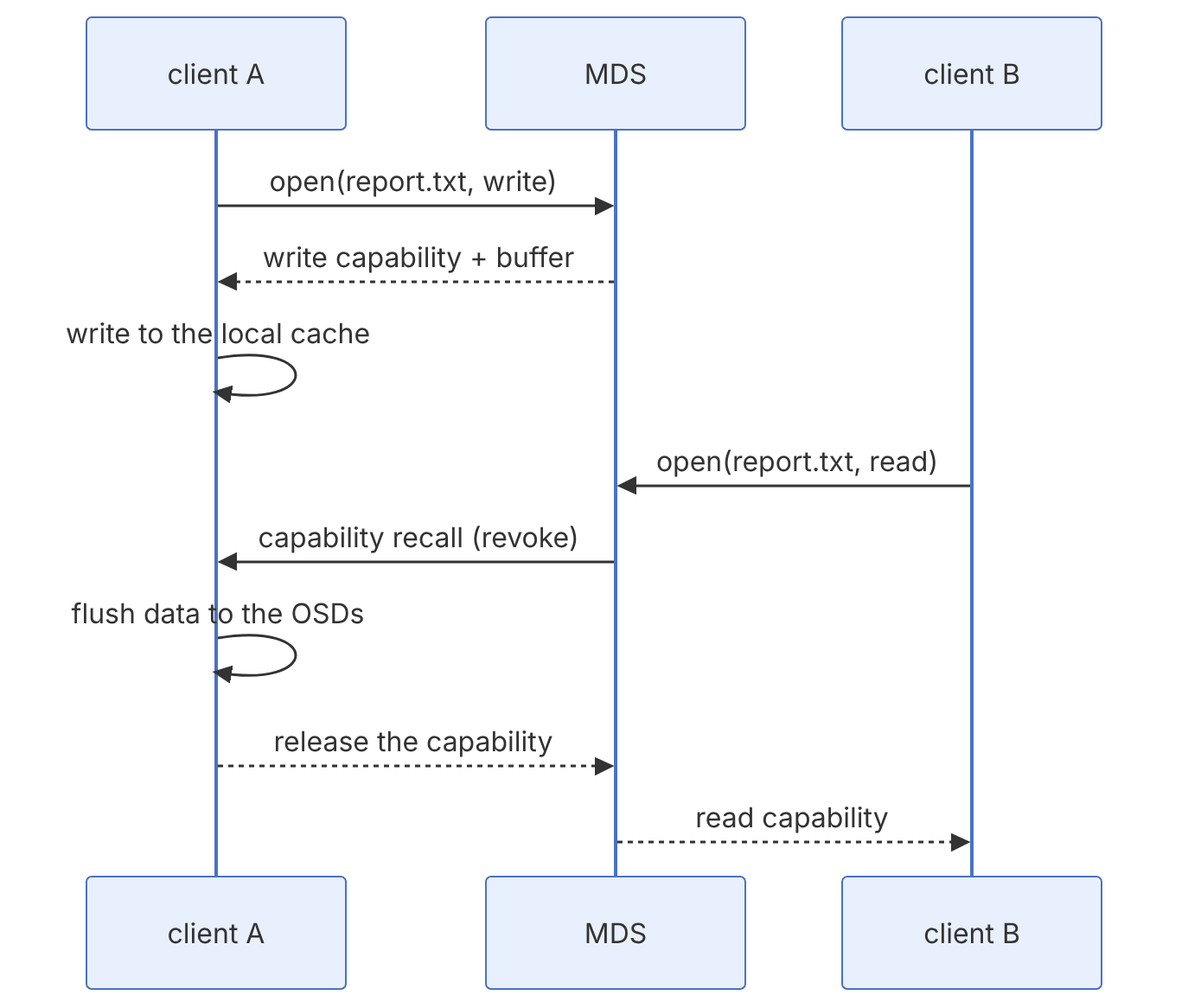
A client that does not release capabilities (for example because of a network outage, a bug or a hung process) can hold up everyone else's access. Warnings such as MDS_HEALTH_CLIENT_LATE_RELEASE and MDS_CLIENT_RECALL are signs of this. After a set timeout the MDS evicts such a client and puts it on the OSDs' blocklist so that it cannot write stale data. An evicted client must be mounted again.
6-2-3 Creating a file system#
The simplest way with cephadm is the volumes interface in the MGR, which creates the pools, the file system and the MDSs in one go:
ceph fs volume create fs01 --placement="2 ceph-node3 ceph-node4"
ceph fs ls
ceph fs status fs01
ceph orch ps --daemon-type mds
The manual way, when you need full control over the pools:
ceph osd pool create cephfs.fs02.meta
ceph osd pool create cephfs.fs02.data
ceph osd pool set cephfs.fs02.meta crush_rule ssd-rule     # metadata on SSD
ceph fs new fs02 cephfs.fs02.meta cephfs.fs02.data
ceph orch apply mds fs02 --placement="2 ceph-node3 ceph-node4"The metadata pool is small but latency-sensitive; always make it replicated (not EC) and put it on SSD or NVMe. If you want data on EC, create the default data pool as replicated, add the EC pool as a second data pool (ceph fs add_data_pool) and direct directories to it with a layout. The reason is that CephFS keeps the backtrace metadata of every file in the default data pool. The EC pool must also have allow_ec_overwrites.
6-2-4 High availability#
| Mode | Behaviour | Takeover time |
|---|---|---|
| standby | An idle MDS that takes the place of any active rank that fails | Must replay the journal from the start and warm the cache; seconds to minutes |
| standby-replay | An MDS that continuously follows the journal of a specific rank | Very fast; the cache is almost warm |
ceph fs set fs01 allow_standby_replay true
ceph fs set fs01 standby_count_wanted 1
ceph fs status fs01Each active rank can have only one standby-replay. If you have several file systems, ordinary standby MDSs are shared between all of them, unless you tie an MDS to a specific file system with mds_join_fs.
6-2-5 Multiple active MDSs#
When one MDS can no longer handle the metadata load (for example millions of small files or thousands of clients), you can have several active MDSs. Each is a rank and is responsible for part of the directory tree:
ceph fs set fs01 max_mds 2
ceph fs status fs01
# Explicitly pin a subtree to a rank
setfattr -n ceph.dir.pin -v 1 /mnt/fs01/home
# Automatically distribute subdirectories between ranks (ephemeral distributed pin)
setfattr -n ceph.dir.pin.distributed -v 1 /mnt/fs01/scratch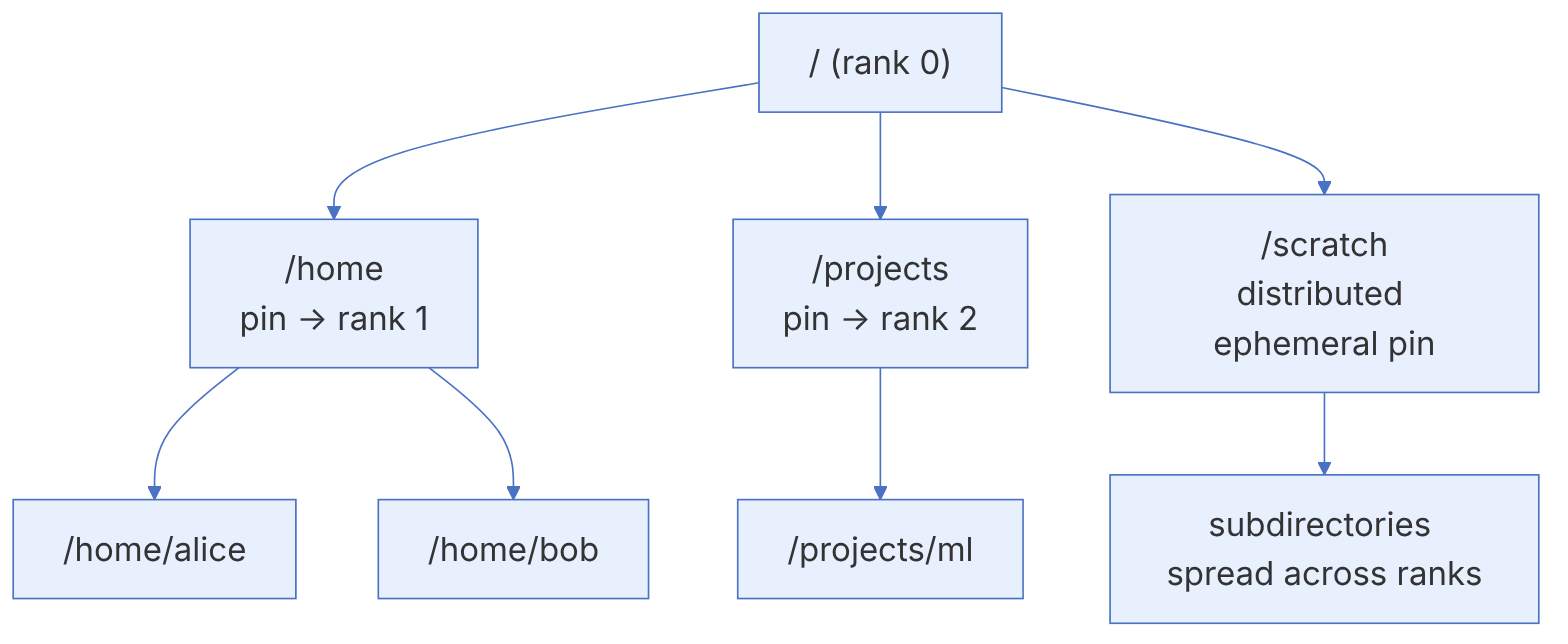
The automatic MDS balancer (which moves subtrees between ranks based on load) has been a source of instability in the past. The common recommendation of the community and the documentation is to use explicit pinning in production. Also, in Tentacle changing max_mds on an unhealthy cluster requires the confirmation flag --yes-i-really-mean-it, because adding MDSs during a problem usually makes things worse.
6-3 Client access#
6-3-1 Creating a user with restricted access#
Never put the client.admin key on a file system client. The ceph fs authorize command creates a user that can access only a specific file system and path, and it sets the necessary capabilities on the MON, MDS and OSD itself:
ceph fs authorize fs01 client.webapp /web rw
ceph fs authorize fs01 client.analyst / r /reports rw
ceph auth get client.webapp
# On the client
ceph auth get client.webapp -o /etc/ceph/ceph.client.webapp.keyring   # from the admin node
scp /etc/ceph/ceph.conf /etc/ceph/ceph.client.webapp.keyring client-node1:/etc/ceph/The second user in the example above sees the whole file system read-only and /reports read-write. To prevent the user from changing layouts or quotas, do not give them the p (layout and quota) and s (snapshot) flags; these flags are active only when you give them explicitly (for example rwps).
6-3-2 The kernel client#
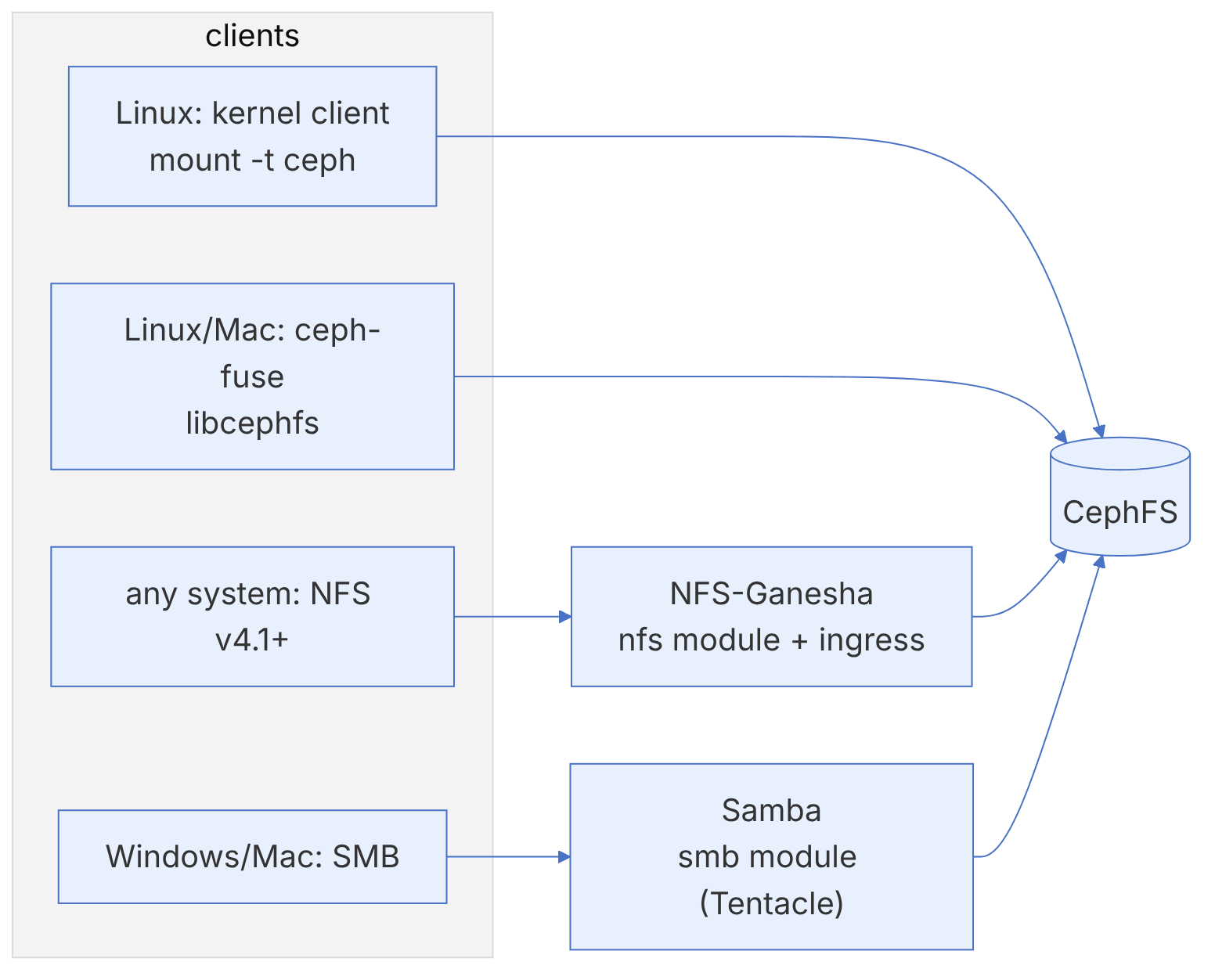
The Linux kernel client (ceph.ko) is the fastest and lowest-overhead way and is the default choice for most production workloads. The new mount syntax (which the documentation calls "v2") has the form name@fsid.fs_name=/path:
sudo dnf install -y ceph-common            # or apt install ceph-common
FSID=$(ceph fsid)
sudo mkdir -p /mnt/fs01
sudo mount -t ceph webapp@${FSID}.fs01=/web /mnt/fs01
# If ceph.conf is not on the client, give the MON addresses explicitly
sudo mount -t ceph webapp@${FSID}.fs01=/web /mnt/fs01 -o mon_addr=192.168.10.11/192.168.10.12
df -h /mnt/fs01
For a permanent mount in /etc/fstab:
webapp@<fsid>.fs01=/web /mnt/fs01 ceph noatime,_netdev 0 0The old syntax mount -t ceph 192.168.10.11:6789:/ /mnt -o name=webapp still works and appears in many older guides. The new syntax is clearer because it names the file system and the fsid explicitly and is unambiguous on clusters with several file systems. With -o ms_mode=secure the kernel client's traffic is also encrypted with msgr2.
The kernel client is tied to the operating system's kernel version. New features (such as quotas on very old kernels, or fscrypt encryption) are available only on new kernels. On enterprise distributions the vendor's backports matter more than the kernel number; read the compatibility table in the documentation before deciding.
6-3-3 ceph-fuse#
ceph-fuse runs in user space and is based on libcephfs, so it always matches the cluster version and gets new features sooner; but it is slower because of the context switches between kernel and user space.
sudo dnf install -y ceph-fuse
sudo mkdir -p /mnt/fs01-fuse
sudo ceph-fuse --id webapp --client_fs fs01 -r /web /mnt/fs01-fuse
# fstab
# none /mnt/fs01-fuse fuse.ceph ceph.id=webapp,ceph.client_fs=fs01,ceph.client_mountpoint=/web,_netdev,defaults 0 0| Criterion | Kernel client | ceph-fuse |
|---|---|---|
| Performance | Better; no user-space overhead | Lower, especially under heavy metadata load |
| Currency | Depends on the operating system kernel | Same version as the Ceph packages |
| Debugging | Harder (dmesg) | Easier (logs and admin socket) |
| Client failure | Can affect the whole node | Limited to that process |
| Suitable cases | Production, HPC, Kubernetes | Old clients, testing, macOS |
6-4 Exporting with NFS and SMB#
6-4-1 NFS with the nfs module#
For clients that cannot mount CephFS directly (old systems, VMware, or networks that must not reach the cluster's public network), Ceph manages the NFS-Ganesha service. Ganesha is a user-space NFS server that connects to CephFS through libcephfs.
ceph mgr module enable nfs        # usually enabled in recent releases
ceph nfs cluster create nfs01 "2 ceph-node2 ceph-node3" --ingress --virtual_ip 192.168.10.50/24
ceph nfs cluster info nfs01
ceph nfs export create cephfs --cluster-id nfs01 --pseudo-path /shared --fsname fs01 --path /web
ceph nfs export ls nfs01 --detailed
# On the client
sudo mount -t nfs -o nfsvers=4.1,proto=tcp 192.168.10.50:/shared /mnt/sharedThe --ingress option deploys an ingress service (haproxy and keepalived) in front of the Ganesha daemons and provides a fixed virtual IP. By default each client sticks to a fixed backend, because NFSv4 is stateful and moving a client between servers requires state recovery. The keepalive-only mode moves only the virtual IP, without haproxy, and suits the simplest HA. Export configuration is stored in RADOS objects (in the .nfs pool), not in a local file, so all daemons have the same configuration.
The nfs module's official support is for NFSv4.1 and above. NFSv3 is available in recent releases with the --enable-nfsv3 option, but because NFSv3 does locking through the separate NLM, test lock and failover behaviour before using it.
6-4-2 SMB with the smb module (Tentacle)#
Before Tentacle, exporting CephFS to Windows meant configuring Samba by hand with the vfs_ceph module. In Tentacle the smb module was added to the MGR; it deploys and manages Samba clusters in containers, with either local users or joining Active Directory:
ceph mgr module enable smb
ceph smb cluster create smb01 user --define-user-pass=alice%S3cret-Ch@ngeMe --placement="1 ceph-node2"
ceph fs subvolumegroup create fs01 smb
ceph fs subvolume create fs01 docs --group_name smb --size 107374182400
ceph smb share create smb01 docs fs01 / --subvolume=smb/docs
ceph smb showThe password in the example above is a sample; in a real environment use Active Directory, or read the password from a secure store so that it does not stay in the shell history. Tentacle also added case-insensitive directories to CephFS, which matter for compatibility with Windows clients; the subvolume commands have the --casesensitive flag for this.
6-5 From the code: capabilities, the journal and dirfrags in the MDS#
6-5-1 Capabilities: the cache contract between MDS and client#
CephFS implements a coherent cache between clients, without a general distributed lock, using capabilities (caps). For each inode the MDS gives each client a set of bits that determines what the client may cache or change locally. The constants are defined in src/include/ceph_fs.h. The generic bits are CEPH_CAP_GSHARED=1, GEXCL=2, GCACHE=4, GRD=8, GWR=16, GBUFFER=32, GWREXTEND=64 and GLAZYIO=128. These bits are shifted onto the prefixes SAUTH=2, SLINK=4, SXATTR=6 and SFILE=8, and CEPH_CAP_PIN=1 is separate.
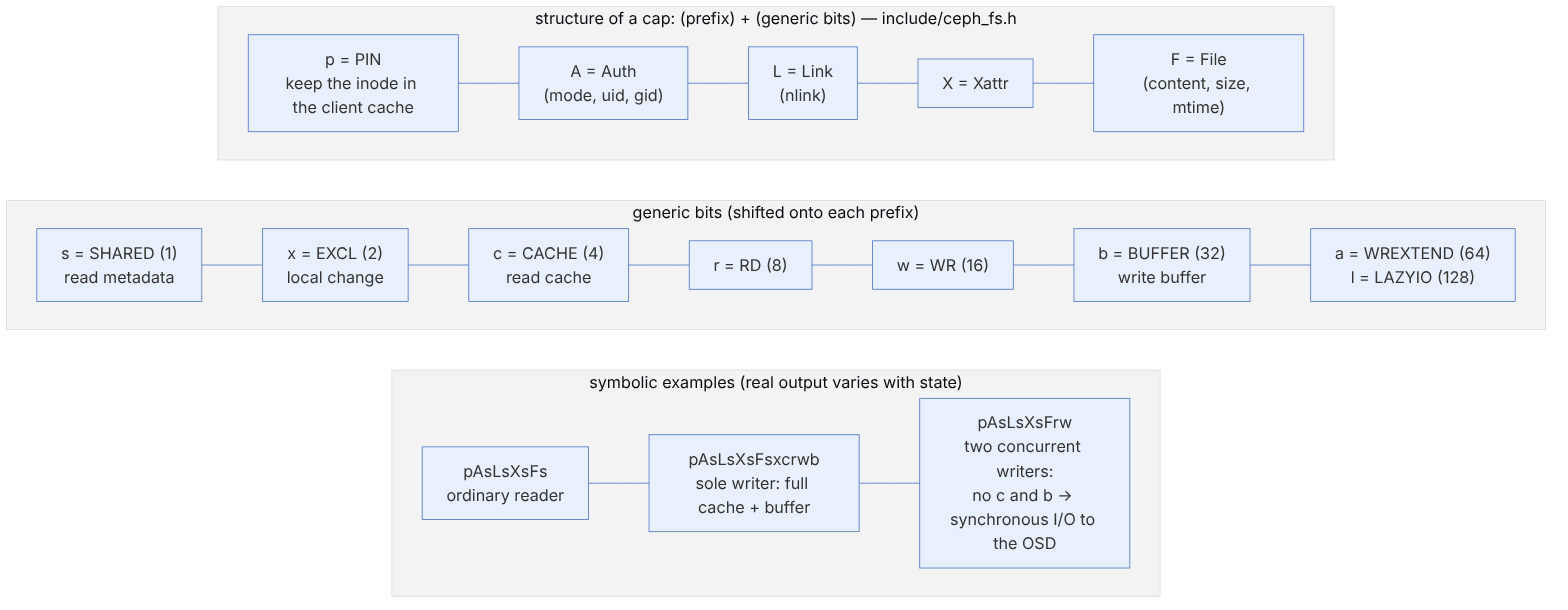
pseudocode: revoke (this book's summary of Locker.cc and Client.cc)
  MDS: client B opens the file for writing and A holds Fcb
     issue_caps(A, wanted=Fsr)              # CEPH_CAP_OP_REVOKE
  A:  flush dirty buffered data to OSD → MClientCaps(UPDATE/ack) with new issued
  MDS: after the ack, Fw to B and Fr to A (without c/b)
  if A does not respond: MDS_CLIENT_LATE_RELEASE warning
and if mds_cap_revoke_eviction_timeout>0 (default 0 = disabled) → evict + blocklist| Option (mds.yaml.in) | Default | Role |
|---|---|---|
| mds_cache_memory_limit | 4_G | Cache memory target; beyond it caps are recalled |
| mds_recall_max_caps | 30000 | Cap on caps recalled from one session at a time |
| mds_max_caps_per_client | 1_M | Soft cap on caps per client |
| mds_cap_revoke_eviction_timeout | 0 | Disabled; automatic eviction of a client that does not return caps |
| mds_session_blocklist_on_timeout / on_evict | true / true | Blocklist the evicted client |
| mds_beacon_grace | 15 | After this long without a beacon, the MON considers that MDS laggy/failed |
6-5-2 Journal, segments and dirfrags#
Every metadata change is first written as an event (for example EUpdate) to the MDLog. This journal lives in the metadata pool and is stored like a continuous log, striped over RADOS objects. After the journal is flushed, a "safe" reply is sent to the client. The directories themselves are written later, when segments expire, into dirfrag objects; each dirfrag is an object named <ino hex>.<frag hex> whose entries live in omap.
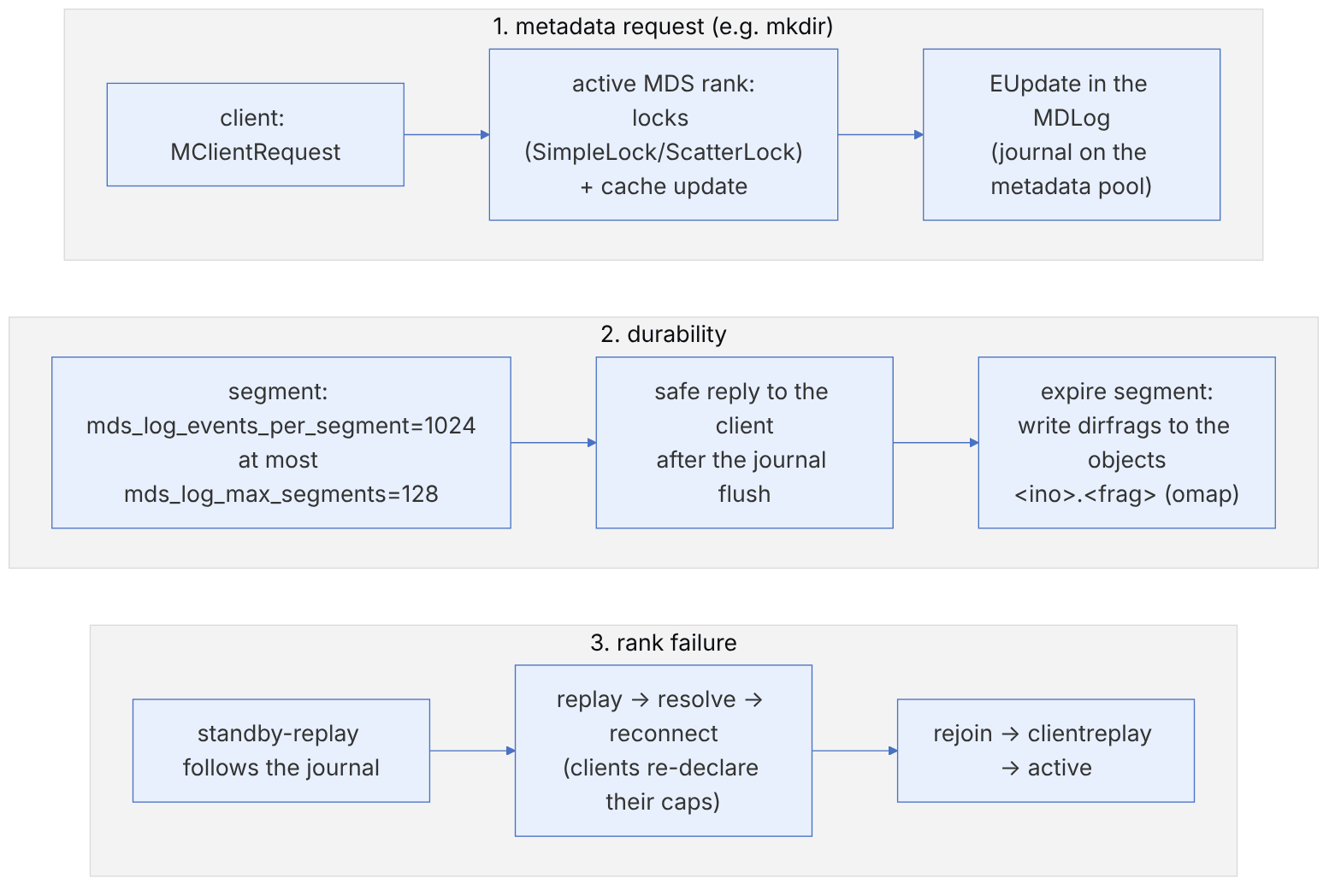
| State (ceph_fs.h) | Value | Meaning |
|---|---|---|
| CEPH_MDS_STATE_REPLAY | 8 | Re-reading the journal |
| CEPH_MDS_STATE_RESOLVE | 9 | Resolving ambiguous cross-rank operations |
| CEPH_MDS_STATE_RECONNECT | 10 | Waiting for clients to reconnect |
| CEPH_MDS_STATE_REJOIN | 11 | Rebuilding the distributed cache |
| CEPH_MDS_STATE_CLIENTREPLAY | 12 | Re-executing the clients' unacknowledged requests |
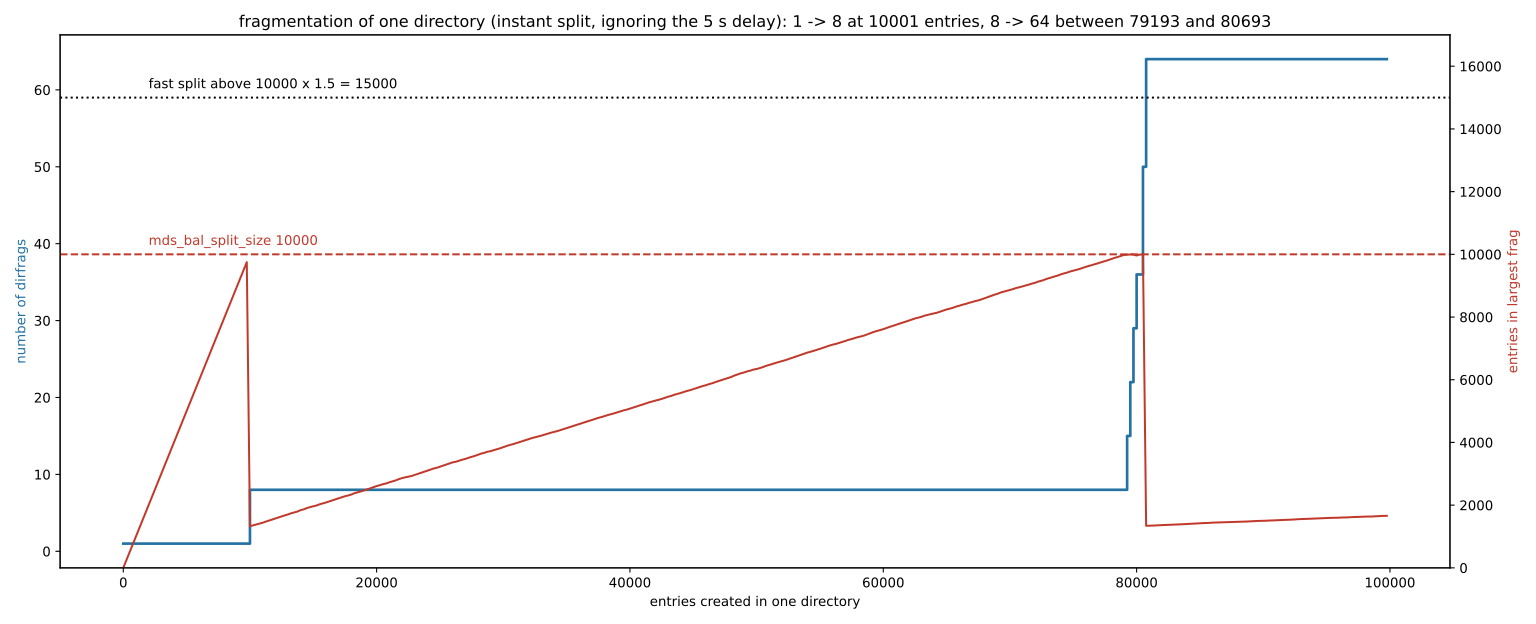
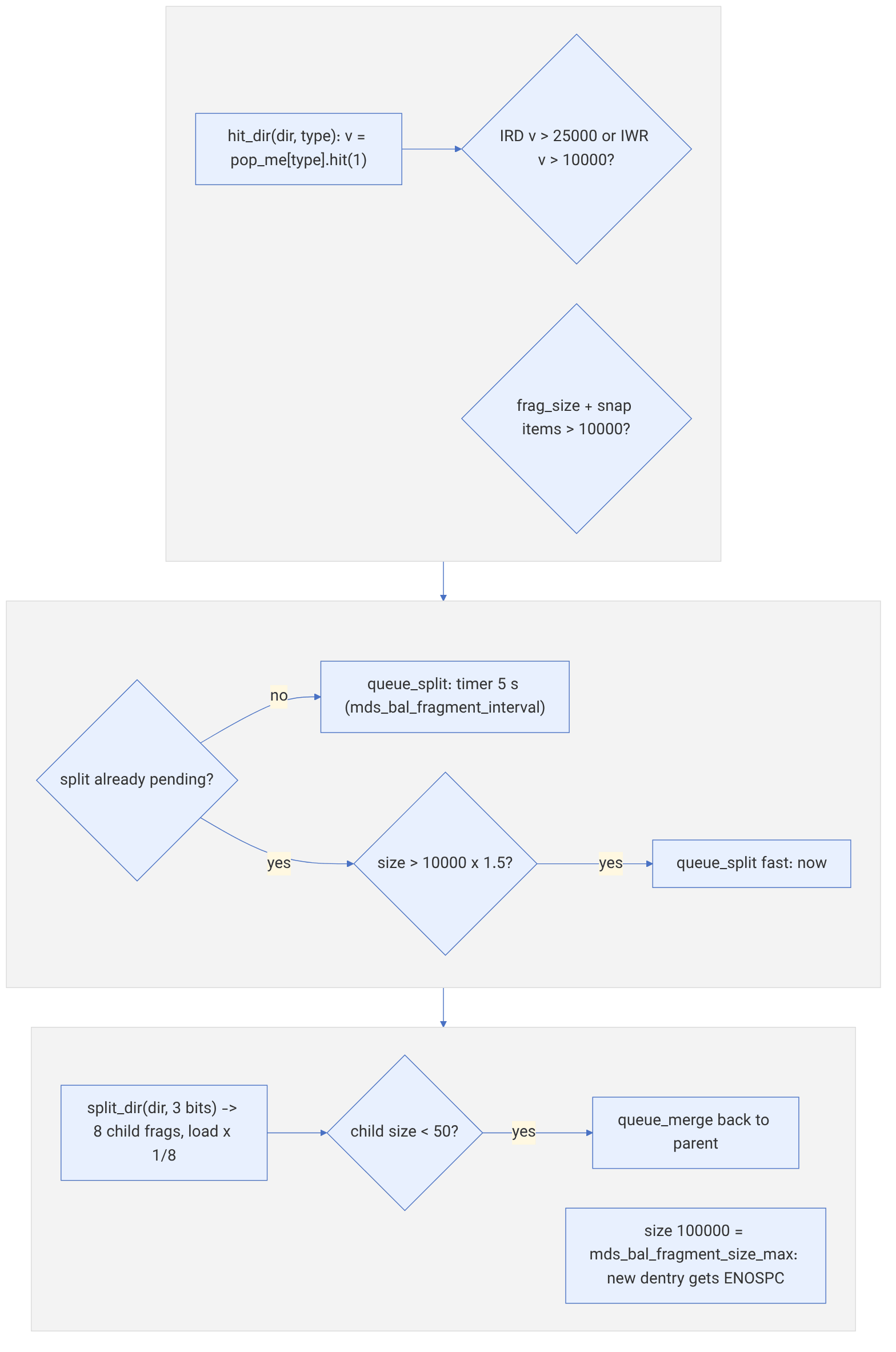
Directory fragmentation (dirfrag): when the number of entries in a fragment exceeds mds_bal_split_size=10000, the fragment is split. If it drops below mds_bal_merge_size=50, a merge happens. mds_bal_fragment_size_max=100000 is the hard cap, after which creating a new file in that fragment is rejected with ENOSPC. These dirfrags are the unit of movement between ranks in the balancer or with pinning.
Inspection commands:
ceph fs status ; ceph health detail | grep -E 'MDS_|CLIENT'
ceph tell mds.cephfs:0 session ls | jq '.[] | {id, num_caps, "client": .client_metadata.hostname}'
ceph tell mds.cephfs:0 dump_ops_in_flight | jq '.ops[0]'
ceph tell mds.cephfs:0 perf dump mds_log | jq '.mds_log | {ev, seg, evtrm}'
ceph tell mds.cephfs:0 cache status
setfattr -n ceph.dir.pin -v 1 /mnt/cephfs/projects # pin the directory to rank 16-6 CephFS by the numbers: object names, dirfrags, splitting and the popularity counter#
This section shows exactly which RADOS object a file and a directory entry in CephFS map to, and on what basis the MDS splits a directory. References are to main in November 2026. Our Python implementation of rjenkins gives 0x7fc1f406 for the name foo, the same value that ceph osd map reports. All the numbers below were computed with this re-implementation.
6-6-1 File to object#
Source in code: src/osdc/Striper.cc :: Striper::file_to_extents; src/include/object.cc :: file_object_t::c_str; src/mds/InoTable.cc :: InoTable::reset_state
Complexity: O(1) per byte and O(number of objects) per range
pseudocode
inos of rank r start at (r+1) << 40 (rank 0 → 0x10000000000)
blockno   = off / su ; stripeno = blockno / sc ; stripepos = blockno mod sc
objsetno  = stripeno / (object_size / su)
objectno  = objsetno × sc + stripepos
obj_off   = (stripeno mod (object_size / su)) × su + off mod su
oid       = sprintf("%llx.%08llx", ino, objectno)       # in the pool of the file's layout (layout.pool_id)
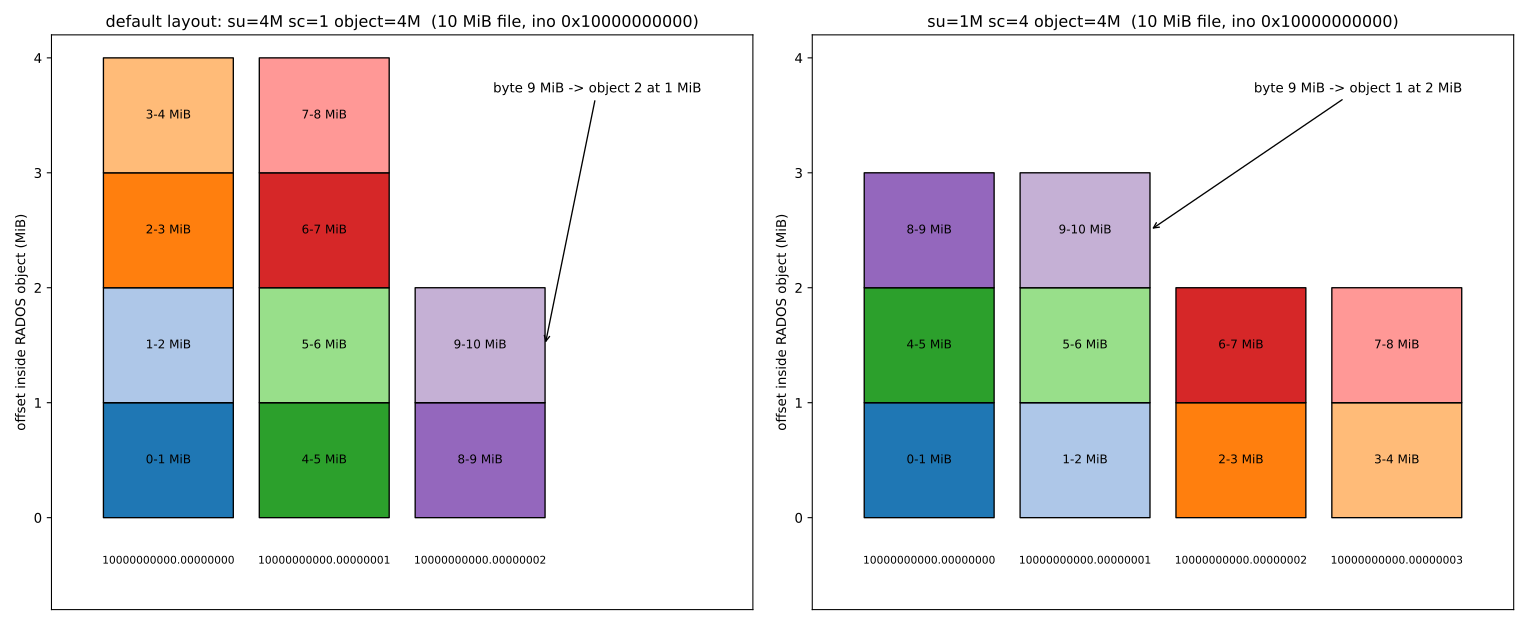
Numeric example. With the default layout (su = 4 MiB, sc = 1 and 4 MiB objects), a 10 MB file with ino 0x10000000000 has three objects: 10000000000.00000000, .00000001 and .00000002. Byte 9 MiB is in object 2 at offset 1 MiB. If, before writing, you change the layout with setfattr -n ceph.file.layout.stripe_unit -v 1048576 and a stripe_count of 4, the same byte goes to object 1 at offset 2 MiB, and the 10 MB is spread over 4 objects. So a large sequential read reaches 4 OSDs at the same time. A file's layout can be changed only while the file is empty. A directory's layout affects only new files.
6-6-2 Entry name to dirfrag#
Source in code: src/mds/CInode.cc :: InodeStoreBase::hash_dentry_name, pick_dirfrag; src/include/frag.h :: fragtree_t::operator[]; src/include/ceph_frag.h
Complexity: O(depth of the frag tree)
pseudocode
h = ceph_str_hash(dir_layout.dl_dir_hash, name)     # default mds_default_dir_hash = 2 = rjenkins
frag = root (bits=0, value=0)
while frag is split in the fragtree (nb bits):
    frag = the child that contains(h): (h AND mask) == value , mask = 0xFFFFFF << (24 − bits)
_enc = (bits << 24) | value         ; dirfrag object = sprintf("%llx.%08llx", dir_ino, _enc)
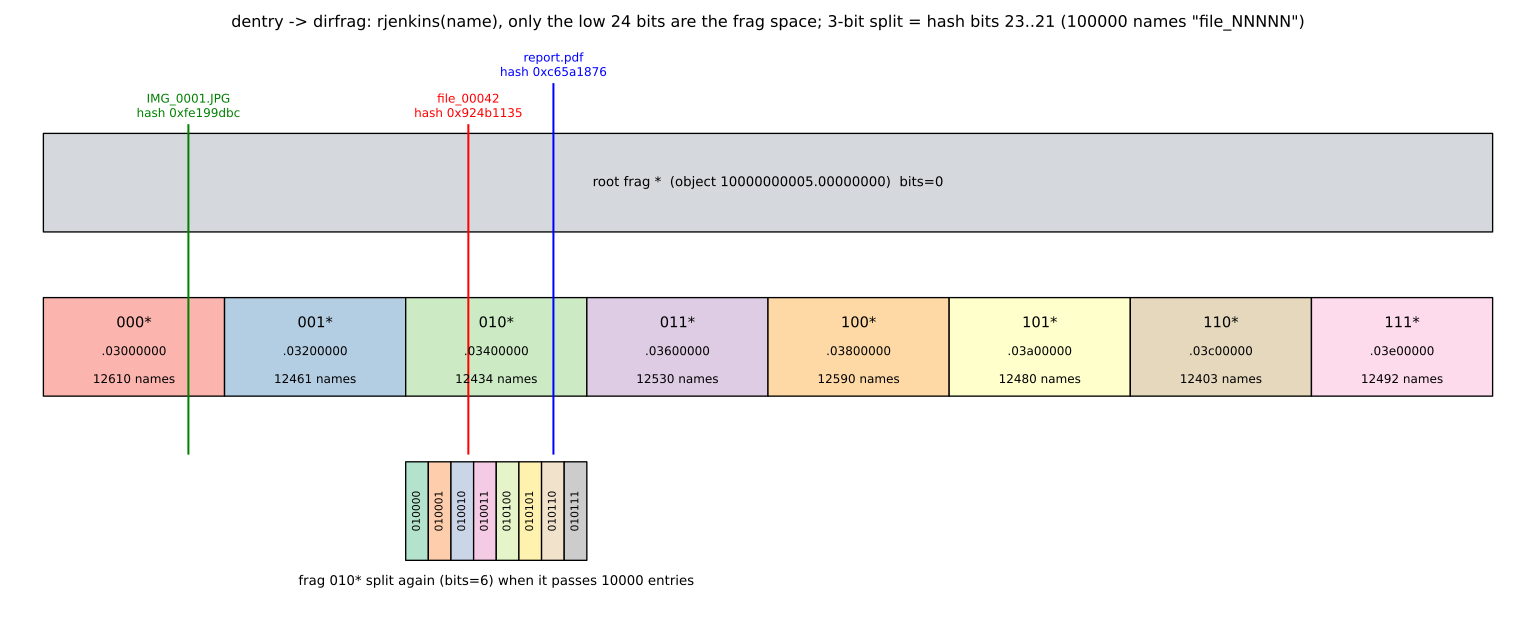
Numeric example. Only the low 24 bits of the hash make up the frag space. A three-bit split reads bits 23 to 21. rjenkins for file_00042 is 0x924b1135, and its bits 23 to 21 are 010, so the entry goes to the frag with _enc 0x03400000, whose object, for a directory with ino 0x10000000005, is 10000000005.03400000. report.pdf with hash 0xc65a1876 also goes to the same frag, and IMG_0001.JPG with hash 0xfe199dbc to frag 0x03000000. The 100000 names file_00000 to file_99999 are spread across the 8 frags as 12403 to 12610 each. Unlike the Linux hash, rjenkins spreads well on the low bits too.
6-6-3 When to split and when to merge?#
Source in code: src/mds/MDBalancer.cc :: MDBalancer::hit_dir, maybe_fragment, queue_split; src/mds/CDir.cc :: CDir::should_split, should_split_fast, should_merge
Complexity: O(1) per hit; split O(entries in the frag)
pseudocode
hit_dir(dir, type): v = dir.pop_me[type].hit(1)
    hot = (type == IRD and v > mds_bal_split_rd 25000) or (type == IWR and v > mds_bal_split_wr 10000)
    if should_split (size + snap > 10000) or hot:
        if no split is queued: queue_split(dir) after mds_bal_fragment_interval (5 s)
        elif should_split_fast (size > 10000 × 1.5): queue_split(dir, fast) , immediately
    if should_merge (size + snap < 50 and not the root frag) : queue_merge
split_dir(dir, mds_bal_split_bits = 3) → 8 frags ; load of each child = parent load × 1/8
hard cap: mds_bal_fragment_size_max = 100000 → a new dentry gets ENOSPC
Numeric example. If 100000 files file_NNNNN are created one after another in one directory, and splitting is assumed to be immediate, the directory is split into 8 frags at entry 10001. Each frag has about 1250 entries and then they grow together. The second split happens almost simultaneously for all eight frags, between entries 79193 and 80693, and the number of frags reaches 64. At 100000 entries the frag sizes are 1462 to 1663. In practice the 5-second delay and the fast path (above 15000) determine how far beyond 10000 a very fast bulk creation gets. The 100000 cap is reached only when splitting is impossible. MDCache::can_fragment refuses to split in these cases: the file system is read-only, the MDS cluster is degraded, a scrub is running on the directory, the directory is quiesced, or it is the root, mdsdir or stray directory. maybe_fragment also skips base inodes. So the CephFS root directory is never split and cannot have more than 100000 entries. Put bulk files in subdirectories.
6-6-4 The popularity counter with a half-life#
Source in code: src/common/DecayCounter.cc :: DecayCounter::decay; src/common/DecayCounter.h :: DecayRate
Complexity: O(1)
pseudocode
k = ln(0.5) / mds_decay_halflife          # default half-life 5 seconds
hit(Δ): val = val × exp(k × (now − last)) + Δ ; last = now ; if val < 0.01: val = 0
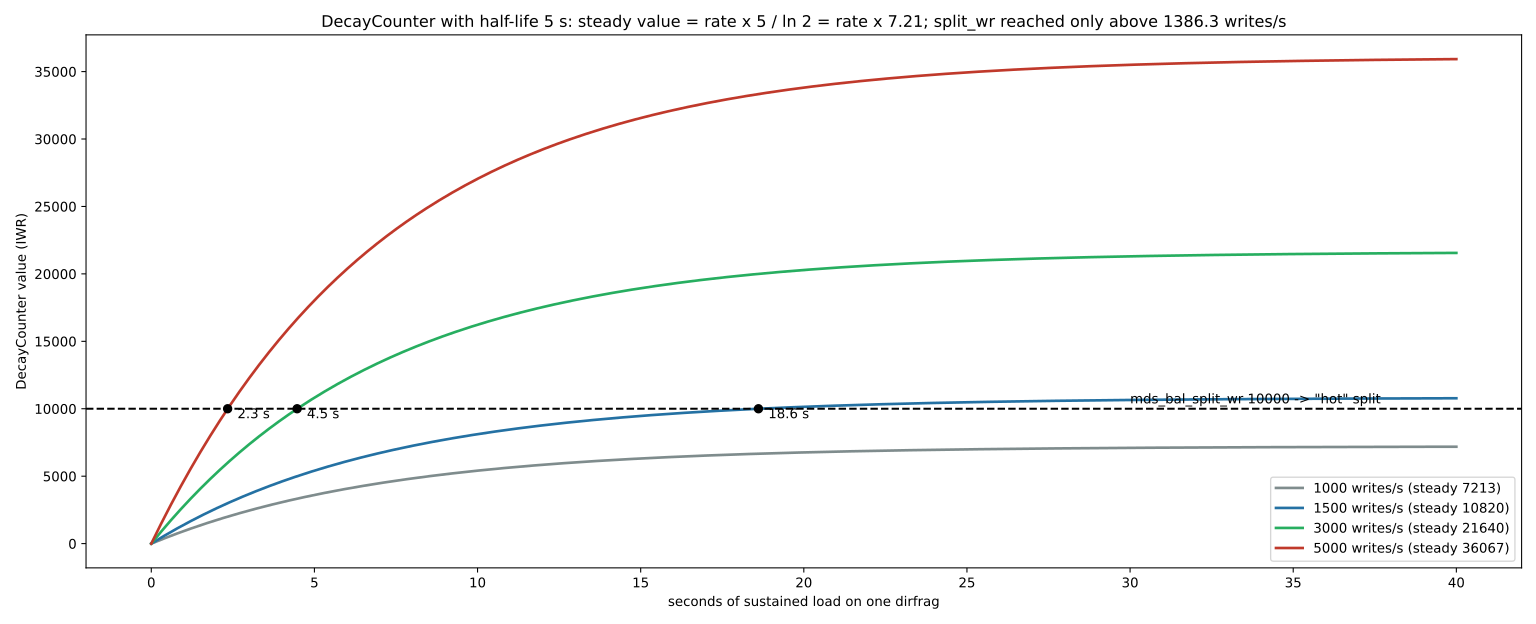
steady value at rate r: r × halflife / ln 2 = r × 7.21
time to reach threshold T: t = −halflife × log2(1 − T / (r × 7.21))
Numeric example. The write threshold of 10000 is crossed at a steady rate r only when r × 7.21 > 10000, that is r > 1386.3 writes per second on one dirfrag. At 1000 writes per second the counter settles at 7213 and the directory never becomes "hot". At 1500 the threshold is crossed after 18.6 seconds, at 3000 after 4.5 seconds and at 5000 after 2.3 seconds. For reads, the threshold of 25000 needs about 3466 reads per second. At 4000 reads per second it takes 14.5 seconds. So a small but busy directory is also split, and its frags become the balancer's unit of movement between ranks. The same DecayCounter is used in the balancer to measure rank load and in the MDS to count cap recalls.
6-7 Subvolumes, snapshots and quotas#
6-7-1 Subvolume: the management unit of shares#
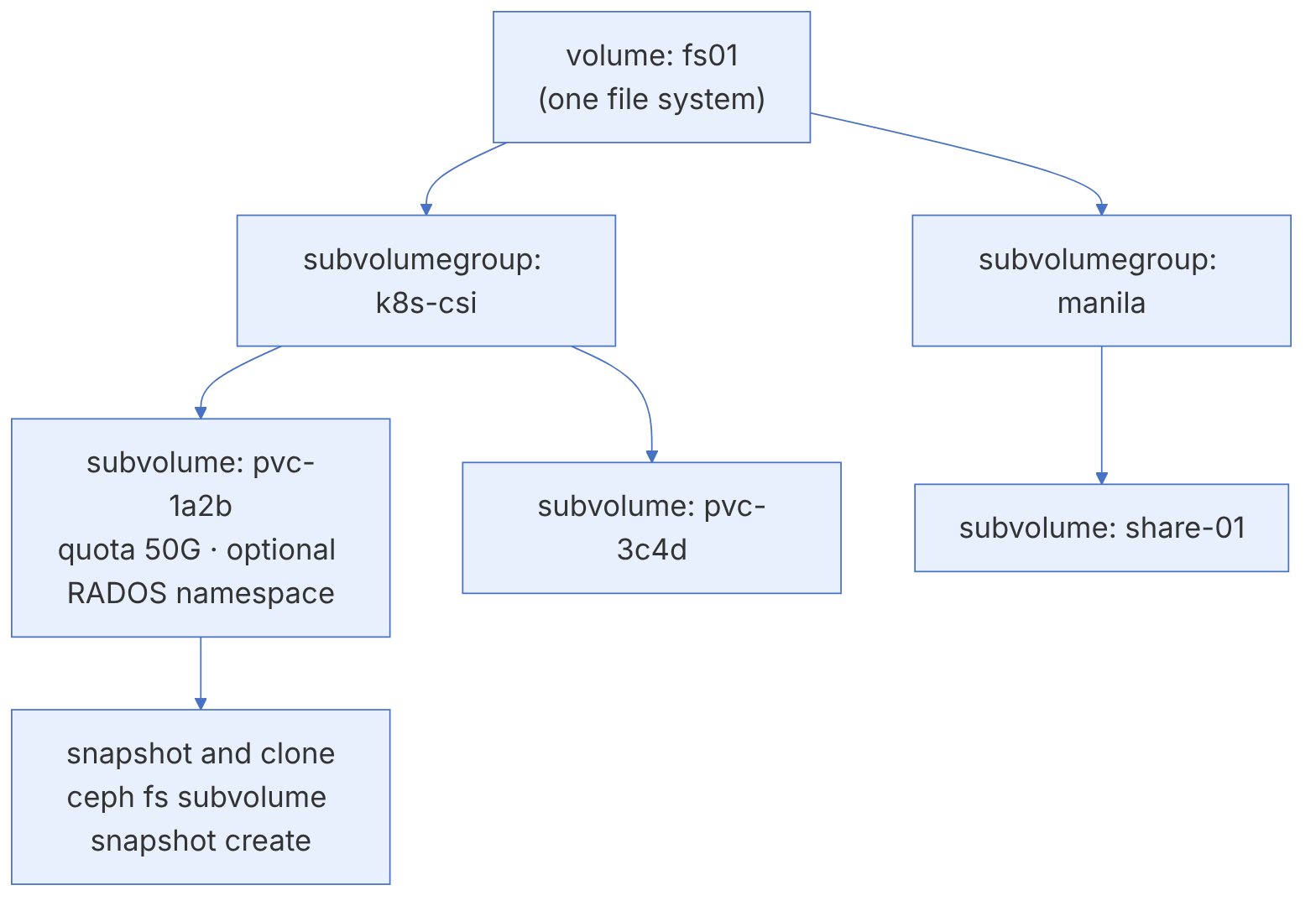
In multi-tenant environments (Kubernetes, Manila) each tenant or each volume needs an independent directory with its own quota, permissions and life cycle. The fs volumes interface in the MGR provides exactly this with three concepts: the volume (a file system), the subvolumegroup (a group of subvolumes with a shared layout) and the subvolume (a managed directory with a quota).
ceph fs subvolumegroup create fs01 teams
ceph fs subvolume create fs01 data-eng --group_name teams --size 53687091200 --mode 770
ceph fs subvolume getpath fs01 data-eng --group_name teams
# output similar to: /volumes/teams/data-eng/<uuid>
ceph fs subvolume info fs01 data-eng --group_name teams
ceph fs subvolume resize fs01 data-eng 107374182400 --group_name teams --no_shrink
ceph fs subvolume ls fs01 --group_name teamsThe ceph-csi driver (which Rook also uses) creates a subvolume in the csi group for each CephFS PVC. If you see orphaned subvolumes piling up in a Kubernetes cluster, usually PVs with reclaimPolicy: Retain were deleted and the subvolumes behind them were left behind.
6-7-2 Snapshots#
CephFS snapshots are taken per directory, not for the whole file system, and are reachable through the virtual .snap directory. Creating them is instant, and they use copy-on-write at the RADOS level.
# On the mounted directory (the user needs the s flag)
mkdir /mnt/fs01/projects/.snap/before-migration
ls /mnt/fs01/projects/.snap/
cp -a /mnt/fs01/projects/.snap/before-migration/report.xlsx /mnt/fs01/projects/   # restore one file
rmdir /mnt/fs01/projects/.snap/before-migration
# For subvolumes, use the management interface
ceph fs subvolume snapshot create fs01 data-eng snap-2026-11-15 --group_name teams
ceph fs subvolume snapshot clone fs01 data-eng snap-2026-11-15 data-eng-test --group_name teams
ceph fs clone status fs01 data-eng-testUnlike a clone in RBD, cloning a subvolume from a snapshot is not instant; the MGR copies the data in the background, and for large subvolumes it takes hours. In Kubernetes this means creating a PVC from a snapshot in CephFS can be slow. For workloads that need fast clones, RBD is a better fit.
6-7-3 Scheduled snapshots#
The snap_schedule module automates taking and removing snapshots periodically:
ceph mgr module enable snap_schedule
ceph fs snap-schedule add /projects 1h --fs fs01
ceph fs snap-schedule retention add /projects h 24 --fs fs01
ceph fs snap-schedule retention add /projects d 7 --fs fs01
ceph fs snap-schedule status /projects --fs fs01
6-7-4 Quotas#
Quotas in CephFS are set with extended attributes (xattrs) on each directory and come in two kinds: maximum bytes and maximum number of files.
setfattr -n ceph.quota.max_bytes -v 10737418240 /mnt/fs01/web
setfattr -n ceph.quota.max_files -v 100000 /mnt/fs01/web
getfattr -n ceph.quota.max_bytes /mnt/fs01/web
setfattr -n ceph.quota.max_bytes -v 0 /mnt/fs01/web # remove the quotaQuota enforcement in CephFS is cooperative: the client itself tracks usage and stops writing when it reaches the cap. For this reason a client that learns about the cap a few seconds late may write slightly more than the quota, and a malicious client that has modified the code can ignore the quota. For strict tenant isolation, use path restrictions in capabilities and a separate RADOS namespace in addition to quotas.
6-7-5 Layout: controlling where data goes#
The layout determines in which pool, and with which striping pattern, the data of a directory's files is stored. A common use is directing archive data to an EC pool:
ceph osd pool create cephfs.fs01.ec erasure
ceph osd pool set cephfs.fs01.ec allow_ec_overwrites true
ceph fs add_data_pool fs01 cephfs.fs01.ec
setfattr -n ceph.dir.layout.pool -v cephfs.fs01.ec /mnt/fs01/archive
getfattr -n ceph.dir.layout /mnt/fs01/archiveA directory's layout affects only files created after it is set. Existing files stay in the previous pool; to move them you must copy them (not mv, because a rename within one file system does not move the data).
6-8 Mirroring and replacing HDFS#
6-8-1 Snapshot mirroring between clusters#
Since Pacific, the cephfs-mirror daemon asynchronously transfers the snapshots of selected directories to a file system in another cluster. This mechanism is snapshot-based: each new snapshot is also created at the destination, and only the differences are transferred.
# Destination cluster
ceph fs authorize fs01 client.mirror_remote / rwps
ceph fs snapshot mirror peer_bootstrap create fs01 client.mirror_remote site-b
# Source cluster
ceph orch apply cephfs-mirror --placement="1 ceph-node2"
ceph mgr module enable mirroring
ceph fs snapshot mirror enable fs01
ceph fs snapshot mirror peer_bootstrap import fs01 <token>
ceph fs snapshot mirror add fs01 /projects
ceph fs snapshot mirror peer_list fs01CephFS mirroring is one-way and snapshot-based; the RPO equals the interval between snapshots. Combine it with snap-schedule so that snapshots are created regularly. In normal operation the destination file system should only be read.
6-8-2 The "HDFS replacement" claim#
Older sources often recommended running Hadoop on CephFS instead of HDFS. The situation today:
- The
cephfs-hadoopplugin has had no active maintenance for years and does not appear in the current documentation as a recommended path. - The big-data ecosystem has moved towards object storage: Spark, Trino, Hive and Iceberg work directly with RGW through the S3A interface (chapter 4).
- For workloads that really need POSIX (for example training machine-learning models with libraries that open files), CephFS is mounted directly with the kernel client.
If you are asked for "Hadoop on Ceph" today, it almost always means "Spark or Trino on RGW with S3A". Its key points: enabling path-style or correct DNS for buckets, using S3-specific committers (such as the magic committer), and watching the number of objects per bucket and resharding (chapter 4).
6-9 Operations and troubleshooting#
6-9-1 Daily monitoring#
ceph fs status
ceph health detail | grep -i mds
ceph tell mds.fs01:0 session ls          # list of rank 0's clients
ceph tell mds.fs01:0 perf dump mds_server
ceph tell mds.fs01:0 dump_ops_in_flight
ceph tell mds.fs01:0 cache status| Warning | Meaning | Action |
|---|---|---|
| MDS_CACHE_OVERSIZED | The cache has grown beyond its set limit | Find clients holding many capabilities; raise mds_cache_memory_limit if needed |
| MDS_CLIENT_RECALL | A client does not respond to cache release requests | Check the client version; it may need to be evicted |
| MDS_HEALTH_CLIENT_LATE_RELEASE | A client releases capabilities late | The network and hung processes on the client |
| MDS_SLOW_REQUEST | Slow metadata requests | dump_ops_in_flight, slow OSDs in the metadata pool |
| MDS_TRIM | The journal has fallen behind | Health and latency of the metadata pool |
| FS_DEGRADED | One or more ranks are not active | The state of the MDSs and standbys |
| MDS_INSUFFICIENT_STANDBY | Fewer standbys than standby_count_wanted | Add MDSs |
6-9-2 Evicting a client#
ceph tell mds.fs01:0 client ls | grep -E '"id"|hostname'
ceph tell mds.fs01:0 client evict id=4305
ceph osd blocklist lsA client whose mount has "frozen" (every ls hangs) has usually been evicted. Look at dmesg on the kernel client. After fixing the cause, detach the mount with umount -f or umount -l and mount it again. The kernel client's recover_session=clean option can reconnect automatically after an eviction, but dirty cached data is lost.
6-9-3 Metadata damage#
The tools cephfs-journal-tool, cephfs-data-scan and cephfs-table-tool exist for recovering damaged metadata. These tools are dangerous, and running them in the wrong order can make things worse.
Before any metadata recovery action, back up the journal (cephfs-journal-tool --rank=fs01:0 journal export backup.bin) and follow the steps of the "Disaster recovery" page of the CephFS documentation exactly. If important data is at risk, get help from an expert or the community mailing list before running cephfs-data-scan.
- Metadata pool: replicated, on SSD/NVMe, with a separate CRUSH rule.
- Always at least one standby MDS; standby-replay for fast failover.
- Multiple active MDSs only when needed; explicit pinning instead of the automatic balancer.
- Each client gets its own user with
ceph fs authorizeand a restricted path. - Enough RAM for the MDS:
mds_cache_memory_limitplus overhead (about 1.5 times). - Quotas are cooperative; for strict isolation, use path capabilities and a RADOS namespace.
- A clone in CephFS is a full copy and is slow.
6-10 Supplementary and up to date#
- Pacific: support for multiple file systems became enabled by default on new clusters (older clusters still need the
enable_multipleflag), and snapshot mirroring with cephfs-mirror was introduced. - Later releases: the subvolume interface has kept growing; the current syntax of
ceph fs subvolume createhas options such as--earmark,--normalization,--casesensitiveand--namespace-isolatedthat did not exist in the 2019 book. - Tentacle: the smb module for managing Samba, case-insensitive directories and name normalisation, explicit confirmation for changing
max_mdson an unhealthy cluster, and Dashboard support for NVMe/TCP. - The book's old path: creating an MDS with ceph-deploy and mounting with the old IP syntax; today
ceph fs volume createand the v2 syntax have replaced them.
Read the details of each release in the official release notes; this chapter includes only changes confirmed in the current documentation.
6-11 Hands-on exercise#
- 1. Create the file system
lab-fswithceph fs volume createand two MDSs, and enable standby-replay. Fail the active MDS withceph mds fail lab-fs:0and measure the failover time withceph fs status. - 2. Create the user
client.labwith read-write access only to/lab. Mount with the kernel client and check that it has no write access to/. - 3. Set a one-gigabyte quota on
/laband exceed it withdd. Which error do you see, and how much was written beyond the quota? - 4. Create a subvolume with a 5 GB cap, take a snapshot, delete a file and restore it from
.snap. - 5. Create an NFS cluster with ingress, define an export and mount it from a machine without the Ceph packages.
- 6. Define an hourly snap-schedule with a retention of 6, and check the output of
statusafter a few hours.
6-12 Review questions#
- 1. Why is the MDS not on the file data path, and what advantage does this have?
- 2. What is a capability, and when does the MDS evict a client?
- 3. What is the difference between standby and standby-replay?
- 4. Why should the default CephFS data pool not be EC?
- 5. When are multiple active MDSs needed, and why is explicit pinning recommended?
- 6. Compare the kernel client and ceph-fuse in terms of performance and currency.
- 7. Why does NFS-Ganesha keep export configuration in RADOS?
- 8. Why are quotas in CephFS called "cooperative"?
- 9. Why does changing a directory's layout not move existing files?
- 10. What is the usual replacement for "Hadoop on CephFS" today?
Answers to these questions are in Appendix E: Answers to Review Questions. Answers to this chapter's questions →
6-13 Sources for this chapter#
- CephFS
https://docs.ceph.com/en/latest/cephfs/ - FS volumes and subvolumes
https://docs.ceph.com/en/latest/cephfs/fs-volumes/ - Mount using kernel driver
https://docs.ceph.com/en/latest/cephfs/mount-using-kernel-driver/ - Mount using FUSE
https://docs.ceph.com/en/latest/cephfs/mount-using-fuse/ - Client authentication
https://docs.ceph.com/en/latest/cephfs/client-auth/ - Configuring multiple active MDS
https://docs.ceph.com/en/latest/cephfs/multimds/ - Standby daemons
https://docs.ceph.com/en/latest/cephfs/standby/ - MDS cache configuration
https://docs.ceph.com/en/latest/cephfs/cache-configuration/ - Snapshot scheduling
https://docs.ceph.com/en/latest/cephfs/snap-schedule/ - CephFS mirroring
https://docs.ceph.com/en/latest/cephfs/cephfs-mirroring/ - NFS module
https://docs.ceph.com/en/latest/mgr/nfs/ - SMB module
https://docs.ceph.com/en/latest/mgr/smb/ - Quotas
https://docs.ceph.com/en/latest/cephfs/quota/ - File layouts
https://docs.ceph.com/en/latest/cephfs/file-layouts/ - Health messages
https://docs.ceph.com/en/latest/cephfs/health-messages/ - Disaster recovery
https://docs.ceph.com/en/latest/cephfs/disaster-recovery/ - Tentacle release notes
https://docs.ceph.com/en/latest/releases/tentacle/