Operating and Managing a Ceph Cluster
TL;DR this chapter in a few lines
- With cephadm every daemon is a container under systemd and you manage services declaratively with
ceph orch; configuration lives in the MON database, not inceph.conf. - Keep each node under about 10–15% of raw capacity and leave enough free space to survive the loss of the largest failure domain without crossing
nearfull. - A failed OSD is marked out after
mon_osd_down_out_interval(10 minutes) and recovery starts; replace disks withceph orch osd rm --replaceand use host maintenance mode for planned work. - Upgrades are staged and automatic with
ceph orch upgrade; the three full ratios andMAX AVAILinceph dfexplain why free space is less than it looks.
7-1 Before you start#
7-1-1 What questions does this chapter answer?#
Building a cluster takes a day; running it takes years. This chapter covers the operator's day-to-day work: managing services, configuration, growing and shrinking the cluster, replacing disks, upgrading releases and controlling recovery load. The 2019 book did these tasks by editing ceph.conf by hand, with ceph-deploy and with packaged systemd units. In a modern cluster with cephadm most of these tasks have become declarative: you state the desired state and the orchestrator keeps it in place.
- What layers does service management have in cephadm, and where does systemd fit?
- Where is configuration kept today, and why is
ceph.confalmost empty? - How do we add or remove nodes, OSDs and MONs?
- What is the safe procedure for replacing a failed disk?
- How do we upgrade without downtime and with controlled risk?
- How do we slow down or speed up recovery and backfill, especially with the mClock scheduler?
7-2 Managing services#
7-2-1 Control layers#
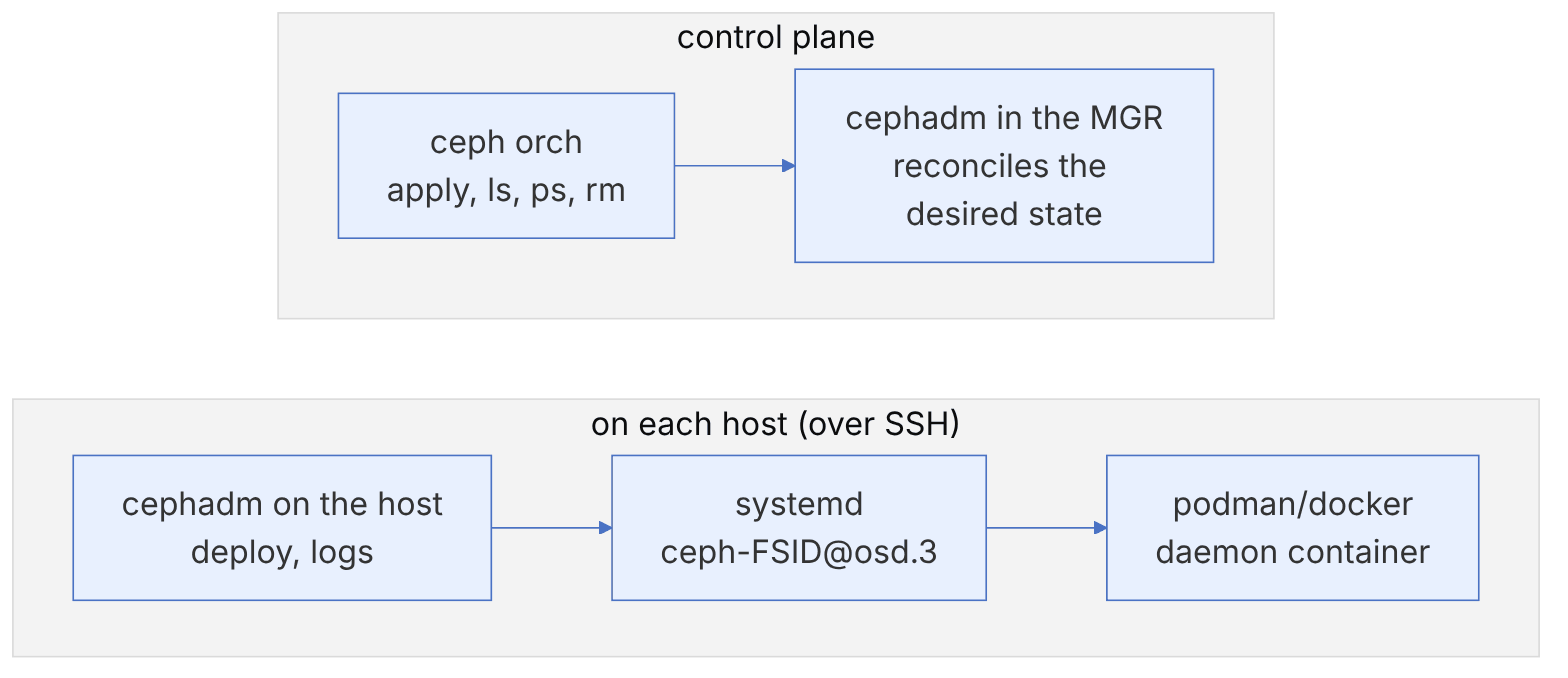
In cephadm each daemon is a container run by a systemd unit. The orchestrator (the cephadm module in the MGR) creates, removes or restarts daemons on the hosts over SSH. You normally work only with the top layer:
ceph orch ls                          # services and the number of desired/running daemons
ceph orch ps                          # all daemons
ceph orch ps --daemon-type osd --hostname ceph-node2
ceph orch ls --export > cluster-specs.yaml   # a backup of the desired state
7-2-2 Start, stop and restart#
ceph orch restart rgw.objstore            # all daemons of a service, one by one
ceph orch daemon restart osd.3
ceph orch daemon stop mds.fs01.ceph-node3.xyzabc
ceph orch daemon start mds.fs01.ceph-node3.xyzabc
ceph orch daemon redeploy mgr.ceph-node1.abcdef   # rebuild the container (e.g. after an image change)
7-2-3 systemd behind the scenes#
On each host the systemd units have a specific naming scheme that includes the cluster fsid. This naming lets several clusters run on one host (for example in a lab) without interfering.
FSID=$(ceph fsid)
systemctl list-units "ceph-${FSID}*"
systemctl status ceph-${FSID}@osd.3.service
sudo systemctl stop ceph-${FSID}.target      # stop all daemons of this cluster on this host
sudo systemctl start ceph-${FSID}.target
journalctl -u ceph-${FSID}@osd.3 --since "1 hour ago"
cephadm logs --name osd.3 # the same log through cephadmIf you stop a daemon directly with systemctl, the orchestrator does not know about it and may restart it or report an error in the next reconciliation cycle. For planned work on a whole host, use maintenance mode (below). Keep systemctl for local debugging or for when the MGR is unavailable.
7-3 Configuration#
7-3-1 The centralised configuration database#
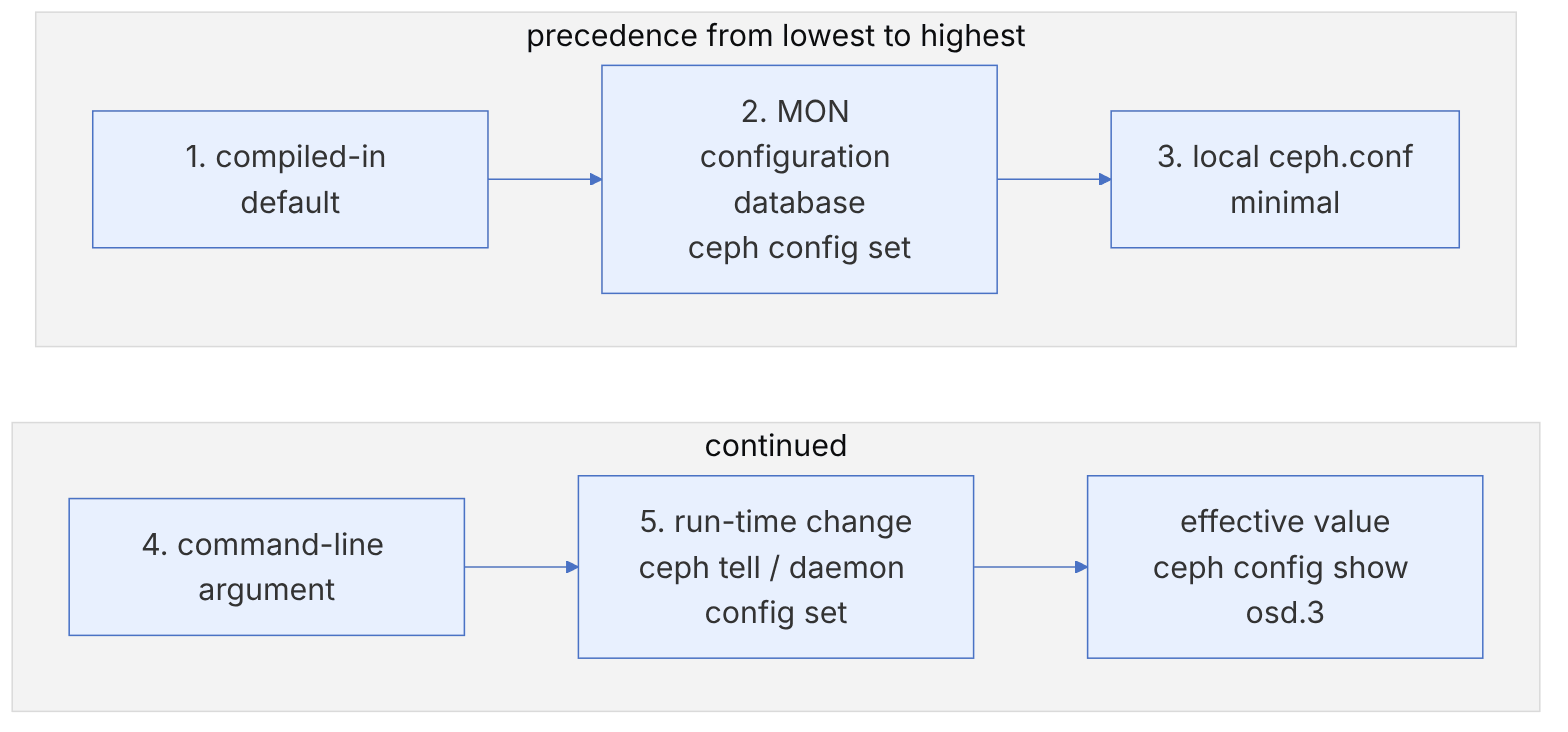
Since Mimic, the cluster configuration has been kept in the MON configuration database, and ceph.conf on the hosts holds only the minimum information needed to find the MONs (fsid and mon_host). The 2019 book still taught adding [mon.a] and [osd.0] sections to ceph.conf; today this is neither necessary nor recommended.
cat /etc/ceph/ceph.conf                      # usually a few lines
ceph config dump                              # all non-default settings
ceph config get osd osd_memory_target
ceph config set osd osd_memory_target 6442450944
ceph config set osd.12 osd_memory_target 8589934592    # one OSD only
ceph config set osd/class:ssd osd_memory_target 8589934592   # all SSD OSDs (mask)
ceph config set client.rgw.objstore rgw_max_concurrent_requests 2048
ceph config show osd.3 | grep memory_target   # the effective value in the running daemon
ceph config help osd_memory_target
ceph config log 10 # the change historyThe ceph config log and ceph config reset <n> commands let you roll back configuration changes. Before any big change, save the output of ceph config dump in version control (Git) so that you can compare the differences later.
7-3-2 Temporary changes at run time#
ceph tell osd.* config set debug_osd 10/10      # temporarily, until restart
ceph tell osd.* config set debug_osd 1/5        # restore
ceph daemon osd.3 config show # through the admin socket, on the same host (inside a cephadm shell)ceph tell sends a message to the daemon over the network; ceph daemon works through the local admin socket and is available only on that daemon's host (in cephadm, inside cephadm shell --name osd.3). When a daemon does not respond because it is stuck on network messages, the admin socket usually still answers.
7-4 Growing and shrinking the cluster#
7-4-1 Scale-up or scale-out?#
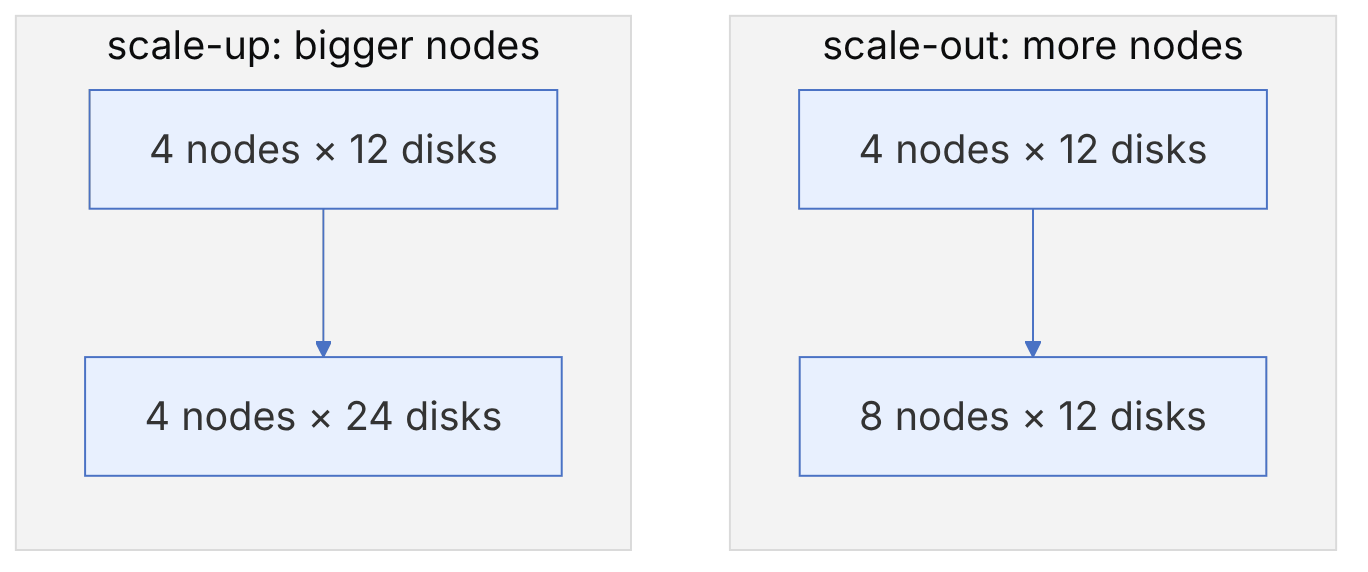
| Criterion | Scale-up (denser nodes) | Scale-out (more nodes) |
|---|---|---|
| Cost per terabyte | Usually lower | Somewhat higher (CPU, network, rack) |
| Failure domain | Large; losing one node recovers a large part of the data | Smaller; faster recovery with less impact |
| Performance | Each node's CPU and network become the bottleneck | More linear as nodes are added |
| Limitation | Minimum number of nodes for EC and the failure domain | Rack space, switches and power |
A practical rule: no node should hold more than about 10 to 15 percent of the cluster's raw capacity. Also, the cluster's free space should be large enough that after losing the largest failure domain (node or rack), the OSDs do not cross the nearfull ratio.
7-4-2 Adding a node and OSDs#
# On the new node: install podman, set up time (chrony) and the cluster SSH key
ssh-copy-id -f -i /etc/ceph/ceph.pub root@ceph-node5
ceph orch host add ceph-node5 192.168.10.15 --labels osd
ceph orch device ls ceph-node5 --refresh
# If your OSD spec (e.g. all-available-devices or a spec with a filter) is active, OSDs are created automatically
ceph orch ls osd
ceph -sSuddenly adding many OSDs causes widespread PG movement. On a busy cluster, set the norebalance and nobackfill flags before adding, create all the OSDs, and then remove the flags so that data moves once rather than several times. Tools such as the balancer module even out the distribution after backfill finishes.
ceph osd set norebalance && ceph osd set nobackfill
ceph orch apply -i osd-spec.yaml
ceph osd tree
ceph osd unset nobackfill && ceph osd unset norebalance
7-4-3 Adding MONs and MGRs#
In cephadm the number and placement of MONs are set with the mon service spec:
service_type: mon
placement:
  count: 5
label: monceph orch host label add ceph-node5 mon
ceph orch apply -i mon-spec.yaml
ceph mon stat
ceph quorum_status -f json-pretty | jq '.quorum_names'Keep the number of MONs odd (3 or 5). Five MONs tolerate losing two MONs; more than 5 usually only adds consensus overhead. Place MONs in different failure domains (racks or rooms).
7-4-4 Removing an OSD#
ceph osd safe-to-destroy osd.9        # can it be removed without losing data?
ceph osd ok-to-stop osd.9             # would stopping it temporarily make a PG unavailable?
ceph orch osd rm 9                    # drain and remove
ceph orch osd rm status
ceph orch osd rm first sets the OSD's weight to zero, waits until all PGs have moved elsewhere, then removes the daemon and deletes the OSD from CRUSH and the map. With --zap the disk is also wiped (LVM and partitions) so that it can be used again.
7-4-5 Removing a whole host#
ceph orch host drain ceph-node5       # drains all daemons, including OSDs
ceph orch osd rm status
ceph orch ps ceph-node5               # should become empty
ceph orch host rm ceph-node5--offline --force in host rm is only for a host that is lost for good; this option removes its OSDs without draining and is safe only when their data can be rebuilt from other copies.
7-5 Replacing a failed disk#
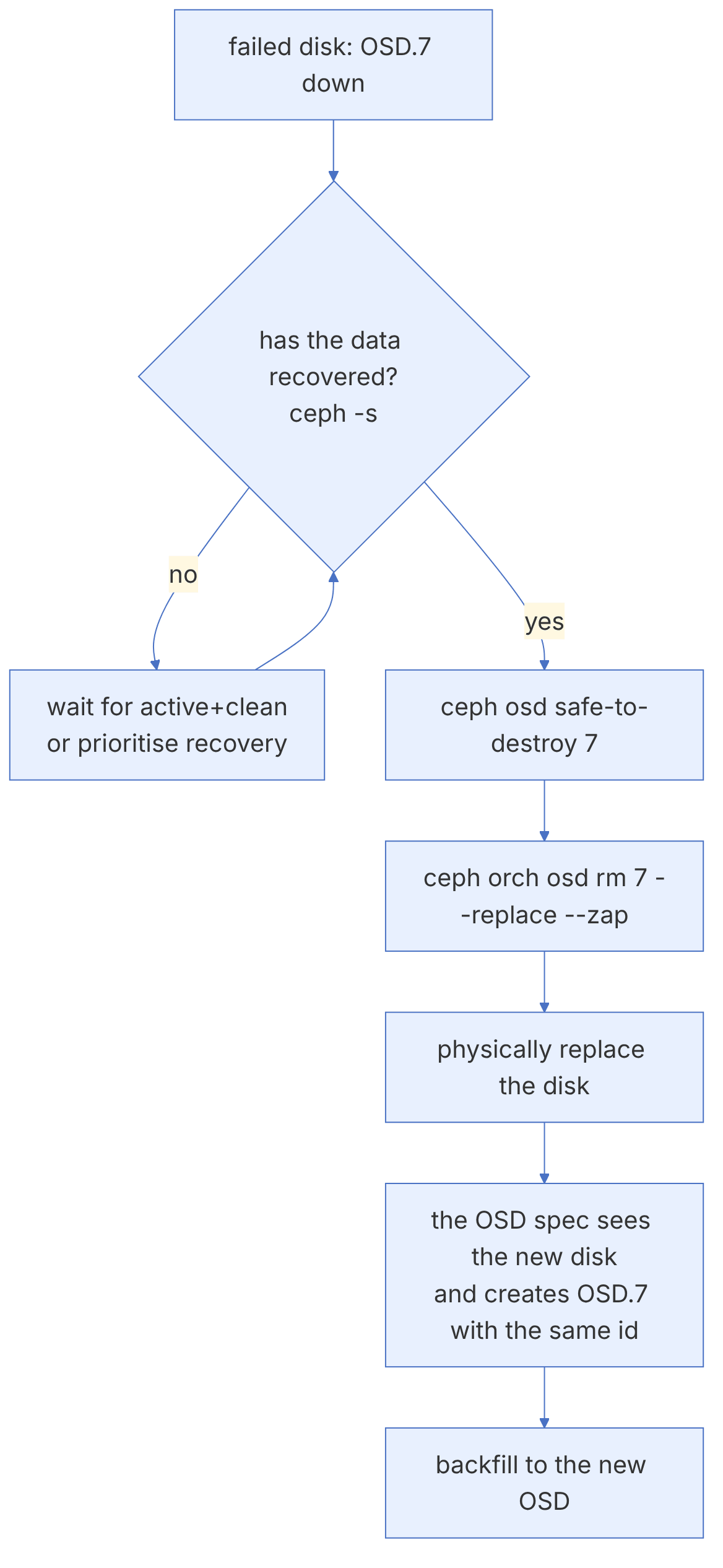
When a disk fails, its OSD goes down, and after mon_osd_down_out_interval (default 10 minutes) it is automatically marked out and recovery starts. The suggested procedure:
ceph health detail
ceph osd tree down
ceph device ls-by-daemon osd.7                 # device id and host
ceph device light on <devid> ident             # turn on the identification light (if the hardware supports it)
# wait until the data has been recovered
ceph -s
ceph osd safe-to-destroy osd.7
ceph orch osd rm 7 --replace --zap
ceph orch osd rm status
# after physically replacing the disk
ceph orch device ls ceph-node2 --refresh
ceph osd tree | grep osd.7The --replace option keeps the OSD in the destroyed state instead of removing it completely; its id and position in CRUSH are preserved. When the OSD spec sees the new disk on the same host, it creates the new OSD with the same id. The advantage is that the CRUSH map does not change and less data moves.
Device health management (ceph device) collects the SMART data of the disks and can predict failures. Check it with ceph device monitoring on and ceph device get-health-metrics <devid>. If mgr/devicehealth/self_heal is enabled, the OSDs of disks with a high probability of failure are marked out preemptively.
7-6 Upgrading#
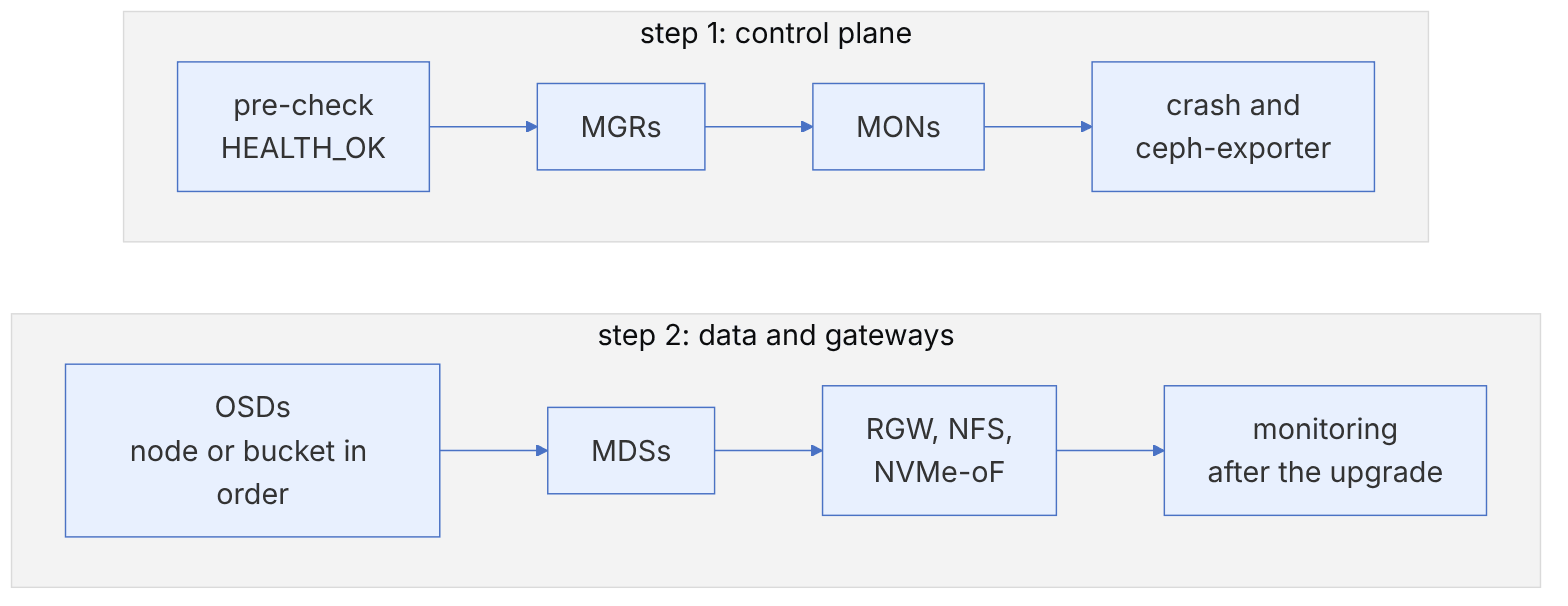
cephadm performs upgrades automatically and in stages, and it respects the correct order. Before upgrading:
- Read the release notes of the target release in full, especially the "Upgrading" section and the incompatible changes.
- Check the allowed upgrade path: Ceph usually supports upgrades from at most two major releases back.
- The cluster must be
HEALTH_OKand every PGactive+clean. - For Umbrella, check the host prerequisites: the images are based on el10, and a CPU at the x86-64-v3 level is required.
ceph versions
ceph orch upgrade start --image quay.io/ceph/ceph:v20.2.5
ceph orch upgrade status
ceph -W cephadm                         # follow the upgrade events
ceph orch upgrade pause                 # in case of trouble
ceph orch upgrade resume
ceph orch upgrade stop
7-6-1 Staged and limited upgrades#
cephadm lets you limit an upgrade to a specific daemon type, service or host. Umbrella added the ability to upgrade OSDs bucket by bucket in CRUSH, which uses the new ceph osd ok-to-upgrade command to check which OSDs can be upgraded at the same time:
ceph orch upgrade start --image quay.io/ceph/ceph:v21.2.0 --daemon-types mgr,mon
ceph orch upgrade start --image quay.io/ceph/ceph:v21.2.0 --daemon-types osd --crush_bucket_type rack --crush_bucket_name rack-aIn a multi-stage upgrade you must respect the order yourself: no daemon may be newer than the MGRs and MONs. After all OSDs have been upgraded, cephadm normally sets require_osd_release; confirm with ceph osd dump | grep require_osd_release. Until this value is set, new OSD features are not enabled and the related warning remains.
7-7 Capacity and balance#
7-7-1 Fullness ratios#
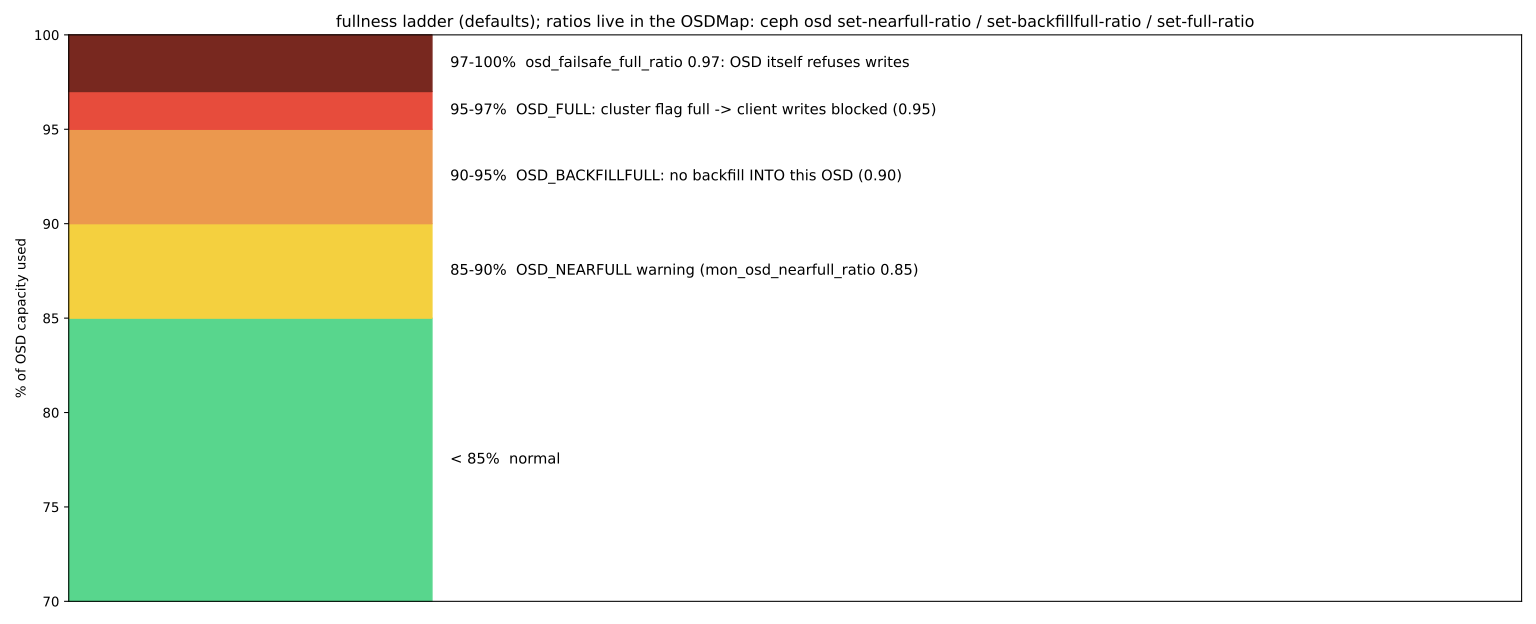
Ceph has three thresholds to prevent OSDs from filling up completely. A completely full OSD is very dangerous in Ceph, because BlueStore needs free space even to delete data:
| Threshold | Default | Effect |
|---|---|---|
| nearfull_ratio | 0.85 | OSD_NEARFULL warning |
| backfillfull_ratio | 0.90 | Backfill to this OSD stops |
| full_ratio | 0.95 | Writes to the dependent pools stop (OSD_FULL) |
ceph osd dump | grep -E 'full_ratio|nearfull'
ceph osd df tree                    # usage percentage and PG count of each OSD
ceph df detail # raw and usable space of each poolIf the cluster reaches OSD_FULL, the natural first reaction (deleting data) may not work. The emergency procedure: temporarily ceph osd set-full-ratio 0.97 (only to make room for deletion), delete or move non-essential data, add capacity, and then set the ratio back to its default. Never raise this ratio permanently.
7-7-2 The real "usable" capacity#
The MAX AVAIL figure in ceph df computes each pool's usable capacity taking into account the redundancy type and the fullest OSD. That is, imbalance reduces usable capacity: if one OSD fills up first, the whole pool counts as full. Use these rules for capacity planning:
- Divide raw capacity by the redundancy factor (3 for three-way replication,
(k+m)/kfor EC). - Subtract the space needed to tolerate the failure of the largest domain.
- Subtract a safety margin up to nearfull (usually aim for normal usage under 70 percent).
You have a cluster with 8 nodes and 12 disks of 16 TB in each node, and the failure domain is host. Raw capacity is 1536 TB. With three-way replication about 512 TB remains usable. To tolerate losing one node (one eighth of the capacity) and stay under 85 percent after recovery, keep normal usage at about 70 percent, that is around 350 to 360 TB. Repeat the same calculation for EC 4+2.
7-7-3 The balancer#
The balancer module in the MGR evens out the distribution by setting upmap mappings (explicit movement of PGs between OSDs). In current releases it is enabled by default, and upmap mode requires clients at least at the Luminous level.
ceph balancer status
ceph balancer mode upmap
ceph balancer on
ceph config set mgr target_max_misplaced_ratio .03     # at most 3% of data misplaced at any moment
ceph osd df | sort -nk17 | tail # the fullest OSDsReef added the new modes read and upmap-read, which balance primaries as well as data distribution so that read load becomes more even (by default reads are served by each PG's primary OSD). These modes use the pg-upmap-primary mapping, and all clients must be Reef or newer. On a cluster with heterogeneous disks, this mode can reduce read bottlenecks on a few OSDs.
7-7-4 Automatic PG scaling#
The pg_autoscaler module adjusts each pool's PG count based on the stored data or a target size you declare:
ceph osd pool autoscale-status
ceph osd pool set rbd target_size_ratio 0.4          # this pool is expected to take 40% of the cluster
ceph osd pool set cephfs.fs01.meta pg_autoscale_mode on
ceph osd pool set images bulk true # a large pool: get enough PGs from the startIn Umbrella the default of mon_target_pg_per_osd was raised from 100 to 200 and the cap mon_max_pg_per_osd from 250 to 500. After upgrading, the autoscaler may raise the PG count of some pools and data movement may start. Compare the output of autoscale-status before and after the upgrade, and schedule the changes if necessary.
PG count calculator
Give the OSD count and each pool's share of the data: see the classic pgcalc answer and what the pg_autoscaler would choose, pass by pass.
| Pool | size | classic pgcalc | ideal (PG replicas) | autoscaler | would it change? |
|---|---|---|---|---|---|
| rbd | 3 | 935 → 1024 | 2304 | 1024 (even bulk) | yes: 32 → 1024 |
| cephfs.data | 6 | 312 → 256 | 2304 | 256 (even bulk) | yes: 32 → 256 |
| cephfs.meta | 3 | 42 → 32 | 96 | 32 (non-bulk) | no |
| .mgr | 3 | 8 → 8 | 0 | 32 (non-bulk) | yes: 1 → 32 |
autoscaler: root budget = mon_target_pg_per_osd × OSDs = 200 × 24 = 4800; pool = ⌊capacity_ratio × pg_left⌋ / size, rounded down or up to a power of two by a knapsack over the budget; min pg_num_min (32); changes only past the threshold (3×; 1× at 512/1024, 2× at 2048)
The autoscaler never goes below 32 PGs (osd_pool_default_pg_num) for a pool it manages, and with bulk unset it starts small and grows with the data.
Follows:
src/pybind/mgr/pg_autoscaler/module.py :: _get_pool_status, _calculate_final_pool_pg_targetthe four passes over a root's poolsmodule.py :: PoolGroup, _find_optimal_pg_distribution, _append_resultrounding groups of pools within the budgetmodule.py :: nearest_power_of_two, get_dynamic_thresholdpower of two and the change thresholdsrc/osd/OSDMap.cc :: pool_raw_used_rateraw space per byte (size, or (k+m)/k)src/common/options/mgr.yaml.in :: mon_target_pg_per_osd (200)target PG replicas per OSDsrc/common/options/global.yaml.in :: mon_max_pg_per_osd (500), osd_pool_default_pg_num (32)the upper limit and the minimum pg_num
7-8 Inside the code: MON, Paxos and the map services#
7-8-1 The role of Paxos in Ceph#
All the cluster maps (MonMap, OSDMap, MgrMap, FSMap, the central configuration, cephx keys and so on) are stored on one shared Paxos instance in src/mon/Paxos.cc. Each "service" (PaxosService; such as OSDMonitor, AuthMonitor, ConfigMonitor) proposes its changes to this Paxos, and Paxos writes them one by one, with a contiguous version number (last_committed), into the monitor's RocksDB. Ceph's implementation is a form of Multi-Paxos with a stable leader: after an election the leader runs the recovery phase (collect/last) once, and from then on each change needs only one round trip (begin/accept) and one commit message.
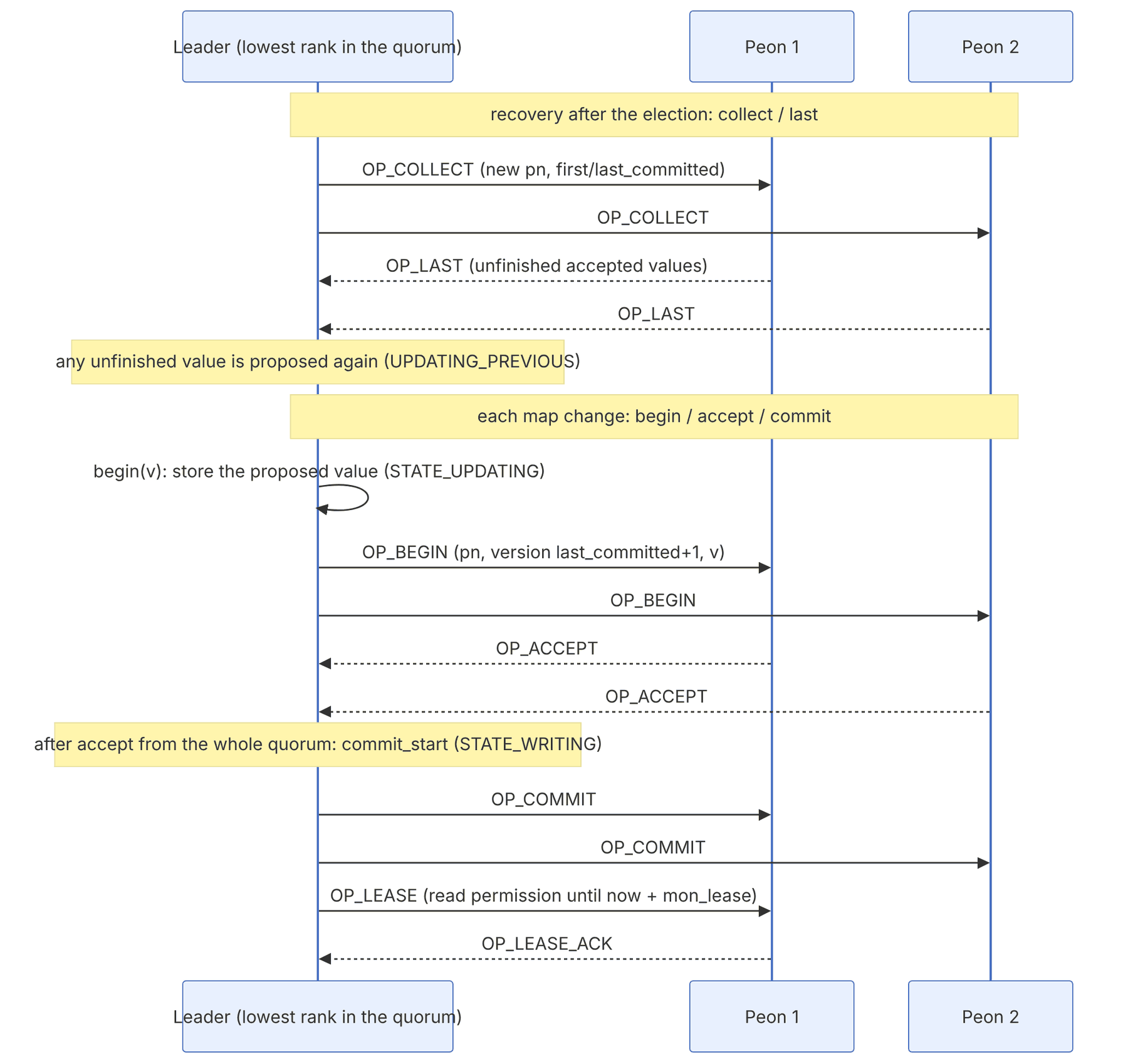
| Message (MMonPaxos) | Direction | Meaning |
|---|---|---|
| OP_COLLECT (1) | leader → peon | Start a round with a new proposal number (pn) |
| OP_LAST (2) | peon → leader | Accept the pn and send unfinished accepted values |
| OP_BEGIN (3) | leader → peon | Proposed value for the next version |
| OP_ACCEPT (4) | peon → leader | Accept the value |
| OP_COMMIT (5) | leader → peon | Announce the agreed value |
| OP_LEASE (6) | leader → peon | Extend read permission |
| OP_LEASE_ACK (7) | peon → leader | Acknowledge the lease |
An important difference from classic Paxos: to commit, the leader waits for acceptance from all members of the current quorum, not just a majority. In Paxos::handle_accept():
// from ceph/ceph, LGPL — src/mon/Paxos.cc, handle_accept() (excerpt)
accepted.insert(from);
...
if (accepted == mon.get_quorum()) {
This is possible because the quorum itself came out of a majority election; if one quorum member does not respond, an accept timeout occurs and a new election is held so that a smaller quorum (still a majority) forms. The advantage: all quorum members always have all versions and can serve reads under a lease.
7-8-2 States and the lease#
The Paxos states in Paxos.h: STATE_RECOVERING, STATE_ACTIVE, STATE_UPDATING, STATE_UPDATING_PREVIOUS, STATE_WRITING, STATE_WRITING_PREVIOUS, STATE_REFRESH (and SHUTDOWN). A read from a peon is allowed only when it holds a valid lease. Parameters:
| Option | Default | Role |
|---|---|---|
| mon_lease | 5 seconds | Validity period of the read lease |
| mon_lease_renew_interval_factor | 0.6 | Renew after 60% of the lease period |
| mon_lease_ack_timeout_factor | 2 | If the ack does not arrive within twice the lease, re-elect |
| paxos_propose_interval | 1 second | Batching interval for changes before proposing |
| mon_election_timeout | 5 seconds | Election timeout |
The lease is the main reason the MON is sensitive to clock skew: the leader tells a peon "you may serve reads until time T". If the peon's clock is behind, it may still hand the old map to a client after the leader has committed a new one. The MON_CLOCK_SKEW warning (threshold mon_clock_drift_allowed) exists to prevent exactly this situation.
7-8-3 From command to new map#
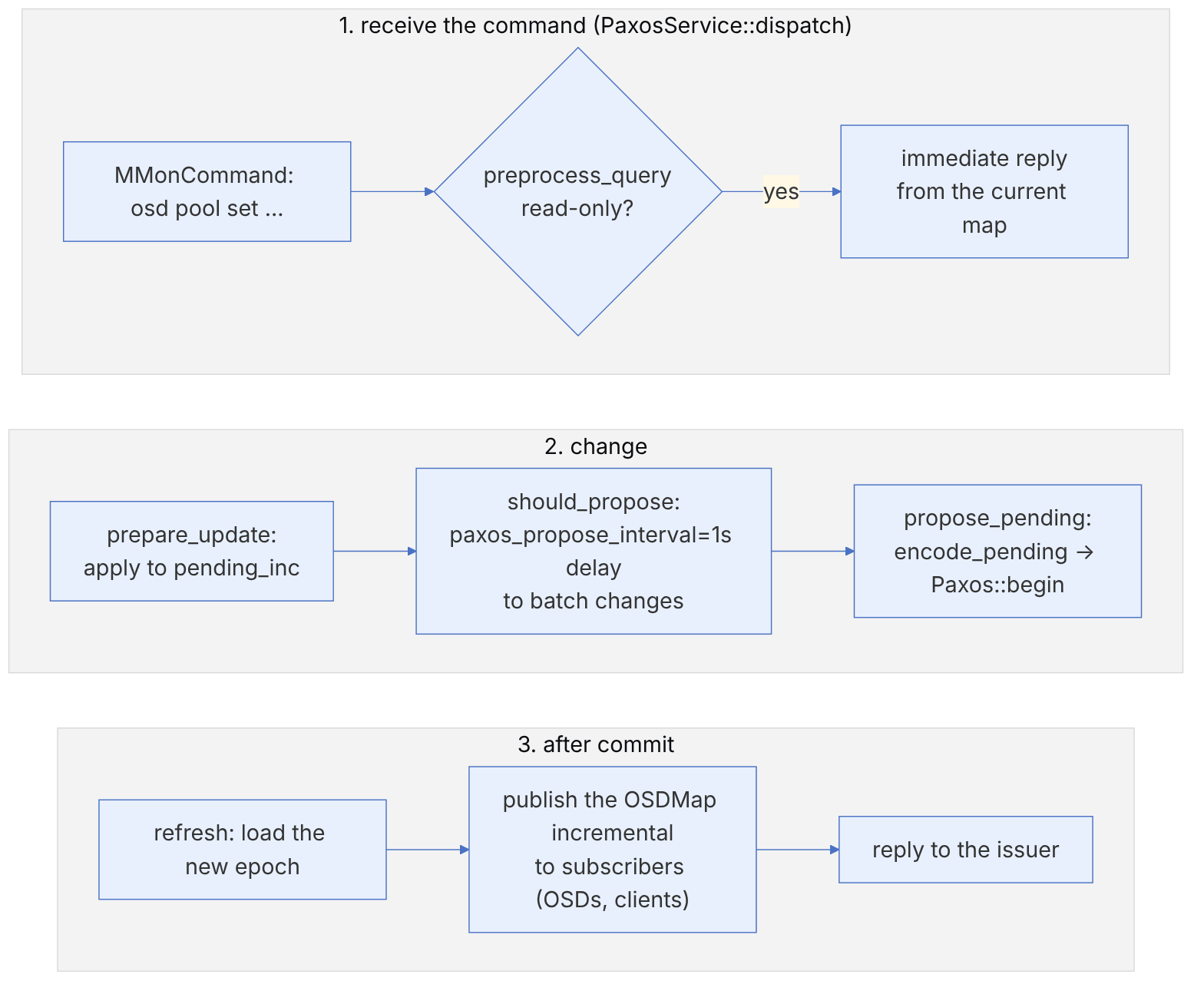
pseudocode: PaxosService (this book's summary of PaxosService.cc and OSDMonitor.cc)
  dispatch(op):
      if preprocess_query(op): return            # read-only; e.g. osd dump
      if not leader: forward(op to leader); return
      if prepare_update(op):                     # change on pending_inc
          if should_propose(delay):              # batching with paxos_propose_interval
              schedule propose_pending() after delay
  propose_pending():
      t = new transaction
      encode_pending(t)                          # OSDMap::Incremental → bytes
      paxos.begin(t)                             # OP_BEGIN to the quorum
  on commit:
      update_from_paxos()                        # new epoch
      publish incrementals to subscribers        # OSDs and clients
reply to waiting opsThis is why running several dozen ceph osd ... commands at the same time usually produces one new epoch with all the changes, not dozens of epochs. And it is also why a modifying command takes about a second even when the cluster is completely quiet.
7-8-4 Elections#
src/mon/ElectionLogic.h has three election strategies: CLASSIC (rank-based; the lowest rank wins), DISALLOW (a list of MONs must not become leader) and CONNECTIVITY (includes DISALLOW, and prefers the MON with better connectivity based on connectivity scores stored in the store). Stretch mode requires connectivity (chapter 18).
ceph mon dump | grep election_strategy
ceph mon set election_strategy connectivity
ceph mon add disallowed_leader e         # the tiebreaker MON never becomes leader
ceph quorum_status | jq '.quorum_leader_name, .quorum_names'
ceph daemon mon.a sessions | jq length # on the MON host7-9 Daily operations by the numbers: down, out, grace and MAX AVAIL#
The four algorithms in this section run in the MON and answer a few everyday operator questions: why an OSD was or was not marked down at this moment, why it was marked out after ten minutes, and why ceph df shows less free space than the raw space. References are to main as of November 2026, and the numbers were computed with a Python reimplementation.
7-9-1 Marking down: reporters and grace#
Source in code: src/mon/OSDMonitor.cc :: OSDMonitor::check_failure, get_grace_time, is_failure_stale
Complexity: O(number of reporters)
pseudocode
group the reporters by mon_osd_reporter_subtree_level (default host)
if number of groups < mon_osd_min_down_reporters (2): not yet
failed_for = now − failed_since                      # from the first report, backdated
grace = osd_heartbeat_grace (20)
if mon_osd_adjust_heartbeat_grace (true):
    decay = exp(failed_for × ln 0.5 / mon_osd_laggy_halflife (3600))
    grace += decay × laggy_interval × laggy_probability             # the OSD's own history
    grace += the mean of the same term for the reporters (decayed from their down_stamp)
if failed_for ≥ grace: mark the OSD down in the next map
if failed_for ≥ grace + osd_heartbeat_stale (600 s) and still no decision: discard the reports
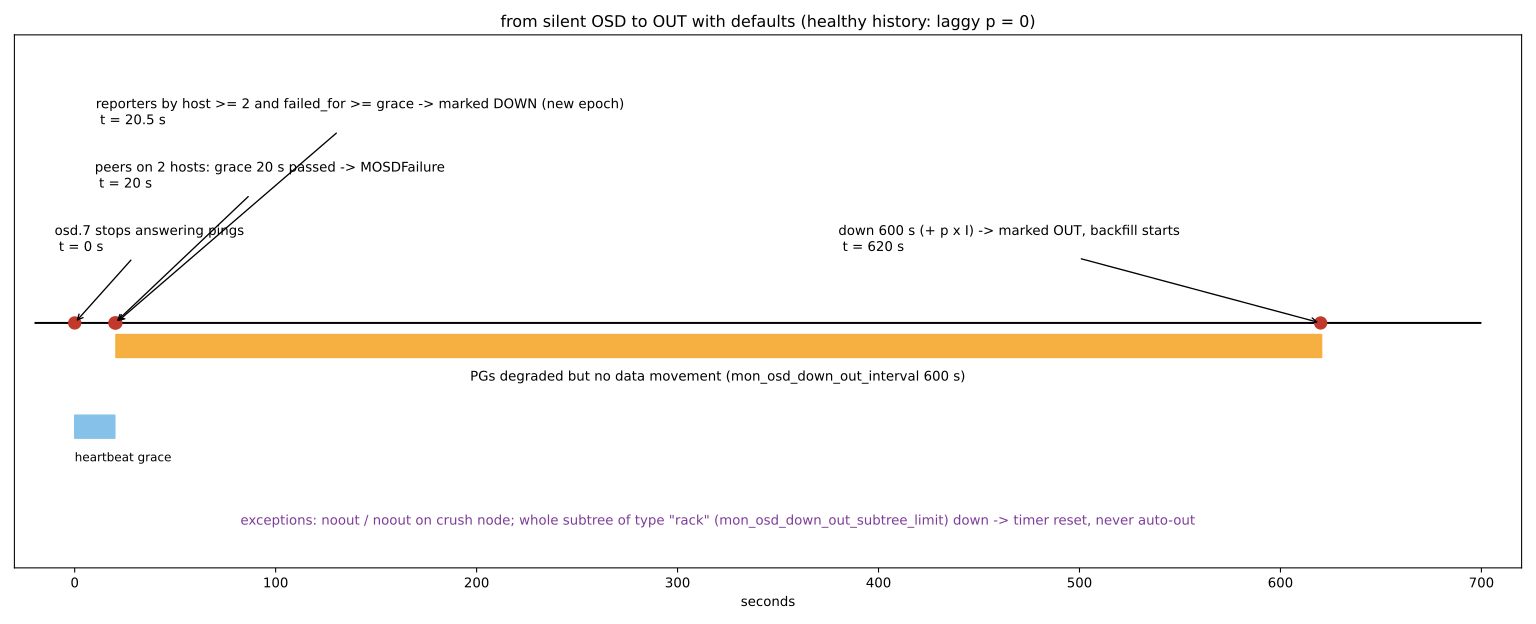
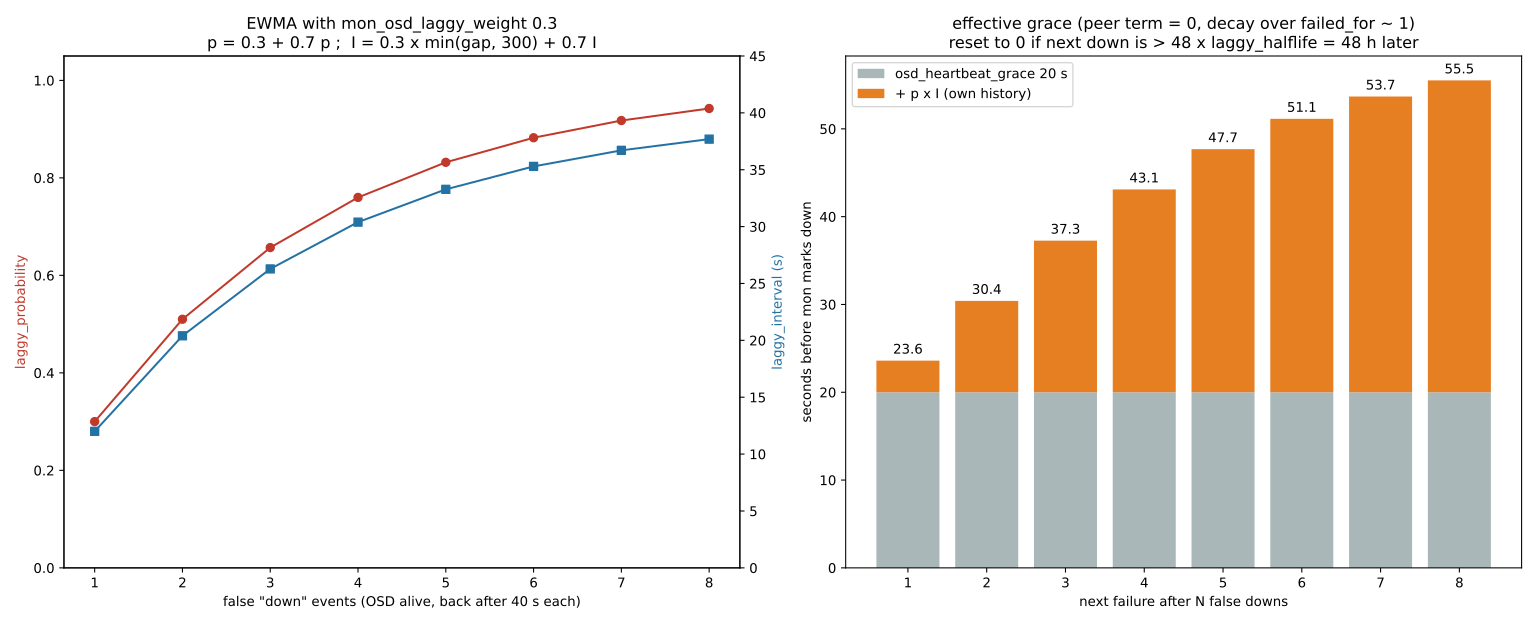
Numerical example. A healthy OSD with no laggy history (p = 0) is marked down when its peers on at least two different hosts report it and failed_for reaches 20 seconds. Because OSDs themselves report after 20 seconds without a ping reply, this is usually almost simultaneous with the first reports. If all the reports come from OSDs on one host, the group count is 1 and the OSD is never marked down. This is deliberate, because a network problem on one host should not cause the rest of the cluster to be marked down. In a three-host cluster, if the other two hosts are healthy, the condition is met.
7-9-2 Laggy history: an exponential moving average#
Source in code: src/mon/OSDMonitor.cc :: OSDMonitor::prepare_boot, grace_interval_threshold_exceeded, set_default_laggy_params
Complexity: O(1)
pseudocode
w = mon_osd_laggy_weight (0.3)
on boot of an OSD that had been marked down:
    if boot_epoch == 0 (the process really started afresh):  p ×= 0.7 ; I ×= 0.7
    else (the process was alive, i.e. the down was wrong):
        gap = min(now − down_stamp, mon_osd_laggy_max_interval 300)
        I = w × gap + (1 − w) × I ;  p = w + (1 − w) × p
if the next down happens more than 48 × laggy_halflife (48 hours) after the previous down_stamp: p = I = 0
Numerical example. An OSD that is wrongly marked down under heavy load and comes back 40 seconds later each time has p = 0.3 and I = 12 after the first time. After the second time p = 0.51 and I = 20.4, and after the third p = 0.657 and I = 26.28. So the grace for the next failure is about 20 + 0.657 × 26.28 = 37.3 seconds. The decay here is computed on failed_for, i.e. a few tens of seconds, and is about 0.994. The grace series for 1 to 8 wrong downs is: 23.6, 30.4, 37.3, 43.1, 47.7, 51.1, 53.7 and 55.5 seconds. Its upper bound is 20 + 40 = 60 seconds. That is, the MON automatically becomes more patient with "difficult" OSDs. What clears the history is not the passage of time but a real process restart or 48 hours without a down. The same term, with decay based on the down duration, is also added to mon_osd_down_out_interval. For the example above, out happens after about 615 seconds, not 600.
7-9-3 From down to out#
Source in code: src/mon/OSDMonitor.cc :: OSDMonitor::tick (down_pending_out), can_mark_out; src/osd/OSDMap.cc :: containing_subtree_is_down
Complexity: O(down OSDs × CRUSH depth)
pseudocode
every tick, for each OSD in down_pending_out:
    down = now − time it was marked down
    grace = mon_osd_down_out_interval (600) + exp(down × ln 0.5 / 3600) × I × p
    if noout flag (global, or on a CRUSH node or device class) or can_mark_out refuses: continue
    if a whole subtree of type mon_osd_down_out_subtree_limit (rack) is down: down_pending_out[o] = now ; continue
    if down ≥ grace: mark the OSD out (reweight = 0) ← PGs are remapped and backfilled
Numerical example. An OSD with no history is marked out exactly 600 seconds after going down. If a whole rack with 3 hosts and 36 OSDs is powered off, none of their counters advance and no automatic out happens. This policy is conservative: it assumes that a complete rack outage (power or switch) is transient and should not cause tens of terabytes of data to move. For planned maintenance of a host, use ceph osd set-group noout <host> or ceph orch host maintenance enter instead of the global flag.
7-9-4 MAX AVAIL in ceph df#
Source in code: src/mon/PGMap.cc :: PGMap::get_rule_avail, dump_object_stat_sum; src/osd/OSDMap.cc :: pool_raw_used_rate
Complexity: O(OSDs in the rule)
pseudocode
wm = each OSD's weighted share in the rule (get_rule_weight_osd_map, sum = 1)
for each OSD with weight > 0:
    avail = max(0, kb_avail − kb × (1 − full_ratio))      # the 5% reserve before full
    proj  = avail / wm[osd]                                # how much raw data until this OSD fills
raw_avail = min(proj)                                       # the fullest OSD relative to its share
MAX AVAIL = raw_avail / raw_used_rate     # replicated: size ; EC: (k + m) / k
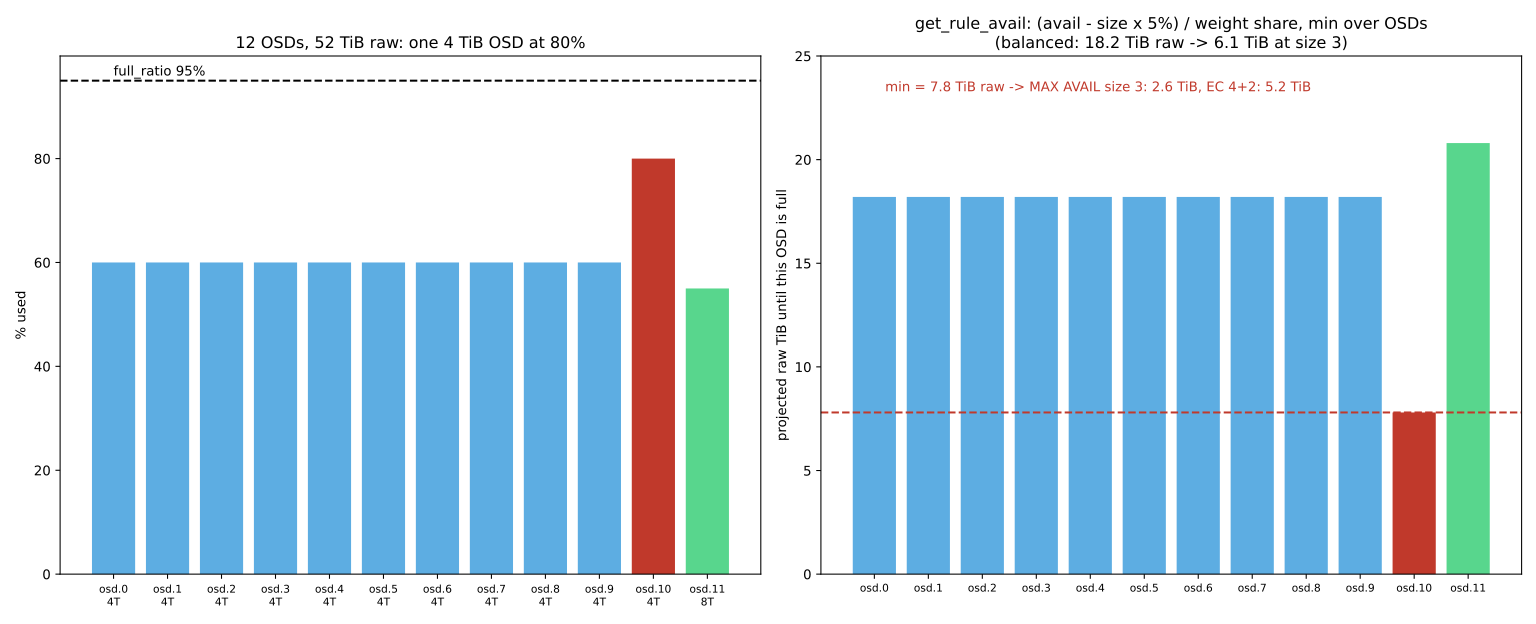
Numerical example. Consider a cluster with 52 TiB raw: eleven 4 TB OSDs and one 8 TB OSD. Ten of the 4 TB OSDs are 60% full, osd.10 is 80% and osd.11 (8 TB) is 55%. The weighted share of each 4 TB OSD is 4/52. For the 60% OSDs we have proj = (1.6 − 0.2) / (4/52) = 18.2 TiB, but for osd.10 only (0.8 − 0.2) / (4/52) = 7.8 TiB. The MAX AVAIL of a three-replica pool is 7.8 / 3 = 2.6 TiB, and of an EC 4+2 pool 7.8 / 1.5 = 5.2 TiB. If osd.10 were also at 60%, the same three-replica pool would show 6.1 TiB. So one unbalanced OSD eats more than half of the reported "usable" space. This definition is correct, because CRUSH spreads data in proportion to weight and that same OSD fills up first. The remedy is the balancer in upmap mode, not adding disks.
7-10 Day-to-day maintenance#
7-10-1 Host maintenance mode#
For planned work (kernel updates, part replacement, reboots), use cephadm's maintenance mode. This mode stops all Ceph daemons on the host and sets the noout flag for that host only, so that its OSDs are not marked out and no unnecessary recovery starts:
ceph osd ok-to-stop $(ceph osd ls-tree ceph-node2 | tr '\n' ' ')   # is it safe to stop all OSDs on this host?
ceph orch host maintenance enter ceph-node2
# ... reboot the host or repair it ...
ceph orch host maintenance exit ceph-node2
ceph -s--force in maintenance enter bypasses the safety checks. If the host holds the last healthy MON or the last available copy of some PGs, forcing it into maintenance means an outage. If ok-to-stop answers no, fix the cause first.
7-10-2 Cluster flags#
| Flag | Effect | Typical use |
|---|---|---|
| noout | Down OSDs are not marked out automatically | Short maintenance |
| norebalance | Rebalancing of healthy data stops | Adding OSDs in bulk |
| nobackfill | Backfill stops | Reducing load at peak hours |
| norecover | Recovery stops | Only in emergencies and briefly |
| noscrub, nodeep-scrub | No new scrub starts | Heavy operations, upgrades |
| pause | All reads and writes stop | Almost never in production |
ceph osd set noout
ceph osd unset noout
ceph osd set-group noout osd.4    # one OSD only
ceph osd set-group noout ceph-node3   # all OSDs of one host (a CRUSH bucket)
ceph osd unset-group noout ceph-node3Forgotten flags are one of the most common causes of strange cluster behaviour (for example, data never recovers because norecover was left on). In monitoring, take the OSDMAP_FLAGS warning seriously and check ceph osd dump | grep flags after every maintenance.
7-10-3 Controlling recovery and backfill speed#
To slow recovery down, older guides taught setting osd_max_backfills, osd_recovery_max_active and osd_recovery_sleep directly. Since Quincy the default OSD scheduler is mClock, and it manages these settings itself. The right way today is to choose a profile:
| Profile | Priority | Use |
|---|---|---|
| balanced (default) | Balance between client and recovery | Normal operation |
| high_client_ops | Clients first; slower recovery | Peak hours, latency-sensitive cluster |
| high_recovery_ops | Recovery first | After a big failure, in off-peak hours |
ceph config get osd osd_mclock_profile
ceph config set osd osd_mclock_profile high_recovery_ops
# after recovery finishes
ceph config set osd osd_mclock_profile balancedIn mClock mode the OSD ignores values such as osd_max_backfills and osd_recovery_max_active, or sets them itself. If you really need to set them by hand, you must first set osd_mclock_override_recovery_settings to true. mClock relies on each OSD's IOPS capacity, measured at first start-up (osd_mclock_max_capacity_iops_hdd and _ssd), to allocate shares. If this measurement was taken on a busy disk, the unrealistic value spoils the recovery share. In Squid the shard defaults for HDDs changed (osd_op_num_shards_hdd set to 1 with 5 threads) to make mClock's behaviour on HDDs more predictable.
7-10-4 Prioritising specific PGs#
ceph pg force-recovery 2.1f
ceph pg force-backfill 2.1f 2.20
ceph pg cancel-force-recovery 2.1f
7-10-5 Scrub#
Light scrub (daily) compares the replicas' metadata, and deep-scrub (weekly) checks the data with checksums. To reduce scrub's impact on clients, limit it to off-peak hours:
ceph config set osd osd_scrub_begin_hour 1
ceph config set osd osd_scrub_end_hour 6
ceph pg deep-scrub 2.1f
ceph health detail | grep -i scrub- Keep the desired state in Git with
ceph orch ls --export. - Configuration lives in the MON database; do not edit
ceph.confby hand. - Before any removal:
ok-to-stopandsafe-to-destroy. - Replace disks with
--replaceso that the id and CRUSH position are kept. - Host maintenance only with
maintenance enter/exit. - Remove flags after the work; monitor
OSDMAP_FLAGS. - Control recovery speed with the mClock profile, not manual tuning.
- Upgrades: release notes, HEALTH_OK, a path of at most two releases, monitoring after the upgrade.
7-11 Supplementary and up to date#
- ceph-deploy is retired, and ceph-ansible is no longer the recommended path either; cephadm and Rook are the two supported methods of deployment and operation.
- Centralised configuration (Mimic) replaced editing
ceph.conf. - mClock (default since Quincy) handed recovery control over to profiles; Squid point release 19.2.1 changed the HDD shard defaults to 1 shard × 5 threads (issue 66289).
- Umbrella: OSD upgrades in CRUSH bucket order and the
ceph osd ok-to-upgradecommand; the x86-64-v3 CPU prerequisite and el10 images; and higher defaults of 200 formon_target_pg_per_osdand 500 formon_max_pg_per_osd, which affect PG planning in upgraded clusters. - Tentacle: the restful and zabbix modules were removed from the MGR; if your operational scripts depend on restful, move them to the dashboard API before upgrading.
7-12 Hands-on exercise#
- 1. Save the output of
ceph orch ls --export, change the number of MGRs and look at the difference withdiff. - 2. Change
osd_memory_targetfor the ssd-class OSDs only and check it on one OSD withceph config show. - 3. Put a host into maintenance mode, reboot it and exit. Note the output of
ceph -sand the flags along the way. - 4. Simulate a disk failure with
ceph orch daemon stop osd.N; after it is marked out, run the replacement procedure with--replace. - 5. Change the mClock profile to
high_recovery_opsand compare the recovery speed (ceph -s) withbalanced. - 6. In a lab, upgrade the cluster to the latest point release of the same line and follow the stages with
ceph -W cephadm.
7-13 Review questions#
- 1. Why is stopping a daemon with systemctl not recommended in cephadm?
- 2. What is the precedence order of configuration sources, and how do you see the effective value?
- 3. What is the difference between
ceph tellandceph daemon? - 4. Compare the advantages and disadvantages of scale-up and scale-out in terms of failure domain.
- 5. Why are the norebalance and nobackfill flags useful when adding many OSDs?
- 6. What is the difference between
ok-to-stopandsafe-to-destroy? - 7. What advantage does the
--replaceoption give when removing an OSD? - 8. What does cephadm's maintenance mode do?
- 9. Why does setting
osd_max_backfillsdirectly have no effect under mClock, and what is the right way? - 10. What risk does upgrading OSDs in CRUSH bucket order in Umbrella reduce?
Answers to these questions are in Appendix E: Answers to Review Questions. Answers to this chapter's questions →
7-14 Sources for this chapter#
- cephadm operations
https://docs.ceph.com/en/latest/cephadm/operations/ - Host management
https://docs.ceph.com/en/latest/cephadm/host-management/ - OSD service
https://docs.ceph.com/en/latest/cephadm/services/osd/ - Upgrading Ceph (cephadm
https://docs.ceph.com/en/latest/cephadm/upgrade/ - Configuring Ceph
https://docs.ceph.com/en/latest/rados/configuration/ceph-conf/ - ceph command reference
https://docs.ceph.com/en/latest/man/8/ceph/ - mClock config reference
https://docs.ceph.com/en/latest/rados/configuration/mclock-config-ref/ - Device management
https://docs.ceph.com/en/latest/rados/operations/devices/ - Monitor/OSD interaction
https://docs.ceph.com/en/latest/rados/configuration/mon-osd-interaction/ - Adding/removing monitors
https://docs.ceph.com/en/latest/rados/operations/add-or-rm-mons/ - Release index
https://docs.ceph.com/en/latest/releases/ - Tentacle release notes
https://docs.ceph.com/en/latest/releases/tentacle/