Working with the Ceph Block Device (RBD)
TL;DR this chapter in a few lines
- An RBD image is a thin set of 4 MB RADOS objects spread over every OSD of the pool; give each client its own user with
profile rbd, neverclient.admin. - krbd is fast and dependency-free but lags in features; librbd (QEMU, rbd-nbd) is the most complete path.
- Snapshots are instant copy-on-write, clones are writable and cheap, and
flattencuts a clone from its parent; without a freeze a snapshot is only crash-consistent. - Mirroring runs in journal mode (RPO of seconds, double writes) or snapshot mode (RPO equal to the schedule); a forced promote without fencing risks split-brain.
2-1 Before you start#
2-1-1 What questions does this chapter answer?#
RBD (RADOS Block Device) is Ceph's most widely used interface. Most Ceph clusters in the world supply the disks of OpenStack, Proxmox and CloudStack virtual machines, or Kubernetes persistent volumes, through this interface. In this chapter we learn:
- What an RBD image really is, and how it maps onto RADOS objects.
- How to configure a client with least-privilege access, and how to create, map and resize an image.
- How snapshots and clones work, and why they are the basis of virtual-machine "golden images".
- What RBD mirroring is, how its journal and snapshot modes differ, and how to set up one-way and two-way replication.
- How to promote the backup site during a disaster and, once the primary site is back, return the data to it.
2-1-2 Prerequisites#
The test cluster from chapter 1, with a pool called rbd and the client-node1 machine. For the mirroring section you need a second cluster; the simplest way is to bootstrap another single-node cluster with cephadm (with --single-host-defaults).
2-2 RBD from the inside#
2-2-1 Images, objects and striping#
An RBD image is a fixed-size virtual disk spread over RADOS objects. By default each object is 4 MB (--object-size), so a 100 GB image has at most 25,600 objects. But RBD is thin provisioned: an object that has not been written to yet does not exist at all and consumes no space.
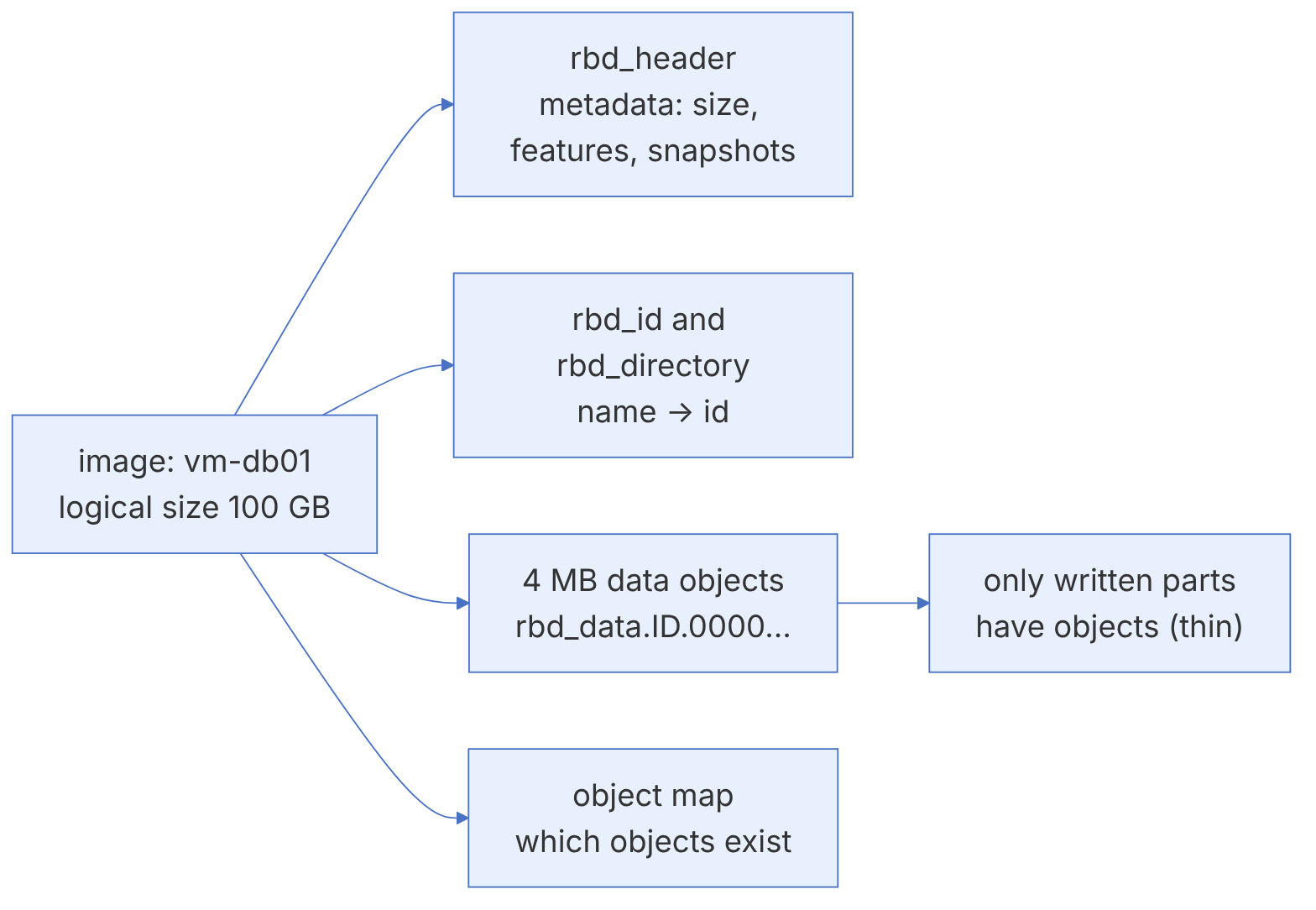
For each image (in format 2, which has been the default for years) these objects exist in the pool:
| Object | Contents |
|---|---|
rbd_directory | Maps image names to their ids in the pool |
rbd_id.<name> | The image's unique id |
rbd_header.<id> | Metadata: size, object order, features, snapshot list, parent (for clones) |
rbd_data.<id>.<offset> | The actual data; the hex number shows the object's position in the image |
rbd_object_map.<id> | A map of which objects exist (if the object-map feature is enabled) |
Because each 4 MB object is placed on the OSDs independently by CRUSH, a large image is effectively spread over every OSD in the pool. This is why RBD scales very well for parallel I/O (for example at a high queue depth), but for single-threaded I/O at queue depth 1 it pays the full latency of a network round trip plus replication. Custom striping (--stripe-unit and --stripe-count) can help large sequential workloads, but krbd supports only some combinations; do not change the default without a reason.
2-2-2 Image features#
Each image has a set of features, chosen at creation time; some of them can be enabled or disabled later:
| Feature | Purpose | Depends on |
|---|---|---|
| layering | Clone support | — |
| exclusive-lock | Only one client can write at a time; a prerequisite for the advanced features | — |
| object-map | Tracks which objects exist; speeds up du, diff, export and deletion | exclusive-lock |
| fast-diff | Fast computation of the difference between snapshots | object-map |
| deep-flatten | Allows flattening a clone together with its snapshots | — |
| journaling | Records every change in a journal, for journal-mode mirroring | exclusive-lock |
The default in recent releases is layering, exclusive-lock, object-map, fast-diff, deep-flatten. The kernel module (krbd) in recent Linux versions supports all of these except journaling; on old kernels you may get an "image uses unsupported features" error at map time.
2-2-3 Client access paths#
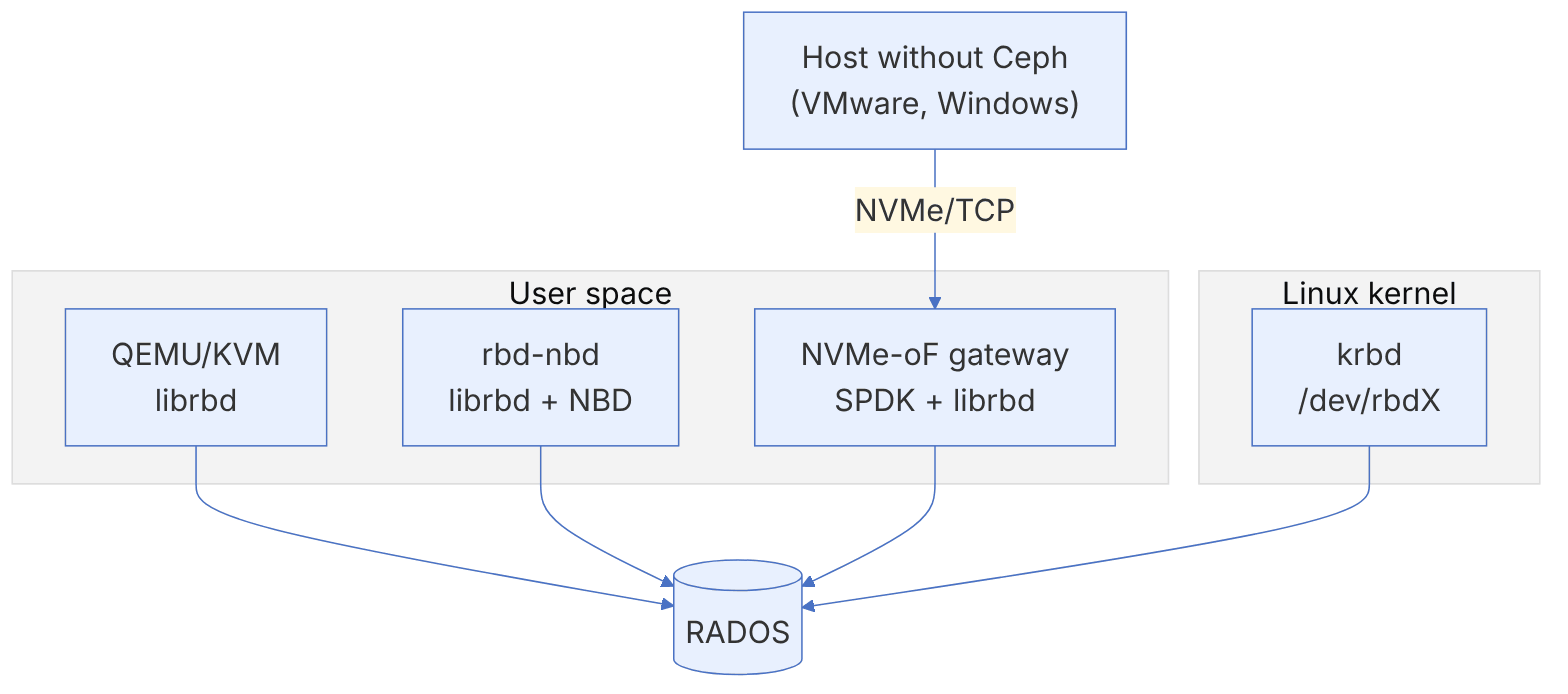
- librbd: the user-space library. QEMU/KVM, libvirt, OpenStack and many tools use it. It supports every feature, including journaling and the client-side cache.
- krbd: the Linux kernel driver, which exposes the image as
/dev/rbdX. It is fast and has no dependency on user-space packages in the data path, but its feature set depends on the kernel version. Ceph CSI on Kubernetes uses it by default. - rbd-nbd: a bridge between librbd and the kernel's NBD device; for when you need a feature that krbd lacks.
- NVMe-oF gateway: for hosts that have no native Ceph support (for example VMware ESXi or Windows). The image is exported over the NVMe/TCP protocol. This gateway is the practical successor of the iSCSI gateway; according to the official documentation, the iSCSI gateway has been in "maintenance only" mode since November 2022 and receives no new features.
2-3 Configuring a Ceph client#
2-3-1 Creating a least-privilege user#
Never use client.admin for a client. Ceph has ready-made profiles for RBD that grant exactly the permissions needed:
ceph auth get-or-create client.rbd-lab \
  mon 'profile rbd' \
  osd 'profile rbd pool=rbd' \
  mgr 'profile rbd pool=rbd' \
  -o /etc/ceph/ceph.client.rbd-lab.keyring
ceph auth get client.rbd-labFor a client that only needs to read (for example a backup server that exports from snapshots), use profile rbd-read-only. To isolate tenants within one pool you can also use a namespace: rbd namespace create rbd/tenant-a and then osd 'profile rbd pool=rbd namespace=tenant-a'.
2-3-2 Moving the configuration to the client#
The client needs two things: a minimal configuration file (to find the MONs) and its own user's keyring.
# On an administrative host
ceph config generate-minimal-conf > /tmp/ceph.conf
scp /tmp/ceph.conf client-node1:/etc/ceph/ceph.conf
scp /etc/ceph/ceph.client.rbd-lab.keyring client-node1:/etc/ceph/
# On client-node1
sudo dnf install -y ceph-common     # or apt install ceph-common
rbd --id rbd-lab ls rbd
ceph --id rbd-lab -s # profile rbd allows reading the statusKeep the version of the client's ceph-common packages close to the cluster's version. Very old clients may not understand new features (for example the version 2 clone format or msgr2). With ceph features you can see the versions of connected clients, and before enabling features that require set-require-min-compat-client, make sure no old client is connected.
2-4 Creating, mapping and resizing#
2-4-1 Creating an image#
rbd --id rbd-lab create rbd/disk01 --size 10G
rbd --id rbd-lab ls -l rbd
rbd --id rbd-lab info rbd/disk01
The output of rbd info includes the size, the number of objects, order 22 (that is, -byte objects = 4 MB), the name prefix of the data objects (block_name_prefix) and the list of features.
2-4-2 Mapping with krbd#
sudo rbd --id rbd-lab device map rbd/disk01      # /dev/rbd0
rbd device list
sudo mkfs.xfs /dev/rbd0
sudo mkdir -p /mnt/disk01 && sudo mount /dev/rbd0 /mnt/disk01
df -h /mnt/disk01
To map automatically after a reboot, use the rbdmap service:
echo "rbd/disk01 id=rbd-lab,keyring=/etc/ceph/ceph.client.rbd-lab.keyring" | sudo tee -a /etc/ceph/rbdmap
echo "/dev/rbd/rbd/disk01 /mnt/disk01 xfs noauto,_netdev 0 0" | sudo tee -a /etc/fstab
sudo systemctl enable --now rbdmapDo not forget the _netdev option in fstab. Without it, the system may try to mount the file system at boot before the network is up, and the boot hangs. Order matters at shutdown too: first umount, then unmap, then take the network down.
If rbd map fails with RBD image feature set mismatch or unsupported features, look at the dmesg message. Disable the incompatible feature (rbd feature disable rbd/disk01 journaling) or use rbd-nbd. If the map hangs, check with the firewall that the client can reach the MON ports (3300 and 6789) and the OSD port range (6800 to 7300).
2-4-3 Resizing#
Growing an image in Ceph is instant, because only the metadata changes. Afterwards the file system has to be grown too:
rbd --id rbd-lab resize rbd/disk01 --size 20G
sudo xfs_growfs /mnt/disk01          # for ext4: sudo resize2fs /dev/rbd0
lsblk /dev/rbd0
Shrinking is dangerous, and Ceph does not allow it without an explicit flag:
rbd resize rbd/disk01 --size 5G --allow-shrinkBefore shrinking an image, shrink the file system first (XFS does not support shrinking at all). Shrinking the image below the size of the file system means cutting off the end of the file system and losing data. In practice it is safer to create a new image and copy the data when you need to reduce space.
2-4-4 Real usage and reclaiming space#
Because RBD is thin, rbd du shows the space actually consumed. When you delete files in the file system, the space returns to Ceph only when the file system sends a discard command:
rbd du rbd/disk01
sudo fstrim -v /mnt/disk01        # or enable fstrim.timer
In QEMU virtual machines, for discards to reach Ceph the disk must also be defined with discard=unmap and a virtio-scsi controller (or virtio-blk in recent versions).
2-5 Snapshots and clones#
2-5-1 Snapshot: a read-only point-in-time image#
An RBD snapshot is a read-only copy of an image at a specific moment. Creating it is almost instant, because Ceph does not copy the data. From that moment on, for every object that changes, the OSD keeps its previous version as an "object clone" (copy-on-write at the level of the RADOS object).
rbd snap create rbd/disk01@before-upgrade
rbd snap ls rbd/disk01
rbd du rbd/disk01                     # each snapshot's share of the space
# Roll the whole image back to the snapshot (the image must be unmapped or unused)
rbd snap rollback rbd/disk01@before-upgrade
rbd snap rm rbd/disk01@before-upgrade
rbd snap purge rbd/disk01 # delete all snapshotsAn RBD snapshot is taken at the block level and knows nothing about the file system inside the image. If you snapshot an image that is in use, the result is only crash-consistent, as if the power had been cut suddenly. For better consistency, freeze the file system with fsfreeze -f /mnt/disk01 before the snapshot and release it afterwards with fsfreeze -u. In virtual machines the QEMU guest agent does this. For databases, use the database's own mechanism (for example its backup mode).
rbd snap rollback rewrites all of the image's data and is slow for large images. If you only need a few files, it is better to create a clone from the snapshot, map it and copy the files.
2-5-2 Scheduling snapshots#
Since Octopus, the MGR module called rbd_support can schedule snapshots for mirroring. For general backup snapshots an external tool is usually used (cron, Velero, Backy2/Benji or the virtualisation platform's own tool).
2-5-3 Clone: writable and cheap#
A clone is a writable image built on top of a snapshot. Until the clone writes to an object, reads of that object are served from the parent. This is the mechanism that makes it possible to create hundreds of virtual machines from one "golden image" in a few seconds.
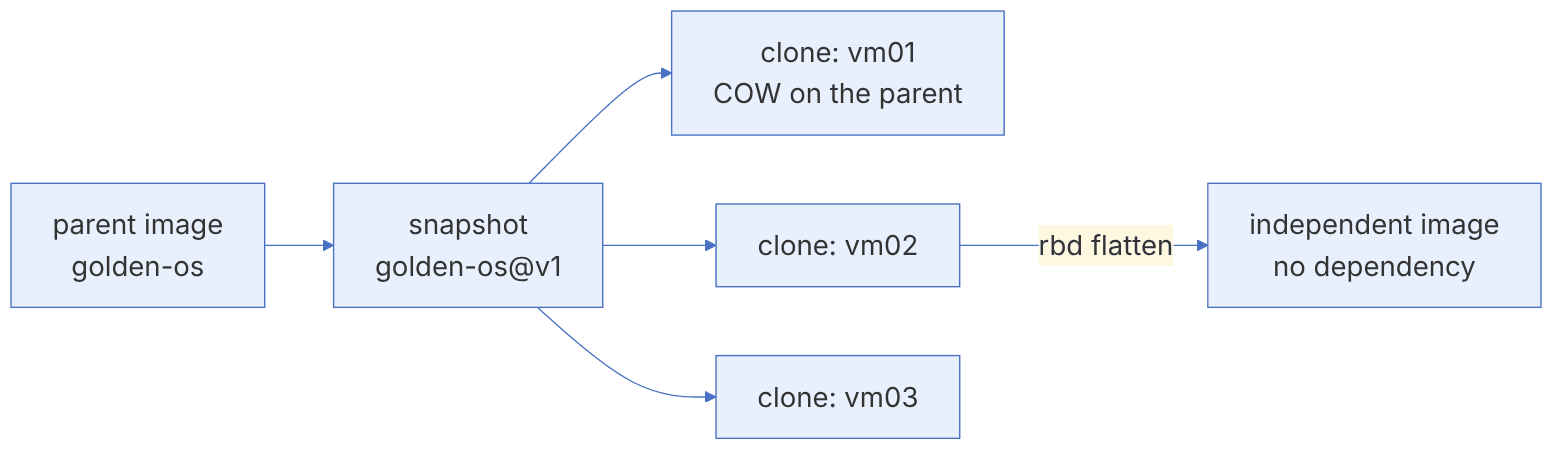
rbd create rbd/golden-os --size 20G
# ... install the operating system on golden-os ...
rbd snap create rbd/golden-os@v1
# In clone format version 1 the snapshot had to be protected:
rbd snap protect rbd/golden-os@v1
rbd clone rbd/golden-os@v1 rbd/vm01
rbd clone rbd/golden-os@v1 rbd/vm02
rbd children rbd/golden-os@v1
rbd info rbd/vm01 | grep parentSince Mimic there is clone format version 2, which no longer needs snap protect. In this format, if you delete a parent snapshot that still has children, Ceph moves it to the "snapshot trash" and really removes it once the last child has been flattened or deleted. The condition for using it is that the cluster has declared the minimum compatible client version to be at least Mimic (ceph osd set-require-min-compat-client mimic). The rbd_default_clone_format option (default value auto) determines which format is used.
2-5-4 Flatten: cutting the cord#
A clone depends on its parent for as long as the parent exists. If you want to delete the golden image or migrate the clone to another pool, you must flatten it: every object that the clone still reads from the parent is copied into the clone itself.
rbd flatten rbd/vm02
rbd info rbd/vm02 | grep parent      # it no longer has a parent
rbd snap unprotect rbd/golden-os@v1 # only for format 1, and only if no children remainDeep clone chains (a clone of a clone of a clone) reduce read performance, because reading an unwritten object has to go through several parent levels. OpenStack and similar platforms usually create only one level of clones. If a chain gets deep, flatten it.
2-5-5 Trash and safe deletion#
RBD has a trash. Instead of deleting an image immediately, move it there so that it can be recovered if it was a mistake:
rbd trash mv rbd/vm01 --expires-at "2026-12-01"
rbd trash ls rbd
rbd trash restore rbd/<image-id>
rbd trash purge rbd                  # delete all expired images
2-5-6 Live migration#
rbd migration moves an image to another pool (for example from HDD to NVMe, or from replicated to EC) with minimal downtime. The client only has to release the image at the moment of prepare; afterwards it can carry on working on the target image while the data is copied in the background:
rbd migration prepare rbd/disk01 fast-nvme/disk01
# The client can now open fast-nvme/disk01
rbd migration execute fast-nvme/disk01
rbd migration commit fast-nvme/disk01
In Tentacle, live migration also gained the ability to import an image instantly from another Ceph cluster or from external sources and formats.
2-6 Disaster recovery with RBD mirroring#
2-6-1 The concept and its two modes#
RBD mirroring is asynchronous replication of images between two (or more) independent Ceph clusters. A daemon called rbd-mirror runs in the target cluster, reads the changes from the source cluster and applies them to the local copy. At any moment each image is primary (writable) in only one cluster and non-primary (read-only) in the others.
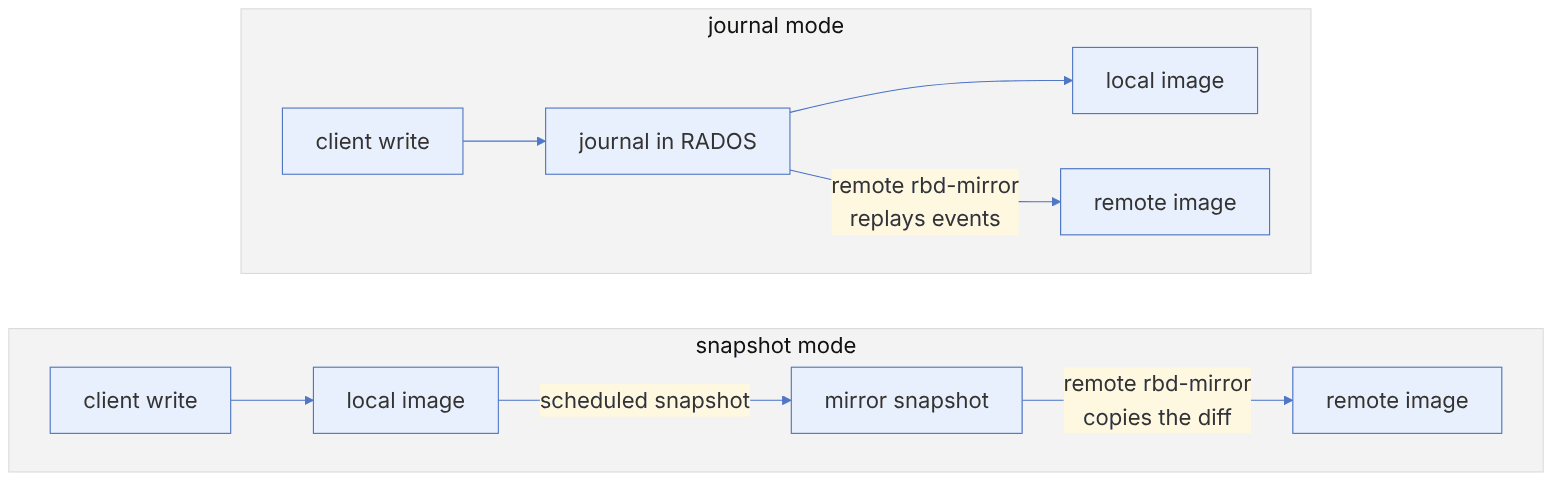
| Aspect | Journal mode | Snapshot mode |
|---|---|---|
| Mechanism | Every write is first recorded in a journal inside RADOS and then applied to the image | Mirror snapshots are created periodically and their difference is transferred |
| RPO | Seconds (depends on the replay lag) | Equal to the schedule interval (for example 5 minutes or 1 hour) |
| Write overhead | About double (journal + data) | Low; only at snapshot time |
| krbd support | No (journaling is not supported) | Yes |
| Write ordering | Preserved (point-in-time consistent) | Crash-consistent at the moment of the snapshot |
| Recommendation today | For very low RPO and librbd clients | The default choice for most uses |
2-6-2 Pool modes#
Mirroring is enabled at the pool level in one of these modes:
- image: each image must be enabled for mirroring separately and explicitly. More flexible, and the only possible mode for snapshot-based mirroring.
- pool: every image that has the journaling feature is mirrored automatically (journal mode only).
- init-only: the pool is prepared for mirroring but the pool itself is not mirrored; for the case where only namespaces are mirrored.
2-6-3 Deploying rbd-mirror#
# On the target cluster (and, for two-way, on both clusters)
ceph orch apply rbd-mirror --placement="2 ceph-node2 ceph-node3"
ceph orch ps --daemon-type rbd-mirrorRun two rbd-mirror instances in each cluster. The instances share the work between them, and the failure of one does not stop replication. rbd-mirror uses considerable bandwidth and CPU; put it on a host with good access both to the local public network and to the remote cluster.
2-6-4 Configuring one-way replication#
Suppose we have two clusters, site-a (primary) and site-b (backup), and a pool called vms has been created in both with the same name.
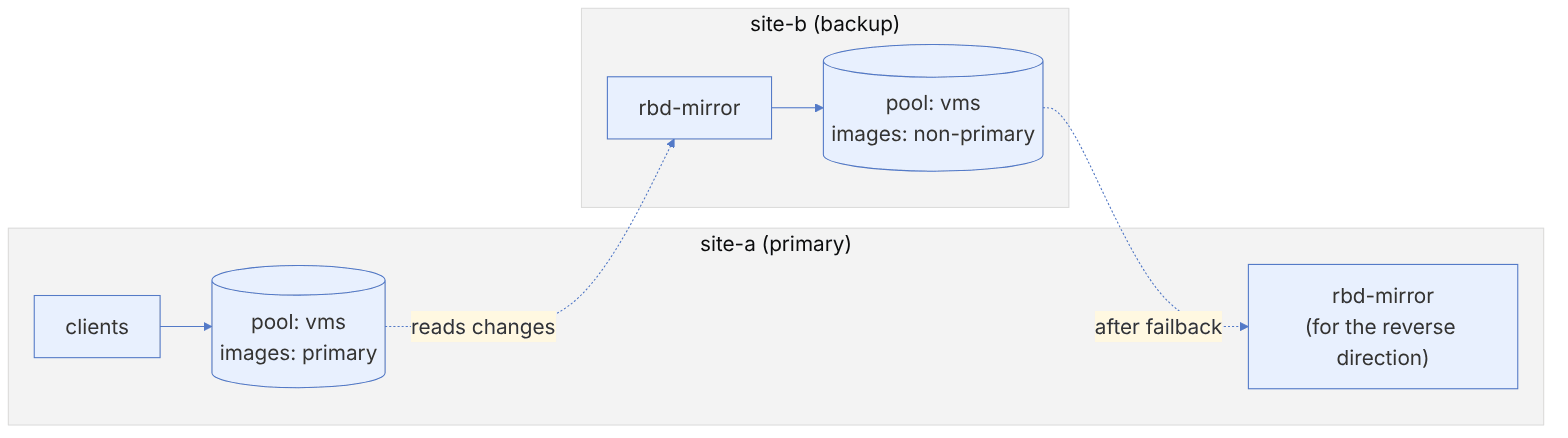
# On both clusters
ceph osd pool create vms && rbd pool init vms
# site-a
rbd mirror pool enable --site-name site-a vms image
# site-b
rbd mirror pool enable --site-name site-b vms image
# site-a: create the bootstrap token (contains the fsid, the user and the MON addresses)
rbd mirror pool peer bootstrap create --site-name site-a vms > /root/vms-token
# Transfer the token securely to site-b and import it
rbd mirror pool peer bootstrap import --site-name site-b --direction rx-only vms /root/vms-token
rbd mirror pool info vmsThe bootstrap token contains the key of a Ceph user with access to the pool. Transfer it like a password (scp over a secure channel), never put it in a ticket or a chat, and delete it after the import.
2-6-5 Enabling mirroring for images#
# Snapshot mode (recommended)
rbd create vms/db01 --size 50G
rbd mirror image enable vms/db01 snapshot
# Schedule mirror snapshots for the whole pool or for one image
rbd mirror snapshot schedule add --pool vms 15m
rbd mirror snapshot schedule ls --pool vms --recursive
# Journal mode (librbd clients only)
rbd create vms/app01 --size 20G --image-feature exclusive-lock,journaling
rbd mirror image enable vms/app01 journal
2-6-6 Checking the synchronisation status#
rbd mirror pool status vms --verbose
rbd mirror image status vms/db01
The healthy state for a non-primary image in snapshot mode is usually up+replaying, and its description shows which snapshot was synchronised last and how long ago. In journal mode, the gap in journal entries (entries_behind_primary) measures how far behind it is.
The state down+unknown means rbd-mirror is not running in the target cluster or cannot reach the remote cluster. Check ceph orch ps --daemon-type rbd-mirror, the daemon log, and network access to the remote MONs and OSDs. The state up+error together with split-brain means the image has become primary on both sides (see the next section).
2-6-7 Two-way replication#
In two-way mode each cluster is the source for some images and the target for others. You only need to deploy rbd-mirror on both clusters and import the token with the rx-tx direction (the default):
rbd mirror pool peer bootstrap import --site-name site-b --direction rx-tx vms /root/vms-tokenTwo-way does not mean that an image is writable on both sides at the same time. It means that images that are primary in site-a are replicated to site-b and images that are primary in site-b are replicated to site-a, and that after a failover the direction of replication reverses without reconfiguration.
2-7 From the code: RBD object layout, object map and exclusive lock#
2-7-1 How an RBD image is stored on RADOS#
An RBD image is not a single "file" in RADOS. librbd turns it into a set of separate objects. The prefixes are defined in src/include/rbd_types.h: rbd_id., rbd_header., rbd_object_map., rbd_data., and the pool-level objects rbd_directory and rbd_trash.
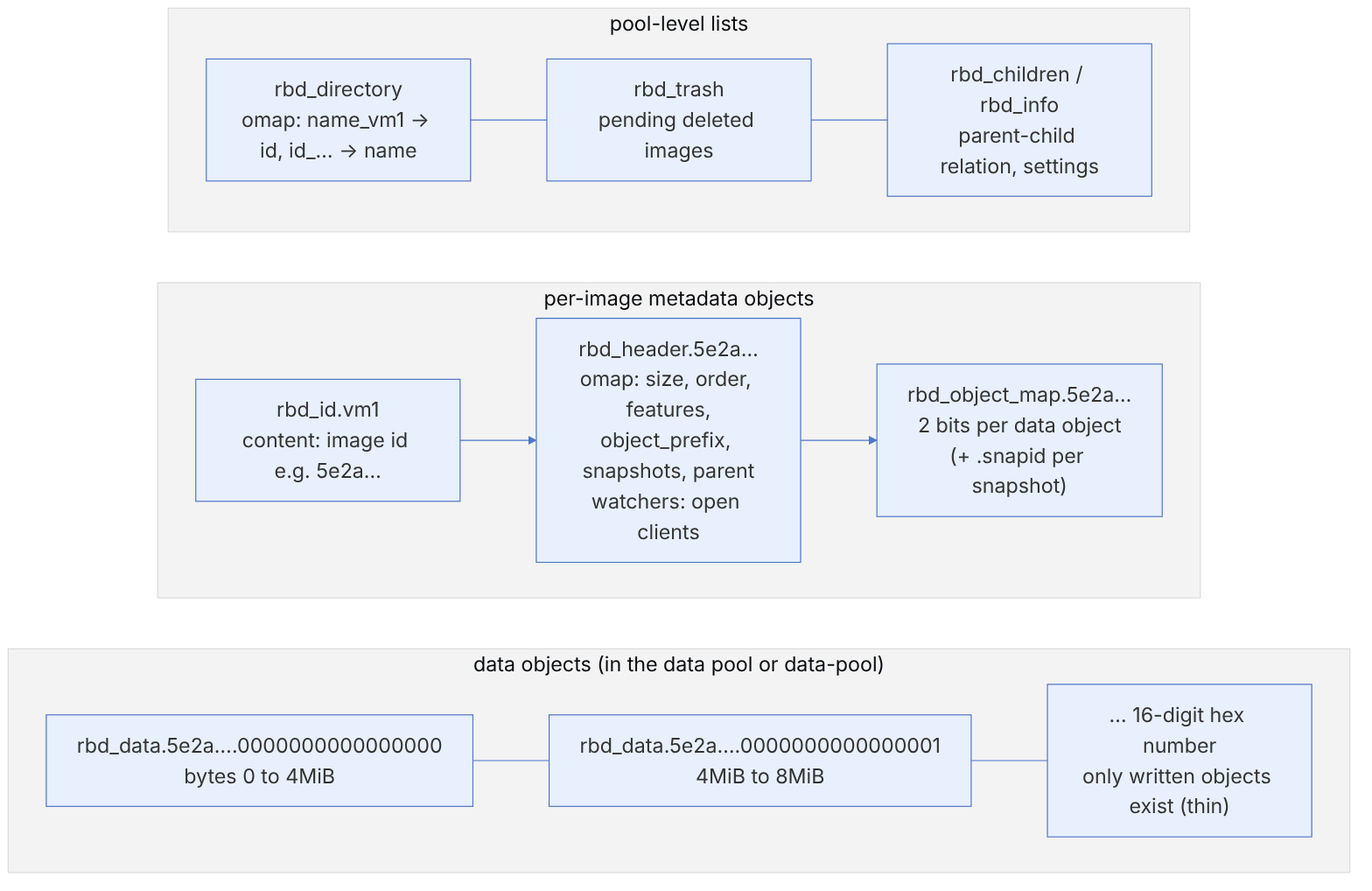
The formula for finding the object for an offset, without custom striping (stripe_unit = object size):
pseudocode (this book's summary of ImageCtx/Striper)
  object_size = 1 << order                 # order=22 → 4 MiB
  objno       = offset // object_size
  obj_off     = offset %  object_size
oid = sprintf("%s.%016llx", object_prefix, objno) # object_prefix = "rbd_data.<id>"rbd info rbd/vm1 | grep -E 'block_name_prefix|order|features'
rados -p rbd listomapvals rbd_directory | head
rados -p rbd listomapkeys rbd_header.$(rados -p rbd get rbd_id.vm1 - | strings)
rados -p rbd ls | grep -c "^rbd_data.<id>" # number of objects actually allocated
rbd du rbd/vm1 # fast with fast-diffIf rbd du on a large image takes seconds or minutes, the object map/fast-diff is probably disabled or invalid. Look at the flags in rbd info (object map invalid) and rebuild it with rbd object-map rebuild.
2-7-2 The object map: two bits that make I/O fast#
The constants of src/include/rbd/object_map_types.h:
| Value | Name | Meaning |
|---|---|---|
| 0 | OBJECT_NONEXISTENT | The object does not exist; a read returns zeros without going to the OSD |
| 1 | OBJECT_EXISTS | The object exists and has changed since the last snapshot |
| 2 | OBJECT_PENDING | A removal/discard is in progress |
| 3 | OBJECT_EXISTS_CLEAN | The object exists but has not changed since the last snapshot (the basis of fast-diff) |
The object map can be trusted only when there is one writer. That is why the object-map feature depends on exclusive-lock. The maximum number of objects covered is MAX_OBJECT_MAP_OBJECT_COUNT = 256000000 in cls_rbd_types.h; with 4 MiB objects that is about 976 TiB.
pseudocode: writing with the object map (this book's summary)
  write(objno, data):
     if objmap[objno] in {NONEXISTENT, EXISTS_CLEAN}:
         objmap_update(objno, EXISTS)        # first update the rbd_object_map object (cls_rbd)
     send write to rbd_data.<id>.<objno>
  discard(objno):
     objmap_update(objno, PENDING) → remove object → objmap_update(objno, NONEXISTENT)
2-7-3 Exclusive lock and ManagedLock#
The default of rbd_default_features in rbd.yaml.in is layering,exclusive-lock,object-map,fast-diff,deep-flatten. The lock is taken on the header object with the cls_lock class under the name rbd_lock (RBD_LOCK_NAME). The librbd/managed_lock/AcquireRequest state machine has three main steps: GET_LOCKER, LOCK_IMAGE and, if the owner is dead, BREAK_LOCK.
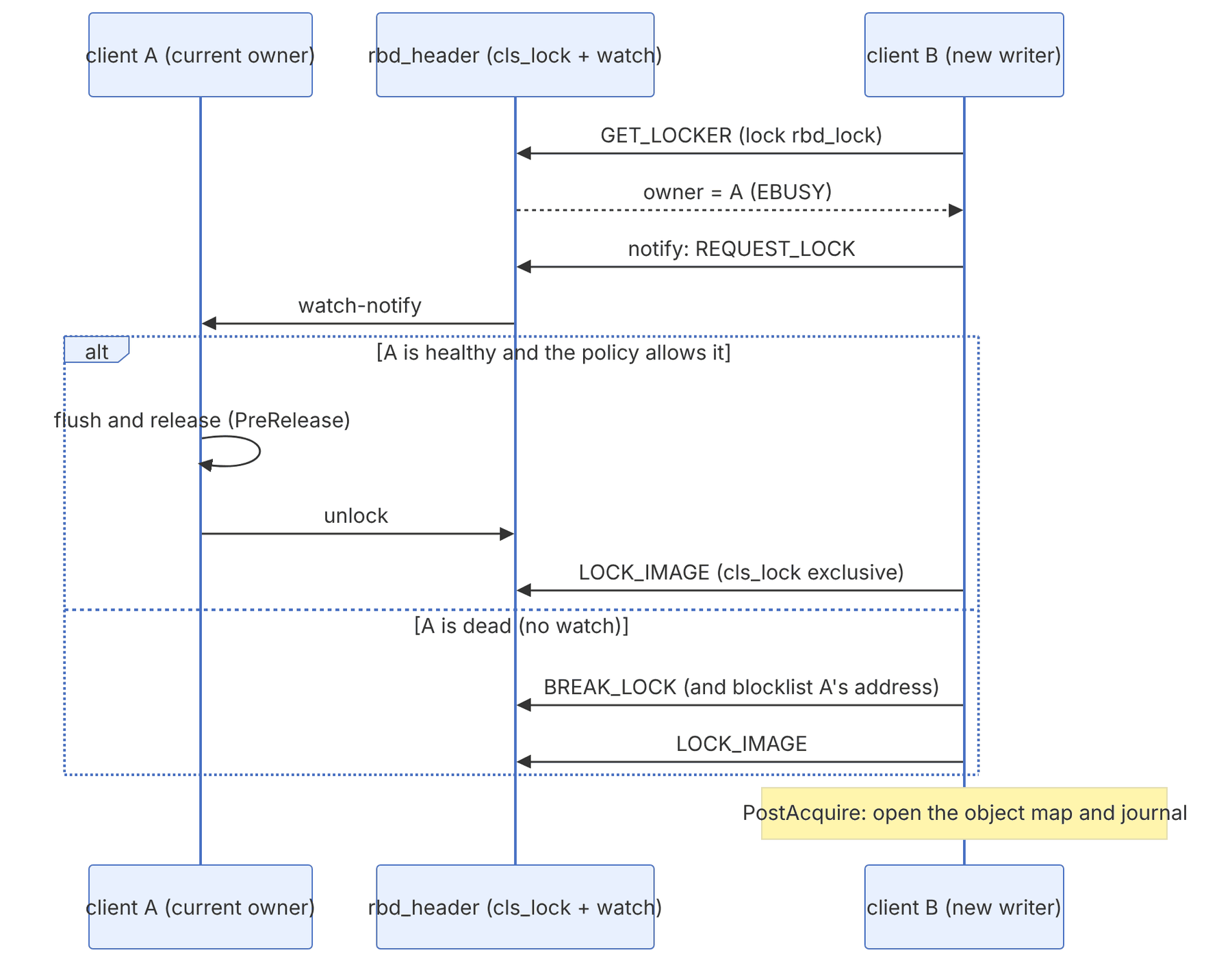
The exclusive lock is not a mechanism for protecting against several simultaneous writers. The lock is passed cooperatively between clients. If you mount one image on two VMs at the same time (for example with ext4), the data will be corrupted. For hard prevention you need rbd map --exclusive (krbd) or orchestrator-level locks.
Commands for troubleshooting locks and watchers:
rbd status rbd/vm1                  # watchers
rbd lock ls rbd/vm1                 # advisory locks and their owner
ceph osd blocklist ls               # has the previous client been blocklisted?
rbd feature disable rbd/vm1 fast-diff object-map # order: dependents first2-8 RBD by the numbers: image id, discard and rbd du#
This section examines three small librbd algorithms that come up often in daily work: the naming of an image's objects, the translation of a discard into object operations, and how rbd du counts the space used. References are to main as of November 2026. Striping and the object map are covered in chapter 3.
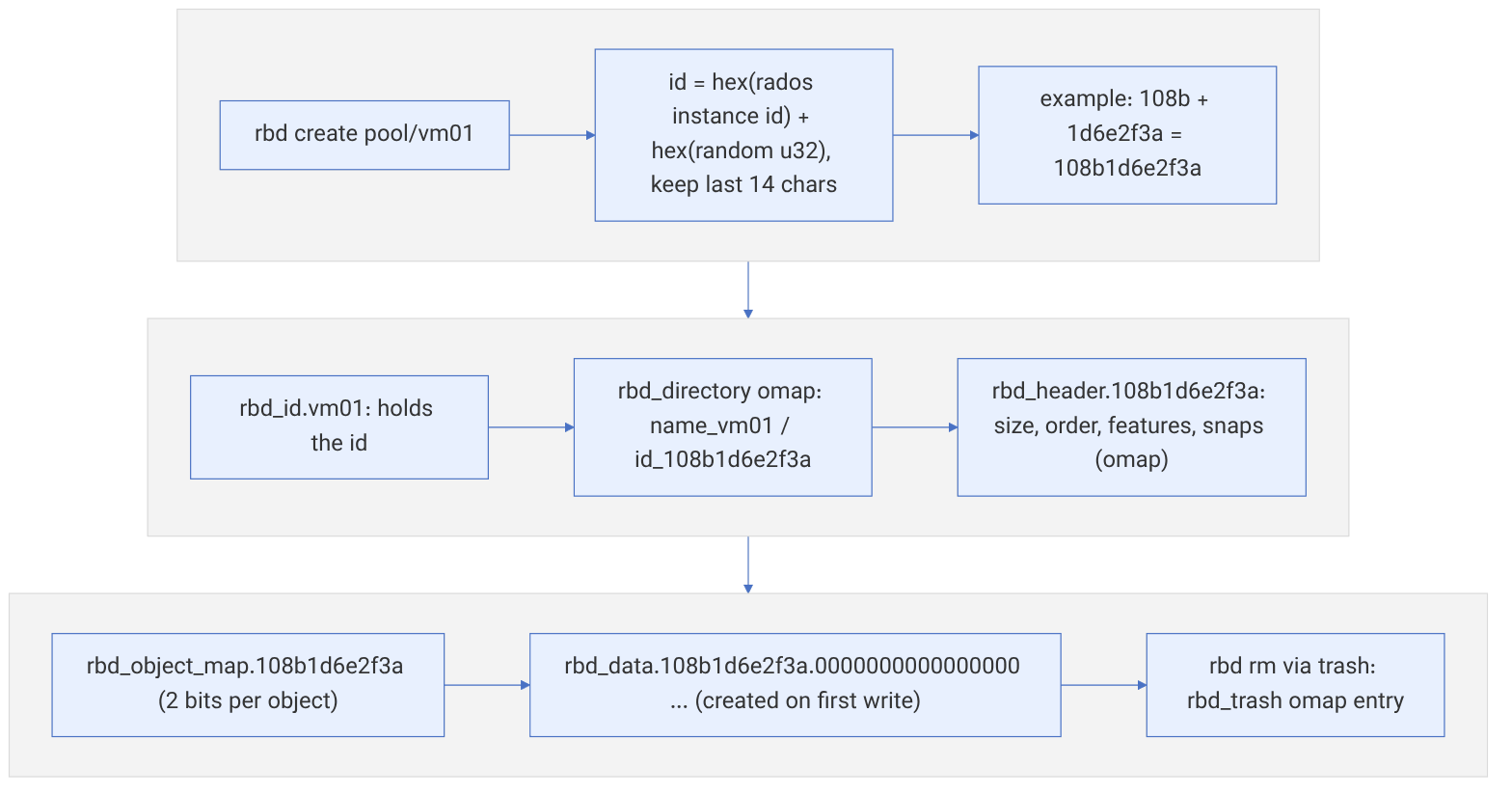
2-8-1 The id and objects of an image#
Source in code: src/librbd/Utils.cc :: generate_image_id; src/include/rbd_types.h (prefixes); src/cls/rbd/cls_rbd.cc :: dir_add_image
Complexity: O(1)
pseudocode
bid   = rados.get_instance_id()          # the global id of this connection to the cluster
extra = a random 32-bit number
id    = hex(bid) + hex(extra)            # no leading zeros; if > 14 characters: the last 14 characters
rbd_id.<name>           ← id
rbd_directory (omap)    ← name_<name> = id , id_<id> = name
rbd_header.<id>         ← size, order, features, snapshots, parent (omap)
rbd_object_map.<id>     ← 2 bits per object (if object-map is enabled)
rbd_data.<id>.%016x     ← a data object with a sixteen-digit hex number, only after the first write
A symbolic example. If the instance id is 4235 (0x108b) and the random number is 0x1d6e2f3a, the id is 108b1d6e2f3a (12 characters), and the third data object is named rbd_data.108b1d6e2f3a.0000000000000002. The 14-character limit (RBD_MAX_IMAGE_ID_LENGTH) comes from RBD_MAX_BLOCK_NAME_SIZE being 24: "rbd_data." (9 characters), 14 characters of id and the terminating character. Because data objects are created only after their first write, rbd create --size 10T finishes in a fraction of a second and consumes no space. To see the existing objects, run rados -p <pool> ls | grep 108b1d6e2f3a.
2-8-2 Discard: from an image range to remove, truncate or zero#
Source in code: src/librbd/io/ImageRequest.cc :: ImageDiscardRequest::prune_object_extents; src/librbd/io/ObjectRequest.h :: ObjectDiscardRequest; src/librbd/ImageCtx.cc (skip_partial_discard)
Complexity: O(number of objects involved)
pseudocode
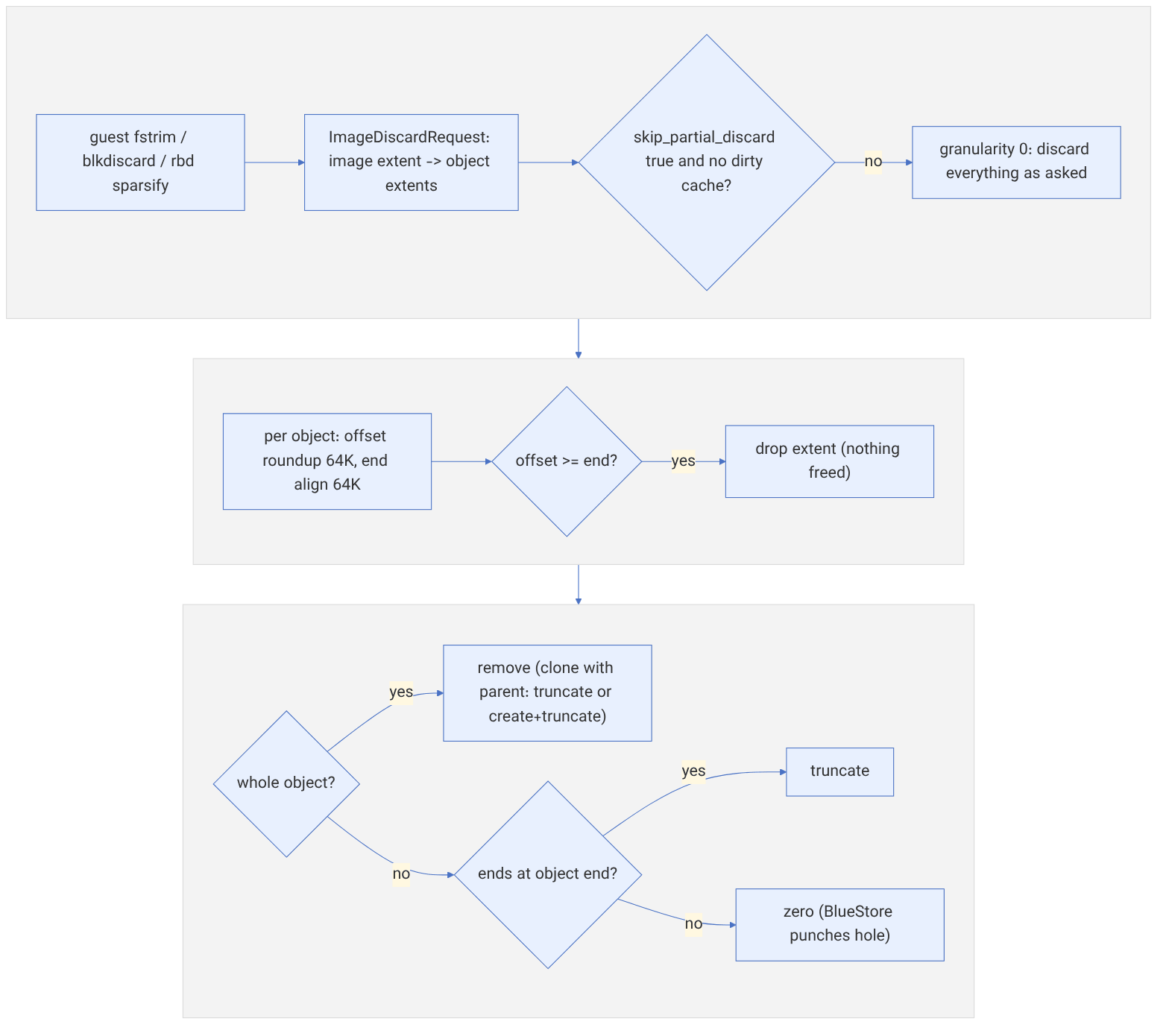
g = rbd_skip_partial_discard (true) and no dirty cache ? rbd_discard_granularity_bytes (64K) : 0
g = min(g, object_size)
for each object extent (off, len):
    if g > 0: off = roundup(off, g) ; end = align(off + len, g) ; if off ≥ end: drop the extent
    if the whole object: REMOVE    (clone with a parent: TRUNCATE or create+truncate so the parent is hidden)
    elif it reaches the end of the object: TRUNCATE
    else: ZERO
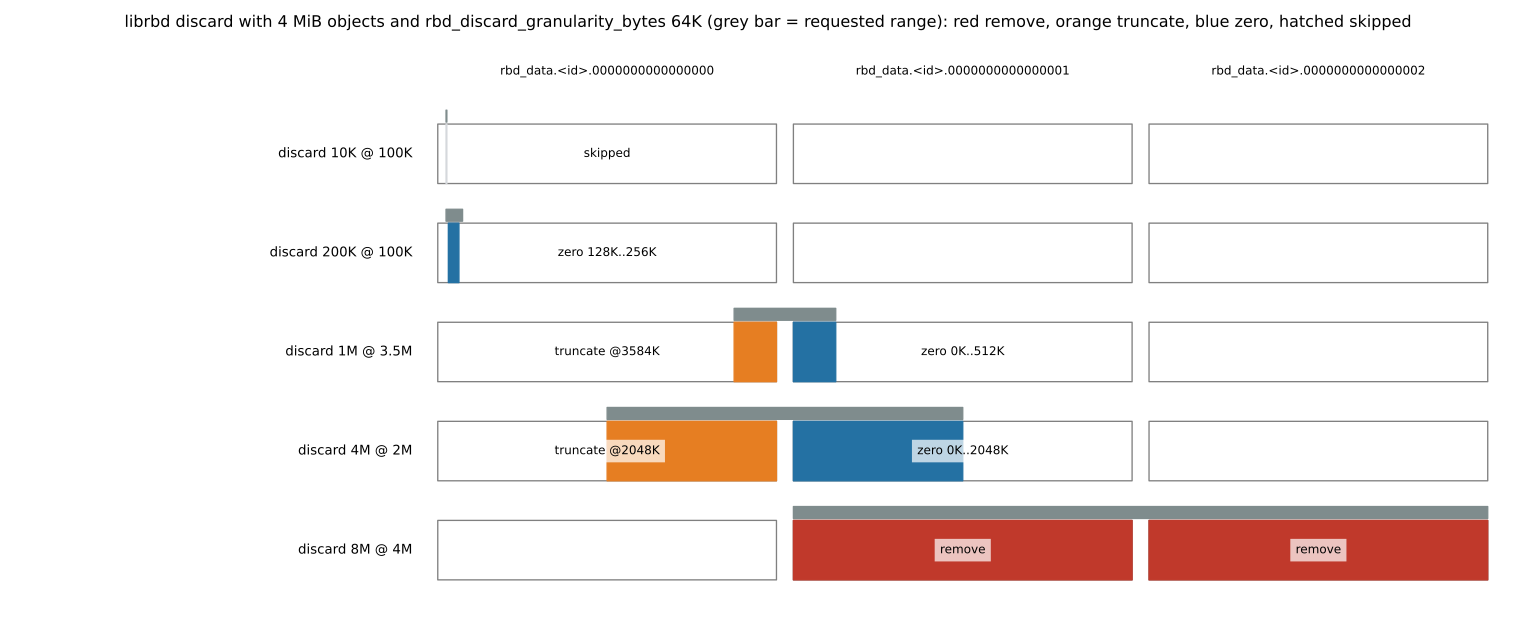
Numeric example (a 4 MiB object). A 10 KiB discard at offset 100 KiB is rounded to the range [128K, 64K), which is empty, so nothing is done. A 200 KiB discard at offset 100 KiB becomes a zero of the range 128K to 256K. A 1 MiB discard at offset 3.5 MiB produces two operations: a truncate of object 0 at 3584K and a zero of the range 0 to 512K in object 1. A 4 MiB discard at offset 2 MiB truncates object 0 from 2 MiB onwards and zeroes the first half of object 1. An 8 MiB discard at offset 4 MiB removes objects 1 and 2 completely. So fstrim on a file system that frees small, scattered blocks gives back almost no space. What really frees space is a truncate or remove of the object, or a zero in BlueStore, which frees those blocks if it is aligned to min_alloc_size.
2-8-3 rbd du: whole objects or exact extents?#
Source in code: src/tools/rbd/action/DiskUsage.cc :: get_image_disk_usage (diff_iterate2 with whole_object = !exact); src/librbd/api/DiffIterate.cc
Complexity: With fast-diff: O(number of objects) from the object map; with --exact: O(number of objects) list-snaps calls
pseudocode
whole_object = not --exact
diff_iterate2(from_snap, 0, size, include_parent=false, whole_object, cb)
    if whole_object and fast-diff is valid: from the object map, each EXISTS or EXISTS_CLEAN object = one full range
    else: for each object list-snaps ← calc_snap_set_diff
          # without a snapshot: the range [0, object size), not the scattered written extents
USED = Σ range lengths                      # PROVISIONED = image size
if fast-diff is invalid or disabled: a warning and slowness (walking every object)
A real measurement. We ran these four workloads on a three-OSD test cluster with Ceph 18.2.7 (Reef, Debian packages), using 10 GB images with 4 MiB objects and the default features (61, that is layering, exclusive-lock, object-map, fast-diff and deep-flatten):
| Workload | Bytes written | rbd du --exact | rbd du default |
|---|---|---|---|
| A: one hundred 1 KiB writes at offset 0 of a hundred objects | 100 KiB | 100 KiB | 400 MiB |
| B: one thousand 1 KiB writes at offset 0 of a thousand objects | 1000 KiB | 1000 KiB | 4000 MiB |
| C: 256 MiB sequential | 256 MiB | 256 MiB | 256 MiB |
| D: two thousand random 4 KiB writes in the first 2 GiB (503 objects) | 7.8 MiB | 1.51 GiB | 1.96 GiB |
Row D shows something that the name --exact does not suggest. In calc_snap_set_diff (file src/librados/snap_set_diff.cc), if the object did not exist in the starting snapshot, the diff is set to the object's whole range [0, size). The size of a RADOS object is the highest byte written in it. So --exact counts up to the last byte of each object, not the scattered extents. A 4 KiB write at the end of an object counts it as 4 MiB. In D each object has on average about four random writes. The expected maximum of four uniform points is 4/5 of the length, which predicts 503 × 4 MiB × 0.8 ≈ 1.57 GiB, close to the measured 1.51 GiB. --exact is close to the data actually written only when the writes are contiguous from the start of the object (A, B and C). Neither number shows raw usage. Raw usage also depends on size or k+m and on the BlueStore min_alloc_size (4 KiB in recent releases), and BlueStore does not allocate unwritten parts. Use ceph df detail for capacity planning, and use rbd du only to compare images.
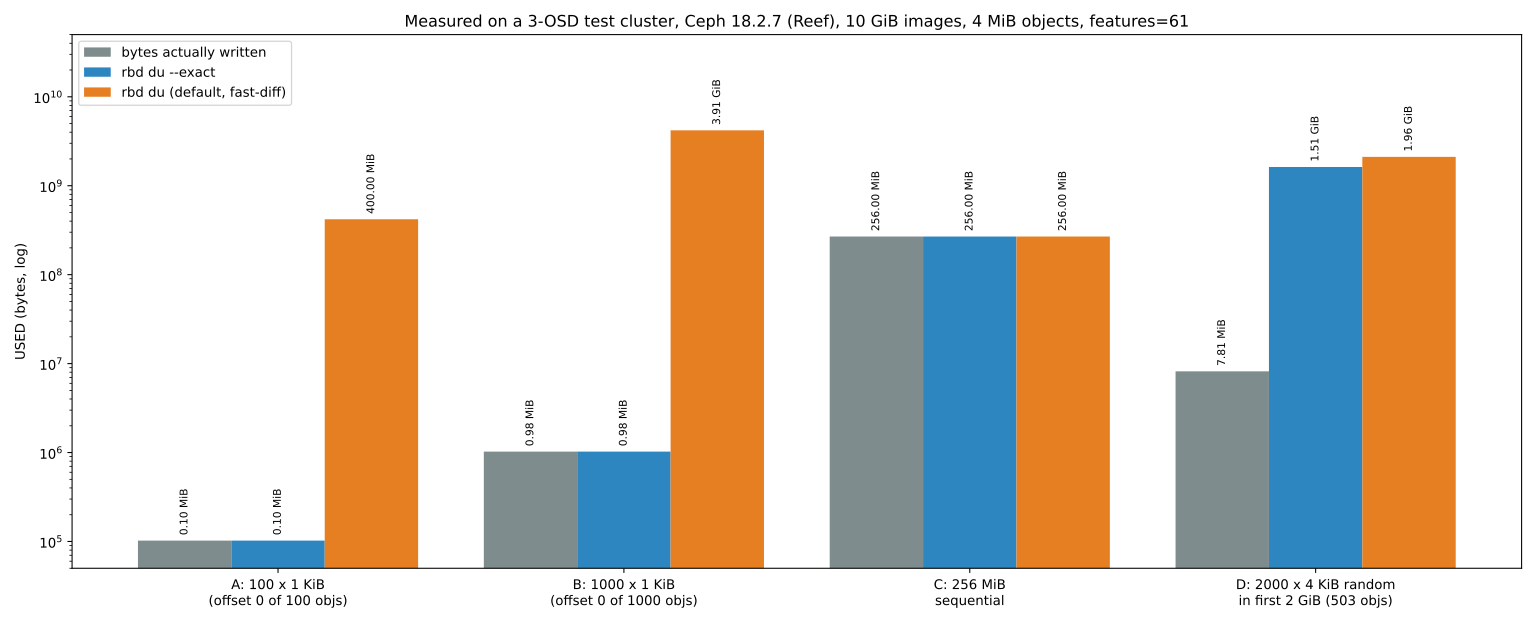
rbd du --exact, and orange is the default rbd du (counting whole objects from the object map). The vertical axis is logarithmic. In the random workload D, even --exact shows about two hundred times the data written, because it counts each object from byte 0 to the highest byte written2-9 Recovering from a disaster#
2-9-1 Three scenarios#
In practice we face three different situations, and each has its own procedure:
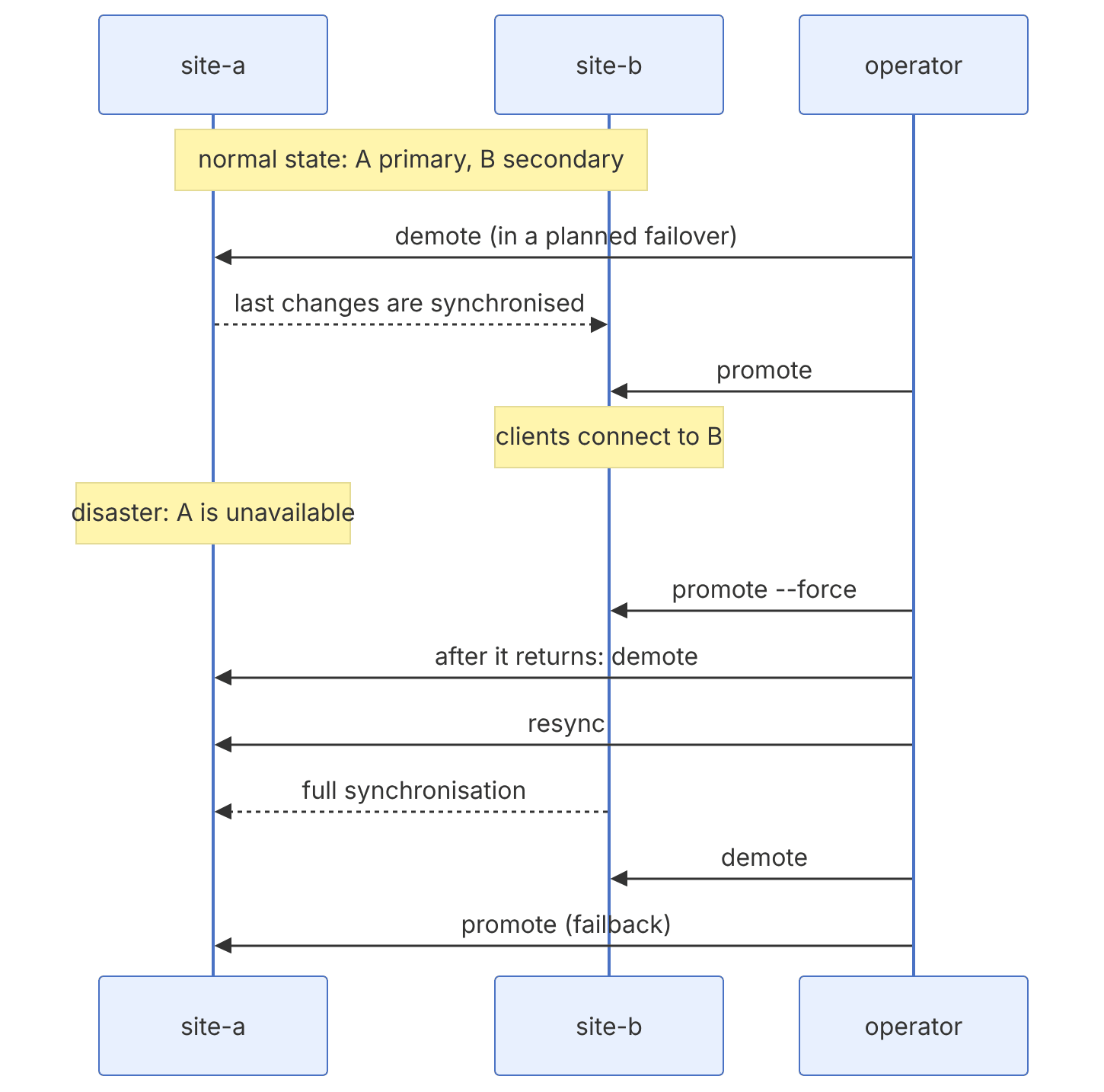
| Scenario | State of site-a | Action | Data loss |
|---|---|---|---|
| Planned switchover | Healthy | demote in A, wait until synchronised, promote in B | Zero |
| Disaster (failover) | Unavailable | promote --force in B | Up to the RPO |
| Return (failback) | Healthy again | demote and resync in A, then a reverse switchover | Zero (after the resync) |
2-9-2 Planned switchover#
# 1. Stop the applications and umount in site-a
# 2. Demote the image in site-a
rbd --cluster site-a mirror image demote vms/db01
# 3. Wait until site-b has received the last snapshot
rbd --cluster site-b mirror image status vms/db01
# 4. Promote in site-b and start the applications there
rbd --cluster site-b mirror image promote vms/db01
For a whole pool there are also the commands rbd mirror pool demote vms and rbd mirror pool promote vms.
2-9-3 Forced failover#
When site-a is unavailable, a demote is impossible. We force-promote the image in site-b:
rbd --cluster site-b mirror image promote --force vms/db01A forced promote means accepting the loss of changes that had not yet reached site-b. Before doing it, make sure site-a has really failed or is completely isolated. If site-a is only cut off from your point of view while its applications are still writing to the image, a forced promote creates a split-brain: two primary copies with different histories. Fencing (cutting off the old clients' access) is an inseparable part of every disaster-recovery runbook.
2-9-4 Failback#
When site-a comes back, its image still considers itself primary. We must demote it and resynchronise it:
rbd --cluster site-a mirror image demote vms/db01
rbd --cluster site-a mirror image resync vms/db01
rbd --cluster site-a mirror image status vms/db01   # until up+replaying
# After synchronisation, the reverse switchover:
rbd --cluster site-b mirror image demote vms/db01
rbd --cluster site-a mirror image promote vms/db01
resync throws away the local copy and rebuilds it from the current primary. For large images this means a full data transfer; take the bandwidth and time needed into account when planning the RTO.
In the lab, mirror an image in snapshot mode with a one-minute schedule, write a file into it, wait two minutes, then stop rbd-mirror on the target cluster and write another file. Now do a forced promote on the target and see which files are there. This simple experiment makes the concept of RPO tangible.
2-9-5 DR design considerations#
- Pool names must be the same on both sides (or use namespace remapping in recent releases).
- Target capacity must be enough for all mirrored images plus the mirror snapshots.
- Inter-site bandwidth: the daily rate of data change (not the total size) is what matters. Monitor the lag with
rbd mirror image statusand the rbd-mirror statistics in Prometheus. - Monitoring and alerts: alert on images whose last synchronisation is more than twice the schedule interval ago.
- Periodic testing: a disaster-recovery runbook that has not been tested is just a hopeful document. Do a real switchover at least once a quarter.
2-10 Supplementary and up to date#
2-10-1 The NVMe-oF gateway#
Since Squid, the NVMe over Fabrics gateway (over TCP) has been the official way to serve RBD to hosts that have no Ceph client. The gateway is built on SPDK and deployed with cephadm. Gateways are organised in a gateway group. According to the documentation, each group currently supports up to eight gateways, and high availability works as active/standby per namespace: each namespace belongs to a load-balancing group, and when a gateway fails another gateway takes over its responsibility. At least two gateways are needed for HA. The Ceph dashboard supports managing multiple NVMe-oF groups and namespaces since Tentacle, and Umbrella added features such as TLS/mTLS, DHCHAP authentication and KMIP.
ceph osd pool create nvmeof-pool && rbd pool init nvmeof-pool
ceph orch apply nvmeof nvmeof-pool group1 --placement="ceph-node2,ceph-node3"
2-10-2 Image-level encryption#
Since Pacific, RBD can encrypt an image in LUKS1 or LUKS2 format inside librbd itself (rbd encryption format). The encryption key is protected by the user's passphrase and is never stored. This feature works with librbd and rbd-nbd. For krbd, encryption is usually done with dm-crypt on the /dev/rbdX device (the method Ceph CSI also uses for encrypted volumes).
rbd encryption format rbd/secure01 luks2 /root/passphrase.bin
rbd-nbd map rbd/secure01 -o encryption-format=luks2,encryption-passphrase-file=/root/passphrase.bin
2-10-3 Quality of service (QoS)#
librbd has client-side QoS limits that can be set at the pool or image level, such as rbd_qos_iops_limit and rbd_qos_bps_limit:
rbd config image set rbd/vm01 rbd_qos_iops_limit 2000
rbd config pool set rbd rbd_qos_bps_limit 209715200   # 200 MiB/s
rbd config image ls rbd/vm01 | grep qos
These limits apply only to librbd, not krbd. For krbd clients, control must happen in the host's cgroup layer.
2-10-4 Other changes since the book#
- Group snapshots:
rbd grouptakes a consistent snapshot of several images at once; for applications whose data lives on several disks (for example a database's data and log). In Tentacle the commands for group information and group snapshots were extended. - Namespace remapping in mirroring: Tentacle added the ability to mirror a namespace to a namespace with a different name in the peer cluster.
- msgr2 by default for krbd: since Tentacle,
rbd device mapuses the msgr2 protocol by default. - Local diff-iterate: in Squid,
diff-iteratecan run locally, which has greatly improved the performance of live disk synchronisation in QEMU and of diff-based backup tools. - The iSCSI gateway: is in maintenance mode; choose NVMe-oF for new deployments.
2-11 Summary and review#
2-11-1 Chapter summary#
- An RBD image maps onto 4 MB RADOS objects, is thin, and is spread over every OSD in the pool.
- A client should have a dedicated user with
profile rbd, notclient.admin. - krbd is fast and has no dependencies, but it lacks some features; librbd is the most complete path.
- A snapshot is instant and COW; a clone is writable and cheap, and flatten cuts its dependency. A snapshot without a freeze is only crash-consistent.
- RBD mirroring works in two modes, journal (RPO in seconds, high overhead) and snapshot (RPO equal to the schedule, low overhead), and promote and demote change its direction.
- A forced promote without fencing means a risk of split-brain.
2-11-2 Common mistakes#
- Using
client.adminon every hypervisor. - Forgetting
_netdevand the shutdown order, so that the host hangs at boot or shutdown. - Shrinking an image without shrinking the file system.
- Not enabling discard, so that the cluster slowly fills up with space deleted inside the virtual machines.
- Keeping hundreds of old snapshots that make every write more expensive and scrubbing heavier.
- Enabling journaling on images that are mapped with krbd.
- Having no tested runbook for failover and failback.
2-11-3 Hands-on exercise#
- 1. Create a user with
profile rbdrestricted to a namespace, and show that it cannot see the images of another namespace. - 2. Create an image, map and format it, write 1 GB of data and look at
rbd du. Then delete the files, runfstrimand comparerbd duagain. - 3. Build a golden image with a snapshot, create ten clones from it and measure the creation time. Flatten one of the clones and compare the space used.
- 4. Build two single-node clusters and set up snapshot-mode mirroring with a 5-minute schedule. Do a full switchover and a forced failover with failback, and write all the steps down as a runbook.
- 5. Measure performance with
rbd bench --io-type write --io-size 4K --io-threads 16 rbd/disk01and then with--io-size 4M, and explain the difference in IOPS and throughput.
2-11-4 Review questions#
- 1. How many RADOS objects does a newly created 100 GB image that has not been written to yet have? Why?
- 2. What is the difference between krbd, librbd and rbd-nbd, and where is each one appropriate?
- 3. Why does the object-map feature depend on exclusive-lock?
- 4. How does a crash-consistent snapshot differ from an application-consistent one, and how do we get the latter?
- 5. What changed in clone format version 2 compared with version 1?
- 6. Compare the journal and snapshot mirroring modes in terms of RPO, overhead and compatibility with krbd.
- 7. What is the difference between
--direction rx-onlyandrx-txin bootstrap import? - 8. Why is a forced promote without fencing dangerous?
- 9. What are the failback steps after the primary site comes back?
- 10. For a VMware host that has no Ceph client, which way of using RBD is recommended today?
Answers to these questions are in Appendix E: Answers to Review Questions. Answers to this chapter's questions →
2-11-5 Sources for this chapter#
- Ceph documentation — Ceph Block Device
https://docs.ceph.com/en/latest/rbd/ - Ceph documentation — Basic RBD commands
https://docs.ceph.com/en/latest/rbd/rados-rbd-cmds/ - Ceph documentation — RBD snapshots and clones
https://docs.ceph.com/en/latest/rbd/rbd-snapshot/ - Ceph documentation — RBD mirroring
https://docs.ceph.com/en/latest/rbd/rbd-mirroring/ - Ceph documentation — Image live migration
https://docs.ceph.com/en/latest/rbd/rbd-live-migration/ - Ceph documentation — Image encryption
https://docs.ceph.com/en/latest/rbd/rbd-encryption/ - Ceph documentation — librbd configuration reference and QoS
https://docs.ceph.com/en/latest/rbd/rbd-config-ref/ - Ceph documentation — The NVMe-oF gateway
https://docs.ceph.com/en/latest/rbd/nvmeof-overview/ - Ceph documentation — The iSCSI gateway (maintenance status
https://docs.ceph.com/en/latest/rbd/iscsi-overview/ - Ceph documentation — krbd
https://docs.ceph.com/en/latest/rbd/rbd-ko/ - cephadm documentation — Deploying rbd-mirror
https://docs.ceph.com/en/latest/rbd/rbd-mirroring/ - Squid release notes
https://docs.ceph.com/en/latest/releases/squid/