Specialist Part (3): RADOS — Snapshots and Clones, Watch/Notify, OSD-Side cls, and the rados and pool Reference
TL;DR this chapter in a few lines
- Pool snapshots and self-managed snapshots (RBD, CephFS) both use the pool's
snap_seq, so a pool can use only one kind. - A clone is an object with the same name and a snap id; SnapSet records the clones and their overlap, and BlueStore clones extents cheaply.
- Deleting a snapshot queues it; the SnapTrimmer removes the clones in the background.
- Watch state is stored on the object, so it survives a primary change; the chapter ends with references for
radosandceph osd pool.
36-1 Before we begin#
Snapshots in RADOS are the basis of snapshots in RBD and CephFS, watch/notify is the basis of coordination between RBD and RGW clients, and object classes (cls) are the basis of most RBD and RGW metadata. Chapter 14 showed these mechanisms from the librados side and chapter 15 showed how to write a class. This chapter follows the same mechanisms inside the OSD: how the SnapSet changes, when a clone is created, which clone a read from a snapshot reaches, how snaptrim frees space, what state watch and notify have in the OSD, and how a class call runs inside the same op transaction. The chapter ends with a complete reference for rados and ceph osd pool.
36-1-1 What questions does this chapter answer?#
- How do pool snapshots and self-managed snapshots differ, and why can a pool not have both?
- What is a SnapContext, and who sends it?
- When does
make_writeablecreate a clone, and what doesclone_overlapshow? - Which clone does a read from snap number 5 reach?
- What does snaptrim do after a snapshot is deleted, and what keys does the SnapMapper have?
- When does a watch expire in the OSD, and when does a notify complete?
- How does a cls call sit in one atomic transaction with the rest of the ops in a message?
36-1-2 Prerequisites#
Chapter 14 (librados, watch/notify), chapter 15 (cls), chapter 34 (object_info_t, SnapSet, the op path).
36-2 Two kinds of snapshot#
| pool snapshot | self-managed snapshot | |
|---|---|---|
| Creation | ceph osd pool mksnap or rados mksnap | selfmanaged_snap_create in librados (RBD and CephFS) |
| SnapContext | built by the OSD from the pool (all of the pool's snaps) | sent by the client with each write |
| Scope | all objects in the pool | only the objects the client writes with that SnapContext |
| Pool flag | FLAG_POOL_SNAPS (pool_snaps) | FLAG_SELFMANAGED_SNAPS (selfmanaged_snaps) |
Both kinds take their numbers from one snap_seq counter in the pool. If both were active on one pool, the ownership of the numbers would become unclear. For this reason, after the first use of one kind, the mon rejects the other. A pool that RBD uses must not have pool snapshots.
A SnapContext has two parts: seq (the largest snapshot number the writer knows about) and snaps (the list of live snapshots, in descending order). RBD keeps it in the image header and librbd sends it with every write to the data objects (chapter 37).
36-3 SnapSet and clones#
36-3-1 The fields of SnapSet#
The SnapSet is stored in the snapset xattr on the head object (chapter 34):
| Field | Meaning |
|---|---|
seq | the largest seq among the SnapContexts this object has seen |
clones | the clone numbers in ascending order; each clone is named after its largest snap |
clone_snaps | for each clone, the snaps this clone represents (descending) |
clone_size | the size of each clone |
clone_overlap | the ranges of each clone that are still identical to the newer clone (or head) |
A clone is itself a RADOS object with the same name and hash but with snap equal to the clone number. In BlueStore the clone is created by a logical copy (cloning the extents with a reference count in the shared blob, chapter 24), so creating it is cheap, and only the parts that are later overwritten take new space.
36-3-2 Creating a clone on write#
Source in code: src/osd/PrimaryLogPG.cc :: PrimaryLogPG::make_writeable, _make_clone
Complexity: O(s) for s new snaps; the clone in BlueStore copies no data
pseudocode
make_writeable(ctx, snapc):
    if snapc.seq < snapset.seq: use snapset's newer context        # an old client
    if head exists and not whiteout and snapc.snaps not empty
       and snapc.snaps[0] > snapset.seq:                           # a new snap since the last write
        snaps = [s in snapc.snaps where s > snapset.seq]           # descending
        coid = head with snap = snapc.seq
        _make_clone(head → coid)                                   # clone in the ObjectStore
        snapset.clones.push_back(coid.snap)
        snapset.clone_snaps[coid.snap] = snaps
        snapset.clone_size[coid.snap]  = head.size
        snapset.clone_overlap[coid.snap] = [0, head.size)
        log CLONE entry ; at_version.version++
    if snapset.clones not empty:
        clone_overlap[newest clone] -= modified_ranges(ctx)        # the overwritten part is no longer shared
    snapset.seq = max(snapset.seq, snapc.seq)
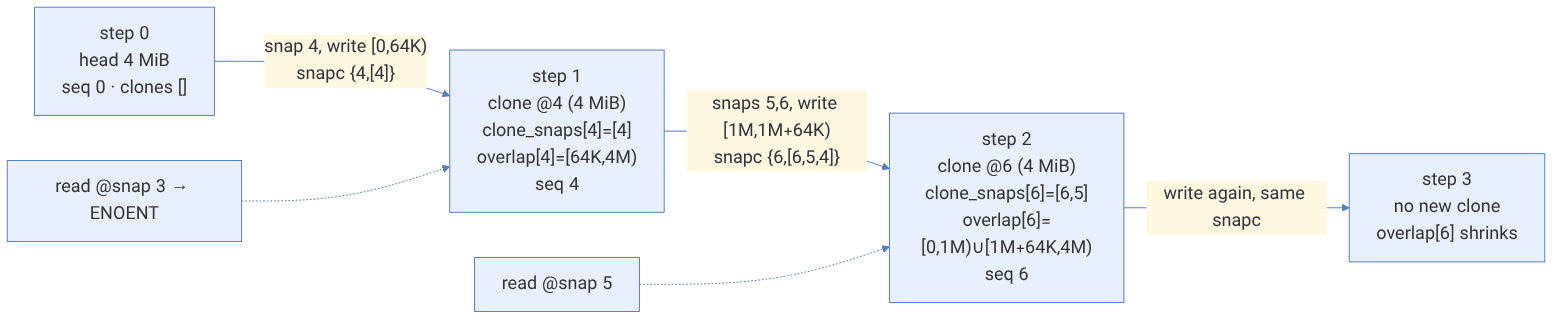
Numerical example. The object rbd_data.5f3a.0000000000000000 is 4 MiB in size and snapset.seq = 0.
- 1. Snapshot number 4 is taken. librbd writes the range
[0, 64K)with the SnapContext{seq: 4, snaps: [4]}. Since 4 > 0, the clone@4is created:clone_snaps[4] = [4],clone_size[4] = 4 MiBand after the writeclone_overlap[4] = [64K, 4M).seqbecomes 4. - 2. Snapshots 5 and 6 are taken. A write of
[1M, 1M+64K)arrives with{seq: 6, snaps: [6,5,4]}. Since 6 > 4, the clone@6is created withclone_snaps[6] = [6,5]andclone_overlap[6] = [0,1M) ∪ [1M+64K, 4M). - 3. The next write with the same SnapContext no longer creates a clone (6 is not > 6) and only shrinks
clone_overlap[6].
The real space used by clone @4 is the part that has been overwritten in the head or in newer clones, that is, 4M minus the size of clone_overlap[4]; in this example 64 KiB. ceph df and rbd du do the same calculation.
36-3-3 Reading from a snapshot#
Source in code: src/osd/PrimaryLogPG.cc :: PrimaryLogPG::find_object_context
Complexity: O(c) for c clones (a linear scan of clones)
pseudocode
find_object_context(oid with snap = s):
    if s == NOSNAP: return head
    ss = snapset of head
    if s > ss.seq: return head                         # the object has not changed since s
    k = first index with ss.clones[k] >= s
    if none: ENOENT                                    # the object was created after s
    clone = ss.clones[k]
    if clone is missing: EAGAIN (wait for recovery)
    if s not in ss.clone_snaps[clone]: ENOENT          # the object did not exist at s
    if s in removed_snaps_queue of pool: ENOENT        # the snap is being deleted
    return clone
In the example above: a read at snap 5 reaches clones = [4, 6]. The first clone ≥ 5 is @6, and 5 is in clone_snaps[6] = [6,5], so @6 is read. A read at snap 7 (greater than seq=6) returns the head directly. A read at snap 3 reaches @4, but 3 is not in [4], so it gets ENOENT, because the object did not yet exist at snap 3.
36-3-4 Deleting the head and whiteouts#
If the head is deleted but has clones, the OSD cannot throw away the SnapSet. In this case the head remains as a whiteout: an object with the whiteout flag in object_info_t that does not exist for the client (its stat returns ENOENT) but keeps the SnapSet. After snaptrim removes the last clone, the whiteout is deleted too.
36-4 snaptrim and the SnapMapper#
36-4-1 Deleting a snapshot#
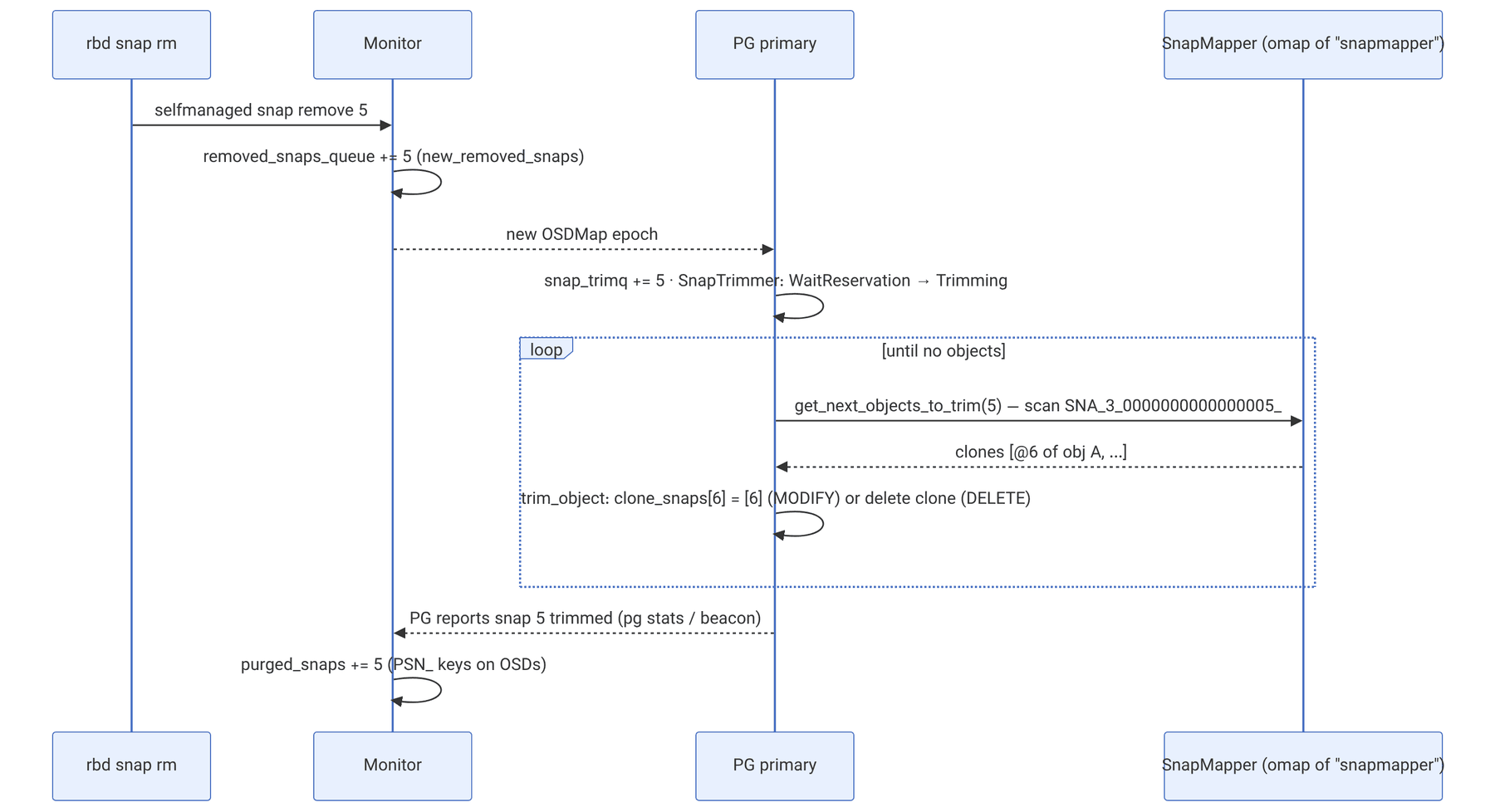
Deleting a snapshot in the mon only adds its number to the pool's removed_snaps_queue (and to new_removed_snaps in the OSDMap). Each PG that sees the new map adds that snap to its snap_trimq, and the SnapTrimmer state machine starts working. When all PGs have finished, the mon records it in purged_snaps.
Scanning all objects to find the clones that have a given snap is expensive. The SnapMapper keeps a reverse index in the omap of the snapmapper object in each OSD's meta collection:
| Prefix | Key format | Value |
|---|---|---|
SNA_ | SNA_<pool>_<snap:016X>_<shard> + hobject.to_str() | the clone's name for this snap |
OBJ_ | OBJ_<shard> + hobject.to_str() | the set of snaps of this clone |
PSN_ | PSN__<pool>_<last:016x> | a range of purged snaps |
hobject_t::to_str() has the format <pool:016X>.<nibble-reversed hash:08X>.<snap>.<name>.<key>.<nspace>. For clone @6 of our example object in pool 3 with hash 0x8c7e1b1f, the SNA key for snap 5 is:
example:
SNA_3_0000000000000005_0000000000000003.F1B1E7C8.6.rbd_data.5f3a.0000000000000000..
The key starts with the prefix SNA_3_0000000000000005_, so all clones of snap 5 in pool 3 are found with one range scan. For EC, a shard prefix (for example .2_) is also added; for replicated it is empty.
Source in code: src/osd/PrimaryLogPG.cc :: PrimaryLogPG::trim_object; src/osd/SnapMapper.cc :: SnapMapper::get_next_objects_to_trim
Complexity: O(c) for c clones of the object; each trim is one replicated transaction
pseudocode
for coid in snapmapper.get_next_objects_to_trim(snap, max):
    new_snaps = clone_snaps[coid] minus (snaps removed or queued for removal)
    if new_snaps empty:                                  # the clone is no longer needed
        if coid is not the oldest clone:
            clone_overlap[older] = clone_overlap[older] ∩ clone_overlap[coid]
        delete coid ; log DELETE
        remove coid from clones, clone_overlap, clone_size, clone_snaps
    else:
        clone_snaps[coid] = new_snaps ; log MODIFY (snapmapper update)
    if head is whiteout and clones empty: delete head
write new snapset to head| Option | Default in main | Meaning |
|---|---|---|
osd_pg_max_concurrent_snap_trims | 2 | the number of concurrent clones per PG |
osd_snap_trim_sleep_hdd | 5 | the pause (seconds) between batches on HDD, when osd_snap_trim_sleep is zero |
osd_snap_trim_sleep_ssd | 0 | the same on SSD |
osd_max_trimming_pgs | 2 | the maximum number of PGs trimming on each OSD |
With mClock, snaptrim is one of the background classes and its priority comes from the profile (chapter 21). The snaptrim_wait and snaptrim states in ceph pg ls and the nosnaptrim flag in ceph osd set are used to control it.
36-5 Watch and notify in the OSD#
A watch is state on the object: it is recorded in object_info_t.watchers (so it is replicated with the object and survives a change of primary), and on the primary it has a Watch object with the client connection and a timer. The sub-operations in CEPH_OSD_OP_WATCH are identified by the codes WATCH (3), RECONNECT (5), PING (7) and UNWATCH (0).
Source in code: src/osd/Watch.cc :: Watch::connect, Watch::got_ping, Notify::maybe_complete_notify, Notify::do_timeout
Complexity: O(w) for w watchers per notify
pseudocode
watch(cookie, timeout = osd_client_watch_timeout):     # default 30 seconds
    oi.watchers[(client, cookie)] = watch_info ; persist with object
    Watch.connect(con) ; register timeout callback
ping every few seconds → Watch.got_ping(now) → reset timer
timer fires (no ping) → remove watch from oi.watchers (a write on the object)
notify(payload, timeout = osd_default_notify_timeout):  # default 30 seconds
    for each watch on object: send MWatchNotify(NOTIFY) ; Notify.start_watcher
    each watcher acks (notify_ack with reply payload) → complete_watcher
    if all acked or timed_out:
        reply MWatchNotify(NOTIFY_COMPLETE, data = {replies, missed watchers})
        return_code = -ETIMEDOUT if timed_out
A practical point: an expired watch is removed by a write on the object, so if the object is in a PG that is not accepting writes (the PG is not active, the object is degraded, or scrub is blocking writes), the removal is postponed and the dead watch stays in the list until then. rados listwatchers and rbd status read this same list from object_info_t.
# example: viewing watchers and sending a test notify
rados -p rbd listwatchers rbd_header.5f3a2b8c1d4e
rados -p rbd notify rbd_header.5f3a2b8c1d4e helloexample (output):
watcher=10.20.0.31:0/2846217731 client.24183 cookie=9482357152153636-6 OSD-side cls calls#
An op with the code CEPH_OSD_OP_CALL carries the class name, the method name and the input. do_osd_ops gets the class from ClassHandler (loading libcls_<name>.so from osd_class_dir if needed) and calls the method with a cls_method_context_t, which is in fact the OpContext itself.
Source in code: src/osd/PrimaryLogPG.cc :: PrimaryLogPG::do_osd_ops (case CEPH_OSD_OP_CALL); src/osd/ClassHandler.cc; src/osd/objclass.cc :: cls_cxx_*
Complexity: as much as the method's work; each cls_cxx_* is a sub-operation on the same ctx
pseudocode
case CALL(class, method, indata):
    cls = ClassHandler.open_class(class)         # loaded only if it is in osd_class_load_list
    m = cls.get_method(method)
    check caps: m.flags RD → needs r or class-read ; WR → w or class-write
    r = m.exec(ctx, indata, outdata)
       # inside the method: cls_cxx_read / cls_cxx_write / cls_cxx_map_set_vals / ...
       # each one calls do_osd_ops(ctx, [one op]) on the same ctx
    if r < 0: whole message fails → no transaction applied
    outdata → reply
Because the method works on the same OpContext, all its changes sit with the rest of the ops in the same message in one transaction and one log entry, and are atomic. That is why RBD and RGW implement logic such as "if the key does not exist, create it and increment the counter" in a class.
| Option | Default in main |
|---|---|
osd_class_load_list | cephfs hello journal lock log numops otp rbd refcount rgw rgw_gc timeindex |
osd_class_default_list | the same list; classes that can be called without an explicit class cap |
Other classes such as cas, or 2pc_queue and queue (which RGW uses for gc and notifications), are installed with the packages but are not in these lists. The actual list in your distribution may differ; check with ceph config get osd osd_class_load_list.
36-7 rados reference#
36-7-1 Pool and object commands#
In the tables of this chapter and the following chapters, {a,b} means "one of a or b", and P, O and S are the pool, object and snapshot names respectively.
| Command | Use |
|---|---|
rados lspools / rados df | the list of pools and each pool's usage |
rados -p P ls [--all] [-N ns] | the list of objects (all namespaces with --all) |
rados -p P put O FILE / get O FILE / append / truncate / create / rm | basic operations |
rados -p P stat O / stat2 O | size and mtime (stat2 with higher precision) |
rados -p P listxattr O / getxattr / setxattr / rmxattr | user xattrs |
rados -p P listomapkeys O / listomapvals / getomapval / setomapval / rmomapkey / clearomap | omap |
rados -p P getomapheader O / setomapheader | the omap header |
rados -p P lssnap / mksnap S / rmsnap S / rollback O S | pool snapshots |
rados -p P -s S get O FILE | reading from a pool snapshot |
rados -p P listsnaps O | an object's clones, snaps, size and overlap |
rados -p P watch O / notify O MSG / listwatchers O | watch and notify |
rados -p P lock list O / lock info O NAME / lock break O NAME LOCKER | cls_lock advisory locks |
rados -p P set-alloc-hint O SIZE WSIZE | an allocation hint for BlueStore |
rados -p P bench SECS {write,seq,rand} -t N [--no-cleanup] / cleanup | performance testing (chapter 10) |
rados -p P export FILE / import FILE | a logical backup of a pool |
# example: the clones of an RBD object
rados -p rbd listsnaps rbd_data.5f3a.0000000000000000example (output):
rbd_data.5f3a.0000000000000000 (seq:6):
cloneid snaps size overlap
4 4 4194304 [65536~4128768]
6 5,6 4194304 [0~1048576,1114112~3080192]
head - 4194304The overlap is shown in the format [offset~length]: 65536~4128768 is the same as [64K, 4M).
36-8 ceph osd pool reference#
| Command | Use |
|---|---|
ceph osd pool create P [PG_NUM] [{replicated,erasure}] [{RULE,PROFILE}] | creating a pool |
ceph osd pool application enable P {rbd,rgw,cephfs} | the application tag (required for HEALTH_OK) |
ceph osd pool ls detail | all properties, including flags and snap_seq |
ceph osd pool get P all / get P KEY | reading properties |
ceph osd pool set P {size,min_size} N | the number of copies and the minimum for writes |
ceph osd pool set P {pg_num,pgp_num} N | the number of PGs (usually automatic with the autoscaler) |
ceph osd pool set P pg_autoscale_mode {on,warn,off} / bulk true / target_size_ratio R | the autoscaler |
ceph osd pool set P crush_rule RULE | the CRUSH rule |
ceph osd pool set P {compression_mode,compression_algorithm} ... | BlueStore compression |
ceph osd pool set P {nodelete,nopgchange,nosizechange} true | protecting the pool |
ceph osd pool set P {noscrub,nodeep-scrub} true | stopping scrub for one pool |
ceph osd pool set P allow_ec_overwrites true | partial writes on EC (for RBD and CephFS) |
ceph osd pool set-quota P {max_objects,max_bytes} N / get-quota P | quotas |
ceph osd pool mksnap P S / rmsnap P S | pool snapshots |
ceph osd pool rename OLD NEW | renaming |
ceph osd pool rm P P --yes-i-really-really-mean-it | deleting (requires mon_allow_pool_delete) |
ceph osd pool stats [P] / ceph df detail | I/O rate and usage |
ceph osd pool autoscale-status | the autoscaler's recommendation |
example (part of ceph osd pool ls detail):
pool 3 'rbd' replicated size 3 min_size 2 crush_rule 0 object_hash rjenkins pg_num 32 pgp_num 32
  autoscale_mode on last_change 1462 lfor 0/0/980 flags hashpspool,selfmanaged_snaps stripe_width 0
  application rbd
The default min_size is zero, which means size − size/2; for size=3 that is 2.
36-9 Tuning and troubleshooting#
- Slow snaptrim and space not being freed: look at
ceph pg ls snaptrim_wait. On HDD, lowerosd_snap_trim_sleep_hddcarefully, or switch the mClock profile tohigh_recovery_opsfor a while. - Slowness after taking a snapshot: the first write to each object after a snapshot creates a clone and writes more metadata. Taking snapshots very frequently on a write-heavy image leads to many clones and a large SnapMapper.
rados lsshows an object but its stat returns ENOENT: the head is probably a whiteout and the clones have not been trimmed yet.- A dead watch on an RBD image header: look at
rbd statusandrados listwatchers. If the client is really dead, it is removed automatically afterosd_client_watch_timeout. To cut it off immediately,ceph osd blocklist addblocks that client's address. EOPNOTSUPPon a class call: the class is not inosd_class_load_list, or its.sofile is not installed.
36-10 Supplementary and up to date#
- Since Octopus, the OSDMap no longer keeps the full
removed_snapslist; insteadremoved_snaps_queueandpurged_snaps(and thePSN_keys in the SnapMapper) are used. Older clusters behaved differently. - In the main branch, copying clones during pool migration (
pool_migration) has its own exception in updatingclone_overlap. - Crimson implements snapshots and snaptrim with the same SnapSet and SnapMapper (
crimson/osd/osd_operations/snaptrim_event.cc).
36-11 Hands-on exercise#
- 1. On a test pool (not the RBD pool) write an object, take
rados mksnap s1, overwrite part of the object and readlistsnaps. Then comparerados -s s1 getwith the current version. - 2. Create an RBD image, take three snapshots and write between them; with
rados listsnapson one of the data objects, match clone_snaps and the overlap against your own calculation. - 3. Delete the middle snapshot and watch its effect in
ceph pg ls snaptrimand again inlistsnaps. - 4. Run
rados watchandrados notifyin two terminals; then stop the watch process withkill -STOPand measure how long it takes to disappear fromlistwatchers.
36-12 Review questions#
- 1. Why can a pool not have both pool snapshots and self-managed snapshots?
- 2. What fields does a SnapContext have, and who sends it in RBD?
- 3. What is the condition for creating a clone in make_writeable?
- 4. What number is a clone named with?
- 5. In the chapter's example, what are the results of reading at snap 5 and at snap 3?
- 6. What is a whiteout, and when is it deleted?
- 7. What structure does the
SNA_key in the SnapMapper have, and why is it shaped this way? - 8. When a clone no longer has any snaps, what happens to clone_overlap?
- 9. How is an expired watch removed, and why may it linger for a while?
- 10. Why is a cls call atomic with the rest of the ops in a message?
Answers to these questions are in Appendix E: Answers to Review Questions. Answers to this chapter's questions →
36-13 Sources for this chapter#
- PrimaryLogPG.cc (make_writeable, find_object_context, trim_object, CALL
https://github.com/ceph/ceph/blob/main/src/osd/PrimaryLogPG.cc - SnapMapper.cc
https://github.com/ceph/ceph/blob/main/src/osd/SnapMapper.cc - Watch.cc
https://github.com/ceph/ceph/blob/main/src/osd/Watch.cc - osd_types.h (SnapSet
https://github.com/ceph/ceph/blob/main/src/osd/osd_types.h - rados.cc (the list of rados commands
https://github.com/ceph/ceph/blob/main/src/tools/rados/rados.cc - Developer documentation on snapshots
https://docs.ceph.com/en/latest/dev/osd_internals/snaps/ - watch/notify documentation
https://docs.ceph.com/en/latest/dev/osd_internals/watch_notify/ - Pool reference
https://docs.ceph.com/en/latest/rados/operations/pools/