BlueStore: The OSD Storage Engine
TL;DR this chapter in a few lines
- BlueStore writes directly to the raw device and keeps all metadata (onodes, omap, allocation) in RocksDB on BlueFS, with checksums on every read.
- Put block.db and the WAL on a fast device; cephadm splits it evenly between the OSDs of a node.
- Small writes may be deferred through the RocksDB WAL;
min_alloc_sizeand compression settings decide how much raw space small objects really use. - FileStore OSDs must be recreated as BlueStore before upgrading to Reef or later; there is no in-place conversion.
12-1 Before you start#
12-1-1 What questions does this chapter answer?#
Every OSD must ultimately write RADOS objects to a physical disk. The layer that does this is called the object store. In 2019 BlueStore had only just become the default, and many clusters still ran FileStore. Today the situation is simpler: FileStore is unsupported from Reef on, and BlueStore is the classic OSD's only object store. But understanding BlueStore's internals is still essential for hardware design, performance tuning and troubleshooting.
- What is BlueStore, and why did it replace FileStore?
- What roles do RocksDB, BlueFS and deferred writes play?
- How do we size and lay out the block, block.db and block.wal devices?
- What effect do compression, checksums and min_alloc_size have?
- How do we migrate OSDs to BlueStore (or to a new layout)?
- The future: where are crimson and SeaStore?
12-2 Why BlueStore?#
12-2-1 What Ceph needs from the storage layer#
To implement RADOS guarantees, the OSD needs several capabilities from the layer below:
- Atomic transactions: a RADOS operation may change data, attributes (xattrs) and omap at the same time, and all must happen together or not at all.
- Ordered enumeration: scrub and backfill must traverse each PG's objects in order.
- Fast key-value metadata for omap (which RGW uses heavily for bucket indexes and CephFS for directories).
- Checksums to detect silent data corruption.
12-2-2 FileStore's limitations#
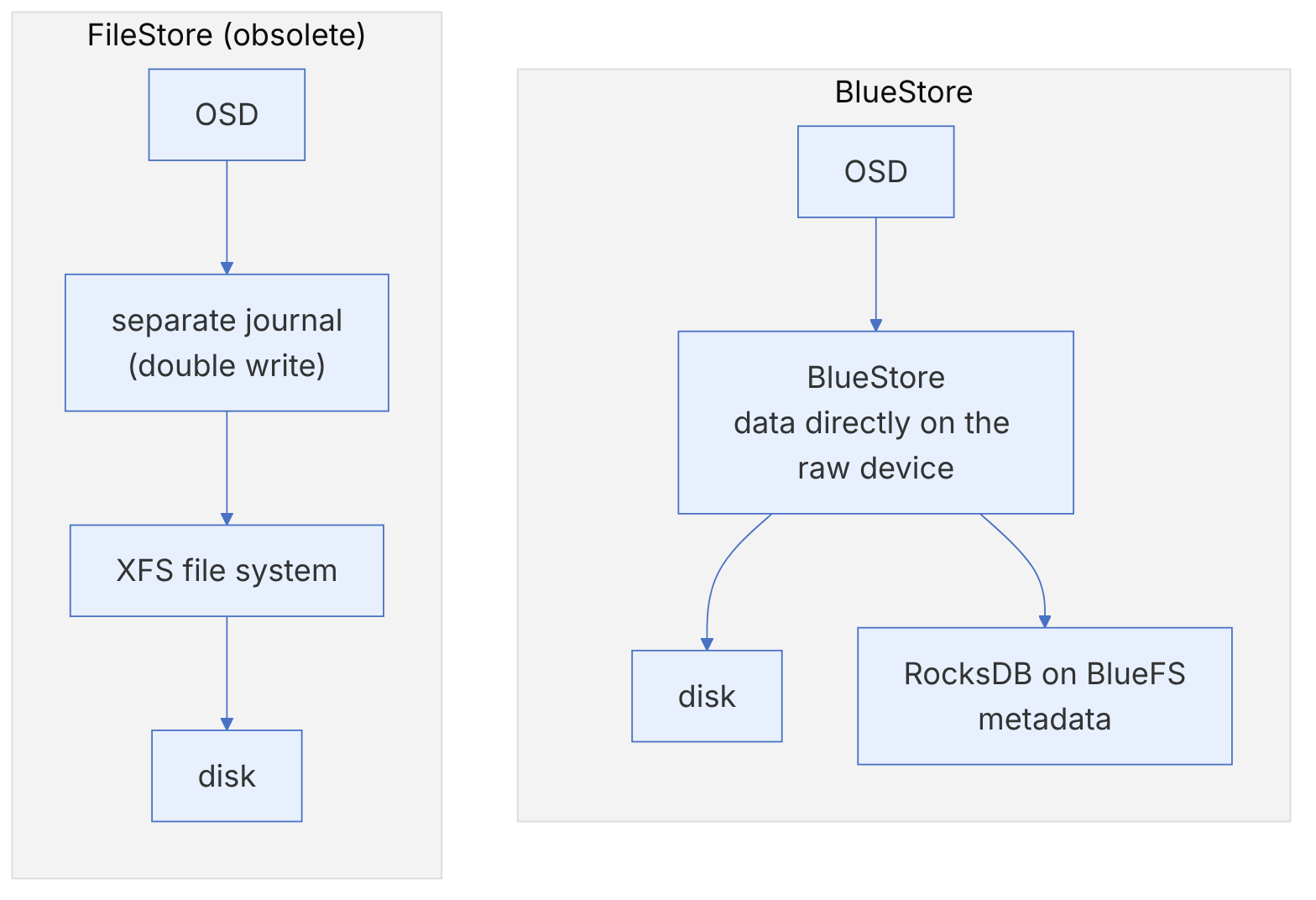
FileStore stored each object as a file on XFS. Because POSIX file systems have no multi-operation transactions, FileStore had a separate journal for atomicity: every write was first written in full to the journal and then to the file system. The consequences:
- Double writes: every byte was written twice, which roughly halved the effective throughput.
- Extra layers: the kernel page cache, XFS, xattrs and omap in a separate LevelDB/RocksDB, which made behaviour unpredictable.
- Ordered enumeration with nested directories and their splitting, which was slow in large PGs.
- No end-to-end data checksums.
12-2-3 BlueStore's solution#
BlueStore writes data directly to the raw block device and keeps metadata in RocksDB. With this design:
- For large writes, the data is written once (to new space, copy-on-write style) and only the metadata is recorded in a RocksDB transaction.
- Every data block has a checksum (crc32c by default), and every read is verified.
- Inline compression at the pool or OSD level is possible.
- The data and metadata cache is managed in the OSD's own memory and controlled by
osd_memory_target.
12-3 How does BlueStore work?#
12-3-1 RocksDB#
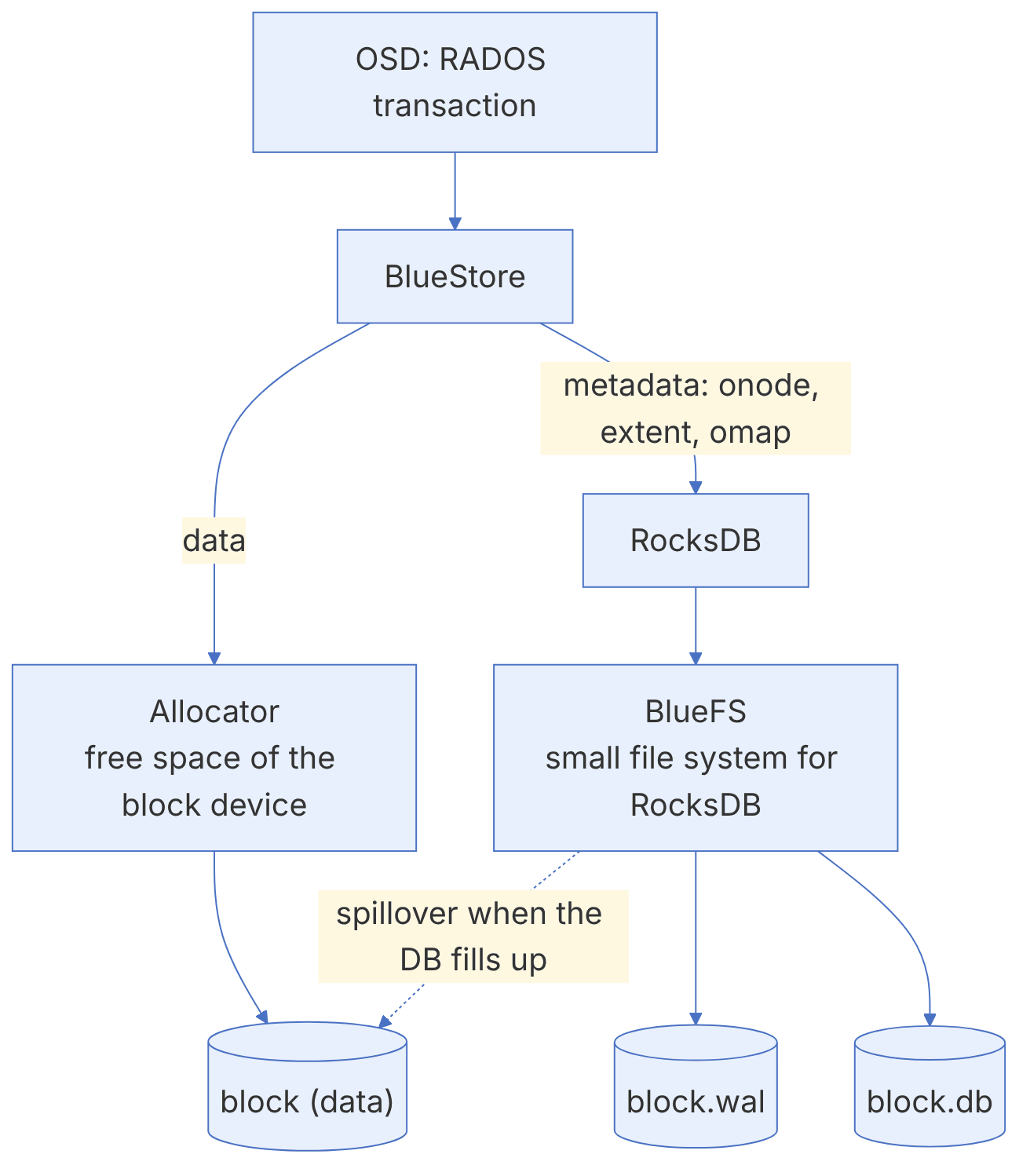
RocksDB is a key-value database based on an LSM structure. BlueStore keeps all its metadata in it: each object's onode (size, extent map, attributes), omap, the free-space map (in some allocators) and the transaction log. Since Pacific, new OSDs create RocksDB sharded: different key types go into separate column families so that compaction of one key type does not affect the others. Older OSDs can be moved to the new layout with ceph-bluestore-tool reshard.
In Squid, LZ4 compression for RocksDB was enabled by default. This reduces the size of the DB and, especially in RGW clusters with heavy omap, lowers the chance of the DB spilling over from SSD to HDD.
12-3-2 BlueFS#
RocksDB needs a file system to work (it writes its SST and WAL files). Instead of XFS, BlueStore has a very small, special-purpose file system called BlueFS that supports only these few file types. BlueFS can be spread over three devices:
| Device | Contents | Suitable hardware |
|---|---|---|
| block | Object data (and everything, if there is no other device) | The main HDD or SSD |
| block.db | RocksDB files (and the WAL if there is no separate wal device) | A fast SSD or NVMe |
| block.wal | Only the RocksDB WAL | The fastest device; only when it is faster than db |
If block.db fills up, BlueFS writes the remaining RocksDB files to the block device (usually a slow HDD). This spillover suddenly lowers metadata performance and is reported by the BLUEFS_SPILLOVER warning. The subtle point is that RocksDB keeps files in levels with exponentially growing sizes, and a whole level either goes on the DB or does not; so DB space between level thresholds may go unused.
12-3-3 Deferred writes#
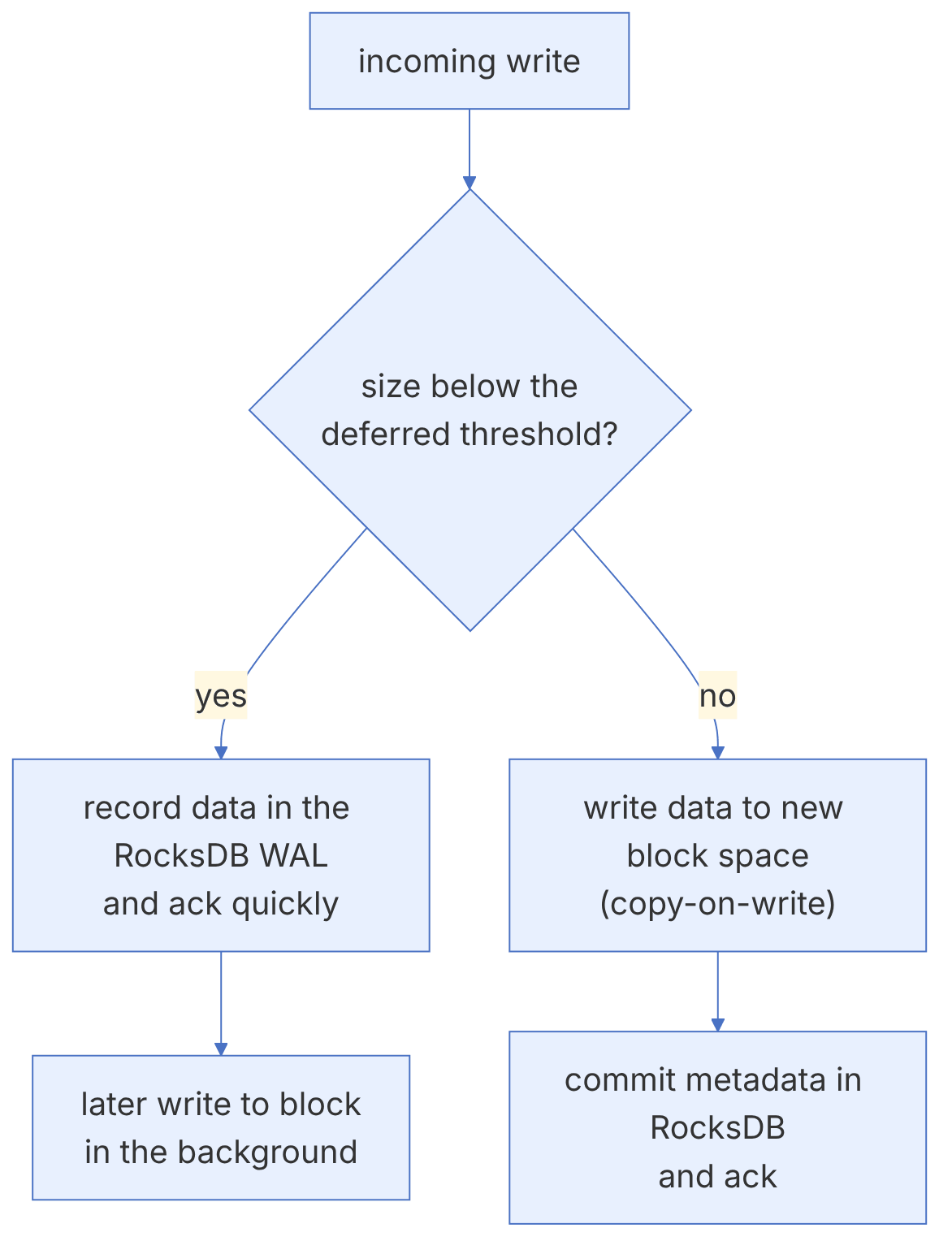
For an HDD, a small random write is expensive (each write is a seek). BlueStore defers writes smaller than a threshold: the data is recorded together with the metadata in the RocksDB WAL (usually on SSD), the client gets its ack, and the data is applied to the HDD later in the background. Larger writes go directly to free space on block, and only the metadata is committed in RocksDB. The thresholds are set with bluestore_prefer_deferred_size_hdd and _ssd, and the flow of these writes is limited by bluestore_throttle_deferred_bytes.
This mechanism is the main reason an SSD for block.db is valuable for HDD OSDs: not only metadata but also small writes go to the SSD first. But the SSD must have power-loss protection; otherwise sync writes to the WAL become slow and the advantage disappears (chapter 10).
12-4 Using BlueStore#
12-4-1 Device layout#
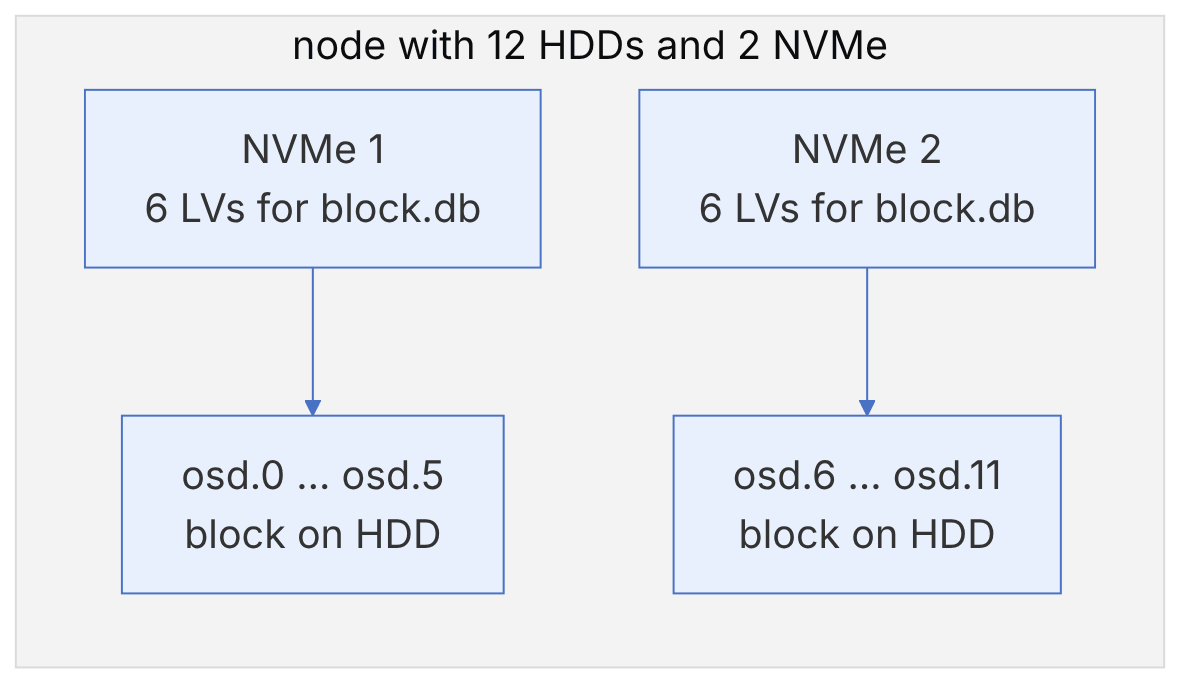
In cephadm, OSDs are created with the ceph-volume tool on LVM. You set the layout in the OSD spec (chapter 11); cephadm divides the fast device's space evenly between that node's OSDs. Three common patterns:
| Pattern | Layout | Use |
|---|---|---|
| All-in-one | block, db and wal on one SSD or NVMe | All-flash clusters |
| Hybrid | block on HDD, db (with its wal) on a shared SSD/NVMe | High capacity at low cost; RBD and RGW |
| Three-tier | block on HDD, db on SSD, wal on NVMe or Optane | Rare; only when the wal device is really faster |
In the hybrid pattern, losing the db device means losing all the OSDs whose db is on it. If one NVMe backs the db of twelve HDDs, its failure is equivalent to the failure of twelve OSDs. Choose the ratio of OSDs per db device so that this failure domain is compatible with the CRUSH design and the recovery capacity; usually at most 4 to 6 HDDs per SATA SSD, and more for NVMe.
12-4-2 block.db size#
The current documentation (after RocksDB compression was enabled in Squid) recommends that block.db be at least 2.5 percent of the block device size. For older releases and heavy omap workloads (RGW) the figure of 4 percent is given, and for RBD 1 to 2 percent is often enough. Example: an 18 TB HDD for RGW needs about 450 to 720 GB of db.
ceph osd metadata 3 | jq '{bluefs_dedicated_db, bluefs_db_size, devices}'
ceph tell osd.3 bluefs stats
ceph health detail | grep -i spillover
12-4-3 min_alloc_size#
bluestore_min_alloc_size is the smallest allocation unit on the device and is fixed only when the OSD is created. The defaults in the current code (src/common/options/global.yaml.in) are 4_K for both HDD and SSD. The history: up to Mimic, 64 KB for HDD and 16 KB for SSD; Octopus brought SSD to 4 and Pacific brought HDD to 4 KB. The motivation was space amplification in RGW with small objects: a 1 KB object with a 64 KB unit wasted 63 KB.
OSDs created before Pacific still have the old value, even after the software upgrade. Check with ceph osd metadata <id> | jq .bluestore_min_alloc_size. The only way to change it is to recreate the OSD.
12-4-4 Compression and checksums#
ceph osd pool set rgw-data compression_algorithm zstd     # or lz4, snappy, zlib
ceph osd pool set rgw-data compression_mode aggressive    # none, passive, aggressive, force
ceph osd pool set rgw-data compression_required_ratio 0.875
ceph df detail | grep -E 'POOL|rgw-data' # the USED COMPR and UNDER COMPR columns| Mode | Behaviour |
|---|---|
| none | Never compress |
| passive | Only when the client hints "compressible" |
| aggressive | Compress unless the client says "incompressible" |
| force | Always try |
Compression is kept only when the ratio of compressed to original size is less than compression_required_ratio. The default checksum is crc32c; the options crc32c_16, crc32c_8, xxhash32 and xxhash64 also exist. Shorter checksums reduce metadata memory but also lower error-detection strength.
12-5 Migrating and maintaining OSDs#

12-5-1 From FileStore to BlueStore#
If you still have FileStore OSDs, you must convert them before upgrading to Reef or later. There is no in-place conversion; the method is recreating the OSD. Two documented strategies:
- OSD-by-OSD replacement: remove each OSD with
ceph orch osd rm <id> --replace --zapso that it is recreated with the same id, this time as BlueStore. Simple, but each OSD causes two rounds of data movement. - Host-by-host replacement: make an empty host BlueStore, move the data of one FileStore host onto it, and use the freed host for the next round. Less movement, but it needs a spare host.
12-5-2 Adding or moving the DB#
If you created an OSD without a db and later added an SSD, or the dbs were too small, ceph-volume lvm new-db and ceph-volume lvm migrate do the job without recreating the OSD (the OSD must be stopped):
ceph orch daemon stop osd.7
cephadm shell --name osd.7
ceph-volume lvm new-db --osd-id 7 --osd-fsid <fsid> --target vg_nvme/db_osd7
ceph-volume lvm migrate --osd-id 7 --osd-fsid <fsid> --from data --target vg_nvme/db_osd7
exit
ceph orch daemon start osd.7
12-5-3 The ceph-bluestore-tool utility#
ceph-bluestore-tool show-label --dev /dev/ceph-vg/osd-block-xxxx
ceph-bluestore-tool fsck --path /var/lib/ceph/osd/ceph-7 --deep
ceph-bluestore-tool bluefs-bdev-sizes --path /var/lib/ceph/osd/ceph-7
ceph-bluestore-tool bluefs-bdev-expand --path /var/lib/ceph/osd/ceph-7   # after enlarging the LV
ceph-bluestore-tool reshard --path /var/lib/ceph/osd/ceph-7 --sharding "<spec>"All these commands run only on a stopped OSD. repair and reshard change the metadata; run fsck first and make sure that OSD's PGs have healthy copies elsewhere (ceph osd ok-to-stop).
12-6 BlueStore by the numbers: the compression acceptance test, the effect of min_alloc_size and the size of RocksDB levels#
The three calculations in this section, with main's defaults as of November 2026, answer three common questions: why compression has no effect on some OSDs, why small objects consume a lot of raw space, and how big block.db should be. The deferred write path and memory autotune are covered in chapter 21, and the allocator in chapter 24.
12-6-1 The compression acceptance test#
Source in code: src/os/bluestore/BlueStore.cc :: BlueStore::_do_alloc_write (want_len, result_len)
Complexity: O(blob length) for compression and O(1) for the test
pseudocode
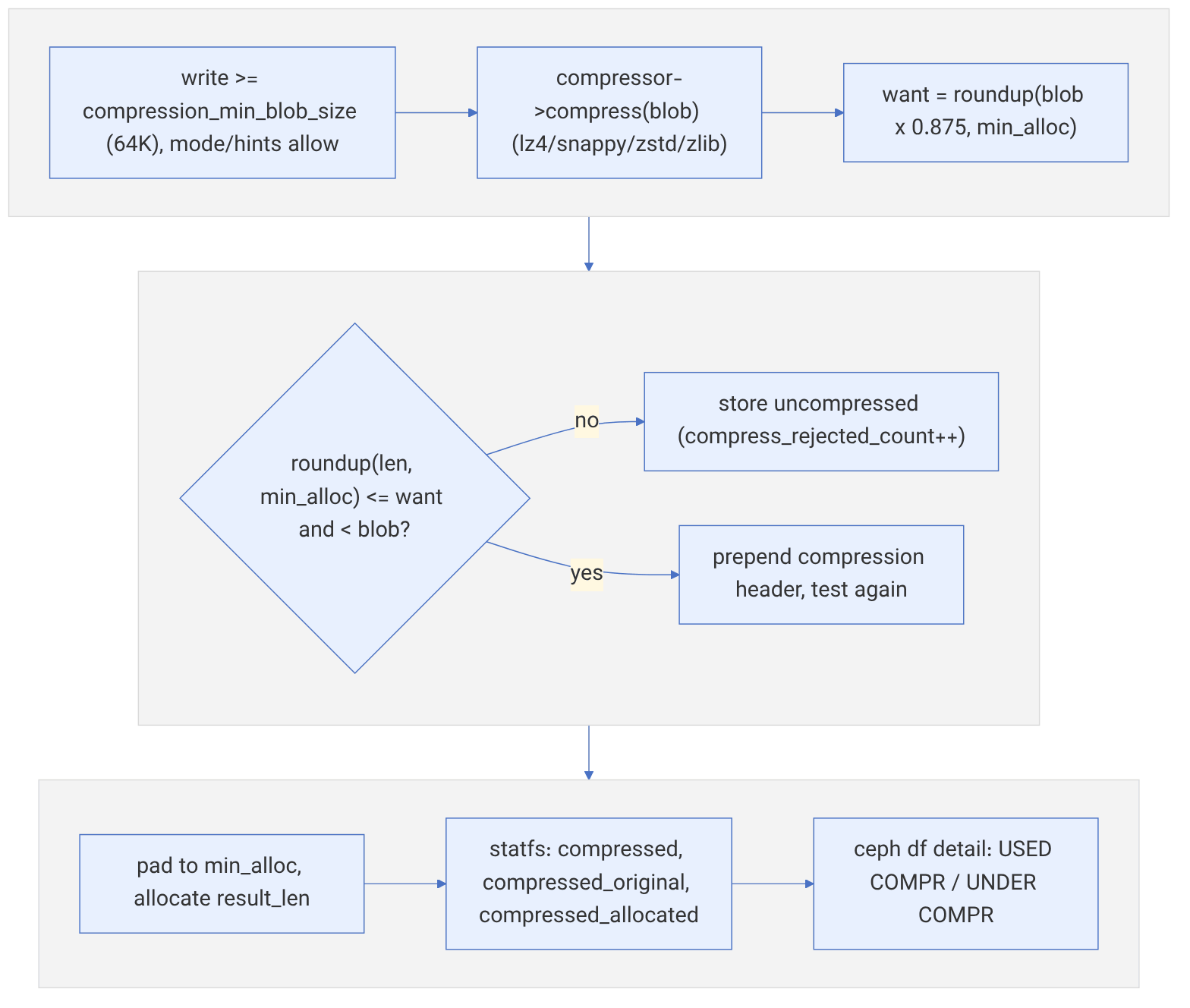
crr = compression_required_ratio in the pool or bluestore_compression_required_ratio (0.875)
want   = p2roundup(blob_length × crr, min_alloc_size)
result = p2roundup(compressed_len, min_alloc_size)
if result ≤ want and result < blob_length:
    add the compression header and repeat the test ; on success pad to min_alloc
else: store uncompressed (compress_rejected_count counter)
compressed blob size: bluestore_compression_min/max_blob_size_{hdd,ssd} (both 64K in main)
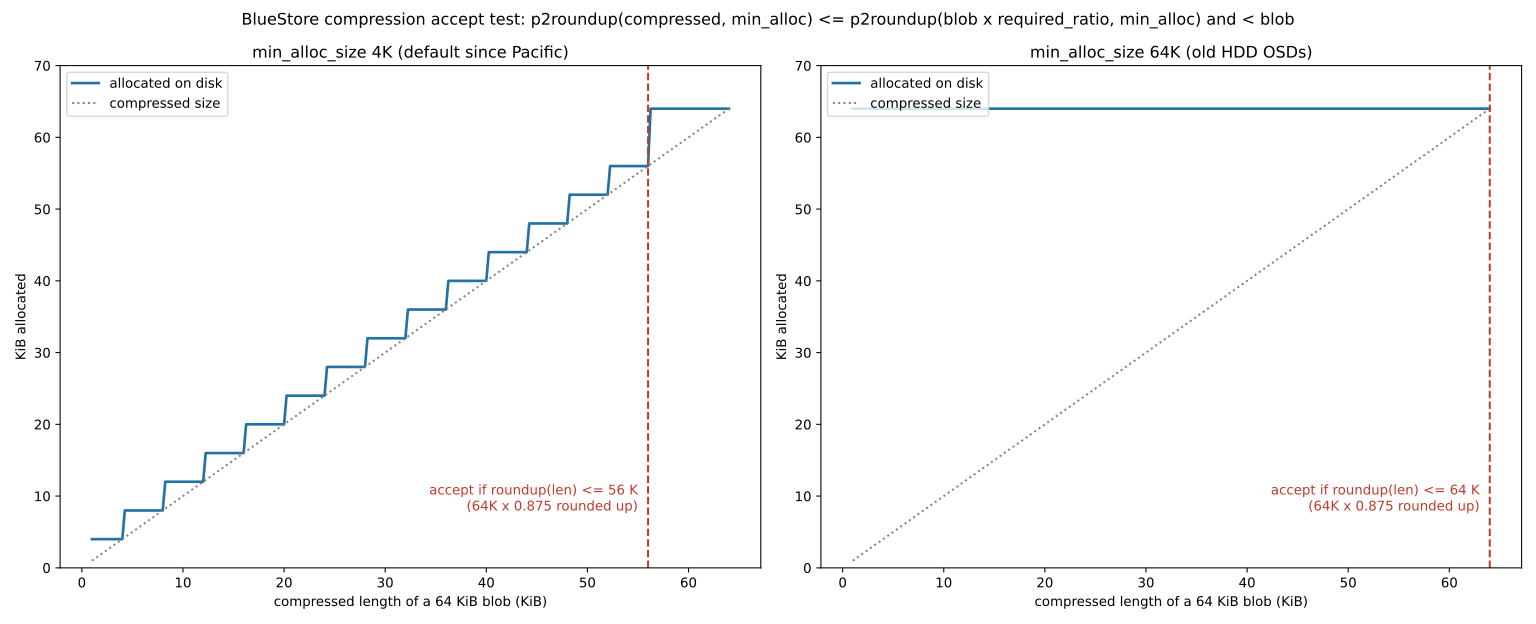
Numerical example (64 KiB blob). With min_alloc_size 4K, want = 56 KiB. If the blob compresses to 50 KiB, result = 52 KiB is accepted and saves 12 KiB. 57.5 KiB is not accepted, because it rounds up to 60 KiB. With min_alloc_size 64K, which was the HDD default before Pacific and cannot be changed after the OSD is created, want = 64 KiB and result is 64 KiB even for a 30 KiB blob. The condition "result < blob" is never met, so on such an OSD, compression with 64 KiB blobs never saves anything. The sign is that the USED COMPR column in ceph df detail stays at zero and the compress_rejected counter goes up. The remedy is recreating the OSD, or enlarging compression_max_blob_size, which raises the cost of random reads.
12-6-2 min_alloc_size and small objects#
Source in code: src/os/bluestore/BlueStore.cc (min_alloc_size recorded in the superblock at mkfs); defaults bluestore_min_alloc_size_{hdd,ssd} = 4K in main
Complexity: O(1)
pseudocode
allocated(size) = p2roundup(size, min_alloc_size)            # per replica or per shard
amplification = allocated / size
in EC: each shard is rounded separately ← shard = ceil(size / k) rounded to min_alloc
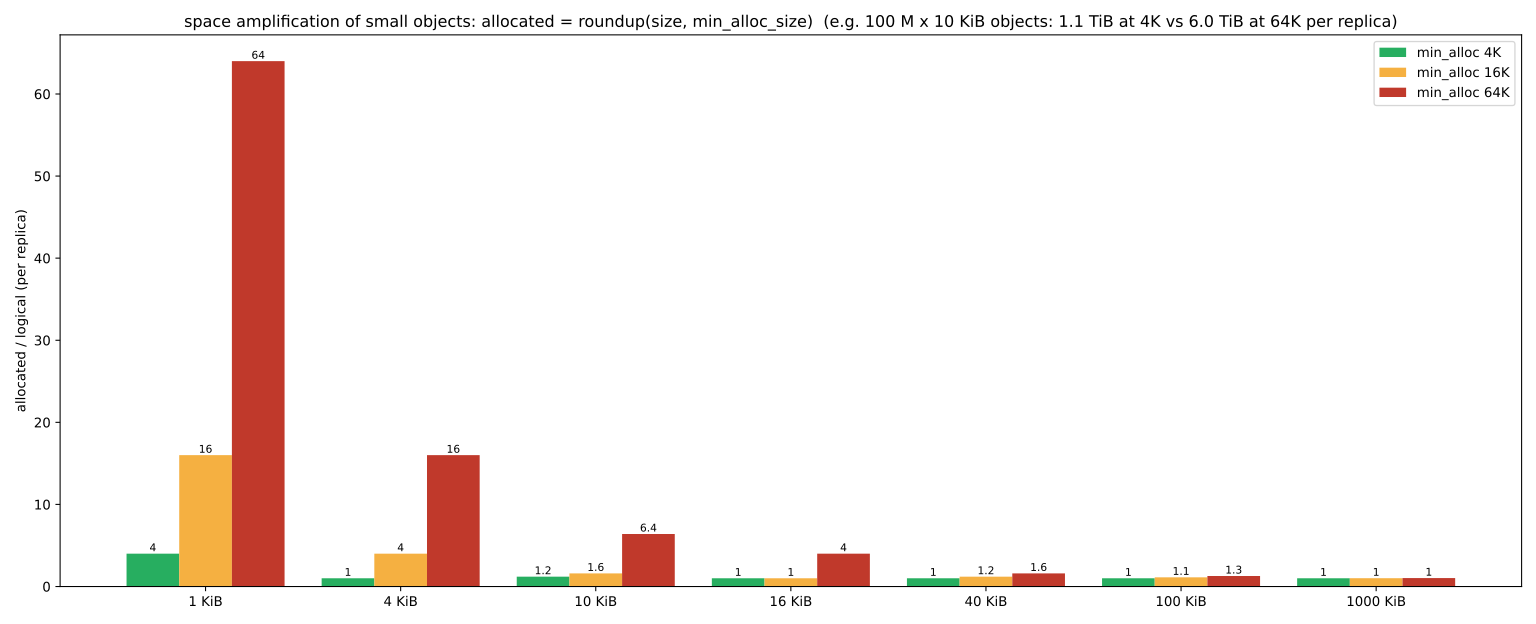
Numerical example. A 1 KiB object with min_alloc 4K uses four times the space, and with 64K sixty-four times. A 10 KiB object uses 1.2 and 6.4 times respectively. For 100 million ten-kilobyte objects (for example RGW thumbnails), the usage per replica is about 1.12 TiB with 4K and about 5.96 TiB with 64K. In a three-replica pool this difference reaches 14.5 TiB raw. In EC the effect is worse: the same 10 KiB object in 4+2 makes six shards, each rounded to 4K, i.e. 24 KiB raw for 10 KiB of data. Each OSD's min_alloc_size can be seen with ceph osd metadata <id> | grep min_alloc.
12-6-3 RocksDB level sizes and block.db#
Source in code: src/common/options/global.yaml.in :: bluestore_rocksdb_options (max_bytes_for_level_base = 1 GiB, max_bytes_for_level_multiplier = 8)
Complexity: O(number of levels)
pseudocode
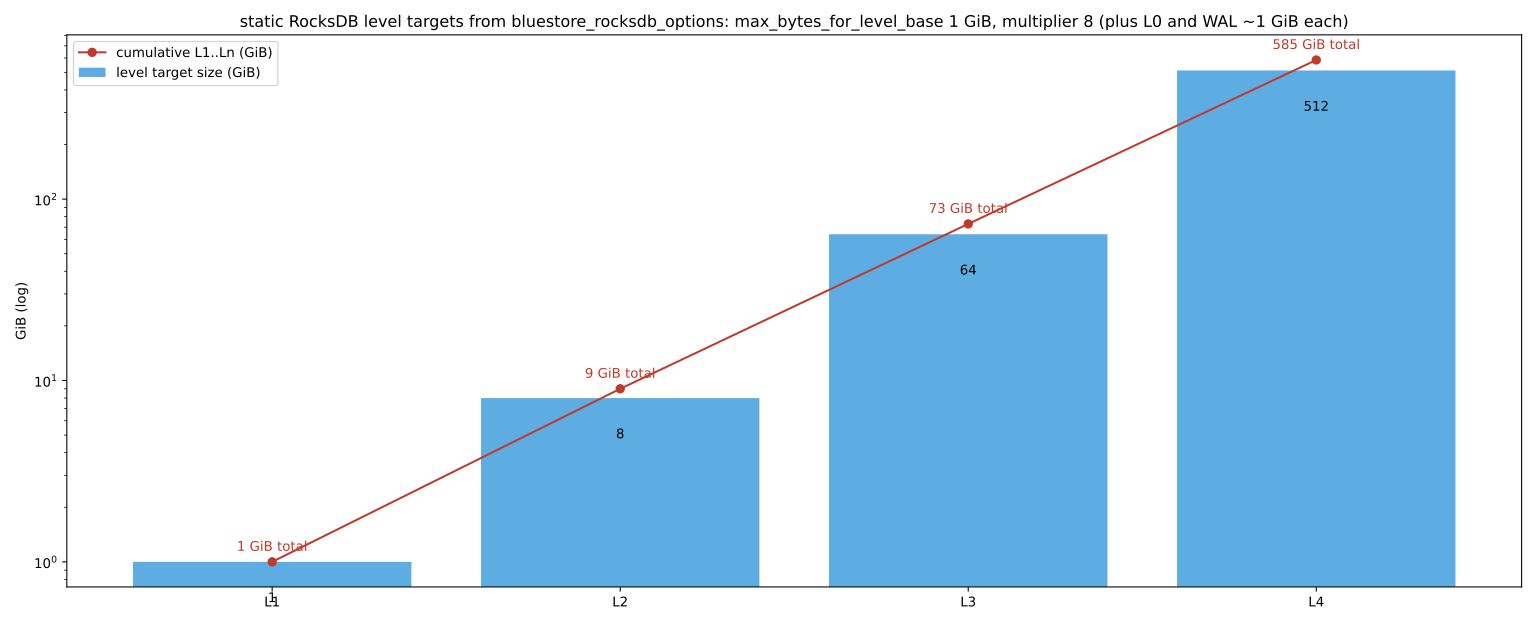
target(L1) = 1 GiB ; target(Ln) = target(Ln−1) × 8
cumulative(Ln) = Σ target(L1..Ln)  ← 1, 9, 73, 585 GiB
a level stays wholly on the fast device only if its space suffices for all the lower levels
in addition: L0 (up to 8 memtable files of 16 MiB before compaction) and the WAL (max_total_wal_size = 1 GiB)
Result. With static levelling, a block.db of about 10 GiB holds only up to L2, and about 75 to 80 GiB holds up to L3. Anything between these two values works in practice like the smaller size, because the next level does not fit and spills to the slow device (the BLUEFS_SPILLOVER warning). These numbers assume "static levelling". Newer RocksDB releases have turned the level_compaction_dynamic_level_bytes option on by default. BlueFS in main also manages some extra space with bluestore_volume_selection_policy. So this table is a starting-point guide, not a law. To be sure, check the output of ceph daemon osd.N bluefs stats on a busy OSD.
12-7 Inside the code: BlueStore#
This section examines BlueStore from the Ceph source code (the main branch of the ceph/ceph repository, as of 14 November 2026). We give file and function names so that you can follow along yourself. Behaviour may differ between releases; wherever it matters, we name the release.
12-7-1 File map#
| File in src/os/bluestore | Responsibility |
|---|---|
| BlueStore.cc / .h | The ObjectStore implementation: transactions, reads and writes, cache, mount/fsck |
| BlueStore_components.h | The TransContext, Onode, Blob and ExtentMap structures and the txc states |
| Writer.cc | The new write logic (deferred or direct decision, splitting into blobs) |
| BlueFS.cc / bluefs_types.h | RocksDB's small file system and its log |
| BlueRocksEnv.cc | The bridge from RocksDB to BlueFS (an implementation of rocksdb::Env) |
| HybridAllocator*, AvlAllocator*, BitmapAllocator*, Btree2Allocator* | Free-space allocators |
| BitmapFreelistManager.cc | Persistent storage of the free-space map in the KV store |
| bluestore_types.h | On-disk structures: bluestore_onode_t, bluestore_blob_t, pextent |
| bluestore_tool.cc | The ceph-bluestore-tool utility |
12-7-2 The RocksDB key space#
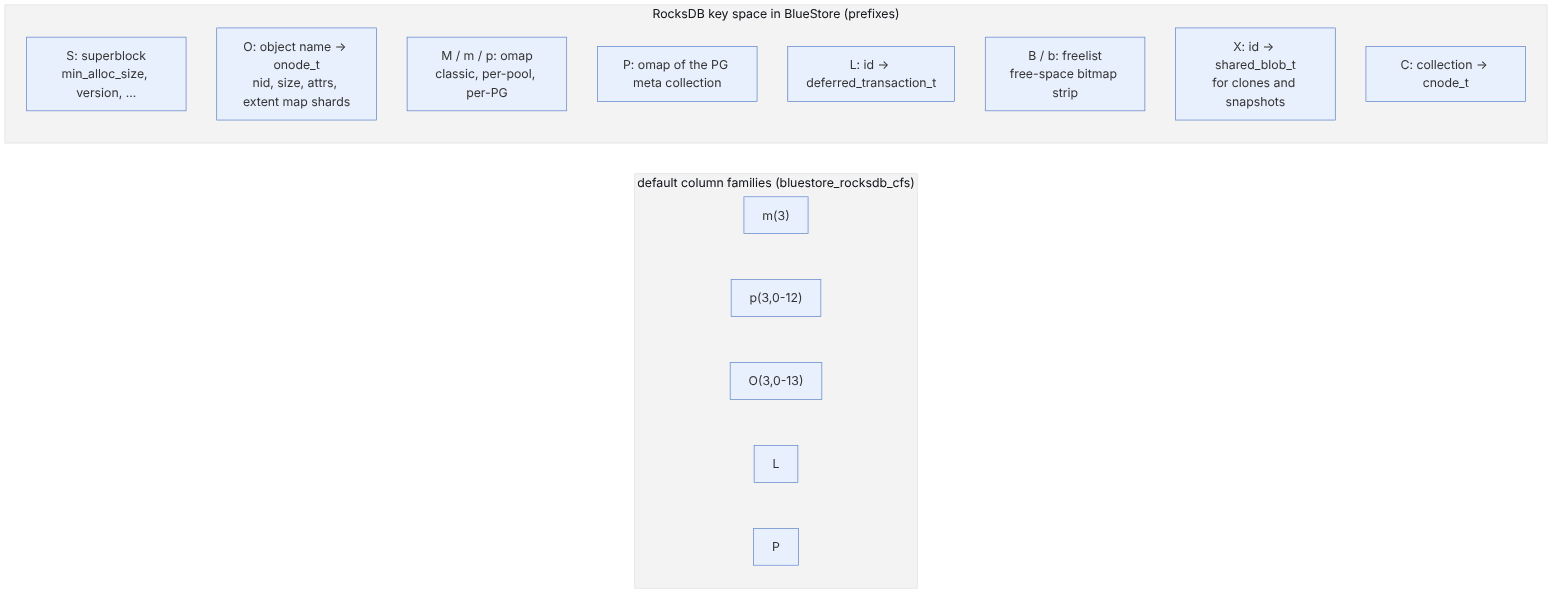
BlueStore keeps all its metadata in one key-value database and separates the kinds with a prefix. The definitions are at the top of BlueStore.cc:
// from ceph/ceph, LGPL — src/os/bluestore/BlueStore.cc (excerpt)
const std::string PREFIX_SUPER = "S";       // field -> value
const std::string PREFIX_COLL = "C";        // collection name -> cnode_t
const std::string PREFIX_OBJ = "O";         // object name -> onode_t
const std::string PREFIX_OMAP = "M";        // u64 + keyname -> value
const std::string PREFIX_PERPOOL_OMAP = "m"; // s64 + u64 + keyname -> value
const std::string PREFIX_PERPG_OMAP = "p";   // u64(pool) + u32(hash) + u64(id) + keyname -> value
const std::string PREFIX_DEFERRED = "L";    // id -> deferred_transaction_t
const std::string PREFIX_ALLOC = "B";       // u64 offset -> u64 length (freelist)
const std::string PREFIX_SHARED_BLOB = "X"; // u64 SB id -> shared_blob_t
Three generations of omap are visible in this list: M (old, one shared space), m (per-pool, so that each pool's omap statistics are accurate) and p (per-PG, so that deleting or moving a PG works on one contiguous key range). Old OSDs raise the BLUESTORE_NO_PER_POOL_OMAP or BLUESTORE_NO_PER_PG_OMAP warning after an upgrade so that they get converted with fsck/repair.
The default column families in the current code:
bluestore_rocksdb_cfs = m(3) p(3,0-12) O(3,0-13)=block_cache={type=binned_lru}
                        L=min_write_buffer_number_to_merge=32 P=min_write_buffer_number_to_merge=32
The number in parentheses is the shard count, and the following range is the key bytes used for hashing. For example, O(3,0-13) means onodes are spread over three column families. The goal is that compaction of one key type (for example RGW's heavy omaps) does not lock the whole database. The RocksDB settings live in bluestore_rocksdb_options, which in the current code starts with compression=kLZ4Compression (the same Squid change).
12-7-3 Onode, ExtentMap and Blob#

- The Onode is the in-memory representation of
bluestore_onode_t. Its main fields:nid(a local numeric id),size,attrs(xattrs),extent_map_shardsand the allocation hints (expected_object_size,alloc_hint_flags). - The ExtentMap maps the object's logical offsets to Extents. For large objects, this map is split into shards, and each shard is stored separately in the KV store, so that a small change to a 4 MB object does not require rewriting the whole map.
- The Blob is the unit of checksums and compression and holds the list of pextents (physical offset and length on block).
- A SharedBlob is created when two objects (for example an object and its snapshot clone) share a Blob; its reference count is stored under the
Xprefix.
Cache: Onodes and data buffers are kept in a separate cache that, with bluestore_cache_autotune=true (the default) and the overall target osd_memory_target (default 4_G in the code), is divided between onodes, data and the RocksDB block cache.
12-7-4 The life cycle of a transaction#
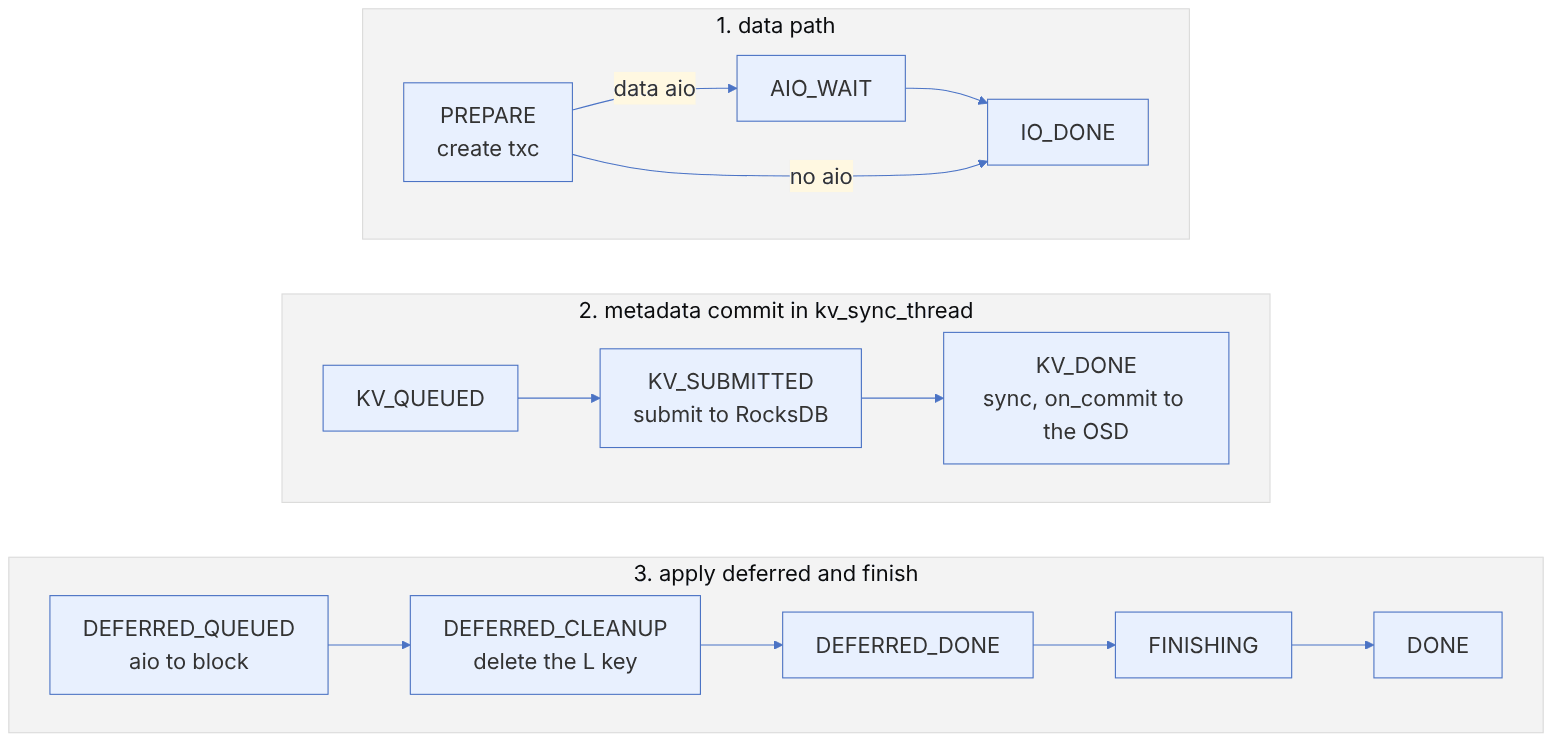
Every ObjectStore transaction the OSD sends with queue_transactions() creates a TransContext (txc). The states are defined in BlueStore_components.h:
// from ceph/ceph, LGPL — src/os/bluestore/BlueStore_components.h (excerpt)
typedef enum {
  STATE_PREPARE,
  STATE_AIO_WAIT,
  STATE_IO_DONE,
  STATE_KV_QUEUED,     // queued for kv_sync_thread submission
  STATE_KV_SUBMITTED,  // submitted to kv; not yet synced
  STATE_KV_DONE,
  STATE_DEFERRED_QUEUED,    // in deferred_queue (pending or running)
  STATE_DEFERRED_CLEANUP,   // remove deferred kv record
  STATE_DEFERRED_DONE,
  STATE_FINISHING,
  STATE_DONE,
} state_t;
Progress between these states happens in BlueStore::_txc_state_proc(): a while(true) loop with a switch on the current state. The flow in plain terms:
- 1. PREPARE:
_txc_add_transactionprocesses the operations; for direct data, new space is allocated and an aio is queued; for deferred data, the data goes into abluestore_deferred_transaction_t. - 2. AIO_WAIT → IO_DONE: waiting for the data write to block to finish. Commit order is preserved within each collection (PG).
- 3. KV_QUEUED → KV_SUBMITTED → KV_DONE: the dedicated
_kv_sync_thread()thread sends ready transactions to RocksDB in batches and performs one shared sync. After the sync, theon_commitcallback runs and the OSD learns that the data is durable. This is where the OSD can ack to the primary or the client. - 4. DEFERRED_*: if the txc had a deferred write, the data is now written from the WAL to its real place on block (
_deferred_queue, batched and sorted by offset so that the HDD seeks less), and then theLkey is deleted.
Why is it safe to ack after KV_DONE, even when the deferred data has not yet reached block? Because the data itself became durable together with the L record in the RocksDB WAL. If the OSD goes down before the deferred write is applied, the _deferred_replay() function reads all L keys at mount and applies them again. A direct write is safe too, because it is written to new space, and nothing points to it until the metadata commits; if a crash happens, the object's previous version is untouched.
12-7-5 The deferred or direct decision#
In the new write path (Writer.cc), the function BlueStore::Writer::_defer_or_allocate() decides:
// from ceph/ceph, LGPL — src/os/bluestore/Writer.cc (excerpt)
uint32_t released_size = 0;
for (const auto& r : released) {
  released_size += r.length;
}
uint32_t au_size = bstore->min_alloc_size;
do_deferred = need_size <= released_size && released_size < bstore->prefer_deferred_size;
That is, a write is deferred when (1) it can be written into the same space that this write releases (an in-place overwrite) and (2) that space is smaller than prefer_deferred_size. The defaults in the current code: bluestore_prefer_deferred_size_hdd = 64_K and bluestore_prefer_deferred_size_ssd = 0 (on SSD deferred writes are effectively not used, because random writes are cheap). The comment above this function also notes that doing part of a write as deferred and the rest as direct is not optimal anyway; so the decision is made for the whole write at once.
BlueStore write path
Choose the device, offset and length of a write and watch BlueStore split it and decide what goes through the WAL (deferred) and what is written directly.
| Piece | Range | Path | How | Read first | Allocated |
|---|---|---|---|---|---|
| big | 0 B + 4 KiB | big overwrite in existing blobs | deferred (WAL) | – | – |
- queue_transactions The OSD hands BlueStore a transaction; a TransContext is created in state PREPARE.
BlueStore::queue_transactions, _txc_create - split at min_alloc _do_write_data cuts the write into 1 piece(s) and sends each to _do_write_small or _do_write_big.
BlueStore::_do_write_data, _do_write_small, _do_write_big - deferred op The bytes to be written in place are put into a bluestore_deferred_op_t inside the same RocksDB transaction.
bluestore_deferred_op_t, BlueStore::_txc_add_transaction - KV commit with data _kv_sync_thread commits the metadata and the deferred data to RocksDB with a sync; the WAL write is the only synchronous disk write.
BlueStore::_kv_sync_thread, _txc_apply_kv - ack After the commit the write is durable; _txc_committed_kv completes the OSD's callbacks and the client can get its ack.
BlueStore::_txc_committed_kv, _txc_state_proc - deferred write Later, in batches (bluestore_deferred_batch_ops), the deferred bytes are written to their place on the block device.
BlueStore::_deferred_queue, _deferred_submit_unlock - cleanup When that write is on disk, _deferred_aio_finish removes the deferred record from RocksDB.
BlueStore::_deferred_aio_finish
Follows:
src/os/bluestore/BlueStore.cc :: _do_write, _do_write_datasplitting a write into head, middle and tailBlueStore.cc :: _do_write_small, _do_write_bigthe small and big write pathsBlueStore.cc :: _do_alloc_write (prefer_deferred_size)allocation and the deferred-or-direct decisionBlueStore.cc :: _txc_state_proc, _kv_sync_thread, _deferred_queuethe transaction's state machine, the KV commit and the deferred queuesrc/os/bluestore/BlueStore_components.h :: TransContext::state_tthe TransContext statessrc/common/options/global.yaml.in :: bluestore_min_alloc_size_hdd/ssd (4K), bluestore_prefer_deferred_size_hdd (64K) / _ssd (0)the default sizes used here
12-7-6 The free-space allocator#
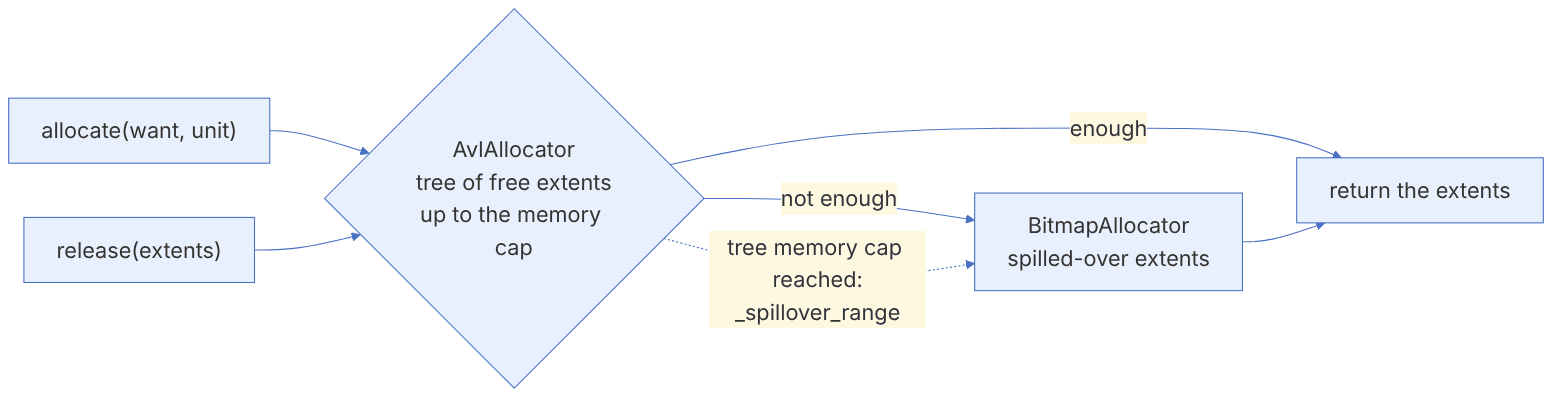
The default bluestore_allocator in the current code is hybrid. HybridAllocator (file HybridAllocator.h) combines AvlAllocator and BitmapAllocator: the AVL tree keeps free extents by offset and size and makes allocating contiguous extents fast, but its memory grows with the number of extents. When the disk becomes fragmented and the number of extents passes the memory cap, _spillover_range() moves extents into the bitmap. The practical consequence: on very fragmented OSDs, allocation becomes slower. Look at the fragmentation score:
ceph tell osd.3 bluestore allocator score block
ceph tell osd.3 bluestore allocator fragmentation histogram blockThe on-disk free-space map (BitmapFreelistManager under the B/b prefixes) is separate from the in-memory allocator. In newer releases, instead of updating the freelist in every transaction, BlueStore can save the allocation state at a clean shutdown and rebuild it from the onodes after a sudden shutdown (OnodeScan.cc); this reduces the KV write load but increases start-up time after a crash.
12-7-7 Summary pseudocode of the write path#
queue_transactions(ops):
  txc = new TransContext(state=PREPARE)
  for op in ops:                       # write, setattr, omap_set, remove, clone, ...
    onode = get_onode(op.oid)          # from the cache or the O key
    if op is write:
      released = extents overwritten by [off, off+len)
      if len <= released and released < prefer_deferred_size:
        txc.deferred.append(data)      # recorded in the L key with the metadata
      else:
        ext = allocator.allocate(round_up(len, min_alloc_size))
        aio_write(ext, data, csum=crc32c)
      onode.extent_map.update(off, len, blobs)
    txc.kv.set("O"+oid, encode(onode)) # plus the updated omap/attr/shared_blob
state_proc(txc) # AIO_WAIT -> KV_* -> DEFERRED_* -> DONE- FileStore is unsupported from Reef; convert every OSD to BlueStore before upgrading.
- block.db at least 2.5% (heavy RGW: 4%); monitor
BLUEFS_SPILLOVER. - Account for the failure domain of a shared db device in the design.
- min_alloc_size is fixed at creation; check OSDs created before Pacific.
- SSDs with power-loss protection for db/wal.
- BlueStore tools only on a stopped OSD; fsck before repair.
- Monitor allocator fragmentation on full and old OSDs.
12-8 Supplementary and up to date#
- Current code defaults:
bluestore_allocator=hybrid,bluestore_min_alloc_size_hdd/ssd=4_K,bluestore_prefer_deferred_size_hdd=64_K,bluestore_csum_type=crc32c,osd_memory_target=4_G. - Pacific: RocksDB sharding for new OSDs; HDD min_alloc_size down to 4 KB.
- Squid: LZ4 compression in RocksDB by default; the db size recommendation lowered to 2.5%.
- Reef: FileStore is unsupported.
- crimson/SeaStore: crimson in Squid and SeaStore in Tentacle are technology previews; the crimson OSD can also use BlueStore as its backend. For production, classic BlueStore is still recommended.
12-9 Hands-on exercise#
- 1. With
ceph osd metadatafor three OSDs, extract the device types, db size and min_alloc_size. - 2. Create a test pool with zstd compression in aggressive mode, write a large text file and an already-compressed file, and compare the compression columns of
ceph df detail. - 3. With
ceph tell osd.N bluefs stats, look at db and slow usage. If you have spillover, analyse its cause against the db size. - 4. In a lab, create an OSD without a db, then add a db to it with
ceph-volume lvm new-dbandmigrate. - 5. Temporarily raise the BlueStore debug level on one OSD to 10, do one small and one large write, and find the words
deferredanddirectand the txc states in the log. Then restore the debug level. - 6. In the source code, find the
_deferred_replayfunction and explain which keys it reads at mount.
12-10 Review questions#
- 1. What were FileStore's three main limitations?
- 2. Why does BlueStore not need a separate journal for large writes?
- 3. What is BlueFS, and why does Ceph not use XFS for RocksDB?
- 4. What is BlueFS spillover, and what effect does it have?
- 5. What is the condition for a write to be deferred in
_defer_or_allocate? - 6. Why is it safe to ack the client after KV_DONE?
- 7. What are the three generations of omap in BlueStore's key space, and why is per-PG better?
- 8. Why was min_alloc_size lowered from 64 KB to 4 KB?
- 9. What trade-off does HybridAllocator strike between AVL and bitmap?
- 10. What effect does the failure of an NVMe that backs db devices have on the cluster?
Answers to these questions are in Appendix E: Answers to Review Questions. Answers to this chapter's questions →
12-11 Sources for this chapter#
- BlueStore configuration reference
https://docs.ceph.com/en/latest/rados/configuration/bluestore-config-ref/ - BlueStore migration
https://docs.ceph.com/en/latest/rados/operations/bluestore-migration/ - ceph-bluestore-tool
https://docs.ceph.com/en/latest/man/8/ceph-bluestore-tool/ - ceph-volume lvm migrate
https://docs.ceph.com/en/latest/ceph-volume/lvm/migrate/ - Health checks
https://docs.ceph.com/en/latest/rados/operations/health-checks/ - Source: src/os/bluestore (BlueStore.cc, BlueStore_components.h, Writer.cc, HybridAllocator.h
https://github.com/ceph/ceph/tree/main/src/os/bluestore - Source: option definitions
https://github.com/ceph/ceph/blob/main/src/common/options/global.yaml.in - Aghayev et al., "File Systems Unfit as Distributed Storage Backends: Lessons from 10 Years of Ceph Evolution" (SOSP 2019
https://www.pdl.cmu.edu/PDL-FTP/Storage/ceph-exp-sosp19.pdf - Squid release notes
https://docs.ceph.com/en/latest/releases/squid/ - Reef release notes
https://docs.ceph.com/en/latest/releases/reef/